
Apogee introduces Quartet for desktop recording
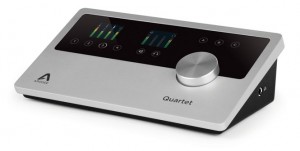
Apogee Electronics has unveiled Quartet, which they describe as “The ultimate desktop audio interface and control center for Mac.” They say that, featuring four inputs, eight outputs, MIDI, top panel display and control, Quartet sets a new standard in performance and connectivity for the modern studio. Here’s the full details in Apogee’s own words…
With ample input and output connections, the signature single controller knob, QuickTouch pads, and Apogee’s conversion technology, Quartet delivers where it counts; sound, functionality and usability.
Quartet connects to any Mac via USB 2.0 high-speed for extremely low-latency and stellar performance. From MacBook Air to Mac Pro, Quartet easily connects at amazingly high-speeds no matter the machine or sample rate; 44.1-192kHz.
Quartet’s four combination inputs offer microphone, instrument and line input with an exceptional gain range of up to 75 dB, leaving plenty of headroom for demanding microphones and sound sources. For additional channels, Quartet’s eight digital inputs create the option of connecting an external interface, like the Apogee Ensemble.
Quartet’s six balanced outputs deliver options for the video producer to mix in surround, the live performer to send multiple mixes to monitors and front-of-house and the mixer to send a mix to outboard compressors and EQs. Using Apogee’s Maestro software, the outputs will also split into three stereo pairs for connecting three speaker sets for auditioning mixes across various types of studio monitors.
A first for an Apogee audio interface, Quartet includes a USB MIDI connection for connecting a keyboard, synth or DJ controller. This feature consolidates all gear connections away from the Mac, making Quartet the control center for any studio.
Apogee CEO and Co-Founder Betty Bennett, told SBC, “We are excited to announce Quartet. Quartet offers a highly requested I/O configuration, award-winning sound and sleek design, all at an affordable price. We have listened to our customers and have designed Quartet with their requests in mind. At Apogee, we are all about delivering the absolutely best in sound, design and functionality and believe Quartet is a winner on every front.”
Quartet Highlights:
- Best-in-class sound quality with Apogee AD/DA converters
- 4 Analog inputs with world-class mic preamps
- Monitor control – up to 3 speaker sets
- USB 2.0 High-speed Mac audio interface
- ADAT/SMUX digital inputs
- MIDI input (USB-A type connector)
- 8 Analog Outputs: 6 Balanced line outputs, +20 dBu maximum output level 1 independent 1/4″ stereo headphone output
- 2 top panel high-resolution OLED displays
- Controller knob
- 6 touchpads for direct selection of inputs and outputs
- 3 assignable touchpads
- Quartet works with any Core Audio compatible application including: Logic, Pro Tools 9 and 10, Final Cut, Ableton Live
- Made in the U.S.A.
Features & Specifications:
- 4 Analog Inputs: Combination line (balanced +20dBu max), Mic/Instrument (+20dBu/+14dBu max)
- 4 Microphone preamps with up to 75dB of gain
- 8 Digital Inputs: ADAT/SMUX Input, 2 Toslink connectors, 44.1kHz to 96kHz
- 8 Analog Outputs: 6 Balanced line outputs, +20 dBu maximum output level, 1 Independent 1/4″ stereo headphone output
- MIDI I/O (USB-A type connector)
- Word clock output
- USB 2.0 High-speed Mac audio interface
- A/D and D/A conversion: 24 bit/192kHz
- 2 top panel high resolution OLED displays
- Controller knob
- 6 touchpads for direct selection of inputs and outputs
- 3 assignable touchpads to control:
- Mute Outputs
- Dim Outputs
- Sum to Mono
- Clear Meters
- Engage Speaker Set (allows monitoring of up to 3 pairs of speakers)
Pricing and Availability:
Price: $1,295 US, €1,295 EUR
Worldwide Availability: September 2012
More information:
Video description:
Apogee Quartet
The ultimate desktop studio interface and control center for Mac
Apogee Quartet is a professional USB audio interface designed to deliver the ultimate desktop recording experience to the Mac-based studio. Featuring 4 inputs and 8 outputs of Apogee’s industry-leading AD/DA conversion technology as well as 4 world-class mic preamps, Quartet bridges the gap between the 2-channel Apogee Duet and the 8-channel Apogee Ensemble.
Complete Connections
All the I/O you need with room to grow
Connect up to 4 microphones, instruments, keyboards or line inputs. Plug in your MIDI controller or keyboard. Expand with up to 8 digital inputs. Monitor and mix it all in stereo, with up to 3 sets of speakers or in 5.1 surround. Quartet is the center of the modern studio and will help you take the performance and sound quality of your projects to the next level.
Total Creative Control
Simple, powerful and easy to work with
With its ergonomic, angular design and intuitive user interface, Quartet is inspiring, easy to use and in perfect harmony with your workspace. Dual full-color screens for critical input and output details, QuickTouch pads for easy I/O selection, and a single controller knob to conduct it all, make Quartet the perfect studio control center for your Mac.
Legendary Sound Quality
Why Apogee Quartet is the best choice for your studio
Apogee is an award-winning industry leader in digital recording technology with over 25 years of experience. Preferred by recording pros around the world, Apogee products like Duet, Ensemble and Symphony I/O have been instrumental in creating countless GRAMMY® and OSCAR® winning recordings and have set the industry standard in professional recording for over two decades. Quartet is built solidly on this reputation.
Highlights
Best-in-class sound quality with Apogee AD/DA converters
4 Analog Inputs with world-class mic preamps
Monitor control – up to 3 speaker sets
USB 2.0 High-speed Mac audio interface
ADAT/SMUX digital Inputs
MIDI input (USB-A type connector)
8 Analog Outputs: 6 Balanced line outputs, +20 dBu maximum output level
1 Independent 1/4″ stereo headphone output
2 top panel high resolution OLED displays
Controller knob
6 touchpads for direct selection of inputs and outputs
3 assignable touchpads
Quartet works with any Core Audio compatible application including: Logic, Pro Tools 9 and 10, Final Cut. Ableton Live
Blender Game Engine with Live Midi Control
Trying again with newer version of Blender. Plus, Bomes Midi Translator to map midi to keyboard. This looks pretty simple but took a bit of figuring out, hoping I can do some cooler visual stuff with it maybe later. On the translator use “pp” as a note variable to track all midi notes to a single key on that channel for both on and off, can save a lot of mapping time instead of doing every note individually on the translator. RS7000 sounds and sequencing.
New gear from Roland announced – MIDI keyboards and Synth modules
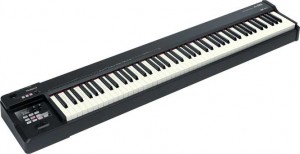
Roland has announced the A-88 and A-49 MIDI Keyboard Controllers, two all-new controllers that combine pro playability with mobile convenience. The piano-action A-88 and synth-action A-49 feature high-quality keyboards along with a slim, light design that’s ideal for today’s on-the-go musicians. They also offer USB, MIDI, and Apple iPad compatibility, as well as onboard control of Roland’s SuperNATURAL-powered synths such as the INTEGRA-7, JUPITER-80, and JUPITER-50.
There’s no shortage of keyboard controllers on the market, but most have playability that’s far below the quality found in high-end digital pianos and synthesizers. With the A-88 and A-49, Roland is pleased to offer keyboard controllers that play like pro-level instruments, giving musicians mobile convenience with no compromises. From the bedroom studio to the big stage, these controllers truly deliver inspiring playability and top-level performance.
The A-88 features 88 full-size weighted keys and Roland’s acclaimed Ivory Feel-G Keyboard with Escapement. This is the same Progressive Hammer Action keyboard found in many Roland stage and home pianos, and allows users to play software-based pianos, soft-synths, and sound modules with an authentic grand piano touch. In addition, the white keys are built with a moisture-absorbing material that replicates the feel of real ivory. Even with its premium hammer-action keyboard, the A-88 is light, portable, and easy for gigging musicians to transport.
Born for mobile use, the A-49 features road-tough construction yet is extremely lightweight (under six pounds). The 49 full-size velocity-sensitive keys have a rounded shape for a comfortable touch, along with many enhancements to reduce noise and increase playability. All these features add up to a premium keyboard that even the most discerning pros will appreciate.
Both the A-88 and A-49 include many performance features, including a pitch bend/mod lever, D-BEAM controller, user-assignable knobs and switches, and OCTAVE and TRANSPOSE buttons. The A-88 also has DUAL/SPLIT, UPPER, and LOWER buttons for splitting and layering tones on its full-size keyboard.
The dedicated SuperNATURAL mode button on the controllers unlocks a host of unique sound-selection features when connected to a Roland SuperNATURAL instrument such as the new INTEGRA-7 sound module or the JUPITER-80 and -50 synths.
The A-88 and A-49 offer USB and MIDI OUT connectors, along with jacks for connecting optional expression and hold pedals. Both controllers can be powered via a computer’s USB bus, while the A-88 can also be powered with an accessory AC adapter. Additionally, the A-49 and A-88 are three-OS compatible, with Mac and iOS music apps on the iPad via Apple iPad Camera Connection Kit, and a SONAR X1 LE DAW software bundle with both controllers, giving Windows users a ready-to-go music production environment.
The A-88 and A-49 come standard in a handsome black finish. The A-49 is also available in white, a perfect companion color for users of the white-finish iPad.

Roland says that, wth the development of SuperNATURAL sound and Behavior Modeling technology, they have blurred the boundary between acoustic and electronic instruments. Built upon these core technologies, they tell us that the new INTEGRA-7 gives musicians a gold mine of the latest SuperNATURAL sounds in a fast-access, fully stocked 16-part module. The powerhouse rack comprises a “greatest hits” collection of sounds from Roland’s flagship keyboards and V-Drums modules, plus a coveted lineup from the legacy SRX library. It also introduces a new technology called Motional Surround, a 17-part ambience engine that lets you graphically control the distance and position of each part within 360-degree sound field.
“With the immense power of the INTEGRA-7, you can create amazingly realistic and detailed orchestral arrangements, immersive, spatial sounds, and beyond.”
Features
- Flagship synth module with over 6,000 sounds built in
- The latest SuperNATURAL sounds with enhanced Behavior Modeling technology for expressive acoustic instruments and accurate reproduction of performance articulations
- Powerful SuperNATURAL synth engine with fat analog synth models and vintage filter types
- Dynamic SuperNATURAL drum engine with natural tonal change derived from Roland V-Drums
- Producer’s “must-have” SRX Expansion sound library built in; all 12 SRX titles included
- Dedicated multi-effects and EQ for each part (16 parts), plus dedicated COMP+EQ (use six simultaneously) for drums and ambience parameters for SuperNATURAL drum kits
- Innovative 17-part Motional Surround ambience engine for stereo, headphone, and 5.1-channel output
- INTEGRA-7 Editor for iPad and Motional Surround VSTi Editor for SONAR software
Test run of the Tinytenori
A test run for the iConnect midi interface using Tenori-On and TouchOSC on the iPhone to control Tinysizer.
One layer of the Tenori-On controls a bass sequence using one of Tinysizer oscillators. TouchOSC provides a virtual joystick controlling Tinysizer’s second oscillator. The joystick needs more work (rescaling) because its really too sensitive at present.
Drum sounds are a custom set I made from the DrumDokta module by Din Sync. No other sound sources involved.
Best on good headphones or speakers.
Arduino MIDI controller accelerometer/gyro test
A demo of some Arduino programs that Amanda Ghassaei has produced – that use an accelerometer and gyroscope for tilt/motion sensing
more info about it on Instructables:
instructables.com/id/Use-an-Accelerometer-and-Gyroscope-with-Arduino/
All LED, button, and MIDI processing is being done by the Arduino, MIDI out was sent to and recorded in Ableton.
Taking a closer look at the Yamaha Arp & Drum Pad
Music iPad App – first look at some of the features of the Yamaha Synth Drum Pad.
“My first impressions are that this is one mother of an app. The sonic possibilities are great, although I’m a little in awe of it.”
Overview
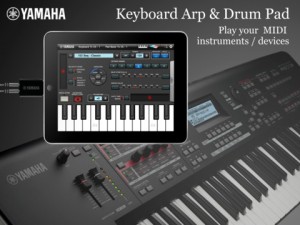
Keyboard Arp & Drum Pad is a Core MIDI application that transmits notes to external MIDI instruments and includes a keyboard, arpeggiator and assignable drum pads. You can play the built-in keyboard, trigger arps and play various patterns of instruments like drum, keyboard, or guitar. Also the drum pads let you play drum phrases or assign the multiple notes on one pad and play chords. You can set the Keyboard Arp and Drum Pad to different channels so you can play drum beats and pad chords along with the sequence phrases run by the arpeggiator.
*Yamaha MOTIF XF offers you WiFi connectivity which enables wireless control.
*If you use the Yamaha i-MX1 iPhone/iPad MIDI Interface, you can connect to any MIDI instrument.
Features
Keyboard Arpeggiator
– You can choose from 342 arps including many different instrument categories.
– Each arp phrase can be modified in real time for swing, beat stretch, octave range and variation
Drum Pad
– Each of the 16 Drum Pads can have up to 5 notes with assignable velocities, so you can play chords or layered percussion with one pad.
– You can even split the pads in half and assign different notes or velocities to the left side and right sides of the pad.
– A learn mode makes it easy to program the pads directly from the MOTIF XF.
– 64 user templates
Tap Tempo
– A Tap Tempo feature allows you to quickly set the Tempo of the arps
Ribbon Controller
– A Ribbon Controller let’s you control Velocity, Pitch and 2 Assignable Parameters
*For the detailed information please refer to the following url.
http://4wrd.it/YAMAHASYNTH
*In order to have the WiFi connection, you need to get an OS updater for MOTIF XF from http://4wrd.it/YAMAHASYNTH and buy a compatible Wi-Fi USB adapter.
Performing live with MIDI hardware and Ableton Live
Background information:
I frequently receive questions about my music setup and how I connect and record the various instruments, when filming my “Synth Jams”. This video gives you an overview of my workflow, and hopefully inspires you to design your own live performance setup. If you have further questions, post them underneath the video, or write me a message. Of course I’m also interested in how you make music, so go ahead and tell me about your setup or link me to your own audio/video on the internet. 
Magellan for iPad Tutorial – MIDI Basics
More tutorials coming your way from Yonac:
In this tutorial, we show you how to control Magellan with your external MIDI controller, including connecting your iPad to the controller, adjusting Synth 1 & 2 channels, and more!
Visit http://www.yonac.com for more info.
Magellan on iTunes: http://itunes.apple.com/us/app/magellan/id544119998?mt=8
Setting up Livid Elements Modular System
A basic guide on setting up your Elements modular MIDI controller system from Livid Instruments.
Element modules come in many different configurations and layouts so you can rearrange, replace, and mix modules, creating your own MIDI controller with ease. Each module connects to the Elements Brain for easy plug-and-play configuration and setup. Elements modules are housed in one of our custom eurorack cases for total plug-and-play integration. The standardized, modular format allows for an incredible amount of flexibility and expansion.
Elements is based around the eurorack format, a popular analog synth standard of modules and enclosure sizes so you can create your own customized setup. The threaded rails of the cases make it easy to connect and configure your controller by simply plugging the module into the Brain and fastening it to the rails. The Elements Configuration Utility lets you configure your layout and edit your MIDI settings. With a growing list of available modules (don’t forget: you can create your own Elements, too!) we’ve designed this system to grow with you and the community of people making modules for the Elements system. Our own DIY Omni boards are also compatible with the Elements system.
Moog Minitaur & Mutable Instruments Shruthi-1 + MIDIpal Demo
The Minitaur (left channel) is controlled by the Little Phatty’s arpeggio. The Shruthi-1 (right channel) is being sequenced by the MIDIpal and sending clock to both the Little Phatty and Shruthi-1.
DATAMASKIN

