
Teaser – Genome MIDI remix pads
Demo of the ‘Remix pads’ coming in version 1.1.0
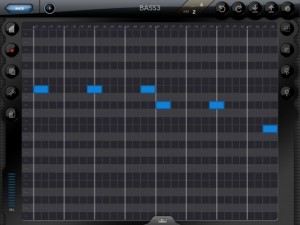
White Noise Software has announced an update to Genome MIDI Sequencer, its software sequencer for the iPad. Here’s what’s new in Genome MIDI Sequencer 1.1.0:
- Fixes for playhead visual positioning issues
- ‘Create’ option for Grooves (create a groove template from a pattern, such as recorded MIDI notes).
- Remix Pads
- File management – Delete, email, Open in… (for opening files in other apps including Dropbox)
- Improvements to Zooming – Zooming in and out should work a little better now in general. When zoomed out, the view now smoothly zooms in instead of abruptly zooming
- New zoom mode. In additioned to the standard ‘fixed’ zoom (where X and Y scale is locked together), there’s an ‘advanced’ mode that lets you zoom X and Y are independently zoomable.
- OMAC App Fast switch – This allows you to quickly switch between compatible apps (not every app supports this yet) via a menu in Genome. The button for this is on the sequencer page.
- Important Change: Genome’s virtual port is no longer ‘on’ by default. You have to enable it via the config menu. The reason for this is that this is a frequent point of confusion for users. Having a virtual port can lead to issues where apps get connected twice (resulting in doubled tempos and other weird cases). It’s only necessary for Genome to have a virtual MIDI port when other apps don’t have one of their own. Only a few apps _don’t_ have virtual ports (such as Animoog), but for the majority of apps you won’t need it on.
- Bugfixes and stability improvements
Not in 1.1.0 but being worked on:
- MIDI Learn (for binding controllers to Patterns and Song steps) – I had wanted to get this in 1.1.0, but there are important bug fixes that need to get out now. This will be one of the first things I implement for the next update.
New features explained – Symphonix Evolution 1.90
This video explains some of the new features in our Symphonix Evolution iPad app. Symphonix Evolution makes it easy to enter music notation, edit MIDI files and work with external MIDI devices through a suitable interface. With wavetable synthesis and audio quality that rivals dedicated synth keyboards, Symphonix Evolution is perfect for taking your music on the road!
New features covered are the advanced MIDI settings, piano/instrument finger positions and the arpeggiator.
Check out http://www.vinclaro.com.au/ios/symphonix/symphonix.htm for more information or our blog at http://vinclaro.blogspot.com
Moon Modular 553 – MIDI to Clock
A short run of Model 553 MIDI to ClockSignal Converter from Moon Modular: in the first half of the video, a DAW drives via MIDI Clock a 960 Step Sequencer; the fixed clock out drives the sequencer with 16 notes density; the variable clock out emits 8dot, 8, 16dot notes. In the second half of video, notes above C3 are converted in clock signal for drive right 960 sequencer and notes below C3 are converted in clock signal for drive left 960 sequencer.
How To Create MIDI-Controlled Analog Feedback In Ableton Live
To download the template and find out more info about the soundcard and pedal used, visit the full post on DJTechtools: http://www.djtechtools.com/2012/05/27/create-rockstar-style-analog-distortion…
Vestax has released V-MIDI for iOS
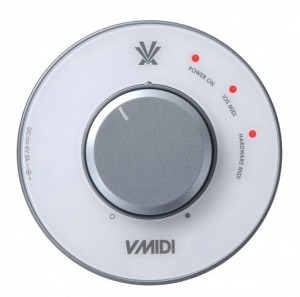
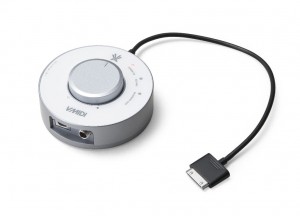
The Vestax V-MIDI is a compact CoreMIDI interface that enables connections between USB MIDI hardware and apps for iPad, iPhone and iPod touch. V-MIDI powers your iPad, iPhone or iPod touch and will also power a range of USB MIDI devices which require external power. V-MIDI also amplifies the audio from your iOS device and provides a knob for volume control.
Features:
- Core MIDI in/out interface
- Connects to any USB MIDI device to control more than 100 CoreMIDI compatible apps available from the App store
- The only CoreMIDI interface compatible with iPhone®, iPad® and iPod touch®
- Charges iOS devices and USB MIDI devices at the same time
- USB host IC connector for MIDI USB devices
- Stereo headphone output
- Headphone amplification & volume control
- MIDI send (iOS / Hardware) LED indicators
- Mini DIN(6pin) to USB convert cable included
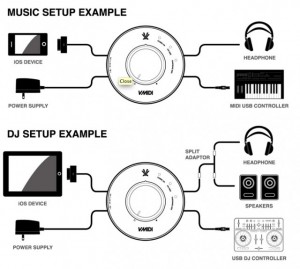
Here are a couple of user scenarios for the Vestax V-MIDI:
Genome Sequencer MASSIVE MIDI Jam!
Background data:
Finally getting my brain in to the GENOME Midi Sequencer, by White Noise Audio. It is VERY COOL!
Using network MIDI, I’ve connected the iPad2 (running Genome/Arctic Keys/BS-16i/NLog Pro), to an iPhone 4 (running Sunrizer) and an iPod Touch (running Arctic Keys).
Also, via an iRig MIDI connector on the iPad, am sending a MIDI signal to a Moog Little Phatty as well. Can you believe this all works! I have a pretty strong WiFi signal, so the iPhone/iPod Touch work well and there isn’t any discernible latency.
Presumably I could run my other iPod touch as well, with a compatible virtual MIDI app. I also have a MIDI splitter box, so the idea of sending to more MIDI hardware is also a idea (or by chaining with MIDI THRU).
The possibilities are great with Genome!
MIDI Mandala – a wireless Midi controller for iOS

Intelligent Gadgets has released MIDI Mandala– a wireless Midi controller for iPod/Touch, iPhone, and iPad
Previously, Intelligent Gadget’s Mandala Music app first introduced the idea of using a circular arrangement of control pads to generate music. The user selects a musical scale that is mapped to the mandala. The lowest note is in the center, followed in increasing pitch from the top, alternating back and forth, down to the bottom. Compared to a square grouping of control pads, or even a keyboard on smaller devices like an iPhone or iPod, the circular arrangement is much easier to play. In fact by mapping a scale to the control pads there are, in effect, no wrong notes.
Where Mandala Music uses an internal FM synthesizer to generate sound, Midi Mandala lets you play networked Midi synths wirelessly using the same circular control concept.
Run multiple versions at the same on different Midi channels and control different synth sounds simultaneously.
After touch controls let you change the pitch and loudness of a sound, providing subtle nuances of expression. 16 presets allow you to save your own custom settings..
EMW WCS-1 Synthesizer “On the Mix”
Little track showing the WCS-1 bass sound.
WAVE COMPOSITION ANALOG SYNTHESIZER WCS-1

Description
The WCS-1 is a MIDI synthesizer module that utilizes a digital oscillator followed by all discrete analog circuits to produce unusual and heavy sounds. The exclusive wave addition resource together with a dual input powerfull VCF and a lightning fast VCA ensures its powerfull sound generation capabilities, being an ideal tool for electronic music production.
Utilization
To make use of the WCS-1 you need a MIDI controller keyboard or any other type of equipment that has a MIDI OUT port, like drum machines, MIDI Pad controllers, bass pedals or a computer with MIDI connection. The WCS-1 has a 1/4″ (P-10) mono jack on the back panel in order to be connected on a sound mixer, computer audio interface or directly to an amplifier.
Orphion MIDI Tutorial
This tutorial shows how to use Orphion with Sunrizer, Animoog and Ableton Live via MIDI-over-WIFI.
Orphion is a musical instrument with a unique sound between string instrument and percussion. Everyone can play expressive, wonderful sounds and easy or virtuosic melodies on it just by moving fingers on virtual pads.
- Different articulations from soft to plucked to hardly slapped
- Natural interaction
- Extend your ways of expression as a percussionist, guitarist, pianist or other musician
- 12 transposable pad-layouts with different tonalities from easy to complex
- 8 individual voices for 8 fingers
(4 on iPad 1)
Get Orphion here:
orphion.de
Become a Fan on Facebook:
facebook.com/Orphion
or follow on Twitter:
twitter.com/#!/OrphionApp
Closer look at the Akai MAX49 keyboard controller
Here are three brand new videos featuring the new controller from Akai, more info below:
MAX49 from Akai Professional places revolutionary MIDI and CV control at your fingertips. With an intuitive layout and included AkaiConnect automatic-mapping software, MAX49 offers an instant, fully immersive experience with your favorite music software and virtually all VST plugins. From its 49 semi-weighted keys and 12 real MPC pads, to its groundbreaking LED touch faders and vintage CV & Gate outputs, MAX49 combines cutting-edge Akai Pro technology with classic capability to give you an unprecedented music-making experience.
CUTTING-EDGE
MAX49 is one of the most unique controllers ever engineered. Right away you’ll notice one of its most distinguishing features: four banks of eight backlit LED touch faders, allowing you to assign up to 32 control parameters. You can use MAX49’s LED touch faders just like analog faders by simply dragging your finger along their touch strips, or you can perform instant leaps in any MIDI value from zero to maxed out and everything in between—an unprecedented, unmatched controller capability.
CLASSIC
MAX49 is also equipped with four banks of 12 backlit MPC pads, giving you a total of 48 assignable pads, allowing you to integrate legendary Akai Pro production capability into live performances and recording sessions alike. These backlit, velocity sensitive pads come with classic MPC Swing, Note Repeat, Full Level and navigation controls to give you all the tools you need to create music at your highest level.
MAX49 comes ready to command any controller hardware or software from any era: USB MIDI, traditional 5-pin DIN MIDI and even Control Voltage and Gate outputs are onboard, allowing you to control everything from today’s most advanced music software, to analog modular synths from as far back as the 1960s. Mackie Control and HUI protocols are also built in to give you instant compatibility with many industry standard DAWs.
DATAMASKIN

