
FL Studio Mobile Android | SOON!
This is a Nexus 7 running Android 4.2.2. Android 2.3 will be the minimum Android version supported.
Cubasis – Introduction video demo
Get it now! https://itunes.apple.com/us/app/cubasis/id583976519
More information: http://www.steinberg.net/cubasis
Cubasis is Steinberg’s streamlined, multitouch sequencer for the iPad. Specially designed for quick and easy operation, Cubasis makes recording, editing and mixing a breeze. You can also open your Cubasis projects in Cubase under Windows and OS X! Cubasis places touch-intuitive production tools in your hands, opening up a new world of possibilities for your creativity.
- Unlimited audio and MIDI tracks (depending on the device used)
- Over 70 virtual instrument sounds based on HALion Sonic
- Mixer with over 10 effect processors (insert and send effects)
- Over 300 MIDI and audio loops
- Virtual keyboard and virtual drum pads
- Sample Editor and Key Editor
- Export to Cubase, Dropbox, SoundCloud, AudioCopy & email
- Core Audio and Core MIDI compatible hardware supported
- Sequence other Core MIDI apps (MIDI recording only) and run Cubasis simultaneously via background audio
- Import audio from your iTunes music library or using iTunes filesharing, use AudioPaste or set up a Wi-Fi server in Cubasis
Cubasis from Steinberg arrives for the iPad
So here are some quite unexpected news from Steinberg – Cubase goes mobile:
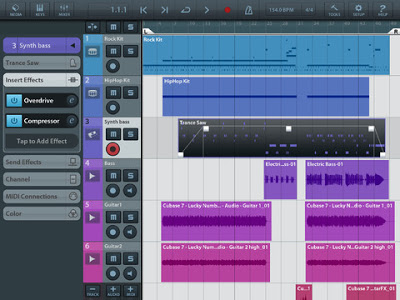
Portable Music Production System Cubasis is Steinberg’s streamlined, multitouch sequencer for the iPad. Specially designed for quick and easy operation, Cubasis makes recording, editing and mixing a breeze. Record tracks in CD audio quality, and edit your music with the Key and Sample Editors, while the included mixer and audio effects polish your song to perfection. Cubasis comes loaded with dozens of virtual instrument sounds which can be played in real time using the virtual keyboard and drum pads. Cubasis’ projects can be even opened in Cubase under Windows and OS X! Cubasis places touch-intuitive production tools in your hands, opening up a new world of possibilities for your creativity.
Key features
- Unlimited audio and MIDI tracks (depends on the device used)
- Over 70 virtual instrument sounds based on HALion Sonic
- MixConsole with over 10 effect processors
- Over 300 MIDI and audio loops
- Virtual keyboard and virtual drum pads
- Sample Editor and Key Editor
- Export projects to Cubase, Dropbox, SoundCloud, AudioCopy and email
- Core Audio and Core MIDI compatible hardware supported
- Sequence other CoreMIDI apps (MIDI recording only) and run Cubasis simultaneously via background audio
- Audio import from iTunes music library, AudioPaste, Wi-Fi server and iTunes file sharing
- Audio mixdown and MIDI export
Polyphony:
- 48 voices: iPad 2, iPad mini
- 64 voices: iPad 3, iPad 4
Project export to Cubase requires Cubase 7/6.5, Cubase Artist 7/6.5, Cubase LE AI Elements 6 or higherCubasis project importer extension must be installed and is available at http://www.steinberg.net/cubasisimporter
Cubasis is priced at $49.99.
Windows 8 based OSC controller
Win8ChucKBasicFrettingAndLegato Wi Fi, details below:
I got basic fretting (loose fretting… it won’t completely prevent quartertones, etc if you play them exactly), and legato rules. I am back to the ChucK engine while I get better acquainted with SuperCollider coding. This is just a Windows 8 based OSC controller. It works running into ChucK or SuperCollider
Audiobus Demo at the London Mobile Music Makers meet
A brief video of part of the demo from tonight’s demo of audiobus.
What’s the difference between Audiobus and Virtual MIDI?
Virtual MIDI is a local communications channel for passing around MIDI messages like “C# 1, Velocity 127“, or “Modulation, 50” – simple messages that control how a synthesizer should generate audio. Audiobus is a communications channel for sending live audio, like the audible output of a synthesizer app, or the output of a guitar amp effects app, for example.
FL Studio Mobile 2 | What’s New?
More info here – http://www.image-line.com/documents/news.php?entry_id=1348098765&title=fl…
Features include:
Audio tracks – Import WAV/MP3/AAC/AudioPaste & iPod library.
Wave editor – Cut, trim, normalize, reverse, fade in/out
Multi-tracking – Up to 8 track simultaneous recording
FL Studio Mobile HD – Now a Universal App
iPad retina display – Supported
Dropbox – Export to Dropbox. Import from Dropbox App.
Library – Amped Guitar & Bass pack in the shop
ZIP – Export improved to include all custom instruments, audio recordings and the project
NOTE: To load an FL Mobile 2 projects in FL Studio for Windows you will need FL Studio 10.8 or higher. In addition to use the Amped expansion you will need to delete the existing FL Mobile Samples folder, from the Shared Data folder (C:\Program Files\Image-Line\Shared\Data\FL Mobile Samples) then re-download it from the content library.
Where’s ANDROID will it EVER happen?! Yes. see here…
http://www.youtube.com/watch?v=6kPX5xTPRKU&feature=plcp
FL Studio Mobile 2.0 – first impressions
A quick first impression video of FL Studio v2.0 featuring audio tracks, Dropbox file management, and Virtual MIDI. If you’re already familiar with Xewton’s Music Studio, this demo will look pretty familiar…
More material on the upcoming FL Studio Mobile 2 – Sampling Percussion
ImageLine continues on their quest of delivering short teasers on their upcoming release, without any further details
More info here – http://www.image-line.com/documents/flstudiomobile.html
FL Studio Mobile 2 | Recording Percussion
http://youtu.be/gE2cBQH3l3c
More info here – http://www.image-line.com/documents/flstudiomobile.html (to be honest there isn´t much more additional info on this link, hehe, so stay tuned for more updates on FL Studio Mobile 2 right here at SBC)
FL Studio Mobile will allow you to create complete multi-track projects on your iPod, iPhone or iPad and, if you want, load mobile projects into FL Studio and take them to the next level. If it’s a beat on the step sequencer, a melody on the piano roll or a full song on the playlist, FL Studio Mobile has you covered.
Mobile Music Meetup with Amy, Jordan, Carson Day and VJ Keisuke
The Tabletop guys are having fun on their Mobile Music Meetup 😉
“This was our second Mobile Music Meetup. Carson Day played his semi analogue set, Ami L looped live and Jordan was the main DJ. We also had Keisuke showing us his VJ set all night long. It was a great evening and fun to see the mobile music community growing.”
DATAMASKIN

