
BEARDYMAN PRESENTS THE BEARDYTRON_5000 mkII
Not really sure what is happening, but it looks cool 
So… finally!
After 6 years of frantic research and development, its here. The Beardytron_5000 mkII, and i can’t wait to share it with you.
For the last year and a half i have been working on the system which will allow me to finally realise the ideas i’ve had in my head all this time which i’ve never had the means to produce. Now i do.
This new system is immensely complicated, but it has to be. What i now have at my disposal is the most complex and fully featured live-production system ever devised. I can start from nothing and get a fully formed track in as long as it takes to imagine it. Real-time music production. This has never been possible before. My old set-up was never suited to task, but i got pretty good at using it live and working around its many flaws… Now however, i can design my way out of any problem i see. This has seen a team of 4 developers pushed to their limits to achieve my dream of being able to drag musical ideas out of my head and into the real world at the speed at which they occur to me.
It’ll never be truly finished, because it’s potential is limited only be my imagination and ability to fund it’s development. But know this… Every time i test a new feature it fires off a thousand new ideas… Basically what i have here is a platform for innovation. At some point i will commercialise the hard work that has been done on the system, but there is no date set for software releases yet or any idea what kind of form any resulting products would take. Still, i feel it is now time to share the fruits of my labours with the world, and i invite u to join me on my ongoing journey into the unknown, to see what lies behind the great mirror, to sample the fruits of the fun-fun shrub, bathe in the cramnumbulant majesty of its myriad splendours. Be… Feel…. Die.
Bigs to:
EDVINAS URNIKAS and SARUNAS BURZA
for doing their camera magic.
Huge software based mixer board at MusikMesse
The mighty Raven MTX at Frankfurt Musikmesse.
The RAVEN MTX is: – A state of the art touch screen display featuring the RAVEN MIXER – A powerful multitouch mixer that can control all major DAW’s – And a flexible and user-customizable, multifunction TOOLBAR. The RAVEN also incorporates a full-featured analog monitoring section designed for today’s audio engineer, with multiple speaker outs and input sources, smart phone connectivity, USB, multiple headphone send and cue options, and much more. But at the heart of the RAVEN MTX is the most important thing of all… Your DAW, right at your fingertips.
The Multi Touch Display
When we began to develop the Raven concept, we studied the touch screen industry for months and became experts in the various technologies. We realized something very quickly: to make a multi touch monitor suited for the pro audio industry, no “off-the-shelf” product would work; they were too slow, with thick, untreated glass and unusable parallax between your finger and the image. The screens themselves wouldn’t look correct at the angle that we needed, the glass had a horrible friction to it, and there were no proper drivers to do real Mac and PC integration with professional DAWs. So we started from the beginning, and built the RAVEN touch display from the ground up, using brand new touchscreen technologies that were literally being introduced to the market as we were working. We build our own displays using commercial grade LED backlit screens and components from industry-standard display manufacturers. It’s sharp, bright, and looks great at any angle. But one of the greatest achievements we made is in our custom made NANO GLIDE surface. This ultra thin 2mm glass is coated with a proprietary nano technology that makes the surface slick and smooth, even smoother than the famous touch tablet… and it allows you to work effortlessly. This is the Rolls Royce of touch screens… nothing on the market comes close in terms of performance, feel, and build quality.
The Raven Mixer
The Raven Multi Touch DAW control software puts your DAW right at your fingertips. A large-format multitouch mixer gives you complete access to faders, pans, mutes, solos, sends, automation, and even plugin inserts. Of course on a 46” screen, plugins become the size of 19” outboard gear – you can easily tweak the controls with your fingers. This is a world-first in DAW control. Having the DAW at your fingertips makes it easy to directly interact with the music.
Quicksilver 606 Introduction
The Quicksilver 606 CPU upgrade for the TR-606 is now available! For more information please visit http://www.socialentropy.com/quicksilver
The soundtrack is by Syn303, track available here: https://soundcloud.com/syn303/kontakt…
New Expressive Possibilities
The Quicksilver 606 is a replacement CPU for the TR-606 drum machine. New features such as individual instrument accent, 32 step patterns and realtime recording combine with the classic analog synthesis to breath new creative life into your productions.
Built for live performance.
MUTE and ROLL mode provides a single interface to perform and tweak patterns in realtime. Programming and performance can all be done without ever stopping the sequencer.
Ultimate Control
MIDI input and output allow the 606 to be programmed from a DAW or external MIDI controller.
“MIDI Control mode” allows the 606 to be controlled from any device that can send MIDI note messages. The sequencer can send and receive MIDI notes and MIDI clock. This allows the 606 to act as an awesome sequencer for other machines.
Modern Connectivity
The Quicksilver 606 comes with USB built in. USB MIDI can be used with USB host devices, and the operating system is easily upgradable directly over USB.
Because all data is stored into internal EEPROM, batteries are no longer required to maintain memory. All internal memory can also be dumped using MIDI sysex messages for sharing or backup.
Roland Capture Series Technology: VS STREAMING
Background video description:
With the CAPTURE Series, Roland once again raises the performance standard for computer-based audio production.
VS STREAMING compatible models:
– STUDIO-CAPTURE: http://www.roland.com/products/en/STU…
– OCTA-CAPTUR: http://www.roland.com/products/en/UA-…
– QUAD-CAPTURE: http://www.roland.com/products/en/QUA…
Arturia’s SPARK EDM perfromance suite has been released
Arturia announces availability of SPARK EDM, a powerful production and performance software suite dedicated to EDM (electronic dance music) production, and EDM, another aptly-named Expansion Pack for its revolutionary SPARK Creative Drum Machine and SparkLE Creative Drum Machine hybrid hardware/software beat production centres, as of March 15…
SPARK EDM can be purchased as a software download for €99.00 EURO/$99.00 USD or boxed for €119.00 EURO/$129.00 USD from Arturia’s Online Shop.
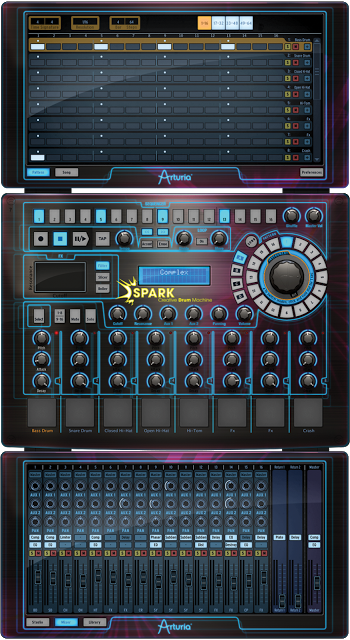
SPARK EDM brings a complete and powerful production suite to the Electronic Dance Music producer.
Featuring a comprehensive library of 30 kits / 480 instruments and 960 patterns , varying from big room floor filling stormers, to underground tech house gems. Spark EDM delivers the drums, stabs, one shots, and fx that will give your tracks the sound they need to produce dance floor hits.
Press release:
Arturia is proud to announce availability of SPARK EDM, a powerful production and performance software suite dedicated to EDM (electronic dance music) production, and EDM, another aptly-named Expansion Pack for its revolutionary SPARK Creative Drum Machine and SparkLE Creative Drum Machine hybrid hardware/software beat production centres, as of March 15…
Capable of standalone operation or seamless integration with any DAW as a VST, VST3, RTAS, or AU plug-in, SPARK EDM caters to the rhythmically remarkable requirements of EDM producers. However, as any discerning dance floor-filling EDM producer knows only too well, EDM, of course, covers a lot of musical ground. So it’s just as well that SPARK EDM comes complete with no fewer than 30 cutting-edge kits — ranging from electro to dubstep, techno to tech house, with much in-between and beyond, it’s all there for the taking!
But that’s barely scratching the creative surface of SPARK EDM. Each of its superb-sounding 480 instruments are based on Arturia’s acclaimed TAE® (True Analog Emulation) synthesis technology and high-resolution sampling, each with 12 adjustable parameters, allowing users to sculpt sounds to their danceable heart’s content — punch through the mix with a filtered kick-ass kick drum, adjust a synth hit’s attack or decay time, re-pitch a tom, and much more besides!
Besides that, SPARK EDM users can customise or simply use any of the 960-plus preprogrammed patterns as the building blocks for kick-starting their next EDM masterpiece. Moreover, thanks to the integrated 16-track mixer, levels, pans, and sends can all be automated, and the mix can be further fine-tuned with 14 high-quality effects (including bit crusher, chorus, delay, destroyer, distortion, flanger, limiter, multi-band compressor, multi-band EQ, phaser, plate reverb, reverb, space pan, and sub generator).
SPARK EDM’s powerful, yet inherently user-friendly interface makes beat- and pattern-creation a breeze — especially when using the onscreen step sequencer situated at the top of the default centre panel. Hardware drum machine enthusiasts will feel right at home here. And thanks to advanced looping modes cleverly combined with the onscreen XY pad’s real-time slicing and filtering controls, users will be producing phenomenal EDM beats with the best of them in no time at all — perfect for live performance!
Speaking of live performance, all of SPARK EDM’s onscreen knobs and pads are easily MIDI-assignable, making them compatible with a variety of keyboard- and pad-based controllers.
At the same time, those SPARK Creative Drum Machine and SparkLE Creative Drum Machine owners out there already hooked on hands-on beat-making need not feel left out in the cold since the EDM Expansion Pack adds those same 30 cutting-edge EDM kits to the already extensive libraries within Arturia’s acclaimed hybrid hardware/software beat production centres. Clearly every beat and sound can be twisted and tweaked therein, thanks to the intuitive and creative workflow that’s at the very heart of the Creative Drum Machine concept.
Quite simply, SPARK EDM and EDM Expansion Pack provide all the drums, stabs, one-shots, and FX needed to produce propulsive dance floor hits! So start afresh with SPARK EDM or expand your Creative Drum Machine hybrid hardware/ software combo… and get the party going on the dance floor.
SPARK EDM can be purchased as a software download for €99.00 EURO/$99.00 USD or boxed for €119.00 EURO/$129.00 USD from Arturia’s Online Shop: http://www.arturia.com/evolution/en/buy/online-shop.html
The EDM Expansion Pack requires SPARK Creative Drum Machine Version 1.5 (or higher), and can be purchased as a software download for €29.00 EURO/$29.00 USD from Arturia’s Online Shop: http://www.arturia.com/evolution/en/buy/online-shop.html“
AKAI MPC Software Version 1.3
The features shown in this update are available for the MPC Renaissance and MPC Studio, with the exception of the Vintage Mode SP1200 Ring which is only available on the MPC Renaissance. Watch as Young Guru brings you through all the new features and improvements that MPC Software Version 1.3 brings.
New features include:
– Completely redesigned plugin architecture, allowing more features and flexibility.
– ProTools transport control.
– New vintage emulation mode: SP1200 Ring.
– Hardware zoom control.
– Project archive facility, to easily move projects between computers.
– File import of MPC2000 and 2000XL format APS and ALL Files.
– Support for custom program edit UIs for plugin programs. The bundled instruments now have tailor-made editors.
Improvements:
-New program mixer, with ability to hide unused tracks, and show mixer strips for plugin programs.
– Improved plugin selection system, allowing you to browse by plugin type, and by manufacturer.
– Redesigned main mode GUI, making information clearer and speeding up the workflow.
– Added new track and sequence selectors to speed up access.
– Project info list shows program type and the plugin loaded in each plugin program.
– Improved track view display, with automation editing for plugin programs, and
access to common track settings in the lane.
– Improved the program editor for plugin programs.
– You can drag samples to lanes in the grid to load them onto a pad.
– Double-click in sequence editor to insert/remove a slice point.
– Improved the hardware’s pad light performance.
– Improved QLink performance.
– Better preferences window, that looks better and is better organized.
– Audio export of submixes and plugin programs.
– Improved MPC 3000 file import.
– Next sequence mode works like an MPC 4000, rather than an MPC 5000.
– Many, many bug fixes.
Learn more about MPC Software Version 1.3 at: http://www.akaiprompc.com
Tablet instruments – are they just toys or will they break the ice
For the past 2 years the market has more or less been swamped with tablet synthesizers, drum machines, vintage clones, ambient electronic instruments for tablets. At first it was more or less an iOS only business, Android has been struggling for a long time with its user experience and more importantly with its audio latency. But now there is movement also on the Android side with several music creation app developers porting their apps also on to Android, ie FL Studio, Caustic to name but a few.
NOTE: We do not claim that this screenshot necessarily implies a poor music experience, it is for illustrative purposes only
All this is great in a sense but how much real music production is being done on these devices, sure there are bands and artists that claim that their entire new album has been done on a tablet, but seriously how many go beyond using them for leisure playing or perhaps inspirational journeys into the ambient worlds of many of these glossy and experimental tablet synthesizers. Of course in a studio environment you can hook these tablets up, attach necessary controllers and get it all in your DAW, but is it effective – will it actually transform how we create music, will it replace an acoustic guitar or piano to create a new tune or melody. As of right now it tends to be more an effects generator for adding cool sounds, ambient pads, chip sounds etc. To be honest music creation is much more than machines – in the end no song is better than the melody that forms the base of music creation – tablets will not change this.
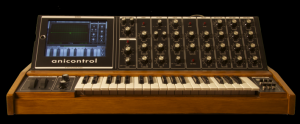
Just to be clear, we are not hardware fanatics in any way, most is done in a virtual studio environments. The question we ask, can tablets really take the jump from a toy or perhaps experimental control surfaces, to be effective tools in the music creation process. With crisp graphics and UIs you can run awesome looking vintage clones, like the iMS-20, but still comparing the feeling of twisting a virtual knob to a physical one – the sense of precision is not the same, sure you can hook it up to a keyboard and sure you can get a “real” KORG analog synth for the price of a couple of visits to Starbucks, but it is not the same as dealing with the real thing. But maybe this is good enough for a greater crowd and we have with tablets definitely pushed the envelope on what defines a music production environment. However, what can be seen now is that we only get more of the same – more ambient synths, more vintage clones, more cheap drum machines and sequencers, more experimental control surfaces and hybrid DAWs.
What will be the next step and will we ever take these guys below seriously
We sure do in one sense, but in another it still feels so 2012…
The Laptop Orchestra of Lake Forest Academy plays Radiohead’s “Meeting in the Isle” as they open their Fall 2012 concert. 8 musicians play and project iPads on sound panels behind them while using a combination of apps including Animoog, iMS-20, iElectribe, Reactable, and Garageband.
Auria LE has arrived – the professional digital audio recording system for iPad
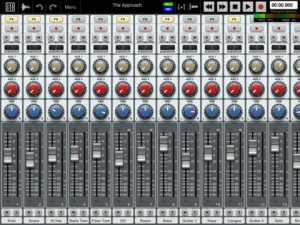
Auria LE – the professional digital audio recording system for iPad.
The mobile DAW you’ve been dreaming of has finally arrived. Auria LE is a 24-track digital recording system designed from the ground up for the iPad. With professional-level features and optional third-party plugin support from names like PSPaudioware, Overloud, Fab Filter and Drumagog (available via In-App purchase), Auria clearly sets a new standard for mobile recording.
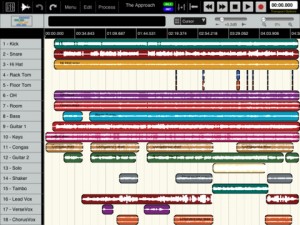

FEATURES:
- 24 tracks of simultaneous playback of stereo or mono files (upgradable to 48 tracks).
- Up to 8 tracks of simultaneous recording when used with compatible USB audio interfaces (upgradable to 24 tracks of recording) Camera Connection Kit required.
- 24-bit recording
- Supports sample rate of 44.1KHz only (upgradable to support 48K and 96K sample rates)
- Vintage-inspired ChannelStrip on every channel by PSPAudioware includes Expander, Multiband EQ and Compressor
- MasterStrip on all subgroup and master channels featuring PSPAudioware BussPressor, EQ and Mastering Limiter
- Third party VST effect plugin support available via in-app purchase (only iOS-version plugins are supported. All plugins must be purchased through the in-app store)
- ClassicVerb reverb plugin included
- StereoDelay and StereoChorus plugins included
- 2 Assignable subgroups(upgradable to 8) and 2 aux sends
- Powerful waveform editor with features like cut/copy/paste, duplicate, separate, gain, and more
- Flexible snapping tools allow snapping to events, cursor, bars, beats and more
- DropBox, SoundCloud and Audio Copy/Paste support
- Full automation support on all controls with graphical editing
- True 100mm faders when used in Portrait Mode
- Optional video import feature allows sample accurate sync of video to an Auria project with adjustable offset times and video export capability
- Timeline ruler options include minutes:seconds, bars:beats, samples and SMPTE time
- Auto-punch mode
- Full delay compensation on all tracks and subgroups
- Adjustable metering modes, including pre or post fader, RMS and peak
- Adjustable pan laws
- Sample accurate loop function
- Automatic sample rate conversion
- Built-in metronome
Includes a demo song mixed on Auria by Grammy winning producer/engineer David Kahne.
REQUIREMENTS:
iPad 2 or later strongly recommended.
Requires iOS 5.0 or later
USB audio interfaces require Camera Connection Kit
IK Multimedia Rocking the World of Mobile Music Accessories
IK Multimedia has announced iRig Recorder for the Android operating system.
iRig Recorder is a simple to use audio recording app that can start recording immediately when it is launched making it a perfect “on the spot” field recorder. Users simply launch the app and hit the record button, or can also configure the app to start recording audio immediately upon launch.
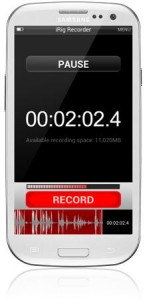
The app automatically groups recordings by date, tags them with geographic location information, and saves the original file as a backup. Recording time is limited only by the available memory on the device.
iRig Recorder also provides a waveform editor, which allows for selecting, cutting, and cropping of the audio content. Automatic onboard audio processing options can optimize recording levels and tone, remove background noise and more. The app can also speed up or slow down a recording without changing the timbre.
Export Options
Finished recordings can be shared by e-mail and FTP, over Bluetooth, through USB cables, from an SD card, or via apps installed on the device. Files can be exported as CD-quality WAV files, or as compressed .ogg files, ranging from 64 to 192 kbps.
A free version of iRig Recorder is also available, which provides the same recording, level-optimization and export features as the full version, and users can add the editing and additional processing via in-app purchase.
Pricing and Availability
iRig Recorder will be available at the end of January on the Google Play Store, and is priced at $4.99.
Video description:
See it all NOW at CES!!! More information: http://www.ikmultimedia.com/news/events/?item_id=1983
iRig HD: http://www.ikmultimedia.com/news/events/?item_id=1978
See latest IK products, photos and more happening at this year’s CES
The best and the brightest come to CES to display their new innovations for the year and at the IK Booth you’ll see no one rocks the world of Mobile Music Accessories like we do!
Get latest product announcements, images and more by visiting the CES Show Report. Also follow us on Twitter, Facebook and YouTube for more CES coverage. Or check back here on the IK site for new IK product announcements that will rock CES socks off!
Show attendants can also come by the IK Booths for hands on demonstrations of current and upcoming products.
Consumer Electronic Show (CES)
Las Vegas, Nevada
January 8-11, 2013
10am-6pm
North Hall, Booth 5625
iPad Music Jam: Korg iMS-20, Magellan, GarageBand, Geo Synthesizer, iRIg MIDI and more
iPad Music Apps are improving fast. Now you can do almost everything using only one device. In this Jam I’m playing with Geo Synthesizer controlling iMS-20 (Lead) and Magellan (Synth Bass and ARP). The arp was programed in Magellan but played by Moog Slim Phatty (using the iRig MIDI interface). Drums by GarageBand.
MIDI Bridge was used for splitting notes played with geo synth for Magellan and iMS-20.
DATAMASKIN

