
Pro Tools First Look: Introduction to Pro Tools 8
Additional videos for this title: http://j.mp/U6aBEw
Pro Tools First Look: Overview Of Pro Tools by Scott Freiman
Video 1 of 6 for Pro Tools First Look: Overview Of Pro Tools
This Pro Tools tutorial serves as a quick overview to the powerful new features in Pro Tools. If you want to see what Pro Tools is all about, or even if you want to compare Pro Tools Vs. Logic or Ableton Live, this free video is for you!
In 30 minutes of tutorials you’ll learn about the Pro Tools interface, how MIDI & notation work, and how to use Track Comping and Playlists in your Pro Tools sessions. There’s also an overview of Pro Tools’ new plugins!
If you like this free Pro Tools tutorial, be sure to check out our comprehensive Pro Tools 101: Core Pro Tools tutorial video, which is also produced by Scott Freiman.
More info on this title: http://j.mp/U6aBEw
Cubasis for iPad – Effects review
In this video we are showing all the effects that come with Cubasis for iPad.
Download Cubasis from the AppStore – goo.gl/p25xN
Portable Music Production System
Cubasis is Steinberg’s streamlined, multitouch sequencer for the iPad. Specially designed for quick and easy operation, Cubasis makes recording, editing and mixing a breeze. Record tracks in CD audio quality, and edit your music with the Key and Sample Editors, while the included mixer and audio effects polish your song to perfection. Cubasis comes loaded with dozens of virtual instrument sounds which can be played in real time using the virtual keyboard and drum pads. Cubasis’ projects can be even opened in Cubase under Windows and OS X! Cubasis places touch-intuitive production tools in your hands, opening up a new world of possibilities for your creativity.
Key features
• Unlimited audio and MIDI tracks (depends on the device used)
• Over 70 virtual instrument sounds based on HALion Sonic
• MixConsole with over 10 effect processors
• Over 300 MIDI and audio loops
• Virtual keyboard and virtual drum pads
• Sample Editor and Key Editor
• Export projects to Cubase, Dropbox, SoundCloud, AudioCopy and email
• Core Audio and Core MIDI compatible hardware supported
• Sequence other CoreMIDI apps (MIDI recording only) and run Cubasis simultaneously via background audio
• Audio import from iTunes music library, AudioPaste, Wi-Fi server and iTunes file sharing
• Audio mixdown and MIDI export
The all new Tabletop from Retronyms – Ready. Set. Play
Big update Tabletop introduces Midi controller support, timeline editor, session sharing, and Tabletop Ready Apps with iMPC from Akai Pro! The update is free! Tabletop is free! http://bit.ly/TXTbd0
Ready. Set. Remix!
The exclusive Soundtrack in this video was created in Tabletop by Richard Devine. You can find the song Glitch Breaker Demo inside the Tabletop in-app community, or on SoundCloud. To celebrate the new update for Tabletop we’re making a call for remixes! Download the Glitchbreaker Session right in Tabletop. You get access to all of the custom samples, sequencing, and arrangement. Remix to your heart’s content. We can’t wait to see what you come up with!
Richard Devine: http://www.facebook.com/pages/Richard-Devine/105387759760
Glitch Breaker https://soundcloud.com/richarddevine/glitch-breaker-made-with-1
Cubasis from Steinberg arrives for the iPad
So here are some quite unexpected news from Steinberg – Cubase goes mobile:
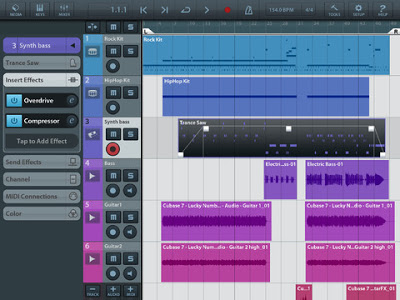
Portable Music Production System Cubasis is Steinberg’s streamlined, multitouch sequencer for the iPad. Specially designed for quick and easy operation, Cubasis makes recording, editing and mixing a breeze. Record tracks in CD audio quality, and edit your music with the Key and Sample Editors, while the included mixer and audio effects polish your song to perfection. Cubasis comes loaded with dozens of virtual instrument sounds which can be played in real time using the virtual keyboard and drum pads. Cubasis’ projects can be even opened in Cubase under Windows and OS X! Cubasis places touch-intuitive production tools in your hands, opening up a new world of possibilities for your creativity.
Key features
- Unlimited audio and MIDI tracks (depends on the device used)
- Over 70 virtual instrument sounds based on HALion Sonic
- MixConsole with over 10 effect processors
- Over 300 MIDI and audio loops
- Virtual keyboard and virtual drum pads
- Sample Editor and Key Editor
- Export projects to Cubase, Dropbox, SoundCloud, AudioCopy and email
- Core Audio and Core MIDI compatible hardware supported
- Sequence other CoreMIDI apps (MIDI recording only) and run Cubasis simultaneously via background audio
- Audio import from iTunes music library, AudioPaste, Wi-Fi server and iTunes file sharing
- Audio mixdown and MIDI export
Polyphony:
- 48 voices: iPad 2, iPad mini
- 64 voices: iPad 3, iPad 4
Project export to Cubase requires Cubase 7/6.5, Cubase Artist 7/6.5, Cubase LE AI Elements 6 or higherCubasis project importer extension must be installed and is available at http://www.steinberg.net/cubasisimporter
Cubasis is priced at $49.99.
AKAI – iMPC Music Production App for iPad
Akai has teamed up with Retronyms to bring the MPC to your iPad. With more than 1,200 samples, 50 editable programs, 80 editable sequences, and iconic MPC workflow, iMPC is the first app to bring all the functionality of a classic Akai Pro MPC to your iPad.
Developed in partnership with Retronyms, iMPC includes everything you need to create a beat quickly and easily, including built-in effects, plus the ability to create new sequences and record and overdub beats. Time correction from 1/8 note to 1/32T with variable swing, and Note Repeat from 1/8 note to 1/32T with latch control are also built in. The app’s built-in sampler can record samples three different ways: using the mic on the iPad, using the line input on the iPad, or using the multi-touch turntable interface in iMPC to record samples directly from iTunes or other music libraries.
Download the iMPC App here: https://itunes.apple.com/us/app/impc/id584548447?ls=1&mt=8
To learn more and download iMPC visit: http://akaiprompc.com/impc
Nuage and Nuendo – Introduction
Steinberg has announced Nuendo 6, the latest version of its audio post-production software.
Highlights of Nuendo 6:
- New mixing console for enhanced operational speed, including a new channel strip with ‘high-quality’ effects
- Nuendo 6 ADR Taker solution for voice recording and language dubbing
- Fully integrated loudness measurement, featuring EBU-compliant metering plus a large choice of RMS metering scales and a dedicated loudness lane
- Anymix Pro from IOSONO for state-of-the-art surround productions and Voxengo CurveEQ with sound-matching technology
- More professional workflow, with new tools such as MemZap quick-jump tool, Remote Control Editor and Steinberg ASIO Guard with intelligent dropout-prevention techniques
- Professional sound library by the specialists of Pro Sound Effects with more than 1.5 GB of dedicated post-production sounds
In addition, Nuendo 6 represents the core of the Nuage system solution, a top-end post-production platform introduced by Yamaha and Steinberg.
Background video description:
The Nuage integrated audio production system offers top-class hardware and software working in perfect harmony, for unprecedented mixing, editing, or dialog replacement efficiency in audio post production applications.
Yamaha control and interface hardware seamlessly integrates with Steinberg Nuendo DAW software in a purpose-built system that offers all-new productivity and flexibility as well as premium audio quality.
More information: http://www.yamahaproaudio.com
Audulus for iPad Briefing
An introduction to the user interface of Audulus for iPad.
Built in modules:
- Virtual Analog Oscillator (4 classic waveforms)
- ADSR Envelope
- Noise Generator
- Sample Player (coming soon to iPad)
- Mathematical Modules: Add, Subtract, Multiply, Sine, Modulo
- Random Number Generator
- MIDI controlled Keyboard
- MIDI assignable trigger
- Delay
- Distortion
- Low Pass Filter
- High Pass Filter
- Pitch Shifter
- Constant Value
- Gain
- Mapper Curve
- Piecewise-linear Spline Curve
- Sample and Hold
- Crossfade
- 4-Channel Mixer
- Level Meter
- Value Meter
- Scrolling Waveform Meter
- Input/Output
- Polyphonic to Monophonic signal mixer
- Global Time
- Sub-Patch (Coming soon to iPad)
- Timer
- Zero-crossing Counter
- Audio Unit Plug-in (Mac Only)
FL Studio Mobile 2 | What’s New?
More info here – http://www.image-line.com/documents/news.php?entry_id=1348098765&title=fl…
Features include:
Audio tracks – Import WAV/MP3/AAC/AudioPaste & iPod library.
Wave editor – Cut, trim, normalize, reverse, fade in/out
Multi-tracking – Up to 8 track simultaneous recording
FL Studio Mobile HD – Now a Universal App
iPad retina display – Supported
Dropbox – Export to Dropbox. Import from Dropbox App.
Library – Amped Guitar & Bass pack in the shop
ZIP – Export improved to include all custom instruments, audio recordings and the project
NOTE: To load an FL Mobile 2 projects in FL Studio for Windows you will need FL Studio 10.8 or higher. In addition to use the Amped expansion you will need to delete the existing FL Mobile Samples folder, from the Shared Data folder (C:\Program Files\Image-Line\Shared\Data\FL Mobile Samples) then re-download it from the content library.
Where’s ANDROID will it EVER happen?! Yes. see here…
http://www.youtube.com/watch?v=6kPX5xTPRKU&feature=plcp
More information about Ableton Live 9 and Push
New information about Ableton live 9!
See Ableton Push in action. Push is a new instrument that solves an old problem: how to make a song from scratch. With hands-on control of melody and harmony, beats, sounds, and song structure, Push puts the fundamental elements of music making at your fingertips – and it fits in a backpack alongside your laptop.
Poor MIDI Timing and Note Jitter in iOS
According to Kevin McCoy this really prevents iOS from being a serious platform for software instruments, despite its merits of having a touch interface and amazing sounding apps.
“Please comment if you have a solution!”, says Kevin
DATAMASKIN

