
Sound Design with NI’s Reaktor
More info – http://bit.ly/qyBVyR
“One of the interesting things that I find in my travels working for Native Instruments, is that there seem to be a whole lot of people out there who don’t really understand what Reaktor is. Reaktor tends to be the one instruments from NI that actually scares people because it looks so complex and sophisticated. Reaktor is a completely modular system that allows you to build virtually any digital audio device that you can imagine. At Dubspot, we teach our Sound Design & Synthesis students how to dive deep into Reaktor’s guts to create their own custom synthesizers and gain a greater appreciation for modular synthesis.”
Two nice iMaschine videos from the realms of Native Instruments
This tutorial explains how to record short one-shot samples to the pads,
and how to record a longer vocal loop using the built-in audio recorder
mode.
This tutorial explains the basics of working with iMaschine, including
navigation within the app, loading sounds, adjusting the tempo, and
programming a simple beat.
More info about iMaschine: http://www.native-instruments.com/imaschine
Going through the Maschine Mikro – all you need to know tutorials
This tutorial explains the basics of browsing and programming drums, synths, and plug-ins to make patterns with Maschine Mikro.
This tutorial explains duplicating patterns, note repeat, the step sequencer, and how to use effects in Maschine Mikro.
This tutorial explains the sampling and slicing functions in Maschine Mikro.
Ping Pong for NI’s Kontakt
Truman Sleeps, from The Truman Show soundtrack
Performed by Carlo Castellano
AudioThing’s Pong Glockenspiel is a Kontakt Instrument made by recording a toy glockenspiel played with ping pong balls.
Features
- 6 Kontakt Instruments (.nki)
- 3 Round Robin
- 2 Velocity Layer (cross faded)
- Sample resolution: 44.1Khz / 24Bit
- Size: 82 MB installed
- Custom performance view
- Native Instruments Kontakt 3.5+ full retail versions is required
Pricing and Availability:
$5
More information:
Rolodecks – Realtime Semi-Modular Multi-Effect for NI’s Reaktor
TWISTED TOOLS have released a brand new mutli-effects unit for Native Instruments’ Reaktor 5. Rolodecks is a realtime dynamic, semi-modular multi-effect, made up of six effects. The default Rolodecks effects are the Slicer, Flange, Filter, Delay, Reverb and Ext effects.
Ext (short for external effect), is an assignable effects slot, giving you the ability to insert your own effects and automate them. With the Ext effect slot, you can truly make Rolodecks unique by adding your own flavor. The Ext slot comes with a Stretch inserted from the Twisted Tools effect, Buffeater, but feel free to swap it out for your own.
Additionally, when you purchase Rolodecks Pro, you also get a special version of Rolodecks, called RoloEXT, which gives you six external effects slots and extra modulation options built using the same framework as Rolodecks. Setting up your own unique effects takes no time at all and the possibilities are endless. If you can connect the ins and outs of a simple home stereo, you can easily setup RoloEXT with your favorite Reaktor effects and more.
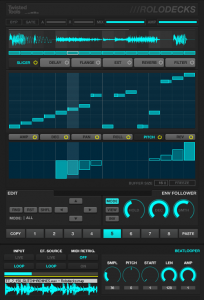
Rolodecks Features:
Slicer, Reverb, Delay, Filter, Flange and EXT effect
Connect your favorite Reaktor, Hardware or Software effects to the EXT effect slot
Rolodecks Pro comes with RoloEXT, featuring 6 EXT effects slots
Dub style fx sends using your host effects with RoloEXT
Effects are playable via MIDI or freely running
Drag effects to set signal flow
8 Scenes that store/recall signal flow, automation and parameter settings
Ext Modulation lanes send MIDI Notes, IC Sends and/or CC’s
Advanced internal modulation system
Modulation speed and length per parameter
Envelope Mode for the modulation lanes
Kore, Maschine and Twisted KP Templates
Time-stretching sample playback system
300+ mb Sample Library
Sound Design by: Antonio Blanca, Derek Mahone, Gil Sharone, Glitchmachines, Jedsound, Lawgiverz, Mike Huckaby, Michael Ndah, Reuel Walker, Si Begg
Extensive Documentation and Demo Video by Dubspot Instructor Matt Cellitti
Free Version Updates
Rolodecks Requierments:
Native Instruments Reaktor 5 for PC/MAC
Price
Rolodecks: $49.00
Rolodecks Pro: $69.00
Product Page: http://twistedtools.com/shop/reaktor/rolodecks/
Emulator – Massive Multi Touch Screen System
“Essentially EMULATOR, provides a front end for creating multi-touch interfaces for existing MIDI controllable software. With a new modular editor enabling the design of custom interfaces, its possible to overlay your own control set while showing parts of the program if you wish (in thius case the Traktor waveform display is shown).
In this demo Alan Smithson (its creator) uses NI’s Traktor – DJ software, you can see the potential for some really great looking performances.
The system demonstrated here, comprises of the software package EMULATOR (£299) plus this 42 inch glass screen, stand plus projector its a great looking setup. (approx £5k)”
http://youtu.be/k4QS1xAWvU4
Emulator FT 1.5 now supports Native Instruments, Traktor 2 Professional DJ Software.
With the introduction of Emulator FT 1.5 for, DJ’s now have sample decks, loop recorders and more amazing effects literally at their fingertips.
Emulator gives the DJ all the functionality of Traktor 2 with a full multi-touch experience.
We tried to make Emulator more intuitive and easy to use so DJ’s can begin playing on a touch screen interface immediately. Whether they use a tablet PC, touch screen monitor or our holographic looking transparent touch surface, the DJ is now in total control”
Jeremy Ellis performs on Maschine Mikro + NI’s Transient Master effect
Here’s one more video about the Maschine Mikro sprung out of the NI labs 
Check out finger drumming phenomenon Jeremy Ellis as he performs an amazing live routine on MASCHINE MIKRO, the upcoming compact version of the acclaimed computer-based groove production system.
For more information on Maschine Mikro, go here: http://www.native-instruments.com/maschinemikro/
“Check out TRANSIENT MASTER – a must-have dynamics effect. Uniquely powerful, deceptively simple and extremely useful. The magic wand for mixing drums and percussion.”
Tech Blips for Native’s Massive
Quick overview of the Synth Pack Massive Tech Blips.
Meyer Musicmedia has released a new Synth Pack for Native Instruments MASSIVE Synthesizer.
A Meyer Musicmedia spokesman told us, “This time it’s a creative Tech Blip macro preset collection of 32 presets. It’s designed to produce this modern driving Tech House and Minimal blip loops.”
- 32 Tech Blip Presets for Tech House and Minimal.
- Requires: Version 1.2.1 of the NI MASSIVE Synthesizer.
- Macro Control optimized
Pricing and Availability:
$9.50
More information:
Traktor Kontrol S2 Breaks The Silence
Watch the upcoming all-in-one DJ system Traktor Kontrol S2 showcased in this video with controllerism guru Ean Golden. Introducing the innovative “2.1” design with a third channel for mixing in Traktor’s Sample Decks, the S4’s smaller brother also contains the flagship Traktor Pro 2 software.

Creating a live dubstep remix of Depeche Mode’s “Enjoy The Silence” using Sample Decks, cue points and effects, Ean shows the virtually unlimited creative potential of this compact solution which will hit stores in October.
More info: http://www.native-instruments.com/s2
Based on a compact version of the market-leading KONTROL S4 hardware, the KONTROL S2 provides a “2+1″ setup with sample decks as well as comprehensive mixing and effect features, all based on the included full-featured TRAKTOR PRO 2 software.
To offer DJs a more portable alternative to the professional 4-deck TRAKTOR KONTROL S4 system, the KONTROL S2 is centered around a new compact controller hardware. It provides the same patent-pending high-resolution jog wheels, combined with ergonomic controls for cueing, looping and effects. The integrated 24bit/96 kHz sound card with its dual stereo outputs is based on the award-winning technology of the TRAKTOR audio interface range, and provides the same acclaimed sound quality with its supreme clarity and especially high output volume.
The two full-featured playback decks of the TRAKTOR KONTROL S2 are complemented by the versatile Sample Decks of the latest TRAKTOR PRO 2 software, which can add up to eight simultaneous one-shot samples or beat-synced loops to the mix. This effectively equips the KONTROL S2 system with a third channel that opens up a wide range of additional creative performance techniques beyond the typical two-deck paradigm in its product category.
TRAKTOR KONTROL 2 benefits from the same seamless bi-directional software-hardware integration as the KONTROL S4, featuring convenient plug&play configuration, dynamically backlit control elements and the high-resolution NHL protocol, for maximum efficiency both during the setup and the actual DJ performance.
More about the entire Traktor product line:
http://www.native-instruments.com/traktor
Native Instruments REAKTOR’s Massive: We Are In Control
Time to blow the doors off stale drum programming by going nuts with Massive’s powers of modulation. You owe it to your drums to check this out.
The Modulation Section looks like a step sequencer, and, in fact, it functions like one as well. The difference here is that you are not programming hits but modulation instructions. (In the sequencer tracks, the bar height in each step determines the velocity of the hit; in the Modulation Section it determines the intensity of the modulation). We are presented with three modulation lanes—MOD1 (blue), MOD2 (green), and MOD3 (orange). There is also fourth modulation source, which is sequencer lane velocity (yellow, to match the color of the steps). These sources give you flexibility in creating modulation patterns, since you likely more than one modulation source for the many destinations available.
The gray boxes you see next to various parameters are Modulation Source selectors (in other words, they tell you that the nearest parameter is modulatable). Click and drag up or down to match the color of the modulation lane (MOD1, MOD2, or MOD3) of your choosing. Once you’ve set up the modulation, you’ll need to tell Massive how much you want to modulate the parameter. That is, you won’t notice any difference in the sound until you dial in a Modulation Amount (as a positive or negative value); do this by clicking and dragging up or down on the numbered field below the (now-colored) box. As illustrated by the video, one of the most interesting parameters to modulate is the Sample Select (SELECT) in the Modulation Section. With this, it’s possible to create dynamic kits that cycle through a wide variety of samples over the course of the pattern. Try it yourself and see if you don’t blow your own mind.
DATAMASKIN

