
The sequenced Metasonix R 54
Feedback connected Metasonix R-54 is controlled by MakeNoise Renè sequencer; there’s a short spoken phrase played by Phonogene and scrambled/mangled with Echophon. Two Doepfer A-111 Oscillators are used as Kick & Snare thru the wild Furio Rupeni’s tube Amp/Distortion unit.
Korg NanoPad Sequencer
Korg NanoPad Sequencer
—
A simple, proof-of-concept sequencer that can be applied to a range of drum pad controller models.
8 pads are used for sequencing.
4 pads are used for selecting between four different sequences, running simultaneously at different related tempo subdivisions.
The XY pad is used to store MIDI CC data for each step for each sequence, and as thus can be used to automate a range of parameters, increasing the available expression for such a setup.
Download the example Live set that I used here: http://milkcrate.com.au/_other/downloads/live_packs/nanopad%20seq%20example%2…
Download the Max patch here: http://milkcrate.com.au/_other/downloads/live_packs/NanoPad%20Sequencer.zip
—
http://www.little-scale.blogspot.com.au/
Future Retro 777 modifications
This video shows off a few modifications to a FR-777 bass synth, performed by Jered at FR some 15 years ago. Shown are the Oscillator sync, Endless-drone, and LFO-to-cutoff mods, plus variations.
“Around 2:20, when I say “Envelope”, please substitute “LFO!”
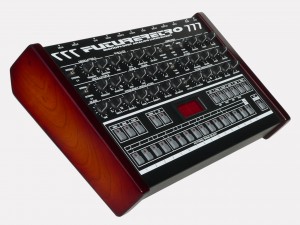
The Future Retro 777 is a monophonic analog synthesizer with a digital sequencer. The 777 is a sleek retro design that has realized the full potential of the monophonic pattern based synth. It’s not just another TB-303 emulator. It uses analog circuitry and has a lot of hands-on knobs for instant sound tweaking. And while the 777 has extensive editing and modulation abilities, the layout is as basic and intuitive as an old SH-101 or MC-202!
The 777 functions quite well as either a standalone bass sequencer or as a sound module in a MIDI environment. Two oscillators (A / B) produce a fat bass sound. Modulation abilities are quite complex, the oscillators themselves can modulate each other for example. The filter is very nice with switchable 3 or 7 pole slopes as well as other sound shaping controls for a wide range of tones. An external sound can be routed through the filter too. The sequencer, OSC B and the decay envelope can also modulate the filter cutoff. The 777 also employs a smart accent effect for that extra bit o’ kick in your bassline.
As a sequencer the 777 shines once again. Bear in mind that this sequencer accommodates a monophonic (single tone) instrument which normally has very basic sequencing needs. Notes are entered using the pseudo-keyboard buttons. Programming is different than other synth / grooveboxes of similar function but is relatively easy to master. Up to 256 patterns can be linked to form up to 16 songs all of which remain in memory. And of course all real-time editing can be recorded into your sequence and are also MIDI controllable. Final goodies include an internal MIDI to CV-gate converter, glide or portamento effects, distortion, chorus and phase effects and more!
Making a simple song using the MIDI Pattern Sequencer
MIDI Pattern Sequencer for iPad. Make a simple song demo.
MIDI Pattern Sequencer is a tool with powerful and at the same time very comfortable, intuitive and easy interface. It is the main feature, through which the sequencer can easily used by anyone, from beginner to professional, and everyone will find it most necessary for their own purposes. The sequencer is designed to control via MIDI any external sound modules, samplers, synthesizers and other applications running on iPad or another computer. Full support for external MIDI interfaces, network and virtual ports, synchronization with external devices and transport control makes this sequencer like playback control center for music devices or other applications.
Main features:
- Classical data structure: Project – Song – Pattern.
- Four main control modes – Transport, Keyboard, Edit pattern, Edit cell.
- No need to save data. All changes will be saved automatically.
- Pattern tracks can be configured for notes or drum events.
- Real-time recording and editing patterns.
- Recording and editing events through internal keyboard or external devices.
- Playback one or more patterns at once. Start and stop patterns during playback.
- Changes pattern events (Transposition, Velocity, Duration) during playback.
- Editing individual events or changes all events in track.
- Length of pattern is defined by last note or can be set to fixed value.
- Correct simultaneous playback patterns with different length.
- Each pattern and song track have individual mute/solo function.
- Song can contain patterns from current project and patterns from any other projects.
- Extended set of editing functions for patterns and songs – insert, delete, move and scroll a single event or entire track.
- Ability to set track titles, pattern titles (pattern button titles) and drum pad titles.
- Set of different color schemes of interface.
See more:
Elektron Analog Four: Polyrhythmic Sequence
Demonstration of a four-voice polyrhythmic sequence on the Elektron Analog Four.
MOSKWA Experiment A
Here’s one of VoltageCtrlR’s evening recording sessions at the Akashic Mountain Sound Temple experimenting with the MOSKA Roto Sequencer by XAOC Devices. This is a complex patch featuring the Moskwa battling the Random Looping Sequencer in this auditory journey. Dubs and effects handled by ZDSP, Space Echo and some spring reverb.
Chroma Sequenced Monosynth for Reaktor
Introducing Chroma, a unique sequenced monosynth for Reaktor featuring sound and sequence morphing and multiple control methods – use your mouse, a MIDI controller, Konkreet Performer, TouchOSC or Lemur.
available now at http://www.reaktortips.com/2012/12/chroma-and-gris-gris-sequenced-monster.html
Chroma is a performance oriented monosequencer and VA carefully tuned for ergonomic ease of use and glitch free operation in standalone and plugin mode. Slur features in Chroma match up with legato and glide features in the Gris-Gris synth to create a slinky sinuous note articulation.
Sequences can be created and controlled via mouse, MIDI, Konkreet Performer, TouchOSC and Lemur. Since there is now full OSC support in the Reaktor plugin version, you can do everything with Chroma in your preferred DAW that you can do stand-alone. A dream come true!
TouchOSC and Lemur templates are included in the package but there’s something special about Konkreet Performer that sets things on fire when it’s paired with Chroma and Gris Gris, a certain magic in the way it morphs and distorts sound. It is my firmly held opinion that not nearly enough people use KP and if you want something really special and unusual on your iPad you should rush right over to Konkreet Labs or head straight for the App Store and buy a license.
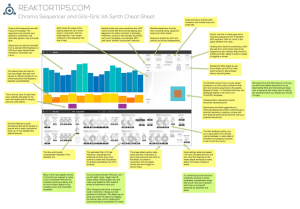
Chroma is 24.99 USD and can be purchased and downloaded immediately. Remember, Chroma is a Reaktor ensemble and requires a full installation of Reaktor 5.8.0, not just Reaktor player.
Moskwa Rotosequencer Demo
Background description below:
This is the first patch I made with XAOC Devices ‘Moskwa Bipolar Rotosequencer’.
This patch features The Moskwa’s CV out to Anti & Uncle OSC, OSC’s outs to Optomix top and bottom section.
Moskwa’s Gate out pinging the Optomix, Optomix out to mixer.
Oh yeah uLFO square out to 8NU8R, 8NU8R out to Moskwa’s direction in.
Teaser on the new Metropolis sequencer – demo
More features of upcoming metropolis sequencer demonstrated including:
quantizer scale selection
root note
skip stage (blinking leds via double click)
current step note display
tb-303 style slide
This is a proto module (hence some of the crazy wires and lack of panel). Code is %95 done and this is set to be released very soon.
DIY Synthesizer & Sequencer
The knobs of a home-made synth are tweaked while it plays a sequence of notes (Syncuino DIY 16-step sequencer, see link below).
—————————————————————–
https://sites.google.com/site/synthaquarium/
http://chemiker1981.blogspot.de/
DATAMASKIN

