
Arpie – Bouncing Ball Music Sequencer
Arpie is the novel musical composition system. Put balls as many as you like, and watch as they make nice music. Higher balls hit the keys with long pauses, as opposed to lower balls which hit fast and repeatedly. By combining them you can easily make a wide variety of musical sequences.
Bangarang on Noisepad – Load your own samples
Bangarang by Skrillex, remixed on Noisepad. Noisepad, a powerful soundboard, sequencer and live-set DJ app, available for iPad & iPhone. Load your own samples or use the in-app shop, create beats, apply real-time effects, be creative!
Soundbanks: Each bank holds 12 samples Load unlimited samples: Organize, create, (re)name, add and remove soundbanks
Sequencer: The onboard sequencer allows you to program up to 12 patterns on-the-fly, each with their own duration (1 – 99 bars).
Rhythm: Set BPM manually. Tap button for BPM: Set amount of swing (0% 100%)
Import / Export: Export individual patterns (.wav) Share samples/patterns between apps with AudioCopy/Paste
Sample settings: Noisepad offers a number of settings which determine how samples are played. Cut, hold, volume , mute, solo.
Effects panel: Real-time effects such as pitch, delay, cut-off, phase, reverb and bit-crush will bring your noise to life.
ARP Odyssey – spiral sequence
BRUNO ENDER LEE – “ARP Odyssey – spiral sequence” – November 2. 2012
Every sound was created with ARP Odyssey MK III, recorded on 4 stereo-tracks (sequence with Doepfer MAQ 16/3, bass, effects & leads) with stereo-panning-delay. Filmed during recording of the bass
composed, arranged & produced by Bruno Ender Lee; 2012 Velvet Voyage Productions
OP-1 LEGO SONG and the LEGO beat sequencer
A little song made possible by the new Brick Shaft accessories!
SoundMachine is a 4 track 8-step drum sequencer that uses the LEGO Mindstorms NXT to scan a set of drum “notes” which are then played using Ableton Live. The NXT uses four colour sensors to detect the colour of 2×2 LEGO bricks as the plate is scanned in. A controller written in Processing interprets the colour pattern and sequences MIDI note messages to send to Ableton Live, which in turn plays the sounds you hear.
The music on the video was created by SoundMachine itself – music you can build!
iSequence for iPad
Jamming with iSequence for iPad
iSequence is one of the most powerful music creation studio designed exclusively for iPad. Thanks to intuitive 8-track sequencer, tons of instruments and flexible mixer with DSP effects you can easily program and record profesional loops, beats and melodies. Now you control every aspect of your music project.
The iPad edition has been rewritten and redefined to take advantage of a bigger screen and better performance.
The workflow is extremely fluid, you record tracks and controls movement in real-time, edit them using step sequencer and automation editor, switch between instruments, tracks and views without stopping playback. You can compose, jam and mix at the same time!
Features [specification]
- 165 built-in high quality instruments embedded in 3 banks; acoustic, drum kits, pads, leads, sweeps and ambient atmospheres recorded with top classic and modern hardware synthesizers. Additional banks available in the BankShop.
- Pattern sequencer: 8 tracks and FX curves editor. Instruments are not bound to tracks, so you can play chords or use multiple instruments on a single track. Up to 999 patterns in the project.
- Piano keyboard (6 octaves) or drum pads.
- Event parameters: note duration, panning, velocity and gliss
- Real time recording; metronome and ‘slow down’ mode.
- Sampler; mapping, loops, ADSR envelope, sample start
- Copy/paste, move and transpose selected area or patterns.
- Mixer: 8 tracks, 5 configurable effect slots with flexible routing. Effects: Filter, Reverb, Flanger, Delay, LO-FI crusher, Equalizer, Compressor. All parameters can be recorded in real-time or edited using automation editor.
- WIFI-sharing: HSQ, MIDI, WAV export. HSQ import.
Electronic music performance: One year later…
Gear used: Elektron Machinedrum as main sequencer, Waldorf Blofeld, Akai mpc500, Korg Ms2000, Clavia Nord Modular G2 and DSI Tetr4.
Doepfer A155 Analog/Trigger Sequencer- Frequency Modulation Tutorial
A demonstration of Frequency modulation of a sequence on the Doepfer A 155 Analog/Trigger Sequencer with low rate cv signals and audio rate signals. Sound and Description by Raul Pena.
Noisepad V2.0 Tutorial
NOISEPAD
Noisepad is a user friendly drum computer, sequencer and beat creator made specifically for live performances and instant result.
It has been designed to give you the most functionality and fun without having to go through a steep learning curve. After installation you’ll find 5 preloaded soundbanks of 12 samples each, ready to start the beat making. You’ll be bouncing your head within 5 minutes, that’s a promise!
The onboard sequencer allows you to program up to 12 patterns on-the-fly, each with their own duration (1 — 99 bars). Switching between patterns is seamless; the sequencer makes sure the next pattern starts when the current has finished. Apply effects to the pattern, mute samples or have them playing solo on your command. Adjust the Beats Per Minute with precision or by tapping at the speed of the beat and add a bit of swing to make the beat feel just right.
It adds a new dimension to your live-sets, parties and all places where you want to make noise. Synchronize the BPM with the music you’re playing and add a little bit of your own flavor to it, or simply trigger the samples by hand. Real-time effects such as pitch, delay, cut-off, phase, reverb and bit-crush will bring your noise to life.
Organize the samples into your own custom soundbanks using the built-in organizer. Once you’re done playing with the packaged samples, the in-app shop provides additional soundpacks to discover or you can load your own samples using iTunes File Sharing for unlimited possibilities.
Noisepad v1.0 was released in 2011 by iPhonk a division of MediaGROE BV
WHAT’S NEW
version 2.0
Organize samples
– Organize samples into Soundbanks, drag ‘n drop them onto buttons and swap them around
– Create as many Soundbanks as you like
– Overview of all Soundbanks, purchased Soundpacks and custom samples
– Rename or remove Soundbanks
– Rename user samples
Sequencer / Record
– Real-time sequencer: record your beats on the fly
– Record up to 12 patterns, each with own variable length (1 – 99 bars)
– Export pattern to WAV file
– Erase single instrument from pattern or the whole pattern at once
– Switch seamlessly between patterns: the next pattern is started after the current finishes
– Copy / Paste patterns to other slots by holding the pattern button
– Configurable BPM and Swing
– Tap button to adjust BPM easilly
– Toggle FX: effects applied to both pattern + tap pads or only tap pads
– Jam with the tap pads while the pattern repeats
New Soundpacks in the shop
– Bong-ra Hardcore
– Bong-ra Drum ‘n’ Bass
– Bong-ra Dubstep
– Loopbased We Love 808
– Loopbased Dirty South Flava
Other
– Two new *free* preloaded soundpacks
– Hold: press down starts sample, release stops it
– Set the volume of each sample individually
– Mute individual samples or let one sample play solo with a single button press
FEATURE LIST
Soundbanks
- Each bank holds 12 samples
– Load unlimited samples, switching between banks doesn’t stop samples
– User samples: Use file sharing in iTunes
( .caf / .wav / .mp3 / .aif audio files, 22khz / 44khz / 48khz, stereo/mono )
– Organize samples into Soundbanks, drag ‘n drop them onto buttons and swap them around
– Create as many Soundbanks as you like
– Overview of all Soundbanks, purchased Soundpacks and user samples
– Rename or remove Soundbanks
– Rename user samples
Shop - Buy Sound Packs from various artists / producers for just $ 0,99 cent per pack.
Sequencer
- Play: real-time sequencer
- Rec: Record your beats on the fly
– Metronome: keeps you on-beat while recording
- Effects: Toggle effects on/off for patterns
- Pattern: Record up to 12 patterns, each with own variable length (1 — 99 bars)
- Erase: Single instrument or pattern
– Hold patterns for 2 sec. to copy and / or paste pattern
Rhythm settings
- BPM: Set BPM manually
- Tap: Tap button for BPM
- Bars: Each pattern has variable length (1-99 bars)
- Swing: Set amount of swing (0% – 100%)
Export/Import
– Export individual patterns to a .wav file
– Share samples/patterns between apps with AudioCopy/Paste
Sample settings
– Cut: Triggered sample cuts previous sample
- Hold: Press down start / release stop sample
- Volume: Set the volume for each sample
- Mute: Mute individual samples
- Solo: Play a sample solo
- Mic-in: Record mic-in audio for sample *soon available*
Effects panel
- Pitch: Slide bar from 0% to -100% or +100%.
- Delay: Slide bar from 0% to 100%
- Reverb: Slide bar from 0% to 100%
- Cut-off: Slide bar from 0% to 100%
- Phase: Slide bar from 0% to 100%
- Crush: Slide bar from 0% to 100%
- Dry / wet: Set effect strength from 0 t
Expand your music arsenal with these new releases
Free 30-Band Graphic Equalizer
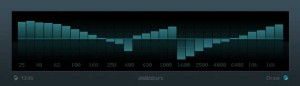
Mildon Studios has released a free 30-Band Graphic Equalizer VST plug-in for Windows with a look that blends perfectly with Cubase.
Pricing and Availability:
Free download
More information:
AudioThing has released TX-101 for Native Instruments Kontakt
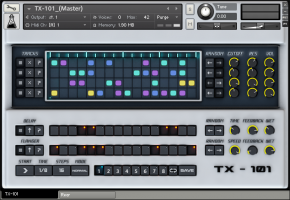
TX-101 is a 4-track sequencer designed for the creation of evolving rhythm patterns. Each track has 4 different samples (for a total of 16 samples), including organic glitches and metal hits. It is possible to store eight presets that can be joined and looped together to build a 128 steps sequence (16×8). It is also possible to sequence Delay and Flanger effects as two additional tracks. Both parameters (cutoff, resonance, effects) and steps can be randomized separately.
There are 6 different variations (.nki instruments) of TX-101 for different mood/styles. The modulation wheel is also assigned to a different set of parameters for each instrument.
Details:
- Sequencer: 4 Tracks and 16 Steps + tracks for Delay and Flanger.
- 8 Patterns presets.
- 6 Kontakt Instruments (.nki) presets.
- Mod. Wheel assigned to different parameters for each preset.
- Size: 16 MB installed / 9 MB Download.
Price: $18. TX-101 is available for the introductory price of $14 until October 11th, 2012.
Native Instruments Kontakt 4.2.4+ full version is required.
Cableguys Curve 2
Curve 2 out now!
FULLY FUNCTIONAL DEMO: http://www.cableguys.de/downloads.html
MORE INFO: http://www.cableguys.de/curve.html
Curve is a software synthesizer with an irresistible waveform editor, huge sound library and slick interface. Ideal for both experimentation and detailed tweaking at an excellent sound quality.
• Sound Features – Curve features aliasing-free oscillators with custom waveforms, noise generation and broad FM options. Waveform crossfades provide for changing timbres; a comprehensive unison mode delivers fat lead sounds, wide pads and massive sound. Drawable LFOs deliver everything from melodic and rhythmic patterns to dubstep wobbles and punishing bit-crushing effects. Flexible filter routing, a feature-rich mono mode plus legato and glide, are all designed for great depth of control.
• Preset Library – Curve’s preset library is a shared online database, providing a constant source of inspirational sound. Public preset sharing allows an ever-increasing number of great presets, public preset voting will help you manage the vast number of sounds, all from within the plugin. Curve ships with an excerpt of this ever-growing sound library. Macro knobs let you explore vast sound variations quickly, for quick access to those parameters that define the core of a sound.
• Elegant Interface – Curve shows you everything important at a glance, featuring high contrasts and a fresh color scheme. Inbuilt MIDI assignment allows you to set up external MIDI controllers quickly.
• Curve Community – Since the first beta of Curve 1.0, the Curve community has steered the synthesizer’s future by submitting feature requests, comments and bug reports, and by sharing presets. Curve 2 is the result of our users submitting wishes and uploading great sounds. Big thanks to all of you!”
Random Looping Sequencer
Here’s a demo of the Random Looping Sequencer DIY module. This patch features the RLS’ seq out multed to uscale in and envelator gate in. envelator out to borg 1… borg out to mixer and into camera. The sound source is the uncle & anti osc tripple wave folded and filtered with the z2040 and ems synthi filter clone.
The Random Sequencer is a circuit that produces random control voltages. These can be completely random, or they can be locked into loops that repeat every 8, 16 or 32 steps. It was inspired by the long history of shift register pseudorandom synth circuits, including the Triadex Muse, Buchla 266 Source of Uncertainly, Ken Stone’s gated comparator and Grant Richter’s Noisering. This circuit includes a transistor noise generator, so should create true random binary sequences. However, the structure of the sequencer and the nature of the digital-to-analog converter used seem to give a particular character – tones that rise and fall in a particular way.
-Tom Whitwell
Here’s more info on this open source diy synth project:
musicthing.co.uk/modular/?page_id=21
DATAMASKIN

