
Moog Sequence Experiment
An extended synth jam exploring timbral and textural tweaking on Moog Voyager, Little Phatty and Slim Phatty synthesizers. In addition, a Kurzweil K2000 (off-camera) is processed by a Moog MF-105M MIDI MuRF and drum beats from a Yamaha MO8 are filtered through a stereo pair of Moog MF-101 Low Pass Filters. Everything but the drum track is also fed through a Line 6 Echo Pro, providing tempo-synced echoes. Ableton Live provides the master clock. Moog synths and MIDI MuRF sequenced by the Koushion step sequencer app. iPad is in an Alesis iDock. Learn more at www.erxerimentalsynth.com
New analog Programmer sequencer – Test run with the Arturia MiniBrute
And here are the background details:
Using the minibrute as test subject. Programmer is feeding pitch and filter cutoff cv. Pitch cv is being run through a quantimator
Bleepy patched with Analogue System’s rs450 CV Recorder + Cwejman MMF-2 Stereo Multimode Filter
Here’s a patch showing the new Analogue Systems rs450 CV Recorder/Sequencer and the Cwejman MMF-2 Stereo Multi-mode Filter module. The Cwejman MMF-2 is filtering a basic saw wave bass from the Cwejman VCO-2RM running into a version of lowpass on the MMF-2. The kick and snare were created using Analogue Systems modules. The sixteenth note percussion is a modulated Cyndustries Zeroscillator through a Cwejman VCA, opened by the Cyndustries Four Transients module.
They’ve pre-recorded a few CV sequences into the incredible new Analogue Systems rs450 CV Recorder/Sequencer. It’s being clocked by an A.S. rs200 sequencer (which is running the whole patch actually). They are switching between four or five preset sequences which in turn is controlling the pitch of a Cwejman RES-4 module.
The rhythms for this patch are derived from the 4ms Shuffling Clock Multiplier and we’re also using a 4ms PEG module as a slow modulation source for the MMF-2. Rad!
Rebel Technologies Stoixeia demo
Zoë Blade was lucky enough to be treated to a demo of Rebel Technologies’ Stoixeia at the Brighton Mini Maker Faire 2012.
Στοιχεῖα is a dual Euclidean Sequencer. It algorithmically generates rhythmic sequences from an input trigger signal. The name (Στοιχεῖα, Stoicheia, or Elements) comes from the title of Euclid’s book Elements in which the algorithm was first described.
Serge TKB Controlling Oberheim SEM and Moog Voyager
Routing separate sequences to separate analog synthesizers in different formats the Serge tkb oversees all control voltage tracking tasks. These sounds were created and tweaked live.
Additional info about the Serge:
A few words about Serge sequencers. Note that Serge/Sound Transform does not make a traditional keyboard like you see on most other synthesizers, such as Moog, Roland, etc. You can get a traditional vintage control voltage keyboard (Roland, Moog, Polyfusion, etc.) and interface it to the Serge, since the Serge adheres to the 1 volt/octave standard. Or you can generate a control voltage from your MIDI keyboard and an interface.
Sound Transform follows the Buchla model of offering a touch sensitive keyboard/sequencer unit, as well as more traditional simple sequencers. Originally, they offered a sequencer whose stage was selected by push buttons. This is what’s called a sequencer-programmer: you could use it in an automatic mode as a traditional sequencer, or use it manually to select/program voltages you set. So you can mimic a traditional keyboard if you want by tuning each stage to various notes. Or discard the traditional keyboard concept and simply use it to fine-tune different parameters in your patch for later recall.
The TKB is the hub of the sequencers – each stage has a corresponding output that goes high when it’s selected. This complements the other sequencers, which have an input that, when high, causes that stage to be selected. So the TKB can be used to control another sequencer, or whole sets of other sequencers, regardless of the number of stages they might have.
Sound Transform offers a set of Serge sequencing programmers, from four to eight stages, plus the Sequencer with eight stages, and the TKB with sixteen stages. Confused? What they call their regular Sequencer is not a sequencing programmer in that each stage is selectable by a button but not by a stage select input. The sequencing programmers have stage select inputs. And the TKB has stage select outputs.
The sequencers are a little ‘bare’ in that none of them have an internal clock. You must use another module as a clock source, and typical sources are the DSG, DTG, and the Smooth section of the SSG, patched to oscillate. But they do have cute features such as step trigger inputs for RESET, UP/DOWN, and HOLD.
Most of the Serge sequencers are optionally available with an internal connection to a quantizer. Why would you want that? The quantizer forces the range of the stage pots into stepwise note intervals. So as you turn the pot, it isn’t a continuous rise or fall, but steps up and down a scale. This makes tuning much easier and more reliable. The variable outputs are still available on quantized sequencers also.
Three new nice virtual products – Sequencer, Compressor and EQ Plug-in
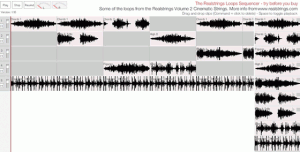
Loopmasters has introduced the Realstrings Online Loops Sequencer, a web-based sequencer by Chris Savage, offering a new way to demo loops from Realstrings sample packs. The sequencer allows you to play with some of the loops before you decide to buy, so you get a better idea of whether your music would benefit from these packs than you might get from the usual audio demos.
We are always looking at new ways to showcase loops packs; here’s an innovative tool from string loops producer Pete Whitfield at realstrings.com – an online loops sequencer.
For loops packs that are construction kits, what better way to try before you buy? Sequence and layer the loops to see how they work in an interactive, musical context.
An iPad version is coming soon, plus some more functionality, based on user feedback.
More information: LoopBlog
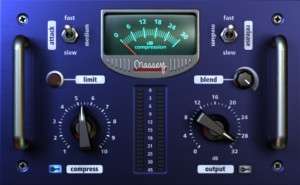
The CT5 is a revision of their popular CT4 compressor. The sonic characteristics that made the CT4 such a versatile and easy-to-use compressor remain intact. ‘The core sound remains 99% the same; I’m tweaking one of the internal filters for the better and improving the dynamic range of the compression circuit,’ says Steven Massey.
The new model improves on a good thing by adding a more aggressive, higher ratio compression curve option, a wet-dry signal blending control, and sidechain input capability. Further, Steven explains, ‘The highest compression setting on the CT4 is equivalent to about 8 on the CT5, even without the limit option enabled. Thus, more compression is available to the user, which is, of course, better.’
Many of these new features were implemented due to customer requests. ‘We encourage feedback, not just from the beta testers, but from everyday users,’ says the newest guy at Massey Plugins, Kevin Weber. ‘I truly enjoy checking in on our web forum and seeing what folks have to say. Sure there are some unrealistic requests, but some spot on ones as well. We take those ideas to heart, even the crazy ones.
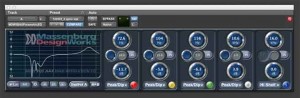
High-Resolution AAX EQ Plug-in For Pro Tools
Developed by the creator of the parametric EQ, George Massenburg,Avid says that the new Massenburg DesignWorks (MDW) Hi-Res Parametric EQ Plug-In for AAX continues to define the state-of-the-art in digital equalization. Here’s all the details in their own words…
Designed for Pro Tools|HD systems, version 5 offers new AAX DSP and AAX Native support, giving operators the flexibility to use the EQ across the entire Pro Tools product line, including Pro Tools|HDX systems. With its nearly unmeasurable low distortion, unprecedented clarity, unmatched smoothness, consistent EQ parameter representation, and superb high-frequency response (especially near Nyquist frequency at 44.1/48k), MDW Hi-Res Parametric EQ is designed for optimal definition in the mixing environment.
MDW Hi-Res Parametric EQ operates in double precision 64-bit floating point processing to take advantage of the maximum capability of the ProTools system. This new generation plug-in emulates the constant shape reciprocal filter curves of Massenburg’s legendary GML 8200 equalizer — the industry-standard reference. The plug-in offers a choice of three or five bands of equalization (both versions support the ultra-wide 10 Hz to 41 kHz frequency range) to target certain frequencies, or conserve DSP resources when only three bands of EQ are needed.
Professional Features
MDW Hi-Res Parametric EQ offers a number of features to help achieve better mixes. It allows viewing the frequency grid in 6, 12, or 24 dB resolution for more accurate representation of the equalizer settings. It also offers various filter types and a wide selection of Q and frequency values.
IsoPeak lets the operator quickly isolate and sweep through the frequency spectrum to find a targeted frequency quickly, a benefit of parametric equalization. One can also toggle between two EQ band settings using A/B snapshots, copy one setting to the other, and invert the phase of a track. And when used with Avid control surfaces, the EQ organizes the bands into ergonomic groups on the channel strips.
High-Resolution Filtering
MDW Hi-Res Parametric EQ 5.0 assures true high-resolution operation. The plug-in delivers double-precision 64-bit processing for vanishingly low distortion for optimal clarity and transparency (think natural-sounding). It also provides high-resolution 96 kHz sample-rate processing for audio recorded at 48 kHz or 96 kHz, and 192 kHz sample-rate processing for 92 kHz audio, allowing for maximum resolution, increased headroom, and fewer artifacts, including lower noise typical of generic equalizers. And with variable Qs (adjustable bandwidths) from 25.6 (1/18 of an octave) to 0.1 (6-2/3 octaves), MDW Hi-Res Parametric EQ 5 delivers unmatched precision and maintains predictable filter curves.
Excellent DSP Efficiency
MDW Hi-Res Parametric EQ 5 allows the operator to select five bands of EQ for enhanced efficiency on Pro Tools|HDX systems or three-band mode for even greater instance counts. On Pro Tools|HDX, the five-band version delivers seven, eight and three instances for 48 kHz, 96 kHz and 192 kHz, respectively, while the three-band version delivers instance counts of ten, eleven and five for sessions of 48 kHx, 96 kHz and 192 kHz, respectively.
- Wide frequency selection, from 10 Hz to 41 kHz, with variable Q and choice of three- or five-band EQ
- Double-precision 64-bit processing for unprecedented clarity
- Emulates GML 8200 constant shape reciprocal filter curves – the industry-standard reference
- IsoPeak(r) functionality quickly solos a target frequency quickly and precisely
- A/B snapshots allow settings comparisons
- Supports both AAX and AAX Native plug-in formats
System Requirements
AAX and AAX DSP versions require Pro Tools version 10.2 or later. AAX DSP plug-in requires Pro Tools|HDX.
Pricing and Availability:
See Avid website.
More information:
MikroWave Android sequencer – sketching a groove
Quickly sketching a groove on MikroWave, the sequenced synthesizer for Android devices. The video shows how a bubbly bass line can be created and what modifiers are available to the synthesizer and drummachine.
You can get it on Google Play : https://play.google.com/store/apps/details?id=nl.igorski.mikrowave
You can also test drive the FREE version (fully functional with the omission of saving and exporting of songs/audio). You can find it under “more apps from this developer” on Google Play.
Korg Radias – ‘The Calling’
A piece sequenced and performed entirely on the Korg Radias and recorded live into Logic Pro 9. Added some Echo using the Delay designer. All other effects are on the Korg Radias – Stereo Phaser on both Bass and Pads. Drums and Bass Line Sequenced on the Radias, Arpeggiator also used on Arp Saws.
“Fashioned on one of my idols Jean Michele Jarre, just in case you were wondering. Bass Sequence and sound programmed by me, all other sounds are from the presets, with a tweak here and there.”
Buchla – Three Layers to Ponder
Buchla one take improv using 3x patch layers.
The 112 Touch Controlled Voltage Source is being used to both transpose the 5-note mini sequence, as well as the delay feedback amount. So you’ll notice differnt levels of synced delay feedback as I play different keys – many of which are tuned to unison pitches . . . and not in perfect tune – this allows for creepy, slight doppler shift note repeats.
MikroWave Android music app : a quick rundown
MikroWave, the sequenced synthesizer for Android developed by igorski.nl, being put through its paces. This video shows the generic sequencer navigation / use, introduction to the synthesizer and a lot of crude auditive side effects when used by a monkey.
You can find the application on Google Play here:
https://play.google.com/store/apps/details?id=nl.igorski.mikrowave
or visit its development website:
http://www.igorski.nl/mikrowave
Description of the app:
Ever fancied a sequenced synthesizer that fits in your pocket ? So did we.
MikroWave is a deceptively simple audio synthesizer ideally suited for quickly sketching out your musical ideas when on the move. Patterns can be created in the sixteen step sequencer, with no limit to the amount of bars your composition requires. Apart from the basic waveforms there is also a secondary oscillator which can be routed to different targets for harmonically enriching your initial sounds. You can shape the basic palette from friendly cheesy 80s trumpets via stuttering robots to totally unlistene-able sonic mayhem. If anything, you can sure annoy people on the bus.
For further improvisation there is a multi-touch keyboard allowing you to play along with the sequencer for quickly testing new ideas. When you’re pressed for time, you can save a song in progress and return to it later for finishing your idea, or plainly reliving your initial enthusiasm when creating that bubbly, acid bassline over that funky beat you had a brilliant destination for.
Apart from working from your mobile device, your songs can be exported in WAV format, uploaded to SoundCloud for direct sharing, or you can export your songs as MIDI data so you can continue work on your desktop computer / other hardware devices.
MikroWave is actively being updated, so keep your eyes peeled for notifications to be sure you’re getting all the latest features. You may also aid development by leaving suggestions and sharing your ideas on the website.
Just to be clear: MikroWave doesn’t rely on samples for sound generation, but actually synthesizes sound. For best performance your device should have a dual core CPU, though the newer generation of Gingerbread and Ice Cream Sandwich-ready devices should have no problems running the application.
When in doubt, MikroWave is also available as a FREE version, note that saving of songs is disabled in this version.
DATAMASKIN

