
The Foundation Of Synthesis: Control Voltage
Additional videos for this title: http://j.mp/SZauJ3
The Foundation Of Synthesis 104: Control Voltage by The Bob Moog Foundation
Video 1 of 22 for The Foundation Of Synthesis 104: Control Voltage
Marc Dotylead educator for The Bob Moog Foundationis back with a series of tutorials in this course on Voltage Control.
But what is Voltage Control and how do you use it in the world of hardware synths? Well, here’s the story: In the early days of sound synthesis, if you wanted your sounds to change or evolve in any way whatsoever, you had to do it manually. Need the pitch to go up? Grab the the oscillator knob and turn it! Want the volume to change? Again, grab the volume knob! What about sequencing a series of notes? Well, before voltage control, you had to record every pitch onto magnetic tape and cut them all together in the order and rhythm that you wanted. It was hard work to create electronic music way back when!
Voltage control forever changed all that! And in this course Marc Doty shows how different hardware synth designers harness the power of VCs to transform and supercharge electronic music composition. Taken one step further you’ll see how Voltage Control was the mother of MIDI… and we all know how powerful MIDI is!
Bob Moog was an early pioneer and inventor of voltage-controlled analog synthesizers. He revolutionized the music industry and his ideas, inventions and musical instruments have dominated the sound of music for more than 30 years. Aside from being an innovator, Dr. Bob was an outspoken advocate of education. The Bob Moog Foundation, created by his daughter, Michelle Moog-Kousa, continues his legacy with Dr. Bob’s SoundSchool, the preservation of his inventions and the development of the Moogseumthe only museum of its kind dedicated to the advancement of sonic education. We hope you will help support the BMF’s efforts by watching these courses with the knowledge that a large portion of the proceeds go to support their awesome efforts!
So sit back, hit the play button, and proceed on your journey into the Foundation of Synthesis with Marc Doty, and the Bob Moog Foundation. Be sure to watch all 6 of the BMF’s courses on filters, modulation, oscillators, sound design and more!
More info on this title: http://j.mp/SZauJ3
Doepfer A155 Analog/Trigger Sequencer- Frequency Modulation Tutorial
A demonstration of Frequency modulation of a sequence on the Doepfer A 155 Analog/Trigger Sequencer with low rate cv signals and audio rate signals. Sound and Description by Raul Pena.
Inside a VSTi – how its made
Have you ever seen inside a VST plugin – how its made? Ourafilmes is, probably, the first to show you!
Here´s a nice video that take you inside the SB-2 monster synth and shows its main features!
This synth is now free and is included in the Ourafilmes Facebook Pack – available in www.facebook.com/ourafilmes
Tutorial: Wave Arts “Dialog” – Introduction to vocal processing
Jonas “Missing Identity” Hagenvald explains the new plugin “Dialog” from Wave Arts and enhances a vocal from the singer Lulablue.
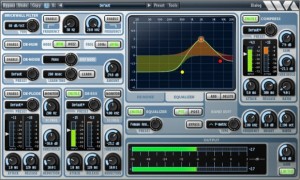
Dialog combines in one plug-in all the processing needed to clean up, adjust, and sweeten recordings of the spoken voice. It is perfect for voice-over, film/tv recordings on location or sound stage, and broadcast.
Dialog includes brickwall filters, de-hum and de-buzz processing, broadband noise reduction, de-ploding, de-essing, 10-band equalization, compression, and limiting. Separate presets for each section allow you to get results fast.
The brickwall filters have variable rolloff slopes and can be used to cutoff low or high frequency ranges. The de-hum processor uses notch filters to eliminate 10 harmonics of either 50 Hz or 60 Hz hum. The de-buzz processor squelches nasty line frequency buzzes. The de-noise processor is the stellar sounding MR Noise algorithm with a simplified interface. De-plode and de-ess are custom processors; use de-plode to tame plosive sounds and use de-ess to adjust the amount of sibiliants. The EQ section is the powerful and easy to use TrackPlug equalizer, with 10 bands of equalization, 11 different filter types to choose from, and a variety of presets. The compressor is the TrackPlug Vintage compressor, with presets tailored to voice processing.
Flute Sounds | Moog Little Phatty: Subtractive Synthesis
In this video Arjen Schat demonstrates how to create flute sounds with the Moog Little Phatty. He starts from the calibration patch (CA CALIBRATION) as usual and create a flute sound as he goes.
Noisepad V2.0 Tutorial
NOISEPAD
Noisepad is a user friendly drum computer, sequencer and beat creator made specifically for live performances and instant result.
It has been designed to give you the most functionality and fun without having to go through a steep learning curve. After installation you’ll find 5 preloaded soundbanks of 12 samples each, ready to start the beat making. You’ll be bouncing your head within 5 minutes, that’s a promise!
The onboard sequencer allows you to program up to 12 patterns on-the-fly, each with their own duration (1 — 99 bars). Switching between patterns is seamless; the sequencer makes sure the next pattern starts when the current has finished. Apply effects to the pattern, mute samples or have them playing solo on your command. Adjust the Beats Per Minute with precision or by tapping at the speed of the beat and add a bit of swing to make the beat feel just right.
It adds a new dimension to your live-sets, parties and all places where you want to make noise. Synchronize the BPM with the music you’re playing and add a little bit of your own flavor to it, or simply trigger the samples by hand. Real-time effects such as pitch, delay, cut-off, phase, reverb and bit-crush will bring your noise to life.
Organize the samples into your own custom soundbanks using the built-in organizer. Once you’re done playing with the packaged samples, the in-app shop provides additional soundpacks to discover or you can load your own samples using iTunes File Sharing for unlimited possibilities.
Noisepad v1.0 was released in 2011 by iPhonk a division of MediaGROE BV
WHAT’S NEW
version 2.0
Organize samples
– Organize samples into Soundbanks, drag ‘n drop them onto buttons and swap them around
– Create as many Soundbanks as you like
– Overview of all Soundbanks, purchased Soundpacks and custom samples
– Rename or remove Soundbanks
– Rename user samples
Sequencer / Record
– Real-time sequencer: record your beats on the fly
– Record up to 12 patterns, each with own variable length (1 – 99 bars)
– Export pattern to WAV file
– Erase single instrument from pattern or the whole pattern at once
– Switch seamlessly between patterns: the next pattern is started after the current finishes
– Copy / Paste patterns to other slots by holding the pattern button
– Configurable BPM and Swing
– Tap button to adjust BPM easilly
– Toggle FX: effects applied to both pattern + tap pads or only tap pads
– Jam with the tap pads while the pattern repeats
New Soundpacks in the shop
– Bong-ra Hardcore
– Bong-ra Drum ‘n’ Bass
– Bong-ra Dubstep
– Loopbased We Love 808
– Loopbased Dirty South Flava
Other
– Two new *free* preloaded soundpacks
– Hold: press down starts sample, release stops it
– Set the volume of each sample individually
– Mute individual samples or let one sample play solo with a single button press
FEATURE LIST
Soundbanks
- Each bank holds 12 samples
– Load unlimited samples, switching between banks doesn’t stop samples
– User samples: Use file sharing in iTunes
( .caf / .wav / .mp3 / .aif audio files, 22khz / 44khz / 48khz, stereo/mono )
– Organize samples into Soundbanks, drag ‘n drop them onto buttons and swap them around
– Create as many Soundbanks as you like
– Overview of all Soundbanks, purchased Soundpacks and user samples
– Rename or remove Soundbanks
– Rename user samples
Shop - Buy Sound Packs from various artists / producers for just $ 0,99 cent per pack.
Sequencer
- Play: real-time sequencer
- Rec: Record your beats on the fly
– Metronome: keeps you on-beat while recording
- Effects: Toggle effects on/off for patterns
- Pattern: Record up to 12 patterns, each with own variable length (1 — 99 bars)
- Erase: Single instrument or pattern
– Hold patterns for 2 sec. to copy and / or paste pattern
Rhythm settings
- BPM: Set BPM manually
- Tap: Tap button for BPM
- Bars: Each pattern has variable length (1-99 bars)
- Swing: Set amount of swing (0% – 100%)
Export/Import
– Export individual patterns to a .wav file
– Share samples/patterns between apps with AudioCopy/Paste
Sample settings
– Cut: Triggered sample cuts previous sample
- Hold: Press down start / release stop sample
- Volume: Set the volume for each sample
- Mute: Mute individual samples
- Solo: Play a sample solo
- Mic-in: Record mic-in audio for sample *soon available*
Effects panel
- Pitch: Slide bar from 0% to -100% or +100%.
- Delay: Slide bar from 0% to 100%
- Reverb: Slide bar from 0% to 100%
- Cut-off: Slide bar from 0% to 100%
- Phase: Slide bar from 0% to 100%
- Crush: Slide bar from 0% to 100%
- Dry / wet: Set effect strength from 0 t
Tabletop App For iPad – A Detailed Introduction
In this video series Freth Productions go into detail about the Tabletop interface and the specifics about how the devices work, up to and including making music.
This video was made using Reflection (iPad screen and audio to PC wirelessly), Camtasia (recorded with) and Power Director 10 (processed for YouTube from a raw AVI to MP4). NOTE: There are audio glitches during extended audio, caused by the Reflection software. It is not caused by Tabletop.
Arturia Spark 1.5 tutorial
Mike Hosker, Director of Sound Design at Arturia, takes us on a video tour showing the new features of SPARK 1.5.
See tips & tricks on how to boost your creativity and performance with the new Sample layering, Tune mode, and Choke groups features.
Deadmau5 – The Veldt – Get That Sound
Learn how to recreate the classic tones of Deadmau5’s The Veldt
For more information:
Pre-order this magazine from http://bit.ly/T4mr6w or purchase digitally from http://bit.ly/vTsHr2 On Sale 27/9/12
Lead Sounds | Moog Little Phatty: Subtractive Synthesis
In this video Arjen Schat demonstrates how to create lead sounds with the Moog Little Phatty. Arjen starts from the calibration patch (CA CALIBRATION) again and create a lead sound as he goes. Quick note: He syncs the oscillators to get a sharper sound. For a wider sound you can leave the oscillators un-synced.
DATAMASKIN

