
Quick tour around the new Swar Studio software
For all you Bollywood music makers out there I guess. This is a quick tour around the new Swar Studio software, the first sequencer aimed at both modern and traditional music from India.
Swar Studio is the first sequencer primarily aimed at music from India, whether modern or ancient. It includes both Indian and Western virtual instruments to allow you to create your favourite songs from the film or classical repertoire without the need of any additional tool.
With Swar Studio, you’ll be able to reproduce your favorite Bollywood hits of the past or present days, and/or create your own personal songs for a fraction of the price of setting up an expensive home studio.
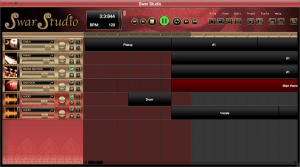
- Fully featured, cost-effective DAW (Digital Audio Workstation)
- Audio tracks for recording or dragging audio loops
- Instrument tracks for recording from keyboard or dragging MIDI loops
- 36 in-built virtual instruments*
- Library panel with hundreds of included MIDI loops
- VST and Audio Unit effects
- Piano Roll editor for MIDI loops
- Link to external tools
- Quantization
- Drag loops directly from SwarShala or Swar Librarian
- Export to audio or MIDI files
- Windows and Mac OS X
- Free updates
Closer look at Cableguys’ VolumeShaper 3
VolumeShaper is a plugin for shaping and automating the levels of any audio signal. From signature pumping effects to extreme gating, from tempo-synced stutter to precise sample-shaping, VolumeShaper provides a wealth of creative musical effects with a visual approach to volume. For Mac and Windows, as VST, AU or RTAS plugin.
New in version 3: A precise oscilloscope for helpful visual control, plus an option to trigger the LFO via MIDI notes.
http://www.cableguys.de/volume-shaper.html
Music by Pangea Dub Force: http://www.pangeadubforce.com
Blippoo playing a Buchla 261e
Basic test of a Rob Hordijk Blippo Box controlling a Buchla 200e.
This is a Blippoo Vers.2 – Lots of tricks as e.g. the proximity sensor are not used.
This is just as a quick vid for the muffwiggler brothers and sisters!
Rob Hordijk’s BLIPPOO BOX is an audio sound generator that operates according to the principles of chaos theory. By designing the Blippoo Box, he attempted to bridge a crossover space between abstract (sonic) art, music and artistic craftsmanship. In the hands of performing musicians the Blippoo Box becomes an electronic music instrument that invites performers to improvise with the chaotic nature of the box. Despite this chaotic behavior, the produced sounds have particular characteristics that are roughly predictable and enable a performer to build a performance around a composed scheme.
 The Infamous Blippoo Box
“By using a nonlinear feedback system, patterns are created that exhibit chaotic properties like attractors, bifurcations, etc. Second, the filter also uses a nonlinear feedback system that can go into ranges where bifurcations occur, which results in the creation of ‘undertones’, where the period doublings create harmonic partials that are lower in frequency as the signal fed into the filter.” Rob Hordijk
Sytrus Demo: Hybrid Synthesizer – subtractive but addictive
A disruptive innovation in software synthesis, nothing else compares to the diversity Sytrus packs. FM, RM & Subtractive synthesis – have it all!
Sound engine
Meticulously crafted, Sytrus delivers ethereal lush pads, sonorous bells, scintillating highs or simply dirty grunge. The 6 user-definable operators can act as independent oscillators for subtractive synthesis, cross-modulate to create complex FM (Frequency Modulation) or RM (Ring Modulation) synthesis or the 256 partial harmonic editor can be used to additively synthesize virtually any timbre you can imagine. With up to 64x oversampling Sytrus delivers 100% epic sound.
Effects
Sytrus features 3 independent, chainable, filter units, each containing an array of filters (13 types each with 5 cutoff slope settings) and integrated waveshaper (distortion processor).
The filter units are optionally followed by a Chorus, Delay & Reverb unit. 100% Flexibility.
Presets
With over 500 hand-picked presets Sytrus is ready to contribute to any genre immediately upon installation. Sounds cover – Arps, Bass, Bell, Brass, Chromatics, Drum, DX7, Experimental, FX, Guitar, Orchestral, Organ, Pad, Percussion, Piano, Plucked, Sequence, Synth, String, Wind. 100% inspiration.
http://www.image-line.com/documents/sytrus.html
Moog “Big Phatty” Ableton Live Pack
Ableton Live Pack created using the Moog Slim Phatty Analog Synthesizer. This video takes you through the AfroDJMac Big Phatty Pack, which contains 33 Ableton Live Instruments.
Available here: http://afrodjmac.spinshop.com
Each instrument has its own unique effects and macro knob settings. I programmed each sound on my Slim Phatty and sampled them into Ableton Live from there, I added a ton of functionality to each instrument. Guaranteed to inspire!
Introduction to Stochastik Drum Programming
This is a brief introduction to Stochastik Drum Programming using the Stochastik Drum Machine for iPad. It shows you how you can use probability to enhance your step sequencing so you won’t have any boring loops in your drum tracks.
Stochastik is a full-featured Drum Machine with one outstanding difference. And many killer features. Unlike any other drum machine, Stochastik lets you set a probability that a note will trigger for each of the steps in your pattern.
Once you add chance into the mix, you can generate thousands of unique variations automatically, in the time it takes to sequence two bars. It’s as easy as programming a loop but it generates a dynamic track: no more boring loops! Hundreds of high-quality samples are included, from classic analog drum machines of the past to pristine acoustic jazz and rock kits. Plus, you can import your own samples through iTunes File Sharing, Dropbox or email.
Create an awesome kit, pattern or song and you can easily share and collaborate with your friends through email, iTunes File Sharing or the Dropbox iPad app.
Aqua – new collection of pads, textures and motions for Native Instruments Kontakt
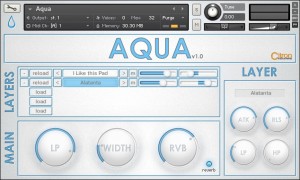
Citron Instruments has announced the release of Aqua, a collection of pads, textures and motions for Native Instruments Kontakt.
Aqua has wide and liquid sounds, clear and ergonomic user interface, high quality and new principles of the instrument control. All of this is Aqua, the 1st element of the library.
Aqua features
- Includes Pads, Textures and Motions.
- Format: NI Kontakt 4,5 (Full Version).
- 500 Mb (NCW Compression).
- Flexible layering of sounds.
- Easy and intuitive use.
- Effects: LP and HP filters, stereo widener, reverberation.
Aqua for Kontakt is currently available to purchase for 59 EUR (price will go up to 79 EUR at future update).
Moog Animoog – Advanced Modulation + Routing
Here’s a nice video to get a little deeper into the core of the Animoog:
More info – http://bit.ly/xKwZEj
In part two of a three-part tutorial on Moog’s Animoog iPad app, Dubspot Instructor Matt Cellitti shows you how to creatively use Animoog’s modulation parameters to achieve complex sounds.
Now that we have looked at how to break down Animoog into a basic initial state, I would like to examine the instrument’s creative options to make more complex sounds. Animoog has a clearly labeled and easy to use modulation area, allowing us to add several modulation parameters to the sound at the same time. We are able to use traditional modulation sources like mod envelopes, filter envelopes, and low frequency oscillators, but there are some hidden gems in here as well. For instance, take control of the Touch Keys to manipulate sounds in ways a traditional keyboard is incapable of. By using the the modulation control of “poly-pressure” to manipulate a destination of filter frequency, the areas of the touch key will activate modulation of the filter’s cutoff frequency. So you can create filter sweeps just by moving your fingers up and down a single touch key. Furthermore, as if the path and origin controls of the X/Y pad weren’t enough, you can use mod controls to effect these parameters even further. It never ceases to amaze me how much flexible control this app has. – Matt Celetti
Analogue Solutions SY02 Multimode Filter w/ VCA – Korg MS20 Clone Filter Module
The beating heart of the VOSTOK MATRIXSYNTH!
The SY02 is as close a clone of the MS20 filter as is possible without digital modeling. It uses the same circuit design. It uses all the same components, except for 2. 1 of which will not affect the sound, the other has been superseded by a part that is essentially the same. In all other respects they are the same.
Not all MS20s sounds the same, and for the same reasons not all Filtered Coffees or SY02s will sound identical to each other or the MS20. Reasons could be trimmer setting variations, component tolerances, but these are the consequences of buying analogue! We believe that the FC and SY02 do sound like MS20 filters, if you don’t it must be imagined!
Controls
Input Level
This sets the input level of the audio signal into the filters.
HPF CV
This sets the level of external CV that affects the HPF cut-off. Set at minimum, the external CV has no effect, set at maximum, the external CV has full effect.
LPF CV
This sets the level of external CV that affects the HPF cut-off. Set at minimum, the external CV has no effect, set at maximum, the external CV has full effect.
Initial Level
This sets the initial level of the VCA. It applies a voltage to the VCA that opens it up. Set to maximum, the VCA will pass signals through at full volume. This would be the normal way of using this control. As the control is turned to minimum, the level of the VCA decrease finally to zero. In this case, an external CV is used to control the VCA level (such as an envelope signal).
HPF Cut-Off
This control sets the cut-off frequency of the HPF. As the controls is increased, more lower frequencies are filtered out (only high frequencies are allowed to pass through).
HPF Resonance
This alters the resonance of the HPF. Set to maximum it will self-oscillate producing a continuous sinewave. In this way the SY02 can be used as a VCO.
LPF Cut-Off
This control sets the cut-off frequency of the LPF. As the controls is increased, more higher frequencies are filtered out (only low frequencies are allowed to pass through).
LPF Resonance
This alters the resonance of the LPF. Set to maximum it will self-oscillate producing a continuous sinewave. In this way the SY02 can be used as a VCO.
Volume
This sets the final output volume of the SY02.
Sockets
VCF IN
Audio input to the filters.
HPF CV
External CV input to control the HPF cut-off frequency.
LPF CV
External CV input to control the LPF cut-off frequency.
VCF Audio Out
This is the audio output from the VCF
VCA IN
Audio input to the VCA
VCA CV
External CV input to control the VCA level.
VCA Audio Out
This is the audio output from the VCA
edison – tempest test
Checking out the DSI Tempest:
“ust a quick mellow track i put together this morning…
got my new tempest from the nice folks at DSI
giving some sounds a try…
this machine is really inspiring and fun….
sounds great!
the tempest is master tempo…
ableton is providing backup percussion and melodies…
hope you dig”
DATAMASKIN

