
MoMa – Kraftwerk Tickets Blues
Funny 
Apparently the booking site was overloaded..
Kraftwerk will give a series of eight performances, each devoted to one of its albums, as part of a Museum of Modern Art retrospective of the electronic music pioneers in April, museum officials said. The performances during “Kraftwerk-Retrospective 1 2 3 4 5 6 7 8,” on consecutive evenings starting April 10, will not only feature tracks from one of Kraftwerk’s albums, but also other original compositions intended to showcase the group’s influence on contemporary culture. Projected images, including 3-D ones, will accompany the music. The albums will be performed in chronological order, one each night, starting with “Autobahn” from 1974 and working up through “Tour de France” from 2003.
For more info: kraftwerk.com
Not even Hitler is left out:
Enjoy
“Pads – the BIG box v3” – the ultimate Pad ReFill !
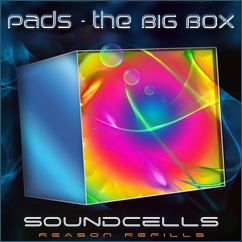
• 470+ combinator patches (92 “BIG box” only ones) in 11 different folders.
• Lots of inspiring demo tracks included.
FRACT OSC DevDiary – Explore, Rebuild, Create
CHECK OUT WWW.FRACTGAME.COM FOR MORE INFO
A quick look at some of the things we have planned for FRACT OSC – a first person adventure game inspired by synthesizers (no kidding!). We’re building some really interesting tools that combine exploration, puzzles and musical creation – and we’re really excited to share them with everyone!
Ableton Live Tutorial – Better Sound with Hi-Quality EQ8
More info – http://bit.ly/w4n2mS
In our new Ableton Live video tutorial series, “Did You Know?”, Ableton Certified Trainer, Dubspot Instructor, and electronic musician Thavius Beck checks out less explored and slightly hidden features in Live. In this newest installment of Did You Know?, Thavius explains and demonstrates an often overlooked an even more often misunderstood feature; Hi-Quality mode on the EQ8.
The EQ8 has a Hi-Quality setting that is not enabled by default. We are able to find the Hi-Quality setting by right-clicking on the EQ8’s title bar and selecting “Hi-Quality” from the contextual menu that appears. Once that has been done, the EQ8 will be in Hi-Quality mode, but what exactly does that mean?
This is a question that took me quite a bit of investigation to find the answer to, and one that requires more explanation than I intended for these particular videos, but this series is all about sharing esoteric knowledge (as it relates to Live of course) so that is what I will do right now.
When Hi-Quality mode is enabled on the EQ8, the audio being fed into the EQ is oversampled by a factor of 2 (meaning the sample rate of the audio is doubled. If your session’s sample rate is 44.1kHz, enabling Hi-Quality will make the audio being fed into the EQ8 88.2kHz). Then the EQ changes are calculated at the doubled sample rate, and finally the audio as it leaves the EQ is undersampled by a factor of 2, or basically brought back to it’s original sample rate.
Why does this happen? It all has something to do with what is referred to as the Nyquist Point. The Nyquist Point is one half of your sample rate, so if your session’s sample rate is 44.1kHz, the Nyquist Point will be 22.05kHz, which is right at the upper limit of human hearing, and just beyond the furthest right edge of our EQ8’s GUI. Any audio that produces a frequency higher than the Nyquist Point cannot be accurately reproduced digitally and will have aliasing or digital distortion as a result.
Because of this, the EQ8’s frequency range was initially limited to 22kHz on the high end (when working on a session with a 44.1kHz sample rate). If your EQ is in normal mode (not Hi-Quality), and you create a notch on the 4th EQ point (reduce the gain all the way on the 4th point), start to increase the Frequency on that 4th point. You’ll notice that as you get closer to the Nyquist Point (22kHz when working with a 44.1kHz sample rate), the curve of the EQ gets squashed so that the curve doesn’t extend beyond 22kHz. Now, enable Hi-Quality mode and try the same thing. Notice how the EQ curve remains intact no matter how close you get to the Nyquist point.
So what does this mean in terms of practical application? Well, it means that you will probably only notice the effect of the Hi-Quality EQ8 if you’re working on a session with a 44.1kHz sample rate, and the improvement will really only be noticeable on the higher frequency sounds effected by the Hi-Quality EQ8. As for specific instances for when you’d want to use the Hi-Quality setting and not, I think that is really for the individual to research a bit further, do a few A/B comparisons, and decide for themselves.
As I was doing my research for this post, I searched a few forums to help me gather the info I needed, and I also reached out directly to the Ableton HQ. Here is a very helpful and informative series of posts from the Ableton forums.
And below is the explanation for the Hi-Quality setting directly from Matt Jackson at Ableton HQ:
“The main difference is that the entire signal is oversampled in high quality mode. Actually the slope isn’t changed.
To get technical, in normal mode with a project sampling rate of 44.1kHZ, you have a nyquist frequency of around 22kHZ, the limit of the EQ. Because – in the design process – the filter is derived from an analog prototype, which has no such a limit, all frequencies (and up to infinity) must be matched to the available frequency range of the digital filter, resulting in the squashed slope near nyquist frequency.
If you look at the EQ in normal mode, you’ll see the filter slopes warp as they get very close to the 22kHZ mark. If you change your project sampling rate to 88.2 or higher, you’ll see that this warping no longer happens.
This is because the nyquist frequency is now much higher than 22kHZ.
The same thing happens when you turn on high quality mode when working at 44.1kHZ. Then Live over samples just the EQ so that the filter gives the correct response all the way to the end. (There is no change in the bottom.)”
MIDITRIBE IO – MIDI-fy Your Monotribe
Third party retrofit kit from Amazing Machines, for adding MIDI in and out to the Korg Monotribe.
Amazing Machines has officially released the MIDITRIBE I/O – a mod for the Korg Monotribe that adds MIDI In and MIDI Out.
Here’s what’s new in the MIDITRIBE I/O, vs their earlier MIDITribe mods:
- MIDI OUT functionality (Outputs MIDI Clock / The Synth Part works as an arpeggiator running at 1/16, which responds to pitch information recorded in each of the internal sequencer’s 16 steps for controlling external synths on MIDI Channel 1 / The Rhythm Part sends trigger information to MIDI Channel 10)
- Control external synths using the Ribbon Controller for Note ON / OFF, Volume Controller – CC 7 and Gate Time
- Send Continuous Controllers 1, 16, 80, 81, 82 and 83 to MIDI OUT Channel 1
- Couples as a MIDI Clock to Sync Pulse or Sync Pulse to MIDI Clock converter using the MONOTRIBE’s built-in Sync I/O
- Added the best MIDI (Female DIN5) connectors available on the market
- Added a Manufactured PCB
MIDITRIBE I/O is pre-assembled and no soldering is required for installation.
See the Amazing Machines’ site for full details.
Roland Jupiter-6 Signature Sounds
The Jupiter 6 is an incredible analog synth. All of the Jupiters have a sound that was unlike any other synthesizer and the Jup 6 is no exception. This sound is due in part to classic analog Roland technology in its filters, modulation capabilities and a thick cluster of 12 analog oscillators at 2 per voice. Easy and intuitive programming via front panel sliders, knobs and buttons for all your tweaking needs.
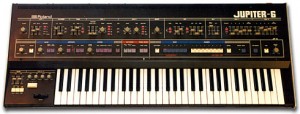
The Jup 6 is a scaled down version of the Jup 8 in terms of programming and polyphony. However the Jup 6 has some major improvements of its own such as newly added MIDI control and better tuning stability! While the Jup 6 does have MIDI, the implementation is very rudimentary and hard to control. The Jup 6 was one of the very first (along with the Sequential Prophet 600) synths to use the then new MIDI protocol, and the implementation on the Jup 6 is far from complete.
http://gstormelectronica.blogspot.com/
A quick demonstration of the Roland Jupiter-6 vintage analog synthesizer. Showing some of the signature sounds that are its claim to fame, and some sounds that may be not so familiar.
Not since 1983 has Roland produced anything quite like it. What sorts of things set the Jupiter-6 apart from its peers?
– Its wild multimode filter capable of Lowpass, Highpass, and Bandpass
– Like a handful of other synths, compound waveform selections are possible for each of the oscillators.
– A feature called Cross Mod: it’s like a third ‘virtual oscillator’ which is a frequency modulator for affecting OSC1. The beauty is that you still have OSC2 to do as you wish.
– Very stable oscillators, and the autotune routine takes about a second to execute! Memorymoog takes around 8 seconds.
– Envelopes: the attack transients are most unique. They aren’t extremely fast, nor syrupy, but I haven’t been able to get any other synth attack to sound the same.
What are these signature sounds the Jupiter-6 does well?
– Buzzy things
– Creamy Sawtooth, silky pad sounds
– Ambient Drones
– Gritty, Dirty, Raw, Nasty, Edgy sounds
– Blippy arpeggios
– Aggressive stabs/leads
– and very rude filter sweeps
Free VST synth for Windows – Synthesizer TubeOhm ALPHA-RAY
TubeOhm say that they are offering a big “thank you” to all TubeOhm users for their support for the 5 last years and hope that they have had a good time with their Instruments.
Available now is Alpha-Ray, a VA synth that includes special TubeOhm features. The full version is free but saving the settings is disabled. Unlocking the effects unit costs 4.95 €.
Features
- 2 main and 1 sub-oscillator / 10 Voices polyphony.
- 2 main and 1 mod LFO (Pitch wheel), tempo host sync and phase sync.
- 3 filters, a 6 dB HP , a 24 dB ladder and a main 12 dB state veriable filter. The 6dB filter coupled to the main filter gives a BP filter.
- OSC FM with OSC 1+2 and OSC SYNC with OSC 1+2.
- Polyphonic overdrive for OSC 1,2 and sub osc.
- Auto Portamento mode. Activates the portamento when 2 keys are played in mono mode.
- Aftertouch for enhanced modulation for the filter and the pitch modulation.
- User manual in 4 languages (German, English, French and Italian).
Additionally, unlocking Alpha-Ray enables saving the effects settings per patch:
- 2-stage overdrive.
- 3-stage chorus.
- Delay ‘x’ and ‘ normal mode, tempo sync to host.
- Special reverb, delay cluster, normal reverb, oil tank effect.
Pricing and Availability:
Free, but unlocking the effects unit costs 4.95 €
More information:
Pulse Surface Controller System
For more information and purchase:
http://www.pulsecontroller.com
Pulse Surface Controller liberates computer-based musicians from conventional input devices of predetermined form factor and layout, allowing the user to turn a surface of various size, orientation and material into an expressive, flexible, reconfigurable MIDI controller.
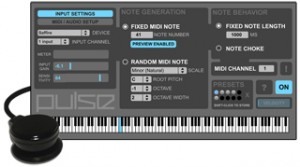
The Pulse Controller is a hardware / software solution that liberates computer-based musicians and performers from conventional input devices by allowing a surface – i.e. desk, laptop, objects and more – to become a playable MIDI controller. An included piezo microphone coupled with a simple yet powerful software interface converts acoustic impulses into MIDI Note messages for playing your software instruments in an intuitive, responsive and connected manner.
The idea behind Pulse Controller was born out of the belief that as computer-based musicians and performers we should not feel relegated to a grid of small 1×1″ pads or a keyboard to create our rhythms and provide pulse to our music. Controllers once intended to give us the immediacy of playing an instrument often end up feeling more disconnected and distracting. With the Pulse Surface Controller System, controlling percussive instruments has a more visceral, immediate quality, and via a powerful MIDI generator that generates notes in predefined musical scales the user can easily extend into the melodic domain to tap into an inspiring world of happy accidents. Power to the fingers!
System Features:
+ Piezo microphone and powerful software interface
+ Attaches to any surface via integrated suction cup
(velcro strips also provided)
+ Connects to external audio device or built-in audio inputs
(1/4″ and 1/8″)
+ Velocity-sensitive and highly responsive
+ Low-latency performance
+ Compatible with all software that accepts MIDI Note messages
(Cubase, Ableton Live, Pro Tools, VST/AU plug-ins, etc)
+ Generate fixed note or random notes in a selected scale,
with control of octave, octave width, root pitch and 21 Scales
+ Fixed note length and note choke modes
+ Store and recall presets
+ Keyboard shortcuts for quick access to presets and important controls
+ Mac OS 10.5, 10.6, 10.7 compatible
(Windows / Ableton Live users, please contact us about M4L version)
Kraftwerk and the Electronic revolution (3/19)
In case you have not seen this series on Kraftwerk, make sure to check it out. It contains a lot of information on these synth pop pioneers
Review: Massive beats from Nuclues SoundLab – Celluloide Beats
Time again for a review here at Steelberry Clones – this time we have taken a closer look at Nucleus SoundLabs’ new Reason Refill called Celluloide Beats.
To begin with Celluloide Beats consists of around 50 (x8) or so Combinator patches and associated sounds recreated as REX-files. Due to the way they are built they may easily be run in anything from 60/70 BPMs up to 270 > or so BPMs – it will still sound great. To get an overview of what you are getting I would loosely categorize it as multi-sampled drums, beats and percussions into a massively unique and powerful mix of rhythms and sounds that would easily fit into dubstep, electro, house, techno type music, but I would not limit it to that since there are several intriguing ambient type sounds with a real sci-fi / cinematic approach to them.
A good thing with the CMBs are that they are very easy to work with, partly because each CMB is more or less a full mix in itself with limited need for further mixing and mastering, and partly because they are using fairly common rhythms meaning that the tempo and the sequenced beats are not overly experimental. Each Combinator patch in a Celluloid Beats contains 8 loops – 1 original loop and 7 creative loop remixes. This is achieved, according to Nucleus, by using the Slice Edit Mode on Dr. OctoRex to change filtering, decay, volume and more on a per-step basis for each loop. Going farther than that, unique FX are added to each patch which are used to effect specific loop slices – so each slice in a loop can have a different distortion, filtering or delay. The resulting loop remixes sound incredibly complex, but they certainly aren’t complicated to use.
To purchase the product use the link below:
DATAMASKIN

