
Introducing the CloudSynth
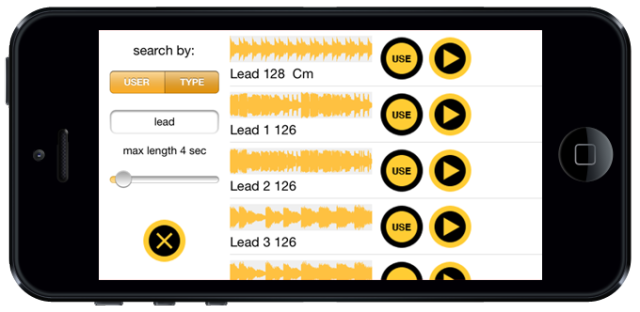
Brio Taliaferro, Alessandro Contini & Daniele Guevara have released CloudSynth – a free app that lets you browse and play sounds from SoundCloud.
Features:
- Search sounds by name, user and duration
- Pre-listen and select the sound
- SAMPLER MODE: play the sound at different pitch
- SYNTH MODE: select a portion of the waveform and create new unexpected granular sounds
- Rotate the iPhone to modulate Reverb and Delay
It’s available as a free download here >>
Dave Smith on MIDI – back in the days
Dave Smith at his home studio in Napa Valley, CA. Interviewed by Eric Chasalow, filmed by Barbara Cassidy 1997.
Copyright 1997 The Video Archive of Electroacoustic Music, all rights reserved.
Oberheim FVS-1 Four Voice Vintage Analog Synthesizer Overview
The Oberheim polyphonic is an analog music synthesizer that was produced from 1975 to 1979. Four dual-oscillator SEM modules each with its own filters and envelopes are joined together along with a simple analog mixer and 49-note keyboard to give you a polyphonic/polytonal Obie-beast!
This combination gives you eight oscillators and four voices of polyphony because there are basically four discrete mono-synths all connected together. This has its pros and cons. What is cool is that this was a lot of simultaneous voices for the mid-seventies. And the ability to craft a different sound on each voice led to some diverse and complex sounds. However, it also meant you have to program each voice independently. Each voice also has its own independent audio output.
The Polyphonic Synthesizer Programmer, released in 1976 and added to the Four Voice stores 16 patches per voice (all of which can be different). The Four Voice could accommodate an additional four SEMs, making it just like the Eight Voice model which officially appeared in 1977.
Unfortunately the Four Voice was blown out of the competition by the release of the polyphonic Sequential Prophet-5, which offered true polyphony with a single set of sound shaping controls and comprehensive patch memory.
PixiVisor: Video over audio – an introduction
PixiVisor is a revolutionary tool for audio-visual experiments. Simple, fun, cross-platform.
More info: http://warmplace.ru/soft/pixivisor
Music: http://nightradio.bandcamp.com/track/…
It consists of two parts: Transmitter and Receiver.
Transmitter converts the video (static 64×64 image or 10FPS animation) to the sound, pixel by pixel (progressive scan). So you can listen the sound of your image. But the main function of the Transmitter is to transmit the signal to the receiving devices.
Receiver converts the sound (from microphone or Line-in input) back to the video. You can set the color palette for this video, and record it to animated GIF file.
Key features:
- file formats supported by Transmitter: JPEG, PNG, GIF (static and animated);
- real-time video export to animated GIF;
- 64 predefined color palettes;
- iOS: iTunes File Sharing;
- iOS: Wi-Fi Export/Import (in the File menu of the Transmitter);
- more functions in the next PixiVisor updates…
Examples of use:
- wireless Lo-Fi video transmission over audio;
- video signal transmission through audio cable; you can then modify that signal by some mixers or audio FX processors;
- VJing;
- sound visualization;
- save any sound to animated GIF;
- hide some images and animation in your music;
- searching for hidden messages in the ambient noise; EVP;
- something else; reveal it first!
Audulus 1.10: Modulate Any Knob
The new feature in Audulus 1.10: Make a connection to ANY KNOB! Audulus is a minimalist modular audio processing application. Design sound from first principles. With Audulus, you can build synthesizers, design new sounds, or process audio. All with low latency real-time processing suitable for live performance. Audulus’s user interface is clean, simple, and easy to learn, allowing you to focus on sound.
Walk-through featuring the Roland TR-909 and Moog Ring Modulator
Background video description below:
A walk through of our store front in Austin, TX to allow you (the viewer) to quickly glance at some of our inventory.
This week your hearing some in house recordings of a 909 and Moog Ring Mod at play!
If you see anything you would like to know more about please feel free to e-mail us at:
switchedonaustin@gmail.com
or Call us: (512) 782-8806 Noon-6pm (Central Standard Time)
Switched On buys, sells, repairs and restores all manners of musical electronics…new, used, and vintage.
Shop with us on our site:
www.switchedonaustin.com
Keep updated on events and new inventory:
@SwitchedOnTX
*and*
http://www.facebook.com/switchedonaustin
SUPERNOVA II Synth Demo – Experimental noise and chip tunes
Experimental noise / ambient drone soundscape played live on Novation Supernova 2 keyboard synthesizer. Utilizing comb filter, reverb, Q Norm, resonance, LFO and filter adjustments.
Performed live, no external processing. Excerpt from a longer session.
Computer / chiptunes-style ambient drone soundscape music played live on Novation Supernova 2 keyboard synthesizer.
Utilizing LFO (sample & hold), reverb, resonance, and filter adjustments.
Performed live, no external processing. Excerpt from a longer session.
Legends at Play | Stevie Wonder | Bernie Worrell | Dr. Lonnie Smith | Larry Dunn
Keyboard legends Stevie Wonder, Bernie Worrell, Larry Dunn, and Dr. Lonnie Smith were among the artists to visit the Moog booth during the madness of NAMM 2013 to play the new Moog SUB PHATTY.
Learn more about the Moog Sub Phatty here:
http://www.moogmusic.com/subphatty
the microTone – microtonal polyphonic synthesizer + controller for iPad
A little demo of the microTone with iRig MIDI and (free) osynth!
http://microtone.ozurkirchen.ch
i connected an iRig MIDI to my iPad with the microTone running. The MIDI signal goes via audio/MIDI interface into my computer where the data is parsed by osynth.
the microTone:
– control one octave fluently without steps. Just glide over the keyboard with up to 10 fingers!
– switch octaves or lowest/highest notes
– the microTone has an integrated polyphonic synthesizer with 8 different sound presets
– send pitch data over MIDI cable to your computer
– send pitch data over WiFi to your computer (receive MIDI or OSC data with e.g. max/MSP or OSCulator)
– receive microTone MIDI or OSC data with osynth: a free synthesizer, made for the microTone.
osynth:
– voice1: saw/sine with hpf
– voice2: white noise filtered with note frequency
– voice3: sine sub-osc
– voice4: sine osc one octave higher
– voice5: wavetable osc
– ADSR
– reverb
– stereo delay
– binaural FX
– pitch random modulator
– recallable presets
– connect the microTone with core MIDI over WiFi or cable
– connect the microTone with OSC over WiFi
Experiments with Livid BASE
BASE and Ableton Live
About Base:
Introducing Base: a new foundation for all your creative productions. Combining the technology of drum machines and touch screens, Base delivers a sleek new pressure-sensitive surface that doubles up the MPC’s fabled 16 pads and opens up your hands to freely mix. With 32 pressure-sensitive pads, nine touch sliders, eight touch-sensitive buttons, and eight momentary buttons there’s plenty of controls to play and control your set. Illuminated throughout with RGB lights and a simple character display, Base provides plenty of novel ways to give you feedback for playing drums, synths, loops, step sequencing, changing presets, and even navigating your set. Customize all the settings and internal presets using the Base Editor web application to best fit your workflow with your favorite DAW, VST, plugin, or application.
DATAMASKIN

