
Free S4 Rhythm Composer for iPad
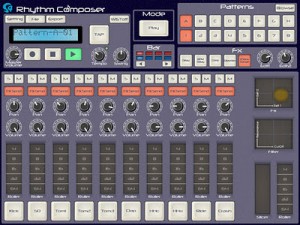
This app is a beatbox allows you to compose and play 64 beat patterns.
You can also record the patterns.
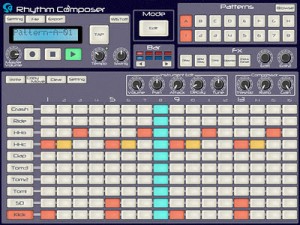
S4-Rhythm composer is a beatbox allows you to compose 64 beat patterns.
To check all beat patterns in a bar immediately, use the large screen of iPad.
Use various Effect Functions while playing a beat; you can enjoy the beatbox as you play the beat actually.
The beat patterns can be exported as WAV files. You can use the files on various DAWs by importing them into PC via iTunes.
Functions
– 10 PCM sound sources (Kick, Snare, Tom1, Tom2, Tom3, HandClap, HHopen, HHclose, Ride, Crash)
– Tempo (40-280 bpm), Tap Tempo, Swing, Groove functions
– Step Sequencer (up to 64 steps)
– Various Part Effect functions (Compressor, Roller)
– Various Master Effect functions (Delay, BPM Delay, Compressor, Distortion, Chorus/Flanger, LPF, Slicer, Roller)
– Audio Export function
– Real-Time Recoding function
– Wireless Sync-Start Technology (WIST) is supported
S4-Rhythm Composer is an app only for iPad; NOT for iPhone/iPod Touch.
Noisepad – new drum machine for the iPad
Get the Noisepad app for iPad now!! Available on the Appstore http://itunes.com/app/noisepad
Noisepad is a new drum machine app for the iPad. It lets you make beats, load up your own samples and sequence them and add effects.
Features:
- Sound effects: Pitch . Delay . Phase . Cut-off . Reverb . Crush
- Slider double tap: reset the effect to the off position
- Soundbanks: samples & beats are organized into multiple sets
- Cut: each sample cuts previous sample
- L/R: switch the orientation to suit left or right handed
- Tap: tap for the tempo of your effects
- Volume: set the Noisepad volume separately from the device volume
- Effects Dry / Wet: set effect strength from 0 to 100%
- Audio output: output meter
- In-App shop: download the latest samples from your favorite artists
- Background music: play a track in iTunes and make some noise on the same device
- Custom soundbank: upload your own samples using iTunes*
- Supported sound formats: (.CAF / .WAV / .MP3 audio files, 22khz / 44khz / 48khz, stereo / mono ).
No mention is made of MIDI support.
NoisePad is currently $2.99 in the App Store. If you’ve used Noisepad, leave a comment with your thoughts on it.
Exploring a “Moog drum machine”
It’s Full of Stars continues her exploration of modular synths, this is what she mentions around this video:
“As far as I know Moog have never made a drum machine. Imagine how cool a huge early 70s Moog drum machine would be – with big knobs, wooden sides and a massive analog sound! So I decided to construct my own Moog drum machine today, using the modular
The 960 sequencer is sending triggers to the trigger gate module. Row A of the trigger gate is making the bass drum, which is 2 VCOs going into the Cynthia low pass gate with some pitch modulation. Row B makes the snare drum, 3 oscillators and some noise, going into the Moog 905 reverb, 904 filter, using the 911 envelope (and the MXR Flanger/Doubler). The high hat is noise / envelope triggered from the main clock, but going into the SSL VC Delay module”
Building nice grooves in SampleTank
SampleTank® 1.1 is a universal app for iPhone, iPod touch and iPad that gives you the power to quickly build grooves with its enhanced PADS interface and 4-track MIDI recorder with unlimited overdubbing. The familiar drum machine-style interface lets you lay down beats easily with adjustable quantize values that you can change on the fly as well loop record and a click track that you can turn on and off at will. Put a drum kit on part A, a bass on part B, a piano on part C, sound FX on part D … anything you like! You can export your recording as a stereo audio AAC file via E-Mail or iTunes File Sharing to use it in another app like AmpliTube or VocaLive or a computer DAW like Logic or Pro Tools. You can also export a .MID standard MIDI file. SampleTank 1.1 is a free update for all existing users and is available in the App Store. Check it out today!
http://ikmultimedia.com/sampletankipad/features/
New Classic Drum Machine for iPhone and iPad
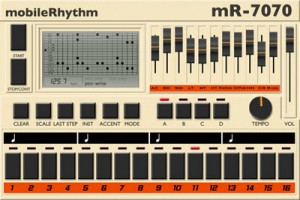
mobileRhythm mR-7070 – Classic Drum Machine for iPhone and iPad. Universal App with an unmistakable 1980’s look and sound.
Features:
- MIDI in, out and MIDI clock out
- Precise tempo control with digital readout.
- 4×16 banks for pattern storage.
- Individual faders for each drum sound.
- Multiple beat divisions for crazy time signatures with adjustable last step.
- Rock solid timing.
- Grid-view pattern display.
- ..And much more.
The hardware drum machines and beatboxes from the 1980’s have defined musical genres from House, Acid, Hip-Hop, right up to and including the latest Dub-step, Grime and other electronic music beats.
The mR-7070 works just like the original beatboxes, and anyone who is a fan of music will instantly recognise the classic sounds it produces.
Its easy to program even complicated beats and with plenty of storage space to store your creations.
MIDI setting are in the iOS settings app, and will work with any “CORE MIDI” interface.
The app is priced at $5.99.
Dave Smith – Tempest – Live demo tutorial of features and sounds
And here are the background data:
I’ve had the Tempest for a few days and decided to share some of the things the Tempest can do live. All of the sounds in this video are from the Tempest. Nothing has been mixed (sorry I just threw this together on a whim). There are no external Effects or synths used. This is quickly turning into on of the best pieces of gear I’ve ever owned and the OS is still in Beta. OS 1.1.2
FX used
Roll
Delay
LP Filter knobs
LP Filter on the touch pad
ADSR to shorten the main synth sound
Reverse
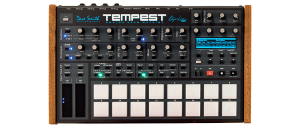
Tempest is a professional drum machine that generates its sounds using six powerful analog synthesis voices, and uses an innovative, performance-oriented operating system that permits an extraordinary level of control to create, edit, arrange, and manipulate beats in real time without ever stopping.
The performance-oriented operating system, ninety panel controls, and bright 256 x 64 dot OLED display work together to provide a tightly integrated, non-stop workflow.
- Record a drumbeat in real-time
- Switch to another drumbeat and use the lit pads to record it using step programming
- Switch to another drumbeat and record tuned keyboard parts
- Use the two touch controllers to to record real-time note sound animations or perform beat-wide sound changes
- Use the generous sound controls to edit any of the drum sounds
- Tweak the analog effects or drum mix
- Arrange beats in real time and record the live arrangement into a song
- And all of the above without ever stopping play
Each of the six analog voices has two analog oscillators plus two digital oscillators (with a large bank of included samples), the classic Curtis analog lowpass filter with audio-rate modulation, an additional highpass filter, analog VCA with feedback, five envelopes, two LFOs, an extraordinary variety of analog modulation routings, and stunning sonic quality, warmth, and punch. Although optimized for drum sounds, it excels at tuned sounds as well, and even doubles as a six-voice analog keyboard synth.1
Sixteen pressure- and velocity-sensitive lit pads are arranged in a 2 x 8 configuration, providing intuitive access to all your fingers and the ideal compromise between the popular 4 x 4 pad arrangement (popular for real-time programming ) and 1 x 16 arrangement (popular for step programming) because Tempest does both. The pads can be used to play thirty-two drum sounds2 (two banks), mute/unmute the thirty-two sounds on playback, play and arrange sixteen beats in real time, play one sound at sixteen tunings (in a variety of scales) or sixteen velocities, or as sixteen time steps for step programming. The ROLL button permits creating drum rolls or repeated groove patterns by varying pad pressure as the beat records, and doubles as a momentary “stutter” effect when the pads are assigned to play beats.
Who doesn’t need an 8bit Drum app and BTW it’s free
♬♬♬ Chiptune and Vintage Drum Machine theme Appeared Drum App!!! ♬♬♬

♬ 24 drum kit appropriate for 80’s Video game console,Home computer,Vintage Drum Machine,Rhythm Machine
(NES/FC,GENESIS/MD,GB-DBG,ATARI2600,C64,TR808/909,VL-1,Simmons SDS-V etc)
♬ 24 drum sets that is appropriate for Soul, Funk, R&B, and HIP HOP are prepared.
♬ 24 lesson riffs are collected.
♬ The drum can be played according to the accompaniment of iPod if it starts after it reproduces with iPod.
♬ Spec:
– Collection drum kit 24
– Collection lesson riff 24
* When the sound doesn’t become it even if touching, it might be a manner mode as for the drum.
* Please confirm the volume setting of “Ring tone” by “Sound” of “Setting” application program when the lesson riff rings and it doesn’t sound the drum.

Apple II D.M.S. Drummer Chipmusic drum machine
Good old days 
A short demo of our Apple ii D.M.S. Drummer Chipmusic drum machine software.
BUY IT HERE: http://8BITWEAPON.COM/store.htm
Apple II DMS Drummer Software
by MJ Mahon & 8 Bit Weapon
Introducing the amazing DMS Drummer for Apple II personal computers! The DMS Drummer is the only wavetable based Drum Sequencer for the Apple //e, IIc, IIc+, and IIGS computers. It comes complete with 8 drum sounds: Bass, Snare, Rim Shot, Hand Clap, Tom, Hat Open, Hat Closed, and Lazer. DMS Drummer also has a massive sequencer built-in for song writing or just some creative noodling. The DMS Drummer monophonic sequencer patterns have 16 spaces. You can create up to 16 unique drum patterns and arrange them into 256 available arrangement slots. Each drum sound can also be re-pitched or “tuned” to the users preference inside the “Tone” section of any pattern. For example, you can take the single tom sound and create a rich sequence of multiple toms in various pitches like in our demo song. Each song sequence can be saved on disk as well for safe keeping.
Features: 8 Drum Sounds (tune-able)
16 Programmable Patterns
256 Arrangement Slots for Patterns Programmable Tempo
Saves your work
3 Demo Sequences by 8 Bit Weapon & ComputeHer
Requirements: Apple //e, IIc, IIc+, or IIgs computer with 80-column capability
5.25″ floppy disk drive
Monitor.
For more info please visit us at
http://www.8bitweapon.com
http://www.computeher.com
Creating a track using FunkBox, Little MIDI and the iRig MIDI interface
Demo of the CoreMIDI capabilities of two iOS music apps, FunkBox and Little MIDI Machine, when connected to an iRig MIDI interface. Other instruments used are a Monotribe, Little Phatty, Tattoo drum plugin, Arctic Keys synth app, NLog synth plugin, and Ableton Live. With CoreMIDI your music apps become musical instruments that can interface with the rest of your studio to make music.
FunkBox is a virtual vintage drum machine app designed to be fun and easy to use. It runs on your iPad, Iphone or iPod Touch.
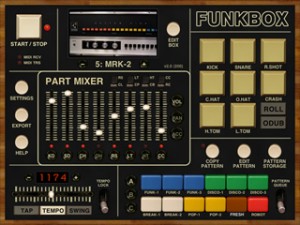
FunkBox features:
The look and feel of a vintage beatbox
Samples from classic drum machines
Thirty six preset drum patterns
Straightforward x0x style editing
Mix, mute and tap individual parts
Tempo, swing, emphasis, random controls
Audio and MIDI export plus audio copy
Fun, cool looking, and easy to use!
v2.0 JUST RELEASED! Includes more drum machines, sample import, customized boxes, CoreMIDI support, and tons more! FUNK YEAH!
Free 8 Voices Polyphonic Virtual Synthesizer Inspired by Alpha Juno
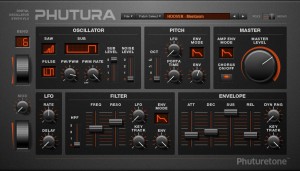
Phutura is a virtual synthesizer inspired by 80’s hardware synth Alpha Juno, best known for the Hoover sound. Its edgy and futuristic feel makes it perfect choice for Lead and Chord Stab type of sounds, suitable for use in dark & energetic styles of music, i.e.: Techno, Rave, Drum&Bass, Electro, Hardstyle, Dubstep.
Specifications:
-
- Polyphony: 8 Voices (+ 8 release reserve).
- Oscillators: 3 Oscillators (Sawtooth, Pulse and Sub, with 4-6 subtypes each) and White Noise Waveform.
- Filters: Non-resonant High Pass Filter (4 modes) and Resonant Low Pass Filter.
- Modulators: LFO, ADSR Envelope, Pitch Bender, Mod Wheel and Key Tracking.
-
- Effects: Chorus.
- MIDI: Automation of all interface controls is possible.
- Patches: 128 Patches (80 presets in Hoover, Bass, Lead, Pad, Polyphonic, Synth & Sound FX categories; and 48 blank User Patches).
- System: Windows with 32-bit host.
By the way these guys also has a nice free Reason Refill that you can download:
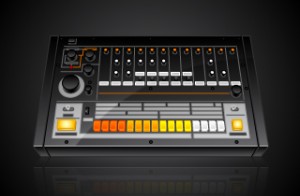
“Thor based virtual analog emulation of Transistor Bass synth 303, Transistor Rhythm synths 808 & 909.”
DATAMASKIN

