
Synthfest – StringStation | Main Show
The new 40-string 3D instrument. 3D Recording Artist/Engineer Jim Bartz on the path to deliver a fully functional prototype of the beautiful StringStation… revealing an advanced, original 3D sonic architecture of endless possibility.
Advanced 40-Stringed Controller Instrument …
– Computerized surround sound pickup matrix under strings at harmonic hot-spots harnessing three dimensional audio.
– Computer controlled and programable 3D resonance of 40 strings creates unique sonic fractals.
– Digital Sound Modeling allows layering of natural string tones with custom modeled sound waves …wide open pallet.
-Exceptionally sensitive to tactile nuances of human touch, offering a hyper expressive dynamic play surface unlike any other resonant instrument.
Introducing the Grantophone for iPad
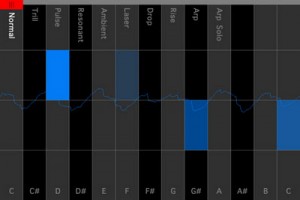
The Grantophone is an extremely expressive and playable musical instrument app. It merges the polyphonic capabilities of a keyboard instrument such as a piano, with the more expressive qualities of instruments like the cello. It supports as many touch points as the device you’re using supports. For iPhone that’s 5 touch points and for iPad 11. You can control articulation, vibrato, volume and slide from note to note or between octaves. It also comes with several modes you can choose from.
Grantophone is a free app and if you want a cool, unique way to play music – it’s worth checking out.
Get iPhase electronic instrument for free

“!!!!!!!FREE FOR A LIMITED TIME!!!!!!!!!!!!
iPhase is a generative music application made by Mikael Holmqvist.
Create amazing beats and melodies with the swipe of your fingers and watch it bounce back and forth on the iPhase grid. Choose from 5 different instruments and drum kits and 14 different musical scales.
Make sure to use loudspeakers or headphones for best possible sound quality!
—————————————————
NEW IN iPHASE 2.0
—————————————————
– Make more complex and better sounding beats with “bounceEdges”
– Save/Load function
– SHARE your beats to the iPhase Community and listen/play along/vote for others.
– Play iPhase arcade modes
—————————————————
—————————————————
INSTRUCTIONS/DETAILS
—————————————————
-SWIPE in any direction to create a TONE. Tones are higher towards the top and right side of the grid. The tones will move on the grid in the swipe direction and continue bouncing between the edges of the grid and the start position of the tone. Every grid edge have its own instrument and you can change the setup whenever you want using the instrument buttons.
– TAP the grid to create a BOUNCE EDGE. When a tone hit a bounce edge, it will turn 90 degrees and change instrument. Tap again to change the orientation of the bounce edge and tap a third time to remove the bounce edge from the grid.
-The tones are arranged in PENTATONIC MUSICAL SCALES which makes every swipe sound good. You can change the scales choosing from a total of 14 major and minor scales – the possibilities are endless!
-Use the PLAY/PAUSE BUTTON to pause your beat. Tones can still be created in pause mode and this can be used to make your beat more precise.
-Use the LOOP MODE TOGGLE BUTTON to switch loop mode on and off. This can be used to first create a cool beat in loop mode and then switch it off to start playing some melody to your beat.
-SHAKE your device to create a RANDOM BEAT. Good when you run out of ideas and want some inspiration from chance.
-SAVE your beats with the SAVE BUTTON. They will then be found in “my saved beats” on the main menu.
———–THE iPHASE COMMUNITY————-
One of the biggest new features of iPhase 2.0 is the iPhase Community. Share your beats to the community and listen to (and play along with) others. There is also a rating system and you can vote for beats on a scale from 1-5.
———————————————
———–ARCADE- and ∏ MODE———–
There are 2 new arcade modes available in iPhase 2.0. Standard arcade mode is a memory game ála “Simon Says”.
The second arcade mode is called π-mode and is not unlocked until you score 30 points or more in arcade mode.
TOP 10 high scores from both arcade modes will be shown in the iPhase Community!
———————————————-
ENJOY!! and remember to use headphones/loudspeakers for best sound quality!!”
Time machine: Remco Sound FX Machine 1979
http://youtu.be/A7SR3JOszV0
Remco Sound FX Machine 1979
Panzer Party-Erwin Rommel Wants Your Quarters
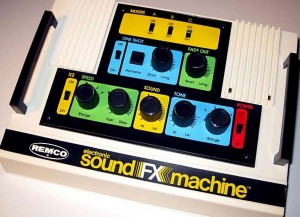
The Remco Electronic Sound FX machine was based on the Texas Instruments SN76477 analog sound effects chip. This little late-1970s integrated circuit generated square and noise waves that could be modulated to create all manner of bleeps, bloops, buzzes and auditory insanity. It’s perhaps most famous as the sound chip used in the arcade version of Space Invaders.
Several toy makers seized on its simple design and $3 price tag, but Remco went a step further by using it to create a bizarre battery-powered sound effects machine capable of generating an enormous range of parent-repellent sounds. The booklet includes pages of strange patch settings.
More info on the Panorama controller for Reason 6
The basic idea of the Panorama is a custom front end controller for Reason 6, based around a MIDI keyboard and plenty of knobs and sliders.
Mixer
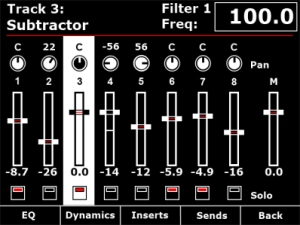
Channel strip
The mixer channel strips in Reason are comprehensive and like the real world hardware – quite long! Panorama breaks the channel strip down in to manageable localized sections, accessible at the push of a button. From the mixer menu described in Part 1, you have access to EQ, Dynamics, Inserts and Sends across the buttons below the display. The encoders to the right of the display map to the targeted channel strip in the mixer. If a track is selected in the sequencer, the corresponding mixer channel becomes targeted. Alternatively, you can target a mix channel using the 8 buttons when set to ‘select’ mode (described in part 1).
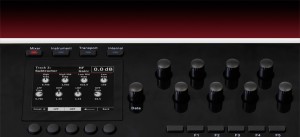
Here we are taking a closer look at how Panorama access’s the EQ parameters.
Panorama allows you to gain access to Reason’s mixer at the touch of a button. Here you see the Reason mixer channels assigned to be operated by each of Panorama’s controls. The display gives you an accurate overview of what parameter each control is assigned to as well as current value state. Let’s look at the display screen in some more detail.
Panorama is our vision of how a great controller should work. Yes, there are many ‘generic’ controllers on the market already but we have yet to find one that satisfies our criteria of operating the software, as if it’s hardware – That’s Panorama. Panorama uses a communication protocol that has been custom designed for Reason 6, putting control – every control – at your fingertips. There’s nothing generic about this controller. Panorama really does access all areas.
Nektar Panorama general specifications
- 49 note weighted keyboard w/aftertouch
- Pitch bend + modulation wheels
- Motorized fader
- 9 50mm faders
- 9 encoders above the faders
- 8 programmable LED buttons
- Display
- Additional 8 encoders
- 12 velocity and pressure sensitive pads
- Navigation and menu buttons
- Transport control
- Sustain socket
- Pedal socket
The whole design is custom for Panorama including the keybed. Our communications protocol that handles interaction with Reason 6 is also custom. The main idea behind Panorama is to complement the computer ,so a user can have immediate access to areas of Reason where tactile control is an advantage without having to reach for the mouse which typically disrupts workflow.
Or to put it in other words: Panorama is first an instrument and gives the user the experience of operating Reason, as if it was hardware.
KORG iKaossilator for iPhone : Preview
Available on the App Store : http://bit.ly/nNlZeE
More info : http://www.korg.co.jp/Product/Dance/iKaossilator/
Here’s what KORG Japan is writing about the product (Googlish):
Palm-sized synthesizer KAOSSILATOR breathed new wind musical instrument industry, has emerged as a long-awaited iPhone app! Familiar interface simply by touching the touch pad that can be played, of course, with the new sequencer with loop at will make tracks and live performances. Biyakana also provides sparkling visual effects enliven the play, KAOSSILATOR is a whole new “iKaossilator for iPhone” reborn as.
Trace your finger on the screen, or hit, a synthesizer can play freely or simply rubbing.
Groove representing the visual effects in conjunction with the play.
150 built-in sounds of every leading dance music.
Features set scale / key anyone can play without removing the pitch.
Easily make a loop sequencer track up to five parts.
The DJ can also be like a live performance and real-time control loop.
Wireless Sync app and play instruments such as function iELECTRIBE WIST.
TNRi – iPHONE vs iPAD – WIRELESS JAM SESSION – David and Goliath by The Great Pyramids
Here’s what’s happening: 10 minute zoom lens IDM Ambient session – like an evolving world map? This is another example of synching two TNRi apps through the internet. We also used Kaoss pads to add additional interesting effects. My iPad was used with the Alesis IO dock for greater output sound quality and MIDI out to synch my Kaoss pad 3, but all sync between the TNRi apps was through wireless internet. We are planning a concert with 4 players – are you up to it?
On the 16 × 16 grid of buttons, basically, the horizontal direction is time, and the vertical direction is pitch.By laying sounds on these buttons, you can combine rhythms and melodies to produce music. A button will glow when its sound is produced. The movements of the glowing lights produce a visual performance.
TNR-i can produce 16 types of sounds at the same time (16 layers), and it can remember up to 16 song patterns produced using those sounds (16 blocks). By switching between song patterns in real time, you can produce a rich variety of musical expressions.
There are six different types of performance modes that you can select for each layer. You can make elaborate music by combining different modes. In score mode, the most fundamental of the modes, you can arrange sounds horizontally (temporally) and vertically (by pitch). In the exciting random mode, the sounds that you arrange are not just played in order—the melody and rhythm constantly change as twists are added. In draw mode, you can perform music by tracing your finger across the buttons as if drawing a picture. In bounce mode, the glowing lights are like bouncing balls that produce sound when they fall. In push mode, you can continuously change the sound as you perform. In solo mode, which is fun for solo performances, you can easily adjust the speed of repetition and the pitch.
Loop Music Video for the iPhone
Featured instruments in this video:
Pocket Guitar :
http://podmap.net/pocketguitar/
Funk Box :
http://syntheticbits.com/funkbox.html
iXylophone :
http://www.ipadboardgaming.com/ixylophone/
Virtuoso :
http://www.peterbmusic.com/
Bebot :
http://www.normalware.com/
RGBSOUND PRO
Only Rgbsound Pro sounds were used for the music of this video.
No effects were added (except of last 5 seconds).
By tapping the colors you play sounds and you launch infinite electronic loops, by shaking the device you change your music pattern. If you have an Ipad you can use the screen-saver mode to project a colored mixture of visual effets on a screen, for example while you’re playing as DJ in a club. RGBSOUND is simple, fast and intuitive; create your groove and surprise yourself!
★HOW TO PLAY★
✔single tap to play a sound
✔double tap to start a loop
✔swipe up/down on a button to accelerate/decelerate a loop
✔single long press to show volume/pitch controls
✔use the direction square buttons to change the sound table
✔shake the device to change the set of sounds in each tables
✔press the central rotating button to show the control mask where there are the master pitch and general bpm sliders, a central reset square button, and square buttons to save tracks
Electric Pianos Emulated
GrandEpiano is a hybrid modeling electric piano. By utilizing Sound Magic Award-Winning Hybrid Modeling Technology, GrandEpiano can simulate several acclaimed vintage epianos such as Rhodes, Wurlitzer and Horner. The most important feature of it is that you can freely “hybrid” this epiano sound with any piano modules in Supreme Piano 2 to create a new fantastic hybrid sound. Aslo GrandEpiano has built in several professional effect to help you shape final sound.
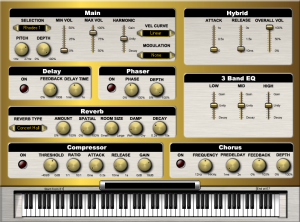
Features:
- NEO Hybrid Modeling Electric Pianos
- Internal Delay, Phaser, Chorus, Reverb and Compressor effect unit
- Separate controls under Hybrid mode
Visit: supremepiano.com
DATAMASKIN

