
Different Drummer review, demo and tutorial for iPad
A video demo and tutorial of the much talked about app Different Drummer
Different Drummer is your secret weapon in the quest for innovative beats that make sense yet defy the status quo. Using patent pending Cyclophone Technology, Different Drummer taps into the primal source of all drumming—waves. Wave motion propels almost everything you can imagine and it’s the perfect controller for drumming too. Different Drummer puts out multi-track drum beats and music sequences which are remarkably lifelike or primal at times and out of this world at others. Different Drummer is not a drum synthesizer but uses waves to play the drum samples (or other samples) in amazing ways that vary from electro and dubstep to tribal to classical.
Audulus 2.0
“New features in Audulus 2.0. Many thanks to the Audulus beta testers for their thorough testing of this release!”
With Audulus, you can build synthesizers, design new sounds, or process audio. All with low latency real-time processing suitable for live performance. Audulus’s user interface is clean, simple, and easy to learn, allowing you to focus on sound.
Key Features:
• Fluid Vector Interface – smooth animated interaction
• MIDI control – use your control surface or MIDI keyboard
• Polyphony – process multiple voices
• Diverse Nodes – from ADSR to ZeroCross
• Patch Browser – quickly flip through your patches
• 32-bit floating-point signal processing
• Fully Enhanced for Retina Display
• Unlimited Undo – full history stored in a patch
• Round-trip workflow with Audulus for Mac
• Virtual MIDI – control Audulus from your favorite MIDI app
• NEW: Audiobus support! – Runs as both an Input and Effect!
• NEW: Sub-Patches – group and reuse nodes!
Here’s what’s new:
- Math Expression node (Math -> Expr). Enter textual math expressions, like “2*x + y +z”. Available as an upgrade, this node has a variety of uses, including: unit conversion, control-signal mapping, wave-shaping or building custom oscillators. It can also be used when doing math with individual nodes is too cumbersome.
- Timing mode (the little stopwatch button below the lock mode button). This shows timings for all the nodes so you can optimize your patch. This is available as an upgrade.
- The Oscillator node now has an amplitude input. If the amplitude is zero, the oscillator takes up much less CPU. Synth patches will see a big performance improvement from driving the Osc amplitude with the ADSR.
- Significant improvement in loading times. Indicate progress while loading.
- No waiting to close a patch. Patches are saved in the background.
- Audio engine optimizations. The audio engine now takes various shortcuts when values aren’t changing.
- Improved responsiveness of the on-screen keyboard.
- Bug fixes.
FL Studio Mobile for ANDROID and iOS
Google Play Store – https://play.google.com/store/apps/de…
iTunes – https://itunes.apple.com/au/app/fl-st…
Info – http://www.image-line.com/documents/f…
FL Studio Mobile is now available for Android and iOS. Use it on any smart-phone or tablet running Android or iOS
A Google/Asus Nexus 7 was used in this video
FL Studio Mobile HD allows you to create and save complete multi-track music projects on your iPad, iPhone and iPod Touch. You can even load the FL Studio Mobile projects into the ‘FL Studio Desktop PC’ version* and take them to the next level.
If it’s a beat on the step sequencer, a melody on the piano roll or a full song on the playlist, FL Studio Mobile has you covered. Never lose that idea again. Get it down and happening wherever you are.
FEATURES
• 133 high quality instruments, drum kits & sliced-loop beats
• In-app shop with 7 sample packs (250 instruments/kits), 2 of them are free
• All instruments have FL Studio desktop counterparts for FL Studio desktop import and extension
• Step sequencer for fast percussion programming and sliced-loop reworking
• Configurable virtual piano-keyboard
• Drum pads
• Audio tracks: audio recording (with monitoring), iPod library import, wav/mp3/aac import, AudioCopy & AudioPaste
• Wave editor: cut, trim, normalize, reverse, insert silence, fade in/out (3 curves)
• Record up to 24 channels simultaneously with CoreAudio (class compliant) hardware
• Background audio playback and recording
• Browser with preview button and logical sorting into Instruments, Synths, Drum kits & Loops
• Sampling: custom kits and instruments can be created from wav/mp3 files, AudioPaste, .zip and .instr files (created with FL Studio desktop)
• Pan, volume, release and attack time configurable per instrument
• Pitch bend via accelerometer
• Low-latency, iOS-optimized, high quality, battery-friendly audio engine
• Drum loops and sliced loops ready to start your project with a cool beat
• Effects include Limiter, Reverb, Delay, EQ, Amp simulator & Filter to enhance your mix.
• 99 track sequencer and intuitive editing options
• Per-track mute, solo, effect bus, pan and volume adjustment
• Edit at the level of tracks, bars or down to individual notes
• Piano roll editor for manual entry of note & chord sequence data or detailed editing of recorded performances
• Unlimited undo and redo for all editable screens
• Metronome with tempo & time-signature settings
• Intuitive positioning of screens with the slide gesture and resize with the pinch gesture
• Save and load your songs, export to WAV and AAC
• MIDI file import/export
• SoundCloud and Dropbox upload
• Email export, AudioCopy, iTunes file sharing and an integrated WiFi server
• Audiobus support (input & output)
• In-app user manual
• Retina Display graphics
• Compatible with: CoreMIDI (MIDI in and out), Virtual MIDI, Line 6 MIDI Mobilizer I & II, Akai SynthStation 25, iRig, iRig Mic, iRig MIDI, Yamaha i-MX1, Apogee Jam, Blue Mikey, Alesis IO Dock, iConnectMIDI, Line 6 Mobile Keys, Line 6 Mobile In, Tascam iU2 and many more.
Visit www.flstudiomobile.com for video tutorials, demos and access to the FL Studio Mobile community. For sales support email flstudiomobile@image-line.com.
Bebot – Robot Synth
http://apps4idevices.com/read/bebot-r…
Bebot is a feature packed polyphonic synthesiser that was the very first music app to fully utilise the full touch screen to control the sound. It has a single oscillator with 4 waveform choices and a sub oscillator with another 4 waveform options, including both one and two octave options below the main oscillator. It also offers distortion, chorus and echo effects, as well as y axis expression within the settable timbre/resonant range, and great sounding filters. There are 25 presets to get started with, but you can also save your own creations. It comes with scale presets and the option to create your own custom scales so you can simply slide your finger across the screen without playing the wrong notes. Another great feature is the ability to Autotune each note to varying degrees or choose not to use Autotune to get that great fretless sound. Bebot also is AudioBus compatible for use in the input slot, so you can directly record your performances into other compatible apps. The video below runs through most of the preset sounds and then continues on to explore all of the other options available, and the audio track shows a few examples of the expressiveness of the app using a few preset sounds. Bebot is a very impressive synth with great expressive control, and with AudioBus compatibility it is definitely a must-have synth, which makes it … A Killer App!Review by Nick Trass
First tour of the new Waldorf Nave synth for iOS
A quick demo of Nave – the new iOS synth from Waldorf in cooperation with Tempo Rubato
According to the developer we will most likely see it in the Appstore in the next few weeks or so, it is still in BETA mode
Steelberry Clones @ MusikMesse 2013
Jordan Rudess is back with two new apps – ShapeSonix and Maestro

Released through Rudess’ company, Wizdom Music, ShapeSonix allows users to create their own visual and audio reality and to compose customizable multimedia soundscapes. The user chooses a preset and either clicks on the screen or moves their fingers on their multi-touch device to create particles.
The moment of impact between particles and shapes will be met with an assortment of beautiful sounds from Wizdom Music’s extensive library. The beauty of ShapeSonix is that it can be as interactive as the user wants. Since particles can also be self generated by an in-app chaos controller, and a particle emitter, active playing is not necessary. Users can also roll the dice on the main page and allow ShapeSonix to change everything randomly for them. From musical beginners to advanced sound designers, there is an entire world here to discover with ShapeSonix.
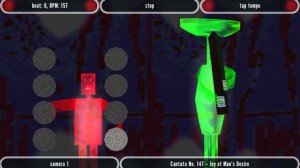
Also via Wizdom Music comes Maestro. Through the use of advanced camera technology and gesture recognition, Maestro allows you to lead an orchestra through the world’s favorite classical masterpieces. Your musicians are a group of three-dimensional characters, whose appearances and instruments you choose. These guys know what they’re doing, so even if you’re conducting is a little shaky at first, your attentive orchestra will follow your lead. In order to conduct, move your hand in a horizontal motion from one side of your camera to the other at about arm’s length away.
As soon as your movement has been recognized, a processed image of your hand, an onscreen beat counter, and clear RED indicators will be shown on the screen. All you have to do is give your orchestra afour count, and then they will start playing! For those that are “camera shy,” or don’t have a camera, don’t worry. Maestro also has a feature that allows you to simply tap the beat. Regardless of your conducting methods, your skilled musicians will become visually illuminated when they are busy playing their part, and the screen graphics will pulse to your song. So jump in and try your hand to see if you have what it takes to conduct an orchestra. Let the music begin!
Rudess explains, “I worked with chief programmer Tobias Miller to create ShapeSonix and bring it to the Intel AppUp center We wanted to create something visually beautiful and at the same time, sonically very engaging and unique. The merging of the audio and visual world is one that Wizdom Music is very involved with. ShapeSonix is the natural progression to our previous releases.”
Regarding Maestro, Rudess notes, “Maestro features a very cool group of on screen 3D musicians that follow your every move…Our goal was to create something really fun and interactive by allowing users to interact with their own web cams to conduct the orchestra. It’s a lighthearted application which was coded by Kevin Chartier and features select classical repertoire arranged specifically for Maestro by Eren Basbug.”
Mellotron App for iPad: “Super Manetron” In App Store NOW!
http://www.insideout.co.jp/apps/
Super Manetron is the Mellotron for iPhone and iPod touch. Genuine sound sampled from Mellotron M400S (serial number 761) manufactured in the 70’s.
The Mellotron is an vintage sampling keyboard by analog tapes. The Mellotron had a strong impact on rock music, becoming a trademark sound of the progressive rock bands.
You can see an internal mechanism (tape running animation) and can enjoy simulation of Mellotron with eyes and an ear.
Features:
– Core MIDI compatible
– 35Kyes of sampled sounds from Mellotron M400S serial number 761 manufactured in the 70’s.
– 8 sec PCM full sampling sounds each Key
– Scrollable Keyboard & dual Keyboards with switchable key width
– No loop sounds (real performance feeling)
– Pre-loaded with 7 instruments including Flute, 3violins (Strings), Cello, Oboe, 8-voice Choir, Vibes, Brass
– 7 instrument sounds can be set as the favorite position of A,B,C position on setting screen
– A+B, B+C mix sounds position
– The sound of motor and tape rewind mechanical noise
– Tape running animation
– Pitch control by accelerometer
– Built-in Reverb that simulates spring reverb
– Original sounds source are recorded by 96KHz/24 bits
– Compiled under the supervision of Fumitaka Anzai (Famous vintage keyboard player & collector of Japan)
New version out of Loopseque Mini
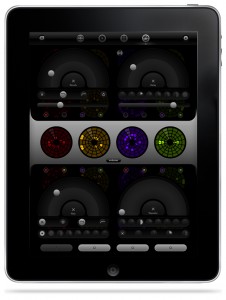
Loopseque Mini – music app for iPhone – has been updated few hours ago with many great features on board.
Intergration with Audiobus and MIDI support allows to use Loopseque with hardware drum machines, synths and other iOS music apps.
See full list of new features below:
NEW EFFECTS SET:
– Delay (two modes: stereo and ping-pong).
– Filter (LP, HP and LFO).
– Reverb (change size, wet/dry and dump).
– Beat Repeater (reverse mode and manual quantize).
All FXs can be easily assigned to each of 4 channels, we call it one-button extra fast routing.
MIDI (iOS 6 or higher):
– MIDI-out: Clock, Events, CC, Latency.
– MIDI-in: Clock.
– MIDI note for each circle: channel, velocity, root key.
– Attack, Release, Start and Length for each note.
– Chord maker presets.
– Pad for X/Y parameters, slider and trigger buttons.
OTHER FEATURES:
– Audiobus support.
– Background audio.
– New BPM control.
– New Tools popover.
– Minor GUI improves.
– OMAC support.
Checking out the Orphion iOS app
Orphion is a musical instrument with a unique sound between string instrument and percussion. Everyone can play expressive, wonderful sounds and easy or virtuosic melodies on it just by moving fingers on virtual pads.
Get Orphion here:
orphion.de
Enjoy
Arturia iMini vs Model D
Sonic takes a look at the new Arturia iMini software realisation of the classic Moog Mini – supplied by Dan from Hideawaystudio.co.uk
Hear Gaz’s output recording tests:
https://soundcloud.com/gazgoldstar/im…
https://soundcloud.com/gazgoldstar/im…
DATAMASKIN

