
Protein Der Klang – new performance sampler for iOS
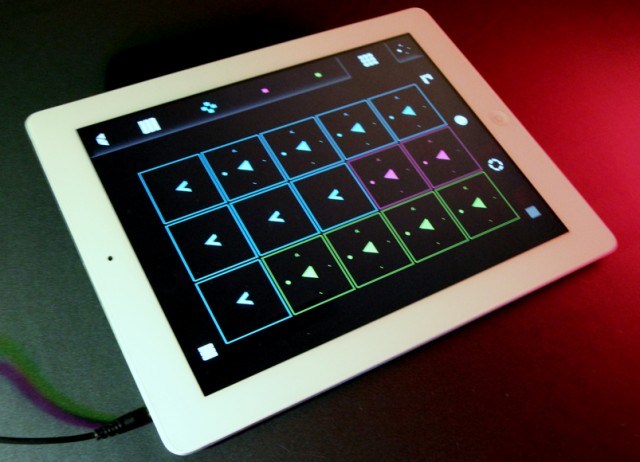
Pierre Guilluy has released a new performance sampler for iOS, Protein Der Klang.
Protein Der Klang is designed to let you play, record and manipulate audio samples using an intuitive multi-touch interface. You can sample directly from the audio input or import via iTunes Sharing.
Features:
- Play with 12 simultaneous samples on the 3 coloured tracks.
- Scratch, revert, slice, pause, fade & resync up to 4 clips on each track.
- Play with an effect on each track & a master effect.
- 5 sound effects: Crusher, Repeater, Delay, Phaser, LP Filter.
- Import and export your samples and patches using iTunes Sharing.
- Record live loops from audio-input and internal mixer.
- Exclusive playback resync feature.
- BPM-synced clip trigger and playback & metronome.
- Smart controls for faster actions.
- Low latency audio engine.
- 4 fresh demo patches.
- 140+ audio samples included.
- Support for 16bit wav samples.
- Embedded user manual and feedback.
Protein Der Klang is available now for $4.99 in the App Store, for iPad, iPhone & iPod Touch.
Introducing Vio: Transform Your Voice
Transform your voice into a mesmerizing instrument. Morph and shape the sounds you create by exploring Vio’s entrancing interface. Learn more at http://transformyourvoice.com
Sonic adventures — always in tune
Build sonic universes from your own voice. The innovative audio engine behind Vio goes far beyond existing voice effects to create novel, futuristic vocal styles. Vio’s sound spaces vary in character from edgy and energetic to mellow and relaxing. Vio surprises and inspires your creativity: you may not intend to do something, and it comes out cool. Whether you are an amateur or seasoned professional, Vio’s pitch correction technology ensures that everyone sounds in tune and is beautifully harmonized.
Touch Control
Explore each sound space by touching Vio’s swirling particle vortex. Move the vortex around the screen and change how your voice is transformed – harmony is added or subtracted, melodies emerge and disappear, and reverberations shape shift.
Looping
Double-tap the screen, loop what you have just sung or hummed, and focus on morphing your sound with the particle visualizer.
Recording & Sharing
Record your performances and share them via email, SoundCloud, Dropbox, or iTunes file sharing. Choose between compressed and high quality audio files.
Advanced Features
Visit http://squareb.co/vio to learn about advanced features like changing keys and recording high quality audio.
Mellotron arrives for iOS
Super Manetron is the Mellotron for iPhone and iPod touch. Genuine sound sampled from Mellotron M400S (serial number 761) manufactured in the 70’s. The Mellotron is an vintage sampling keyboard by analog tapes. The Mellotron had a strong impact on rock music, becoming a trademark sound of the progressive rock bands.
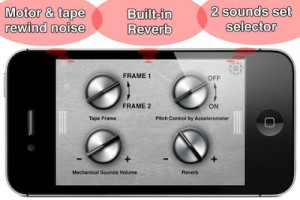
You can see an internal mechanism (tape running animation) and can enjoy simulation of Mellotron with eyes and an ear.
Features:
- Core MIDI compatible
- 35Kyes of sampled sounds from Mellotron M400S serial number 761 manufactured in the 70’s.
- 8 sec PCM full sampling sounds each Key
- Scrollable Keyboard & dual Keyboards with switchable key width
- No loop sounds (real performance feeling)
- Pre-loaded with 7 instruments including Flute, 3violins (Strings), Cello, Oboe, 8-voice Choir, Vibes, Brass
- 7 instrument sounds can be set as the favorite position of A,B,C position on setting screen
- A+B, B+C mix sounds position
- The sound of motor and tape rewind mechanical noise
- Tape running animation
- Pitch control by accelerometer
- Built-in Reverb that simulates spring reverb
- Original sounds source are recorded by 96KHz/24 bits
- Compiled under the supervision of Fumitaka Anzai (Famous vintage keyboard player & collector of Japan)
SPECIAL SALE! 50% OFF TILL NEXT MAJOR UPDATE!
We are going to support iPad as universal app in the next major update (2nd Quarter of 2013). 50% off till then.
The app is priced at $3.99
KoalaSAN + audiobus prototype
Teaser for a new iOS app
Casino 2 – 64 presets for Cassini
Casino 2 contains 64 new presets for Cassini. Basses, Leads, Pads, Arpeggiations, Chiptune, Formant and FM patches, and more.
Every preset has the modulation wheel routed as well as all 4 performance modulation knobs assigned to interesting and important aspects of the sound, giving you a high degree of real time control and command over your sound.
Compatible with iPhone 3GS, iPhone 4, iPhone 4S, iPhone 5, iPod touch (3rd generation), iPod touch (4th generation) and iPad. Requires iOS 4.3 or later.
Format:
▪ 100% Original and Royalty Free
▪ 64 cassini_timbre files
▪ 256 Controller knob settings
▪ 64 Mod Wheel settings
▪ Includes easy installation instructions
Price: $2.49
Available from – www.sunsineaudio.com
Free Preview Pack – http://www.sendspace.com/pro/dl/cd5ikl
PixiVisor: Using the Korg Monotron As Video Filter
Using the Korg Monotron (Pocket Synth) As Analog Video Filter.
PixiVisor is a revolutionary tool for audio-visual experiments. It is based on the video signal transmission over audio (you can listen to the sound of your image).
More info: http://warmplace.ru/soft/pixivisor
Music: http://soundcloud.com/nightradio/anal…
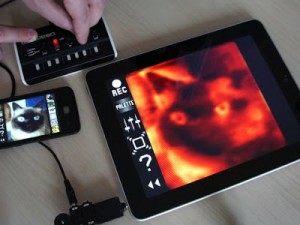
PixiVisor is a revolutionary tool for audio-visual experiments. Simple and fun, cross-platform application with unlimited potential for creativity!
It consists of two parts: Transmitter and Receiver.
* Transmitter converts the video (static 64×64 image or 10FPS animation) to sound, pixel by pixel (progressive scan). This lets you listen to the sound of your image. But the main function of the Transmitter is to transmit the signal to the receiving devices.
* Receiver converts the sound (from microphone or Line-in input) back to video. You can set the color palette for this video, and record it to animated GIF file.
Key features:
* file formats supported by Transmitter: JPEG, PNG, GIF (static and animated);
* real-time video export to animated GIF;
* 64 predefined color palettes;
* iTunes File Sharing;
* Wi-Fi Export/Import (in the File menu of the Transmitter);
* it also available for Android, Windows, Linux and OSX;
* more functions in the next PixiVisor updates…
Examples of use:
* wireless Lo-Fi video transmission over audio;
* video signal transmission through audio cable; you can then modify that signal by some mixers or audio FX processors;
* VJing;
* sound visualization;
* save any sound to animated GIF;
* hide some images and animation in your music;
* searching for hidden messages in the ambient noise; EVP;
* something else; reveal it first!
Official PixiVisor homepage + test broadcasts + more videos:
http://warmplace.ru/soft/pixivisor
iOS stuff: Roland CUBE Lite MONITOR
http://youtu.be/3k1MRkV-dRU
Sing, Play, and Practice with Your Favorite iOS Devices
http://www.rolandconnect.com/product….
Featuring mic and instrument inputs, iOS interfacing, and a quality 2.1 Channel audio system, the CUBE Lite MONITOR is perfect for enjoying music at home with your iPhone, iPad, or iPod touch. Connect your iOS device to the i-CUBE LINK jack, and then launch the free CUBE JAM app to play, record, and take advantage of great practice tools like speed/pitch adjustment, Center Cancel for minus-one tracks, and more.
Figure from Propellerhead gets AudioBus and SoundCloud sharing support
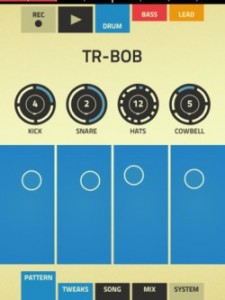
Propellerhead has updated Figure for iOS, adding some frequently requested features, like SoundCloud and AudioBus support.
Here’s what’s new in Figure 1.4:
- SoundCloud Sharing – share your Figure tracks with access to Facebook, Twitter and more
- Audiobus support: Now you can stream live audio directly to other Audiobus-compatible apps
- Background audio (in device Settings)
- Sort song list by Name/Date
- Bug fixes and performance improvements
Figure is $.99 in the app store >>
The nitty gritty details:
• Bass & lead parts use Reason’s Thor synthesizer
• Drums powered by Reason’s Kong drum machine
• Play in different keys & modes. Set once or change on the fly.
• Increase the Shuffle to loosen up your beats
• Turn up Pump to add a club sound to your tracks
• Adjust levels using Propellerhead’s legendary mixer
• Save, browse and load song files
• Set length of loop (1,2,4,8 bars)
• Export audio to iTunes File Sharing
Introducing the CloudSynth
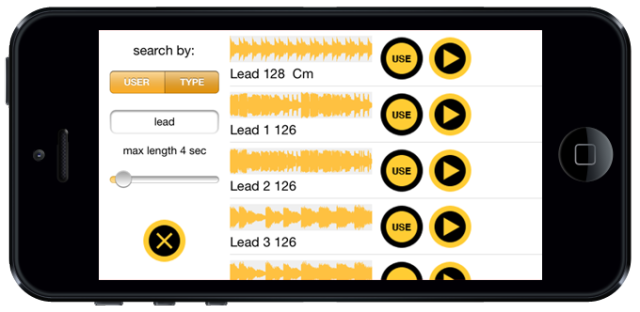
Brio Taliaferro, Alessandro Contini & Daniele Guevara have released CloudSynth – a free app that lets you browse and play sounds from SoundCloud.
Features:
- Search sounds by name, user and duration
- Pre-listen and select the sound
- SAMPLER MODE: play the sound at different pitch
- SYNTH MODE: select a portion of the waveform and create new unexpected granular sounds
- Rotate the iPhone to modulate Reverb and Delay
It’s available as a free download here >>
Cubasis video tutorials
In this video tutorials Steinberg shows you how to use Cubasis.
Cubasis is Steinberg’s streamlined, multitouch sequencer for the iPad. Specially designed for quick and easy operation, Cubasis makes recording, editing and mixing a breeze. You can also open your Cubasis projects in Cubase under Windows and OS X! Cubasis places touch-intuitive production tools in your hands, opening up a new world of possibilities for your creativity.
Key features:
- Unlimited audio and MIDI tracks (depending on the device used)
- Over 70 virtual instrument sounds based on HALion Sonic
- Mixer with over 10 effect processors (insert and send effects)
- Over 300 MIDI and audio loops
- Virtual keyboard and virtual drum pads
- Sample Editor and Key Editor
- Export to Cubase, Dropbox, SoundCloud, AudioCopy & email
- Core Audio and Core MIDI compatible hardware supported
- Sequence other Core MIDI apps (MIDI recording only) and run Cubasis simultaneously via background audio
- Import audio from your iTunes music library or using iTunes filesharing, use AudioPaste or set up a Wi-Fi server in Cubasis
DATAMASKIN

