
Audiobus: Filtering FunkBox and Sunrizer with NLog into Loopy HD
Sebastian uses Loopy HD to loop Sunrizer and FunkBox being filtered by NLog. Audiobus is a communications channel for sending live audio, like the audible output of a synthesizer app, or the output of a guitar amp effects app, for example.
http://audiob.us
Funkbox: https://itunes.apple.com/app/funkbox-drum-machine/id350437349?mt=8
NLog Synth PRO: https://itunes.apple.com/app/nlogsynth-pro/id393879841?mt=8
Sunrizer: https://itunes.apple.com/app/sunrizer-synth/id443663267?mt=8
Loopy: https://itunes.apple.com/app/loopy-hd/id467923185?mt=8
Demo of the music chopper app “iterator” for iPad
New iPad audio chopper app. See http://www.touchsynth.com for more information.
iterator is an inspiring sample based musical instrument with a stylistic interface. The premise is simple: The x-axis controls the sample playback position. The y-axis controls the repeat speed. The result is surprisingly musical.
Create your own soundscapes using any of the built-in 75+ samples from over 25 artists, including Richard Devine, Parallel Worlds, Toppobrillo, Atomic Shadow, and many more. Or, supply your own .mp3s through iTunes.
Patrick Feaster discusses “Pictures of Sound”
“Pictures of Sound: One Thousand Years of Educed Audio: 980-1980” is a book/CD set produced by Patrick Feaster
http://www.dust-digital.com/feaster/
This video is derived from a slideshow that was presented by Patrick Feaster at the 2011 ARSC Conference: http://www.arsc-audio.org/
iSequence for iPad
Jamming with iSequence for iPad
iSequence is one of the most powerful music creation studio designed exclusively for iPad. Thanks to intuitive 8-track sequencer, tons of instruments and flexible mixer with DSP effects you can easily program and record profesional loops, beats and melodies. Now you control every aspect of your music project.
The iPad edition has been rewritten and redefined to take advantage of a bigger screen and better performance.
The workflow is extremely fluid, you record tracks and controls movement in real-time, edit them using step sequencer and automation editor, switch between instruments, tracks and views without stopping playback. You can compose, jam and mix at the same time!
Features [specification]
- 165 built-in high quality instruments embedded in 3 banks; acoustic, drum kits, pads, leads, sweeps and ambient atmospheres recorded with top classic and modern hardware synthesizers. Additional banks available in the BankShop.
- Pattern sequencer: 8 tracks and FX curves editor. Instruments are not bound to tracks, so you can play chords or use multiple instruments on a single track. Up to 999 patterns in the project.
- Piano keyboard (6 octaves) or drum pads.
- Event parameters: note duration, panning, velocity and gliss
- Real time recording; metronome and ‘slow down’ mode.
- Sampler; mapping, loops, ADSR envelope, sample start
- Copy/paste, move and transpose selected area or patterns.
- Mixer: 8 tracks, 5 configurable effect slots with flexible routing. Effects: Filter, Reverb, Flanger, Delay, LO-FI crusher, Equalizer, Compressor. All parameters can be recorded in real-time or edited using automation editor.
- WIFI-sharing: HSQ, MIDI, WAV export. HSQ import.
Tutorial: Wave Arts “Dialog” – Introduction to vocal processing
Jonas “Missing Identity” Hagenvald explains the new plugin “Dialog” from Wave Arts and enhances a vocal from the singer Lulablue.
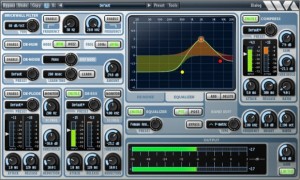
Dialog combines in one plug-in all the processing needed to clean up, adjust, and sweeten recordings of the spoken voice. It is perfect for voice-over, film/tv recordings on location or sound stage, and broadcast.
Dialog includes brickwall filters, de-hum and de-buzz processing, broadband noise reduction, de-ploding, de-essing, 10-band equalization, compression, and limiting. Separate presets for each section allow you to get results fast.
The brickwall filters have variable rolloff slopes and can be used to cutoff low or high frequency ranges. The de-hum processor uses notch filters to eliminate 10 harmonics of either 50 Hz or 60 Hz hum. The de-buzz processor squelches nasty line frequency buzzes. The de-noise processor is the stellar sounding MR Noise algorithm with a simplified interface. De-plode and de-ess are custom processors; use de-plode to tame plosive sounds and use de-ess to adjust the amount of sibiliants. The EQ section is the powerful and easy to use TrackPlug equalizer, with 10 bands of equalization, 11 different filter types to choose from, and a variety of presets. The compressor is the TrackPlug Vintage compressor, with presets tailored to voice processing.
Melodo with Ableton Live – Music collaboration
Download Melodo for Mac / Windows: http://comelody.com/melodo
Melodo is a platform for instantly browsing short musical phrases contributed by users from around the world.
Melodo is available as a VST / Audio Unit plug-in.
New music creation app from Brian Eno called Scape
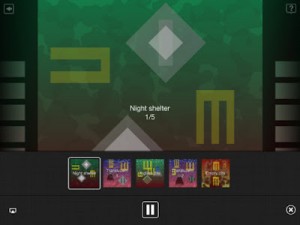
Scape makes music that thinks for itself. From Brian Eno and Peter Chilvers, creators of Bloom, Scape is a new form of album which offers users deep access to its musical elements. These can be endlessly recombined to behave intelligently: reacting to each other, changing mood together, making new sonic spaces.
Here’s what they have to say about Scape:
“Scape is a new form of album which offers users deep access to its musical elements. These can be endlessly recombined to behave intelligently: reacting to each other, changing mood together, making new sonic spaces.”
Can machines create original music? Scape is our answer to that question: it employs some of the sounds, processes and compositional rules that we have been using for many years and applies them in fresh combinations, to create new music. Scape makes music that thinks for itself.
– Brian Eno, Peter Chilvers
- Includes 15 original scapes
- Scapes can be saved into a gallery and added to a playlist
- Plays in background of other apps (excluding iPad 1)
- Generates random scapes
- Scapes can be shared by email
- Supports AirPlay and Retina display
Headphones or external speakers recommended
Scape is $5.99 in the App Store.
Mobile Music Meetup with Amy, Jordan, Carson Day and VJ Keisuke
The Tabletop guys are having fun on their Mobile Music Meetup 😉
“This was our second Mobile Music Meetup. Carson Day played his semi analogue set, Ami L looped live and Jordan was the main DJ. We also had Keisuke showing us his VJ set all night long. It was a great evening and fun to see the mobile music community growing.”
OP-1 Demo House Track feat Nitro FX
New video focusing on the Nitro effects processor is capable of, details below:
Here is a demo of a quick house song I made while checking out what the new “Nitro” effects processor added in the new OS update is all about. Nitro is, or can be, many different types of effects depending on how you set it. As a base description it is a resonant bandpass filter with an envelope follower. You can use it as the following modes:
– Lowpass Filter (sounds like 12db to me)
– Highpass Filter (same sounding slope)
– Bandpass Filter
– Auto Wah
– Sine Generator
The envelope follower affects each filter in a different amount it seems with the Lowpass filter getting more of the frequency sweep (to my ears only, not proven). I am thrilled to finally be able to remove the low end frequencies from patches and particularly audio samples. You could always do this with the main bus EQ, but now you can target specific drum kits and synth engines as you lay them down to tape tracks. This was the single biggest omission from the OP-1 OS for me and now it is here and awesome!
Repeat: I love nitro, I love nitro, I love nitro…
Thank you TE! You continue to amaze with support for this product/platform.
Beat Making / Beatmaker 2 / Emotional Chopped R&B Beat “Give Me A Chance”
Background information:
What’s up youtube fam…this is ya boi Deleswa. I’m back and this time around I’m making a chopped/emotional type beat on Beatmaker 2
As a bonus for all you who have continued to support me….I decided not to be lazy and instead included beatmaking during the entire video.
That’s right…you’ll get to see me rockin’ the pads and the keys. Also….you’ll be able to watch the beat from beginning to end on the Beatmaker 2 DAW that I included in the video.
Coo….so that’s about it…so check me out and please leave and comment and Subcribe and I will keep the sounds comin…cause music is what I do….God Bless!!!
Get hot beats for your next music production @ http://www.rocbattle.com/deleswa
Beats @ http://www.reverbnation.com/deleswa can be made avail for licensing upon request.
Follow me on Twitter @ http://www.twitter.com/deleswa
Official domain @ http://www.deleswaproductions.com (work in progress)
Get at me @ http://www.myspace.com/deleswaproductions
Check me out @ http://www.indiebychoice.com/deleswa
Latest album “Black Noise” and singles avail @ http://www.cdbaby.com/Artist/Deleswa
DATAMASKIN

