
Introducing the new virtual Klang Drum Machine

Now available from Supersynths, Klang Drum Machine is a new virtual drum instrument for Windows, featuring full enveloping, loop and groove editing, effects, pattern sequencing, and much more for the beat-making musician.
According to Supersynths, Klang Drum Machine is an eight-layer drum sequencing beast. Klang Drum Machine has eight layers, each with its own mixer, panner, MIDI channel selector, envelope controls, and loop editor. Each layer is MIDI CC learnable, so you can assign them to pads, keys, and so forth. As Supersynth notes, the pattern sequencer allows you to either create up to 64 patterns that can play in any order you wish, or you can stack them to create multi-timbral patterns. With Klang Drum Machine, you can load and save patterns and banks of patterns.
As for effects, Klang comes complete with reverb, delay, and a compressor — all tempo synced for great tempo effects. The virtual instrument also comes with a simple unison drone oscillator, which you can use to create rumbling drones, sc-ifi sounds, and anything in between.
The Klang core library (326 MB compressed / 750 MB uncompressed) features a wide variety of clangs, hits, strikes, and more. Many new dry samples are also included, covering bass drums, snares, toms, cymbals, side sticks, and more; in addition to the more unique samples available, there are plenty of “bread and butter” samples to allow you to create any kind of percussion tracks you wish.
Klang Drum Machine features at a glance:
- 750 MB sample library
- 8 Layers with envelope, mixing, and panning
- Multiple tempo-synced effects
- MIDI channel learnable and selectable
- Full-featured pattern sequencer
- Low footprint for instant results
- Use as many instances as you want
Until January 1, 2012, Klang Drum Machine for Windows will be available at the introductory price of $40. For a limited time, Klang Drum Machine will include the Cloudplayer and one expansion. You can learn more about Supersynths’ Klang Drum Machine virtual instrument at supersynths.com.
Short improvisation featuring the Phaedra
Short improvisation. Yamaha CP80B, DSI TETR4, Korg Monotribe, Eventide Space and TimeFactor, Doepfer modular, Roland RE-201. Sequenced from Naught Panther Phaedra running on an iPad.
“Since there will be an inevitable question, I’ll go ahead and say now that the CP-80B is running through the TimeFactor and Space, and the Space is set to its Shimmer algorithm. These are the only effects on the piano. … Anyhow, sequenced by Phaedra, as is proper for music like this.” – Chris Randall
Audiotool Sketch Tutorial
Luke explains the basics of Audiotool Sketch in this video.
Out now in the Android Market: https://market.android.com/details?id=de.despudelskern.application.audiotools…
Audiotool Sketch allows you to sequence sounds using emulations of three different classic devices. Make some beats with one of the drum machines and then move onto the bassline. Once you have finished building your sequences navigate to the overview and start switching up the patterns, add some delay or change the tempo, all in real time.
Each device includes the full range of parameters which would have been found on the original machines, this coupled with the multi-touch functionality makes it possible for the user to really control each device’s output signal. Audiotool Sketch is built around the same audio engine as Audiotool and outputs full power audio.
The Uncanny Sequencer for Ableton Live
The new & fresh & unique sequencer for IDM & braindance music w/Ableton Live.
You can buy it there: http://designthemedia.com/uncannysequencer
I designed this max for live machine for my own purpose, initially.
Indeed, I’m also protofuse (http://protofuse.net) and I need tools that makes my music unique & doesn’t sound like the one of the others.
I decided to sell it, because I had a lot of requests about that, which made me happy about your very strong enthusiasm.
Features:
– 8 channels (meaning 8 sequencers in one)
– fire midi notes from its output to anything internal or external
– based on probabilities
– unique sequences generation
– huge presets bank engine (including morphing between 2 presets)
– 10 pages documentation
club of the knobs – synthesizer model 15
This is a little demonstration of the replica of the mighty Moog Model 15 from Club of the Knobs. The challenge was to create a self-sequencing patch with no other use than the Model 15 and the great M569 sequencer from Moon Modular. I recorded the audio directly to the Zoom R16 and added only some delay. No other effects or mastering utilities have been used.
Endless Fantasy Worlds
Nice ambient tones made with SunVox, enjoy
Made in SunVox: http://www.warmplace.ru/soft/sunvox/
It is a small and fast multi-platform pattern based sequencer (tracker) with modular synthesizers.
With this program you can compose music anywhere. On any device. It also available (for FREE!) for Windows, Mac OS X, Linux, Maemo, PalmOS and Windows Mobile.
Listen to tracks made in SunVox:
soundcloud.com/groups/sunvox
[ Jordan Rudess about this app ]
Sunvox is a serious music application. I am personally running it on my iphone. In the overcrowded world of music apps, Sunvox stands out as both unique and powerful. If you are a musician and own an iphone, you owe it to yourself to try this amazing application!
[ Key features ]
• Modular interface.
• Highly optimized synth algorithms.
• Flexible architecture: SunVox can working on variuos devices with completely different CPUs;
• WiFi export/import;
• Multitrack WAV export;
• MIDI IN/OUT;
• Mic/Line-in recording.
[ Built-in synthesizers & effects ]
• DrumSynth with 120 unique synthetic drum sounds;
• FM synthesizer;
• Generator (saw,triangle,square,noise,sine);
• Kicker;
• Sampler (supported formats: WAV, XI, AIFF);
• SpectraVoice (FFT-based synthesizer for deep and beautiful pads);
• Amplifier;
• Side Chain Compressor;
• DC Blocking Filter
• Delay;
• Distortion;
• Echo;
• 3Band equalizer;
• Filter (Low-pass, High-pass, Band-pass, Notch);
• Flanger;
• LFO;
• Loop (for glitch effects);
• Reverb;
• Vocal Filter (for human voice simulation);
• Vorbis Player;
• Vibrato.
Phaedra iPad Sequencer First Look…
Last week we got a teaser of the upcoming Phaedra iPad sequencer, now the developers gives us some more details:
This is a quick overview of the highlights of Phaedra, the “analog” style four-channel MIDI sequencer for iPads, coming soon from NaughtyPanther.
In this video, Phaedra is driving a DSI TETR4, a Doepfer modular synth, a Korg Monotribe, and an Eventide Space and TimeWorks. No DAW is used in the sequencing. Everything is being clocked from Phaedra.
Micro Patch Synth: patching and arpeggiator demo
“In this video I demonstrate how to patch the keyboard to VCO1.
I then play each arpeggiator pattern in sequence.
NOTE: The software still requires a fair amount of work to reduce the noise and buzzing from the waveform synthesis.”
The Phaedra sequencer is soon to be released
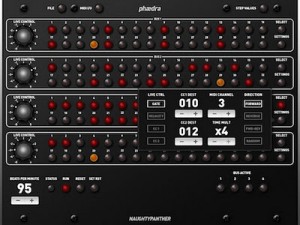
A new MIDI sequencer is coming from Analog Industries. The plan for Phaedra is to include background mode and WIST too for launch.
In my ludicrously ample free time, I’ve been working on this bad boy, Phaedra. It is an “analog” style four-channel MIDI sequencer for the iPad. Click the picture for the full-rez screenshot. In the interests of full disclosure, I borrowed heavily from the Moon Modular 568 Quad Sequential Trigger Source, which you can read all about up in here.
I still have a long way to go, but it is coming along nicely. Each step has note, velocity, gate time, and a pair of MIDI CCs of your choosing. I haven’t yet coded in the chaining feature, but it’ll be able to do 4 x 32, 2 x 64, and 1 x 128 modes. The steps can be 32nd note, 16th note, 8th trips, and 8th note, and each “bus” can run in arbitrary lengths. The “Live Control” knobs on the left can be used to modify one of the four destinations.
I haven’t yet conquered “MIDI background mode,” as used by many iPad synth apps, but I hope to include it, as well as Korg’s WIST. It already does normal hardware MIDI and Network MIDI fine, though, and can clock, or be clocked from, an external source.
I have no idea when I’ll have this done, as I’m only working on it in spare moments, but I hope to be done before Christmas. I’ll keep you posted. Note this is not an Audio Damage product. (I know that even though I say that, and it clearly does _not_ say “Audio Damage” anywhere on the UI, all the other blogs that pick this up will say it is. You can lead a horse to water…)
Latest info will be found here >>
BallBeats – Amen Break – It takes balls of steel to compose beats!
Playing with a Sliced Amen Break!
Alkex Instruments’ Ball Beats is a 6 track 8 step midi sequencer using balls as it’s trigger.
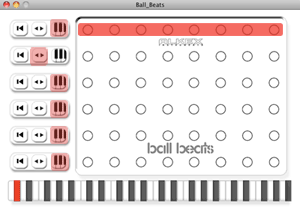
8 Step Sequencer
6 Multimode Channels
Built in USB i/o interface
Sync to Midi Timecode
Includes 50 1/2″ Steel Balls
Compact size (6″x8″x1″)
< Included configuration software (pc/mac/linux)
Each of the 6 tracks has 3 modes:
Note Trigger Mode:
Plays a note when a ball is scanned
Reset Mode:
Resets to step 1 when a ball is scanned
Reverse Mode:
Set the loop in the opposite direction (ping pong)
DATAMASKIN

