
Experimenting in the studio – micromac_poly2
Background info on the video:
here’s a further experiment using the separate Control Voltage Inputs to the 3 Oscillators that micromac has- playing three note chords but recorded as a sequencec! This is the sound of 2 x micromac units with the lead solo sounds coming from the sister unit- the Photon! Occassionaly, I wear a hat…please excuse!
Seline Ultimate – iPad music app – Teaser
Here’s a teaser for a new iPad synth with quite an intriguing and colorful user interface.
Using the “overdub” function in the all-new Seline Ultimate, to create a track in less than a minute. MIDI is also recorded, so you can take what you’ve created straight into the studio!
Latte – new virtual synthesizer instrument
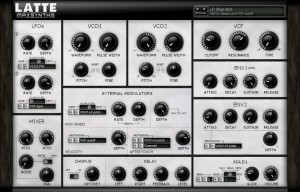
MaxSynths has announced the release of Latte, a virtual synthesizer instrument for Windows.
Latte is inspired by the old synthesizers from the past and is able to produce powerful synth sounds, fat basses, expressive leads, crazy sounds and more.Despite the synth layout looks very simple the modulation options allows to shape the sound in a lot of different ways. One of the most interesting features is the possibility to use the polyphonic aftertouch as a modulation source to create the typical expressive sounds which has been a trademark for the well known synth gurus of the past.
The Saw/Pulse oscillator of Latte, characterized by a powerful and warm sound, has been created specially with the aim to recreate a realistic vintage sound.
Latte features
- 2 Oscillators with custom Saw and Pulse waveforms and noise generator (White and Pink noise).
- 12dB Low Pass/High Pass state variable filter.
- 2 LFOs with assignable destinations.
- Assignable envelope generator.
- Extensive options for external modulation with routable Channel or Poly Aftertouch.
- FX section with Chorus and Delay.
- 16 voice polyphonic.
- Low CPU usage.
Latte for Windows (VST) is available to purchase for 19.90 EUR. A free version (limited to 4 voice polyphony) is available to download.
DODECAUDION – new audiovisual controller
DODECAUDION
a project by panGenerator / HEDOCO product.
pangenerator.com
hedoco.com
Dodecaudion is a spatial audiovisual controller based on such technologies as infrared distance sensors, arduino, bluetooth, processing and osc.
Most of the sound in this video was recorded live and edited/postproduced later on.
(you’ll find live and uncut performance played during hackdays here: blip.tv/hackdays/dodecaudion-koncert-5556815 – please mind that sound setup and recording weren’t optimal though )
The project is in alpha phase right now but should be ready for production in following months and will be available via HEDOCO online shop.
Dodecaudion is totally opensourced:
MIT license – source code.
Creative Commons (CC BY-NC-SA) – form design, PCB layout & everything else.
You’ll find source code, CAD documentation and PCB schematics on github ( please note however that they still need some cleanup, we’ll post an update soon ).
github.com/panGenerator/dodecaudion
Dodecaudion connects via Blutooth to computers. Messages are translated and retransmitted via OSC (software for Mac OSX and Windows available for download).
Included:
- Arduino Uno,
- Dodecaudion Shield rev. 2.0,
- Alluminium and polymer composites housing,
- Power source (230 V for EU continental outlets)
- USB cable (not neccesary for normal operation but handy for tinkering with microprocessor code)
It’s available now and priced at 5,000 PLN, which translates into around US $1,600.
AudioCube Jam with 9 Box Casual Musical Instrument at Electro-Music 2011 Festival in NY
Mark Mosher is at it again 
There was an AudioCube jam at the 2011 Electro-Music Festival in NY (http://event.electro-music.com/), I brought 6 AudoiCubes (http://www.Percussa.com) and setup my casual musical instrument templates called the 9 Box. This same system is the basis for multiple music labs in schools.
The system fits in a backpack, is intended for 1-4 players. It only takes a few minutes to setup the system and about 1 minute to learn to play the 9 Box. “9 Box” refers to a 3×3 matrix of 9 clips – hence the “9 Box”. Why 9 clips? After much research I’ve concluded that 9 is a perfect number of clips for mapping to a single AudioCube and a small enough number of clips that it’s easy to keep track of the different musical or sound phrases.
Watch for annotations in video for more details.
Mark Mosher
http://9box.modulatethis.com
http://www.MarkMosherMusic.com
Synth spotting: I Feel Blade Runner Love
http://youtu.be/T1hZgELpBGU
Background information:
On my Kawai SR-7 organ. Homage to “I Feel Love” by Donna Summer and “Blade Runner Theme” by Vangelis. These seem to gel together in a loose way. Yamaha HS-8 on the right has nice string sounds.
The iMac Bullet Recording Sessions
Here’s a cool video of bullet recording, check it out:
There is a first time for everything and recording bullet pass bys and impacts was a first for me. I’ve always wanted to try my hand at bullet recording but never had the knowledge or association with anyone that had a permit to use a gun suppressor. After some searching, now I do.
Here are some clips from the first recording session of a iMac being shot at with slow moving bullets shot from a suppressed Glock 22 with custom made 40 caliber rounds.
Rainboard: Rebang
This video is an original composition and performance (David Gerhard) using the Rainboard. The Rainboard is a DIY dynamic isomorphic keyboard. It can interface the Musix iOS app in order to change layouts and adjust settings. As well, it can be played on its own after a layout is set. More details can be found at http://rainboard.shiverware.com or sign up for the Rainboard newsletter: http://eepurl.com/g3G0r
Free iPad Control Surface for JP-80
This is a free file I created which you can download by going to jupiter80.music-technology-online.com. This control surface for the iPad adds extra control to your JP-80. The “JP-80 Mixer” runs via the MIDI Touch app which can be found on the iTunes app store.
This control surface for the iPad adds extra control to your JP-80. The “JP-80 Mixer” runs via the MIDI Touchapp which can be found on the iTunes app store. The control surface offers the following control for your JP-80:
1. Global control of Upper, Lower, Solo and Percussion parts.
2. Independent On/Off control of tones for the Upper and Lower parts.
3. Independent control of Cutoff and Resonance for the Upper and Lower parts.
4. Independent Toneblender control for the Upper and Lower parts.
5. Independent Matrix controls of the Cutoff and Resonance for the Upper and Lower Parts.
“To use the control surface, you will need to download MIDI Touch from the iTunes app store and install it on your iPad. Then simply send me an email to request the control surface plug-in and installation instructions. You will also need the Apple Camera Connection Kit in order to connect your iPad to the JP-80 via USB.”
Testing the Midi Ratchit module on one simple sequence
Here is only one simple sequence modified by the Midi Ratchit
MIDI plugin for Windows designed to deliver the classic Tangerine Dream step sequencing ratcheting effect:
Ratchit is a tool to achieve the “ratcheting effect”, which was made famous by Tangerine Dream on their old records.
It is meant to be placed behind ClockWOrK but will of course work with any step sequencer or manual MIDI input.
Ratchit is a VST-plugin that repeats incoming notes according to the selected clock divider. It can be triggered manually or via MIDI CC controller. That way it can be controlled by the CC knobs of Clockwork to have different divide speeds at different steps.
DATAMASKIN

