
Open Labs features new Music OS overview
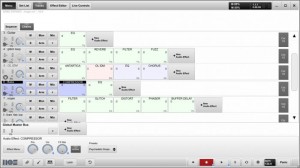
An over view of the new music production and live host software, Music OS. Powered by Open Labs
Music OS 3.0 or MOS (moss) is the world’s first music creation and live performance software designed specifically to address the needs of both music creators and live performers. MOS was developed and optimized for touch screen use; however, a touch screen is not required when installed on PC desktops and laptop systems. With streamlined recording and performance features, MOS allows music innovators to create, record and perform their ideas quickly and seamlessly. MOS was engineered to work in conjunction with traditional D.A.W. programs; leveraging existing studio investments and adding strong value, features and capabilities in areas where most musicians need it – the creative & live performance process. One can think of MOS as a professional ‘scratch pad’ when creating and performing live music. MOS emphasizes ease-of-use, stability and power all in an affordable $299/USD package.
Rockit DIY 8bit synth is now launched
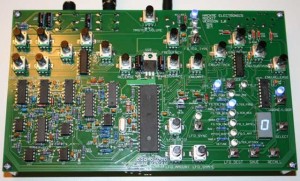
HackMe Electronics has announced that the Rockit synth – their DIY 8-bit synthesizer project – has shipped.
Rockit is an open source analog-digital hybrid synth, created by Matt Heins. Heins says that he’s shipped about 175 Rockits in some for (assembled, kits or PCBs). The Rockit is now available assembled for $229, or as a kit for $139.
Features:
- Two Mixable Oscillators with 16 Waveshapes/Sounds and Detune
- Analog Voltage-Controlled Amplifier with ADSR controls
- Digitally Controlled Analog Filter with Selectable Low/Band/High Pass and External Audio Input and Independent Envelope
- Two LFOs with 16 Waveshapes and 6 Destinations Each
- MIDI In and Out
- Open Source C Code with an AVR Microcontroller
- 16 Slots for Patch Save and Recall
You can preview the sound of the Rockit synthesizer below:
Open source EigenD (Eigenharp) connected to a modular synth
Background information:
Striving for higher resolution electronic instruments to connect the player to the sound the old-fashioned way.
This is a technical demonstration, meaning, I finished the technical coding, hooked it up, patched the simplest thing I could on the modular and started noodling.
The way this works is that since EigenD (eigenharps platform) is now open source, we’ve (with the help of eigenlabs) been able to crack it open a bit for hacking. We now have an OSC agent which pumps an insane volume of raw data out of the harp ready for some experimental harvesting.
In this demo, I have a MAX patch which sanitizes the data, and makes it expressly fit for translation to control voltage of a modular.
Some data points here. EigenD sends 2000 events per control point per second. Per note there are 3 high res control points per note (pressure, yaw, pitch). So that is 6000 events per sec translated over the wire into voltage. 2 more control points require voltage which are pitch and cv. That means using an audio interface for cv, you need 5 audio outs per level of polyphony. 5 outs for monophonic, 10 outs for duophonic, and up.
Luckily, monophonic is pretty amazing, duophonic is an incredible luxury and 3 levels is showing off.
After I have prototyped this, I could see writing an EigenD agent expressly to do this directly, making the eigenharp modular friendly out of the box.
I however have to mention that this would not be possible without Expert Sleepers Silent Way plugins as the OSC to CV bridge. Nor would it be possible without MAX in this prototype stage.
PrB quick demo by tatsuki*
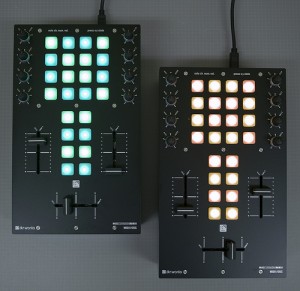
The future of iOS music continued
This is a preview of an upcoming polychord release. In this video, we’re using polychord (BETA) as a MIDI keyboard for nLog Pro (BETA) — all on one iPad, all without any cables. App makers are starting to work together to make all of your iOS music apps play nicely with each other through virtual MIDI. This is still experimental, and it will be a little while until app makers optimize their apps for multitasking, and enable virtual MIDI. It’s very exciting and clearly the future of iOS music making.
If you are a developer, get involved with the open music app group: groups.google.com/group/open-music-app-collaboration
A sneak preview of the new version of IanniX
IanniX is a graphical open-source sequencer, based on Iannis Xenakis works, for digital art. IanniX syncs via Open Sound Control (OSC) events and curves to your real-time environment.
New open source digital musical instrument
Illusio is an open source digital musical instrument that allows the control of real-time recorded loops through collaborative and ludic performances based on relationships between sketches and sounds.
Developed in Processing and Openframeworks, it mixes multitouch technologies with the interaction metaphor of guitar pedals.
Concept and development by Jeraman, finalized in 2011.
Footage by Kamilla de Souza.
Developed with the support of Rumos Itaú Cultural Arte Cibernética 2009.
For further informations, check this site (only in portuguese):
jeraman.info/illusio
KXStudio (Ubuntu based) – SynthsNSamplers demo
Promotional propaganda video showing KXStudio 10.04-3 in action. In this part we examine some of the synths and samplers that come with KXStudio. Note that only a selected few of the plugins and standalone apps are shown here…
KXStudio is a multimedia oriented linux distribution based on ubuntu. It comes with a heap of multimedia, audio and midi applications, tons of audio plugins, 2D – 3D graphics applications, fonts and more…
The Mixxx development team is pleased to announce the release of Mixxx 1.9.0!
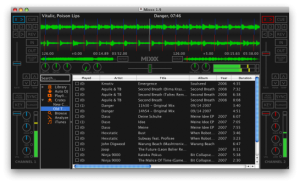
Nice free DJ software 

- Shoutcast / Icecast support
- Mixxx can now broadcast over the internet (heavily requested feature)
- External Mixer Support
- The new Sound Hardware preferences pane allows you to route each playback deck separately, which allows you to use Mixxx with an external mixer.
- ReplayGain normalization
- A user from our forum worked closely with our developers to fully implement volume normalization, including performing the ReplayGain analysis for tracks which are not tagged.
- Waveform Gain
- The scrolling waveforms now scale according to the channel gain for better visual feedback.
- Key lock buttons
- Formerly known as “pitch-independent time stretch”, there are now easily accessible key-lock buttons for each for deck.
- Revamped default skin
- Since the original source material for the Outline Netbook skin was lost eons ago, our artist completely redid it from scratch and tweaked it for better visibility. The new skin has also added EQ kill switches.
- HSS1394 support (Windows, OS X)
- Mixxx now supports firewire HSS1394 MIDI devices such as the Stanton SCS.1 series.
- Improved FLAC support
- We’re now using libFLAC directly for smoother FLAC decoding.
- Revamped metadata parsing
- Integration of TagLib allows Mixxx to parse more metadata from songs, and do it more consistently.
- Metadata writing
- Mixxx can now write changes in song metadata back to disk. This feature is off by default, and can be enabled in the Library preferences pane.
- Millisecond time display
- The time counters in Mixxx now have an extra millisecond display.
- Library improvements:
- Played column – The library now indicates whether a song has been played in the current session already, and also counts the total number of times the song has been played.
- Ratings column – 5 stars, no stars, or anywhere in between.
- Better search – Search now searches in more columns, and by-term instead of by-phrase.
- Revamped iTunes integration – A rewrite yielded a significant speedup of iTunes parsing.
- Faster library scanning – The library scanner should perform much better on large libraries.
- Inline Editing – Double click any item in the track table to edit its contents.
- Recording to MP3/Ogg – Now your recordings can be saved in either MP3 or Ogg/Vorbis format.
- New MIDI mappings:
- Vestax Typhoon
- Vestax Spin
- Hercules DJ Console Mk4
- Numark MIXTRACK
- Pioneer CDJ-350
- Updated MIDI mappings:
- Hercules DJ Control MP3
- Hercules DJ Control e2
- Hercules DJ Control Steel
- Hercules MK2
- Vestax VCI-100
- Reloop Digital Jockey 2
- M-Audio Xponent
- Tons of bug fixes and performance improvements!
Paulstretch has become even more stretchie
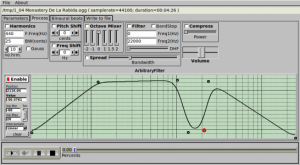
Developer Paul Nasca has released an updated version of Paul’s Extreme Sound Stretch, or Paulstretch, a program for stretching audio.
It is suitable for extreme sound stretching of audio and for applying special effects by “spectral smoothing” the sounds. It can transform any sound/music to a texture.
Version 2.1 is even more extreme and stretchier, and it can stretch your audio file up to one quintillion times ( 10^18 x ).
New in Paulstretch 2.1:
- Added loading/saving parameters.
- Added Linux Jack support.
- Added “Symmetric” mode of Binaural Beats.
- Support for longer stretches – for the really patient ones – up to one quintillion times ( 10^18 x ).
- Fixed a bug which produced infinite loop at the end of some mp3 files (at playing or render).
- Fixed a bug in the mp3 reader.
- Other minor additions.
Paulstretch is open source software released under a General Public License (GPL2).
A Windows binary is available to download at Nasca’s site. The Mac version is maintained separately, here.
DATAMASKIN

