
Kinect WiiMote Ableton Midi Over IP – soon as Open source
Alistair keeps feeding us with nice updates on the Kinect WiiMote solution
After battling against slow laptops and extreme latency, I’ve started turning this demo into a cluster system with different operations being farmed out to different machines, it could be the only audio application that has had it’s latency reduced by sending Midi messages over TCP/IP.
The demo only has one of the instruments connected, the green bar at the side. The little horizontal lines across the bar are the lower stave (bass clef) and can active Midi Notes. The other box does nothing, instead a wiimote is used to tune synth parameters.
Ableton Live is being used as the output device, it’s not quite the right thing for this, a software synth is preferable.
PS. Alistair also tells me this:
Just cracked getting the WiiMote and Kinect and Ableton to co-operate together making music by using midi over IP, will be releasing an open source version in February so people can collaberate making music over the net
VOX VDL1 Dynamic Looper
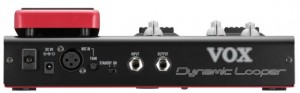
A candidate to challenge the reigning BOSS Loop Station line, there’s rival VOX. While they’re both loopers with some things to stomp on, the designs are quite different. The BOSS units can store up to three hours and 99 phrases; the VOX VDL1 stores two loops with a total recorded time of 90 seconds. Nor do you get the utility of the BOSS’ USB storage transfer. And the Vox is mono, whereas the BOSS is stereo.
In place of those features, the VDL1 focuses more on live looping and effects:
- Live effects: Pedal/Wah (Clean/Comp/Crunch/Overdrive/Distortion), Mod (Chorus 1/Chorus 2/Flanger/Phaser/Tremolo), Bass (Electric 1-4/Synth 1/ Synth 2), Acoustic (four models). Pitch, stutter, EQ, delay, reverb, “sci-fi.”
- Loop effects: volume, crossfade, reverse, “loop in loop” (no idea on that one), pitch, speed, scrube, stutter, mod, filter, delay.
- Master limiter.
- Mono input jack, mic in (no phantom power)
- Undo and redo in overdubbing.
- Infinite layers.
This video demonstrates using the VDL1 and the basic operation of the controls.
A demonstration of the VOX VDL1 Dynamic Looper using multiple instruments to build up a backing track.
Father of Circuit Bending

Here’s what he has to say about it:
Reed Ghazala also known as the father of Circuit Bending has many artistic outlets. Recent accessibility of quality video editing and HD camera technology allowed Reed to create new experimental movies that he can now easily share with the rest of us. To fully experience these you may want to view the videos in full 1080p HD glory on Reed’s YouTube page or through his Flickr Poster Portal. Reed also wants to encourage people to print the posters and show the films at film nights, festivals, parties, bending workshops, etc.
Eventide Space – Sneak Peak
Here’s a nice one for you. Sneak peak of the new Eventide “Space” Reverb stompbox. Running a Roland TR-808 and TB-303 through some of spatial effects including basic reverbs, delays and unique combination effects.
“Reverb” seems a bit too vanilla to describe a box from Eventide. Regarded as one of the best hardware effects processors ever, Eventide’s brilliant sounds have sadly been out of reach to most musicians. Eventide’s new stompboxes finally make those effects portable and affordable. The latest is Space.
- Room, plate, spring, hall.
- Special effects / combo effects: Shimmer, ModEchoVerb, DualVerb, Blackhole, MangledVerb, TremoloVerb, DynaVerb
- Mono and stereo operation.
- Tap tempo, MIDI clock sync. (Yes, that’s right – a tempo syncable reverb.)
- Instant program change, which makes this ideal for live performance use in a way many reverbs, hardware or software, aren’t.
- True analog bypass.
- Real-time controls – ten knobs, MIDI, expression pedal, metal footswitches, and a programmable “HotSwitch.”
- USB MIDI, USB2 software upgrades, and MIDI in, out/thru. Expression pedal, aux switch.
Straw demo
Nice patch
On Saturday, I folded multiple loads of laundry, cleaned the bathroom, and played closet tetris in order to claim some space to put the air conditioner I pulled from the window. Then I cleaned the top floor. Feeling pretty good about releasing a 512 version of press cafe the day before, I decided to tackle an idea I had for the monome involving FM synthesis. The horizontal axis is pitch and a modal pitch map can be quickly generated on any base note, or you can edit the pitch map arbitrarily. The vertical axis is a modulation parameter that can be routed simultaneously to several destinations. Patch editing is very gratifying as everything is live all the time, so you don’t have to re-trigger notes to hear the effect. This also opens the door to additional real time control. It is easily hackable. There are no polyphony/voice limitations. The downside is it isn’t light on the processor. This patch consumes 20% of one core on my core i7. I’m using some hacked in support for the powermate knob to quickly make some parameter changes to broaden the range of timbres demonstrated.
I finished the patch on Saturday night and resolved to make a video on Sunday. I had in mind something more musical for a demonstration, but I was losing sunlight, so this will have to do for now. I added reverb after the fact (Valhalla Shimmer), otherwise, you’re hearing the real-time output.
20 years ago, I wished for the ability to design a purpose-built synthesizer/instrument in a specific configuration, and use an adaptable, non-specific interface to control that synthesizer. Today this is possible. I wish I could spend every day making things like this.
The Third Generation Karma Motif
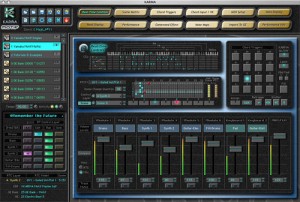
KARMA® is the award-winning interactive music generation technology that has been enhancing high end workstations (such as Korg’s Karma, OASYS, M3 and new KRONOS) for over 10 years. Now, KARMA Developer Stephen Kay is bringing a new version of KARMA to the Yamaha Motif XFand XS series: “KARMA Motif” – for Mac OS X and Windows.
Jam/Create/Produce
KARMA Motif provides almost instant gratification
to the aspiring musician, making it fun and easy
to create professional sounding tracks or jam for hours, while providing
enough power and scalability to satisfy the most experienced producer
looking for something more to inspire and elevate their production and
song-writing to a higher level.
The heart of KARMA is the “GE” (Generated Effect) – a parameterized
specification for an algorithmically generated musical phrase. You can
think of it as a “mutant arpeggiator on steroids.” A KARMA Performance
can use up to six independent GEs to produce multi-instrumental
grooves with an unheralded degree of interactivity and variability.
KARMA has seven layers of real-time control in each multi-module
Performance: one for each of the six Modules, and a Master Layer that
controls multiple modules at the same time. 32 Scenes in each layer store
snapshots of every setting, and the scenes can be changed during the
performance to produce completely different variations: verses, choruses,
bridges, breakdowns – and you can quantize when the scene changes
happen, as well. Press a button ahead of time and the scene changes at
the next downbeat, 2 bars later, or 4 bars later – however you prefer.
Third Generation KARMA
KARMA Motif also debuts the newest, most advanced, third generation
(KARMA 3.0) technology with a host of new features including:
8-track design (6 KARMA Modules, 2 Keyboard Layers) per Performance.
Per-track Volume and Mute stored in each of the 32 Scenes – individually
adjust the mix of all parts in each scene, and which parts are playing.
Velocity Response Curves – individually tailor the velocity response for
the left hand keyboard, the right hand keyboard, the input to KARMA
from the keyboard, and the Chord Triggers (pads), without editing the
Motif’s programs or songs.
Fill/Stop Feature – use one or more modules as a melodic or drum fill,
with the ability to stop and start other modules automatically.
Advanced Stutter Feature – rapidly “stutter” (retrigger) the entire groove
at different rhythmic resolutions, providing an effect similar to how it
would sound if you sampled the entire KARMA groove and then
replicated small slices of the beginning of the sample in your DAW. From
machine-gun like stutters to slow triplet hits, it adds a completely new
dimension to a KARMA Performance.
Master Transpose – play in one key, generate output in another,
switchable in real-time.
Chord Triggers (Pads) – Individual Vel. Sensitivity and Transpose, for not
only triggering KARMA with pre-programmed chords of your choice, but
for triggering hits, sound effects and even the Motif’s arps.
Performance Notes Feature – bring up a detailed Performance Notes
document for each included Performance, with information about the
Scenes, RT Control assignments, Chord Trigger assignments, key zones,
methods of playing, suggested uses and more. Edit to include your own
comments and create your own notes for your own Performances.
Extensively redesigned single-window interface…and more!
The power of KARMA comes to the Yamaha Motif XF and XS!

KARMA’s interface ties the Motif’s Remote Mode to powerful and inspirational real-time control of your grooves.
Where’s the Remote?
Activate the Motif’s Remote Control mode, and all of the buttons
and sliders on the Motif’s interface can be used to trigger the 16
Chord Triggers, Fills, Stutter feature, Scene changes, Scene mixes
and real-time algorithmic variations – no need for an external
fader/button box, although full support for interfacing them is
also provided, with more assignable CCs for real-time control via
external controllers.
You can use the Motif’s buttons to trigger 16 different chords, hits
or SFX stored in each KARMA Performance. Store your own chord
progressions instantly to the buttons using the keyboard, or
assign hits, drum sounds or even the Motif’s arps as additional
elements to be used during performances.
Use the Motif’s 8 sliders and 8 knobs to control KARMA’s
Real-Time Sliders or Scene Mix, and use additional rows of
buttons to select the current Module Control Layer, various
Stutter effects, KARMA’s Real-Time Switches, or KARMA Scene
changes – among others.
Enter the Matrix
KARMA’s Scene Matrix provides an overview of the 32 scenes in
each of KARMA’s seven Control Layers (that’s 224 scenes per
Performance)! Mix and match Scene 1 of the Bass line with Scene
4 of the Drum groove with Scene 7 of the arpeggiated synth – all
called up at the touch of a single button in the Master Layer
Scene. We’ll do the math for you: assuming all 32 scenes were
programmed in all 6 of the Module Layers, you would have access
to over 1 billion potential combinations of scenes within a single
Performance – we think that should be sufficient!
Going to the Library
KARMA Motif includes a library of preprogrammed Performances
and GEs for instant inspiration, in a variety of popular musical
styles such as techno, trance, hip-hop, new-age, classical and
more, utilizing the high-quality sounds and effects of the Yamaha
Motif XF or XS.
Also slated for inclusion is a library of “Single-Module
Performances” – these are not multi-part groove and song
templates, they are simple single-program interactive phrase
producers you can integrate into your more traditionally
sequenced workflow. Need a finger-picked guitar pattern?
KARMA comes around. Need a funky bass-line? KARMA comes
around. Just need a drum groove, and the ability to customize it a
bit so it feels like your own? KARMA definitely comes around!
Reaching an arrangement
Unlike popular “arranger keyboards”, the key to KARMA’s unique
sound and almost mystifying ability to sound “fresh” is the fact
that KARMA generates music algorithmically, with hundreds of
parameters capable of independent manipulation in real-time
while the music is being created, resulting in thousands of custom
variations that would be impossible to achieve in any other way.
An arranger keyboard plays static MIDI phrases over and over; a
KARMA performance can be randomized, changed, and morphed
from something busy to something simple, at the touch of a
slider, knob or switch.
Ready to record when you are!
KARMA Motif’s Performances use the Motif’s Song/Mixing mode,
where each of the 64 songs is a complete, up to 16 part
multi-track six-module KARMA algorithmic music groove, with a
left hand zone for controlling KARMA and a right hand zone for
soloing on top of it. The Motif’s arps are also additionally
integrated in many performances as additional elements that can
be added via the 16 Chord Triggers.
What this means is that when you load a KARMA Performance, it’s
ready to record at any time. Since you are already in Song Mode,
you’re just one step away from recording the your KARMA-fied
musical performances into the Motif’s sequencer – or you can
route the output to any DAW for external sequencing.
Furthermore, a KARMA Performance can call up any Motif Voice,
Performance, Song, Pattern, or Master slot when loading, so that
KARMA can be easily integrated with any of the Motif’s modes.
Availability
KARMA Motif is currently undergoing final development with an
expected release date of April 1st, 2011. All features and
functionality discussed here are preliminary and subject to
change without notice. © 2011 by Karma-Lab. Please consult
www.karma-lab.com for the latest specifications and information.
PreSonus releases StudioLive Remote, wireless control software
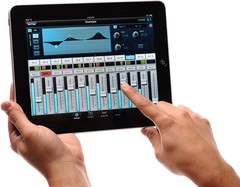
PreSonus has released StudioLive Remote for the Apple iPad, the first dedicated wireless control software for the StudioLive small-format digital console.
At last, you can have wireless remote control of any PreSonus StudioLive-series digital mixer’s channels, auxes, effects, subs, Fat Channel processors, and more. Not only can these functions be controlled from anywhere in a venue by the front-of-house sound person, but custom aux mixes can be simultaneously adjusted by any performer with an iPad.
StudioLive Remote, available free from the iPad Apps store, provides direct wireless control over PreSonus Virtual StudioLive software for Mac and Windows, which in turn controls the StudioLive mixer.
Can’t set up your StudioLive mixer front-of-house? Put it on stage; grab your iPad, running StudioLive Remote; and stroll to the back of the hall to adjust the main and aux mixes, channel settings, Fat Channel processing, effects, and graphic EQs. Need to tweak a monitor mix while on stage? Now you can!
More information: PreSonus
NAMM 2011 Rob Papen Demos New Synth Punch
Punch Modeling Synthesis for fresh sounds
Ambient Analogue 001
This is a very nice video of a new audio experiment we came across
Ambient Analogue 001 is the first release of an audiovisual experiment with footage of Chicago cut to an ambient music track of classic vintage and modern analogue synthesizers.
Audio/Video produced by Logan Mannstrane
Music is available as a free download on SoundCloud:
soundcloud.com/loganmannstrane
Audio information:
Sequential Circuits Prophet VS: From 0:05 – 4:19
Roland Jupiter 8: @ 1:55, 2:21, 2:45, 2:51,
Sequential Circuits Pro One: From 4:20 – 4:48
Oberheim FVS (Four Voice): From 4:49 – 6:26 and 7:57 – 8:32
Roland TR-808: At 4:53-END
Moog Voyager: From 6:28 – 7:56 and 8:32 – 11:09
Sequencing done with Logic Pro and StepPolyArp for iPad. Mixed in Pro Tools 9. Filtering of drums and select synths with the Oberheim Four Voice stereo inputs.
Pictures of Moog’s OMG-1 synth


The OMG-1 Synthesizer
The OMG-1 was designed by Persing as a live performance instrument and is not a commercial product — it’s truly one-of-a-kind
The state of the art dual-manual OMG-1 combines:
- a Moog Little Phatty analog synthesizer
- Spectrasonics’ flagship Omnisphere software synthesizer
- An internal Apple Mac Mini computer
- Dual Apple iPads
- Dual iPods
- Spectrasonics’ new Omni TR iPad app
All this electronic music technology is integrated into a beautiful, hand-crafted curly maple cabinet, created by American artisan Daniel Auon.
During the special presentation, Moog-Koussa, Executive Director of the Bob Moog Foundation, and Persing talked about their collaboration and Eric gave a progtacular demo with the OMG-1. Using the OMG-1, Persing demonstrated that he could play complex OmniSphere virtual instruments and manipulate them using the multi-touch controllers, play iPad synth applications and add true analog leads with the Little Phatty.
“I’ll never forget the first time I played a Minimoog when I was a little kid…it truly changed my life!” said Persing. “So, it’s a privilege after all these years to give back to the foundation honoring my hero Bob Moog and keeping the spirit and history of his inventions alive for the next generation. I had a blast designing the OMG-1 with Dan and I can’t wait to see who wins it!”
Michelle Moog-Koussa added, “Eric’s OMG-1….represents the contemporary convergence of analog and digital, hardware and software. I think Bob would applaud Eric’s efforts to transcend boundaries in order to create an instrument with new and unique capabilities.”
Details on the Moog Foundation will be announced when the contest begins on March 15th, 2011.

DATAMASKIN

