
Quick Start Guide for Tempest Analog Drum Machine from Dave Smith Instruments, narrated by Roger Linn
Tempest is a collaboration between Smith and longtime friend and fellow instrument designer Roger Linn. Though they’ve consulted with each other on past projects, Tempest marks the first time a product will carry both the Dave Smith Instruments and Roger Linn Design logos. “If you’re going to make a drum machine, who better to have in your corner than Roger Linn?” said Smith, referring to Linn’s legacy as inventor of the digital drum machine.
Though Smith is also responsible for some fine drum machines—most notably Sequential’s DrumTraks and Studio 440—Tempest is his first to utilize analog synthesis to generate the sounds. “We’ve designed a very flexible new synth voice for Tempest,” said Smith. Linn added, “The design of Tempest reflects a rethinking of what a drum machine needs to be in the current era. It’s not so much a drum machine as a new musical performance instrument for the creation, manipulation, and arrangement of beat-oriented music, with an intuitive and efficient use of human gestures.”
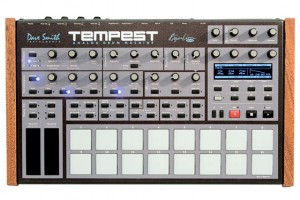
Tempest’s 16 velocity- and pressure-sensitive pads are arranged in an 8 x 2 array to facilitate both real-time and step entry of beats. Two pressure- and position-sensitive Note FX slide controllers provide a unique new method of performance and control.
- Each of the 6 analog voices has 2 analog oscillators plus 2 digital oscillators (with a large bank of included samples), Dave’s classic analog low-pass filter with audio-rate modulation, an additional high-pass filter, analog VCA with feedback, 5 envelopes, 2 LFOs, an extraordinary variety of analog modulation routings, and stunning sonic quality, warmth and punch. Although optimized for drum sounds, it excels at tuned sounds as well, and even doubles as a 6-voice analog synth. In addition to the 6 direct voice outputs, there are stereo mix outputs and phones outputs, plus 2 inputs for foot switches or expression pedals, MIDI in/out and USB.
- The performance-oriented operating system, 90 panel controls, and bright 256 x 64 OLED display work together to provide a tightly integrated, non-stop workflow: record a drumbeat in real-time, switch to another drumbeat and use the lit pads to record it using step programming, switch to another drumbeat and record tuned keyboard parts, use the 2 touch controllers to to record real-time note or beat-wide parameter animations, use the generous sound controls to edit any of the drum sounds, tweak the analog effects or drum mix, arrange beats in real time and record the live arrangement into a song, enter/exit Song mode and much more, all without ever stopping play.
- 16 pressure- and velocity-sensitive lit pads are arranged in a 2×8 configuration, providing intuitive access to all your fingers and providing the ideal compromise between the popular 4×4 pad arrangement (popular for real time programming ) and 1×16 arrangement (popular for step programming) because Tempest does both. The pads can be used to play 32 drum sounds (2 banks), mute/unmute the 32 sounds on playback, play and arrange 16 beats in real time, play one sound at 16 tunings (in a variety of scales) or 16 velocities, or as 16 time steps for step programming. The ROLL button permits creating drum rolls or repeated groove patterns by varying pad pressure as the beat records, and doubles as a momemtary “stutter” effect when the pads are assigned to play beats. Use the Sustain button on tuned parts like a keyboard’s Sustain pedal, or to choke drum sounds or drumbeats when the pad is released.
- Two pressure- and position-sensitive Note FX slide controllers permit real-time recording of note or beat-wide sound parameter changes into the drumbeat as you play. For example, record simultaneous filter frequency, tuning, envelope decay and pan changes for each note, or control similar parameters affecting the entire beat.
“The Unknown” by TSF
“This new composition is about the unknown, and having no idea where things are going but knowing that you’ll get there somehow and enjoying the journey along the way.
The piano lead (Yamaha Motif-6/A-90) played by Danielle is improvised over the accompaniment of the Jupiter-8 res/bass patch and the D-50 synth strings patch played by Crystal.
TR-808 drum machine is also used for an analog percussion track.
Please enjoy the randomness.
and thanks for joining us on the journey. :)”
MOOG SOUND LAB: Phantogram “16 Years”
MOOG SOUND LAB: Phantogram “16 Years” from Moog Music on Vimeo.
DJ Bootcamp – Sasha masterclass – on how to make a break through
Sasha shares his advice with the DJs on how to break through. Hear about his journey from listening to Acid House at the Hacienda in Manchester, to his first club residency, to eventual cult status!
More on: http://facebook.com/burn and http://burn-studios.com
Sasha began his career playing acid house dance music in the late 1980s, and became a central figure in the development and popularisation of electronic dance music. He partnered with fellow DJ John Digweed in 1993, touring internationally and producing a series of mixes (compilations of other artists work played in a continuous fashion). Through their track selection and mixing techniques, Sasha and Digweed were instrumental in the evolution of progressive trance and house music.
Sasha has produced multiple UK-charting singles and has remixed tracks for artists such as Madonna and The Chemical Brothers. His remix of Felix da Housecat’s “Watching Cars Go By” earned him a 2004 Grammy nomination. Sasha’s remixing and production often combine electronic music genres, making it difficult for critics to pinpoint his musical style, including on his debut album of original work, Airdrawndagger.
Eowave Ribbon Controller in the Dark
“We wanted to show the striking visual beauty of the Eowave Ribbon in a darkened environment, which makes it a drop dead show stopper!
In this video we are using the Eowave Ribbon to control a Dave Smith Instruments Evolver whose output is being processed by an Eventide Space.”
Sunrizer on iPad – Sinevibes bank demo
This is a showcase of some of the patches from the Sinevibes bank for Sunrizer. You can download the bank for free over here: http://www.beepstreet.com/horizon
Sunrizer synth (previously known as ‘Horizon synth’) is a virtual analog synthesizer that takes the definition of iOs synthesizer to the next level. Thanks to carefully designed architecture and heavy usage of coprocessor it blurs the boundaries between iOs and hardware synthesizers. Sunrizer was built to perform and works perfectly with any MIDI keyboard or sequencer. A lot of research has been done in order to achieve unheard warmth and clarity.
First preview of the new MIDIbox SEQ V4L
This video demonstrates the brand new MIDIbox SEQ V4L, a variant of MBSEQV4 with minimalistic user interface. Buttons and LEDs are directly connected to the MBHP_CORE_LPC17 module (which is under the small table). An external keyboard is required to enter Notes, Pitchbender and CCs.
MBSEQV4L controls a virtual Mk II with Seq1, and a Wurlitzer with Seq2. Both sequences have been recorded live and at once, only the Stylus RMX based drums have been added later in Logic Pro to make this video a little bit less boring. 😉
What happens:
[0:05] configuring Seq1 for 32 steps (2 bars)
[0:14] a basic pattern is entered in Live Recording mode to define the basic rhythm
[0:19] now this sequence is automatically looped
[0:25] switching to Step Recording mode
[0:27] and entering additional notes for selected steps
[0:32] activating force-to-scale: Pentatonic Minor (previously forgotten)
[1:05] yes, we can also enter chords! 
[1:55] activating the Humanizer with extreme settings (random keys/velocity/length – always in scale!)
[2:04] activating Groove with Shuffle feel and modified Delays/Velocities/Lengths
[2:11] now it gets more funky!
[2:12] trying some magic LFO presets – affecting note and velocity
[2:36] trying different Step Progressing presets – affecting step increment/decrement/repeat
[2:35] some different LFO presets again
[3:08] break
[3:17] entering a second sequence, played by a virtual Wurlitzer
[3:26] notes are entered in Step Recording mode
[3:57] trying different MIDI Echo effects on Seq1 with Note increment (but forced to scale)
[4:28] introducing our special guest! 😉
[4:32] my beloved app “Pianist Pro” is running on the iPad, it sends OSC messages to MBSEQV4 which are converted to MIDI and thereafter sent to Logic Audio via USB
[5:21] additional notes are entered, making the sequences more complex
[5:33] muting Seq1, the Wurlitzer plays alone
[5:58] all MIDI effects are activated – MBSEQV4L jams a bit out of human control meanwhile, but it still sounds nice 😉
[6:40] unmuting and modifying the MIDI effects of Seq1
[7:04] slowly some steps are disabled to thin out the sequences
EARTH TO DISK
12 inch vinyl 2008-2011 [BY ART OF FAILURE]
(realized with Flo Kaufmann and the ArtKillArt label)
Earth_to_disk is a projects that uses the earth elevation data. The height informations of the globe are analogically transposed on a 12 inch record. A standard turntable can after that read this relief. The chain of the elevation data crossed during the playing is directly transposed into audible sound vibrations. By every rotation of the disk, we can recognize patterns corresponding to the relief of the crossed continents. The engraving of this elevation’s information on the surface of the disk generates in consequence a subtle image of the earth. This image may remind us the representations that are proposed to us since the stellar exploration during the 60’s, until today with applications like google-earth.
fes.artoffailure.org/
Fans testing out Alan Wilder’s equipment at Manchester Depeche Mode auction
Once in a lifetime experience of testing out gear of Alan Wilder before it disappears for good in a private collection!
Read our interview with Alan Wilder before the auction right here >>
Lector – new vocoder effect plug-in for PC and Mac
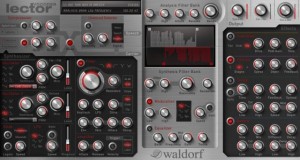
Waldorf has released Lector, a vocoder effect plug-in for Windows and Mac.
Robot voices, whispering strings, talking drum loops, rhythmic pads, the resonant ringing of bells, dripping water – the possibilities are all but infinite. With a quick tweak here and there, the Lector turns any incoming signal into novel sounds and effects.
Tremendously versatile, the Lector puts in your hands a sonic toolset for a wide range of diverse applications. Just about anything goes, from distorting the human voice to adding subtle harmonies to lead vocals and getting creative with movie soundtracks. The analysis filter bank splits the incoming audio signal into as many as 100 frequency bands, the intensity of which modulates the volume levels of an equal number of band-pass filters in the synthesis filter bank. The integrated 16-voice synthesizer or an external source provides the input signal for the synthesis filter bank. This lets you do fun things like apply a melody line or chord sequence to articulate vocals or speech.
Lector features
- 3 to 100 band Vocoder.
- Adjustable range of Analysis Filter Bank.
- Adjustable offsets and LFO modulation of Synthesis Filter Bank.
- 3-band Equalizer with variable mid band.
- Individual Compressors for Speech and Carrier signal.
- Voiced / Unvoiced Detector.
- Overdrive (types Tube, Diode, Clip).
- Stereo Chorus / Flanger, 2 to 6 stages.
- Stereo Delay, syncronizable.
- Reverb.
- Sidechain input (VST 3 and Audio Unit).
- Carrier plug-in (VST 2).
- 16-voice Synthesizer (per voice):
- Polyphonic, Monophonic or Free-Running.
- 2 Oscillators, waveforms sine, triangle, sawtooth, pulse with pulse width modulation, sample&hold, noise, single and multi sample playback.
- FM.
- Ring Modulation.
- Portamento / Glissando.
- 1 Filter, types Lowpass, Bandpass, Highpass, Notch (12dB and 24dB), Whitening.
- 1 LFO, synchronizable, waveforms sine, triangle, sawtooth, square, sample&hold, noise.
- 2 AR envelopes.
Lector for Windows and Mac (VST) is available to purchase for 199 EUR.
DATAMASKIN

