
Time for a new free Ableton Rack – SynthPad Tape
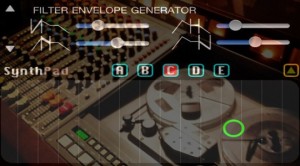
Free Ableton Instrument #59: SynthPad Tape. This is an Ableton Live Instrument Rack created by sampling Big Robot Studio’s SynthPad app. The Sample was originally recorded to my Tascam Reel To Reel Machine, which gives it some analog warmth, and then it was collected into an Ableton Instrument. From there it is coupled with a dirty sine wave synth and plenty of effects. Enjoy!
Download @ http://bit.ly/freesynth59
Here’s what AfroDJMac has to tell us about his new rack:
“My main goal was to create an imperfect instrument, that is still completely usable, but has some character. The sample I chose isn’t the cleanest one, but it sounds nice looped. I added some super subtle modulation to the pitch to make it sound a bit more like an analog synth. These days, music is so perfectly in tune that it can take away from the character of the instruments. I think it is worth playing around with the tuning of your soft synths to emulate the subtle intonation imperfections found in real instruments and hardware synths. It gives the music a more “alive” feeling and can add tremendous character and charm. So this particular synth is not perfectly in tune but it won’t clash with instruments that are. Also, pulling the sample from the tape machine adds some warmth to the sound as well.”
Synth exploration: POLIVOKS Filter Demo
Here’s a new video focusing on filters appearing on the Russian Polivoks synth:
It’s a strange synth. But what great filter …. can be switched from low pass to bandpass in an instant. It also posesses two envelopes that can be looped over the attack-decay sections.
I understand that Rammstein use this synth as does Franz Ferdinand.
This is the first of two videos comparing an original Polivoks Filter to one of its many clones.
In this demo, its Blue Lantern’s LM4250 VCF.
http://youtu.be/6RM2HqfXOwg
Im starting with an open filter… Cutoff at max – level 6, resonance at 0.
I’ll update this later with a more detailed explanation of the controls (for those who cant read Russian).
Modulation is via an LFO on the extreme left and an ADSR envelope.
Fresh on Android: Music Riff Studio – Overview and tutorial
Example of using. Music Riff Studio for Android
Download from
http://www.samsungapps.com/topApps/topAppsDetail.as?productId=G00007778176
Compose music everywhere! Drum machine, step sequencer, loop editor, wavetable synthesizer. Guitar distortion, mute strings distortion, bass, drums and so on. You can save and load your loops without restriction. You can exchange loops with others (send via email or Evernote). All in one. The best solution for mobile rhytm section. Created by music composer for music composers. Use earphones for better sound.
Bookshelf: Power Tools for Reason 6
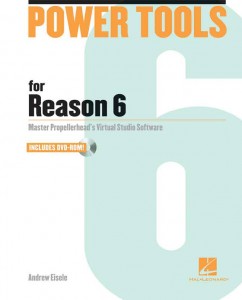
Hal Leonard Books is now shipping Power Tools for Reason 6 by Andrew Eisele, described as a comprehensive book that provides a quick-start tutorial that not only gets you up and running quickly, but also delves into advanced sequencing and mixing techniques.
“With an unbelievable array of tools, Reason 6 gives you everything necessary to record, mix and produce music projects from start to finish. Reason 6 has the best of Propellerhead’s Record and Reason, with the addition of some fantastic new features and effects, including the Pulveriser Demolition, Alligator Filter Gate, and the Echo tape delay. With the ability to record and edit audio directly into the arrangement window – and with audio time-stretching capabilities – it is now possible to record audio and adjust the tempo while keeping everything in sample accurate synchronization.”
Inside Power Tools for Reason 6, you’ll find:
- How to set up your studio for Reason 6
- An overview of the feature set
- An explanation of MIDI concepts from signal flow and recording to hardware and instruments
- A sound primer for digital audio concepts and recording
- How to get the most out of the synths, effects, drum and percussion instruments, and routing capabilities of Reason 6
- How to best use the sampler to capture, play back and manipulate digital audio
- And much more
Hal Leonard tells us that Power Tools for Reason 6 includes video tutorials on an accompanying DVD-ROM that let you see and hear many of the most important tools and techniques now available in Reason.
About the Author:
Andrew Eisele is the author and host of the Music Pro Guides, a training DVD series spanning 40-plus titles covering all major music production software. His teaching credits include Full Sail Real World Education, the School of Audio Engineering and Dubspot. Currently, he works as a producer/DJ and is co-founder of the arts collective Tsunami Bass Experience and MorphSaru Productions.
Pricing and Availability:
$39.99
More information:
Quick tour of the Nektar Panorama P4 Controller
Tim Chandler form Nektar takes us through the use and applications of the new Panorama P4 MIDI controller. Designed to seamlessly integrate with Reason 6, the Panorama P4 will also offer control for any of the other major DAWs out there.
For more information or to buy a Panorama P4 today, please visit our store:
http://www.dv247.com/computer-hardware/nektar-panorama-p4-keyboard-controller…
Details:
The Nektar Panorama P4 49-Note Keyboard Controller has been custom designed for the user to have full control over all the functions and features in Propellerhead Reason. The Panorama is different to other generic controllers. It’s sole purpose is to cater for Reason producers and musicians who have been looking for a controller that does it all.
The Panorama P4 from Nektar Technology uses a unique protocol custom designed to work flawlessly with Propellerhead’s Reason 6. Its clever design and clear layout help put control at the fingertips exactly in the same way as hardware would. With its 49-note keyboard, 12 velocity-sensitive pads, a vast array of knobs and faders, and a white on black crystal clear display, the Panorama P4 provides everything required for hands on control of Reason on stage or in the studio.
The Panorama P4 layout is divided between the Mixer Section and the Channel Strip control Panorama let’s you operate Reason like no other controller. The mixer section of the Nektar Technology’s Panorama offers 9 faders (8 channel faders and a master fader) mirrored in the display controlling Volume, pan, inserts, send and returns, mute and solos.
The Channel Strip control gives all the control necessary to each channel strip in a clear layout. The channel Strip is broken down into the different sections, namely EQ, Dynamics, Inserts and Sends. Each section is easily accessible at the touch of the relevant button. Once selected the 8 encoders map to the relevant controls of the selected channel strip in the mixer.In addition, the Panorama features a silent multi-function, touch-sensitive motorised fader that can be used with any instrument, sequencer or mixer channel, delivering precise control of Propellerheads flagship DAW.
DarkStar VST Synth – Plugin Features Overview
New video guide from Loopmasters producer Andre Touhey as he explores the DarkStar Synth VST Plug-in from Minimal System Instruments (MSI).
DarkStar is a monster analogue modelled synth. With its 4 oscillators you can easily create the sounds you need. In this video Andre gives us an overview of the DarkStar synth’s main features, with a examples of the synth at work in a track. For more information on the Minimal System Instruments Line synth and purchase – please visit the http://www.PluginBoutique.com store.
Kilpatrick Format Modular Synth
Here’s a quick overview of the Kilpatrick Format Modular Synth touching on some of the features of modules K1, K2, K3, K4 and K5. The system shown in the video is the original prototype system running in the Kilpatrick Audio studio.
For more information check out: www.kilpatrickaudio.com
Ableton Live 8.4 Beta Brings 64-Bit Support
OK – 64-bit is finally on the horizon for Ableton users 
We are pleased to announce the beta version of Live 8.4, featuring native 64-bit support. With 64-bit support, Sets in Live 8 can now accommodate much larger memory usage, and third-party plugins that support 64-bit. Registered Live 8, Suite 8, Live Intro or Live Lite 8 users can download the beta now.
The 64-bit version of Live works with PCs running Windows Vista/7/8 (64-bit) and with Intel-Macs running OS X 10.5 and up. The 64-bit version of Live 8 does not support Max for Live, video, or The Bridge. We are currently working with our partners to add support for these features.
Learn more about the benefits and limitations of 64-bit Live 8
The release version of Live 8.4 will be available later, as a free update for registered Live 8, Suite 8, Live Intro or Live Lite 8 users.
Some of the main highlights below:
- 64-bit version of Live can use a theoretical maximum of 16 exabytes of RAM – much more RAM than computers actually have.
- You can use the 64-bit version of Live if you are running a 64-bit version of Windows Vista, Windows 7 or Windows 8, or Mac OS 10.5 or higher on an Intel-based Mac.
- The 64-bit version of Live 8 will not support Max for Live, video, or The Bridge. We are currently working with our partners to add support for these features.
- All 64-bit plug-ins can be used in the 64-bit version. 32-bit plug-ins cannot be used directly in the 64-bit version, but there are third-party tools (such as jBridge) that will allow 32-bit VST plug-ins to be used within the 64-bit version.
- You can have 32-bit and 64-bit Version installed at the same time.
- Live documents made in 32-bit versions of Live will work properly in the 64-bit version of Live, and vice versa. If the Live Sets use features which are not available in the 64-bit version, those features will be limited or disabled as described below:
- Max for Live – the Live document will load and play, but the Max devices will behave as if they were bypassed.
- Video – the Live document will load and play but clips containing video will behave as if the referenced video file is missing.
- Plug-ins – Live documents that were created using 32-bit versions of plug-ins will work normally, but only if 64-bit versions of the same plug-ins are installed.
SYNCHIME CLONE ANALOG DRUM SYNTH WITH MINI8 SEQUENCER
THIS IS THE SYNCHIME CLONE HOOKED UP TO A MINI 8 ANALOG SEQUENCER
This is a clone of a 1980’s analog drum synth called a Synchime, others in the series include Syntom and synbal. This clone also has a CV input which is not on the original Synchime.
Voxkit – a sound-triggered MIDI drum controller for iOS
Voxkit is a universal app for the iPhone, iPad, and iPod Touch.
It’s designed to trigger drum samples (either internally, or through MIDI), and distinguishes between four different tones at a time.
The app is currently in review in the iTunes store, and should be available shortly. For the release, it’ll be priced at $1, and we’ll have some promo codes available on our Facebook page…. http://www.facebook.com/SecretBaseDesign
For more info, go to http://www.secretbasedesign.com/apps
DATAMASKIN

