
Duet for Synthesizer and Rail Cars
Enjoy!
Joris Voorn explaining how he reworks loops in Ableton Live
Watch as Joris Voorn explains how he uses Ableton Live’s automation on the envelope shaper to edit and rework stock samples and loops into something custom and unique.
SE ObieRack X2 Bass Jam w/ Analogue Solutions Oberkorn & Telemark
This is bass — so headphones required!
Here’s a little bass jam put together with 2 Studio Electronics ObieRacks, an Analogue Solutions Oberkorn analogue sequencer, and a Telemark V2 semi-modular synth. A five voice!
The Telemark (under the ObieRacks) is providing the backing pitchy, swooshy f/x, and you’ll see the binary inputs of the Oberkorn being patched — which creates new patterns on the TM in binary fashion.
The ObieRack has a master filter cutoff (for both SEMs) that is adjusted during the video. Additionally, the SEMs are switched to bandpass mode for some variety in the sequence.
No overdubs, no FX, no frills — just a quick recording of the dry/raw juicy analogue sounds.
just for fun!
Drum Machine 101 with Redrum – Micro Tutorial
Ever since Reason 1.0 beatmakers, producers, and button-mashers alike have all loved the venerable old Redrum Drum Computer. And it’s easy to see why. Step sequencing drum machines like Redrum or even the classic Roland 808 offer a nearly perfect layout for programming the rhythmic syncopated beats used in so many popular music genres. The 16 buttons, representing the 16 steps in the beat, provide the right blend of predictable beat construction and random experimentation when you want to spice up your beats.
In this micro tutorial, we’ll get you started with drum step sequencing and get familiar with the Redrum’s layout. You’ll soon learn why producers the world over love Kong but also keep coming back to Redrum for that special creative simplicity.
Rob Papen’s new RP-Dock – standalone host for Rob Papen products
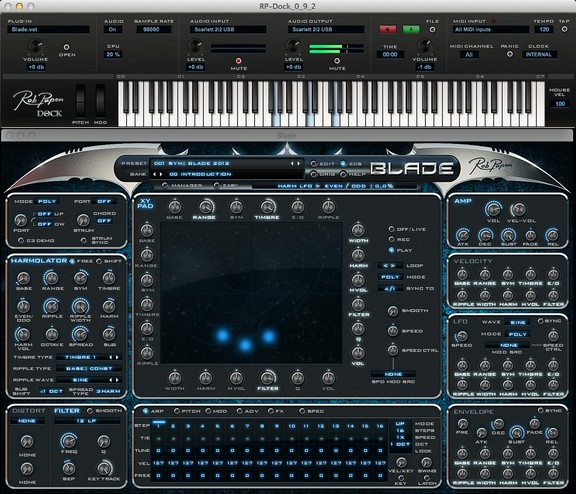
Rob Papen has announced the release of RP-Dock, a standalone host application for Rob Papen products.
There are handy features like tempo setting and an audio recording/playback facility. The audio setting for sample rate can be selected from 44.1Khz up to 96Khz (depending on your soundcard/device). Midi input offers merging of all connected Midi controllers and also included is an optional midi channel selector.
RP-Dock will host all current RP products and is completely free!
A great tool if you are playing live or in the studio or… simply cool if you just like to play around with the synthesizers or effects.
RP-Dock is currently available to download for Mac, free of charge. The Windows PC version is to be released soon.
Creating Water Drop Sound Effect for Footage using KORG iMS-20
Watch the beauty of Sound & Visual come together.
Knob by Knob the almighty KORG iMS-20 makes a WaterDrop Sound Effect.
Make sure to watch till the end to see Footage merge with Sound.
Footage: www.stockfootageforfree.com
Novation introduces the Launchpad S
Launchpad S — the next generation of Launchpad
How “KTR” setup the Launchpad: http://youtu.be/KLUqYpMJNpY
~ LIKE our video and click ‘show more’ for additional information.
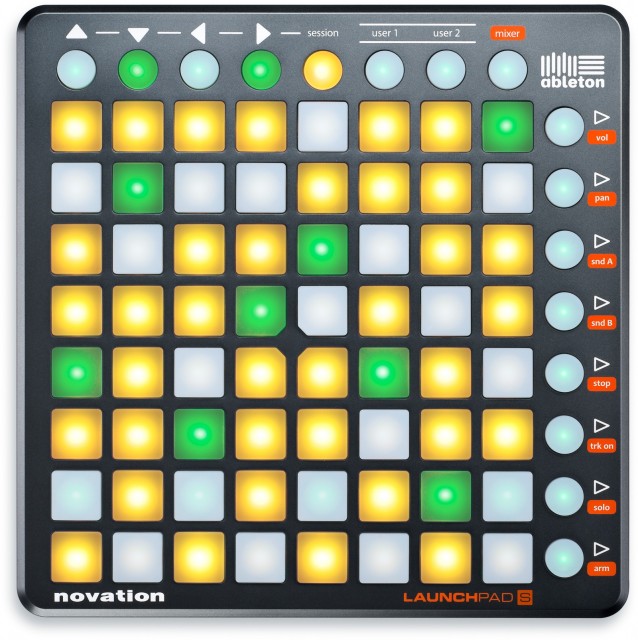
Novation’s Launchpad may have begun its life focused mainly on controlling Ableton Live. But a new update, while not radically different from the original, is more flexible, working with more software and more operating systems – including the iPad. It’s also brighter and refreshes faster than the original.
For all the details on Launchpad S visit:
http://bit.ly/Launchpad_S
Track: RoboSonic
Artist: KillTheRobot
http://www.facebook.com/killtherobotm…
http://twitter.com/kill_the_robot
http://soundcloud.com/killtherobot
http://www.youtube.com/user/killthero…
Download the samples and Ableton session here:
http://bit.ly/KillTheRobotSamples
Launchpad S is the evolution of Novation’s best-selling Launchpad 64-button grid music controller — with much brighter buttons, significantly faster refresh rate and it supports multiple software. It’s MIDI Class Compliant so it works with any MIDI software on your Mac or Windows PC. It even works on your iPad via a Camera Connection Kit (not included): Launchpad S converts your iPad into a grid-based music system: no additional power supply required, just plug in and play.
Key Features:
•The new 64-button grid music controller with MORE
All the features of the original — now with much brighter buttons, faster refresh and expanded app/system support
•Supports Ableton Live and other grid music applications
Ableton Live software is in the box — also supports FL Studio with no additional drivers. And your iPad!
•Control your mix
Including volume, pans, sends, track arming, soloing and muting. Launchpad S lets you jump to different levels across eight channels at once
•Launchpad iPad app
Trigger loops and effects using the Launchpad app on iPad — Launchpad S can be plugged into your iPad and fully powered with a Camera Connection Kit
•Take it anywhere
Launchpad S is fully USB bus powered — no need for power sockets or batteries — and it’s lightweight and easy to carry anywhere.
•More software and sample content
Comes with the Novation Bass Station synth plug-in and over one gigabyte of Loopmasters samples
SLEEPY REVIEW: NI Reaktor on Microsoft Surface Pro
Josh Morky – a Mac user for 10 years and also an iPad music app fan – was intrigued by the new Windows 8 Surface tablets
I’ve been a mac user for almost 10 years now and recently learned about the new Windows 8 taking the leap into touchscreen. More or less all new windows computers are touch. Its pretty obvious from the thousands of apps that have popped up on the iPad in recent years that performing electronic music on a touch screen is fun, expressive, and kind of what we’ve all been waiting for. It just makes sense. Ive used an iPad for playing music – which I love – but can’t help but feel that Apple is purposefully limiting its potential. File management is a nightmare, and multitasking just doesn’t work. The iPad is brilliant at making sure you get all your apps, music, movies through Apple. By controlling your work/data flow, they make more money – a good business model, but not good for the creative user.
Windows 8 seemed too good to be true, but nobody on the internet has been writing about it. I decided to take the leap and bought a Microsoft Surface. Best Buy has a great return policy, so if I didn’t like it, I could always return it….
Basically, I ended up loving this thing. The operating system looks great, works great, and is altogether fun to use. Multitasking and switching between programs is great, and its really fun to be able to use a pen/stylus in addition to touch (its super precise and pressure sensitive). It really feels like the future of computers. I use a new 15″ macbook pro in my studio and a new 27″ imac at work, and now it feels like a bummer every time use them. They feel outdated. Trying to use the iPad is even more depressing. There are a lot of new windows tablets/laptops out there – but there are two things that made the Surface appeal to me more: 1) it comes with a pen (which helps if you need precision – especially with such a small screen – and taking notes or drawing is a lot of fun) and 2) the kickstand. I didnt really realize how nice it would be to be able to prop up a tablet – the ipad can be annoying to use in a lot of situations because it doesnt have one. Other things that are awesome is that it supports flash (Hulu!) and has usb – so you can use external drives, midi controllers, audio interfaces, etc….
Using Reaktor is great. I personally hate having to use midi controllers whose interface bears no resemblance to the patch Im using, and touch OSC on an ipad can be buggy and you have to create templates for every patch you use and end up constantly changing your template if you change anything in your patch. I also dont want to have to take 2 computers to a show, I want a tablet up there with me and thats all. Surface does this. Reaktor is really responsive and expressive – but it doesnt support multitouch yet. I thought this would make it pointless to use on a touchscreen, but I barely notice it. There are times it would be great to use multitouch, and things could definitely get more interesting with multitouch, but even just touching one thing at a time completely blows away using a mouse/midicontroller/touchOSC.
I tried using Ableton and it was super buggy with touch. You’d need a mouse, but even then, the screen on the Surface is just a bit too small.
As much as I loved the Surface, I ended up returning it. My car required $1000 to fix the day after I bought this thing, and as close to perfect as it was, the screen size of the Surface is just a bit too small for performing. At 10.1 inches, it has the same problem as the iPad in that you can’t fit too much on a screen without making the controls too small. Its fine if you miss a knob when you’re working in your studio, but in a live setting, you’d want something you can reliably hit 100% of the time. Unfortunately, most of the windows tablets are around 10/11 inches – and for some reason the idea of getting a laptop sounds too old fashioned to me – I DONT want a keyboard. Im going to wait around a little bit till things like the Dell XPS 18 come out (an 18 inch tablet with a sweet kickstand thats even more versatile than the Surface’s – though doesnt have a pen) or Microsoft comes out with a second edition (rumors are that they’ll make a 14 inch version, which sounds like the perfect size for mobility, home use, and performance). In the next 6 months a ton of new computer sizes/formats will be coming out – and they’ll get cheaper. When the perfect one comes out, I’ll be ready for it.
What REALLY needs to happen is that software companies need get on board. Theres not much yet that takes full advantage of multitouch. It’ll come, but its not there yet. This is really exciting – its the obvious next step in the evolution of the computer. Windows made a great new operating system, now its the software companies turn to take advantage it.
John Foxx presents Gazelle Twin – Never Let Me Go
More details soon……
DJ Shiftee Takes On Traktor DJ
DJ Shiftee hits the streets of Berlin to showcase his mind-blowing mastery of Traktor DJ. http://www.native-instruments.com/tra…
TRAKTOR DJ brings the leading pro DJ software to iOS with an intuitive app for instant, high-impact DJ sets. Create mixes in seconds — put your hands directly on beautiful waveforms and manipulate them using gestures you already know.
[Please note: Traktor DJ is being used as two additional decks in the club scene. It is patched into the mixer through a Traktor Audio 6 interface. It is not being used to control Traktor Pro 2.]
More DJ Shiftee:
http://facebook.com/djshiftee
http://twitter.com/djshiftee
DATAMASKIN

