
Yellofier video tutorial
In App Store April, 2013!
Yellofier is an iPhone/iPad app that makes anything into music. Record your voice, a musical instrument or everyday noises. Within seconds the app magically turns them into groovy music.
Create unique music with your own sounds and with the sounds of Yello’s musical maestro Boris Blank. The Yellofier also includes sounds and songs by some of the greatest musicians within electronic music. Anything can be yellofied!
Learn more about Yellofier and discover more of Yello’s music at yello.com
Produced by Boris Blank
Developed by Jonatan Liljedahl
Designed by Håkan Ullberg
Concept by Håkan Lidbo
Presented by Electronic Beats – Telekom’s international marketing program.
electronicbeats.net
New LSD-525 amplifier and parallel EQ plug-in
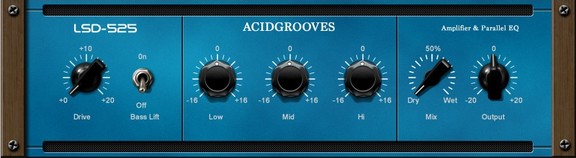
Acidgrooves has announced the LSD-525 amplifier and parallel EQ plug-in with Entropy technology.
This is the first of a new breed of Plug-Ins developed by Acidgrooves that feature the Acidgrooves Entropy Technology™.
This patent pending technology brings to the Audio Plug-In world one of the characteristics of analog hardware that provides them with some of their unique sound qualities: the passage of time.
With time, capacitors, resistors, transformers and other analog components will decay and lose some of their original specifications which will effectively change the sound and personality of that particular unit.
Our technology tries to recreate exactly that.
LSD-525 features
- 4 channel parallel equalizer: bass lift, low, mid and highs.
- Mix knob for dry /wet control.
- 2 Entropy Sound Technologies: TAD & USP.
- A / B Setups, Presets, Undo & Redo capabilities.
- Designed from day one with low cpu usage in mind.
- Ideal to be used along virtual synths.
- Up to 64x oversample.
- Built-in limiter.
- Lifetime updates.
The LSD-525 for Windows and Mac (VST/AU) is available to purchase for the introductory price of $39 USD until May 11th, 2013 (regular $49 USD).
Experimental: Korinsky – Atelier für vertikale Flächen /// documentary
Korinsky Studio consists of Abel, Carlo and Max Korinsky. They mainly focus on their shared passion: exploring the possibilities of using sound in vertical surfaces. 3845 m/s is their newest installation using their own software, in a former coal power plant in Berlin.
Documentary about the work of Berlin-based art collective “Korinsky – Atelier für vertikale Flächen” and their sound installation 3845 m/s – for more information check korinsky.com
////////////////////////////////
Video by Him not me & zero
Logic / iOS Tutorial: Your iPad as a 2nd Monitor + How to Create a Touchscreen Arpeggiator
More info: http://bit.ly/10vIReH
In the second part of this two-part video tutorial, Dubspot instructor and course designer Matt Shadetek shows how to control an arpeggiator in Logic’s Environment using the iPad as a second monitor.
In this video we’ll continue using the iPad as a touchscreen controller and look at how to apply this. If you missed part one of this tutorial please check it out first, it explains how to set up the Air Display app which will allow wireless connection of your iPad to your Mac or PC.
In this example we’re going to use Logic’s Environment to set up an arpeggiator with large buttons that toggle between different resolutions or arpeggiator rates. We’ll learn how to map MIDI control change data to the arpeggiator in the Environment and how to create large visual controls to send that data. We’ll take a look at using the button object in the Environment to send MIDI control change data, a technique which could be applied to many different workflows. The goal of the video, beyond the specific application, is to get you thinking creatively about ways to manipulate MIDI data in Logic’s Environment to create unique musical tools and customize your own setup. – Matt Shadetek
Roland Capture Series Technology: VS STREAMING
Background video description:
With the CAPTURE Series, Roland once again raises the performance standard for computer-based audio production.
VS STREAMING compatible models:
– STUDIO-CAPTURE: http://www.roland.com/products/en/STU…
– OCTA-CAPTUR: http://www.roland.com/products/en/UA-…
– QUAD-CAPTURE: http://www.roland.com/products/en/QUA…
Shift – new animated frequency shifter
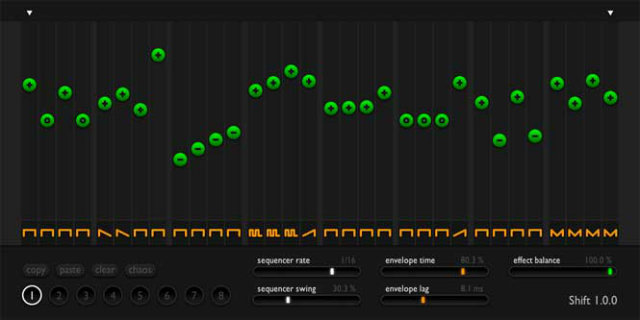
Sinevibes has announced its new AudioUnit effect plugin called Shift, an animated frequency shifter. They tell us that it is designed to add tasty vibes to basses, synths and pads, spice up drum and percussion loops, or simply turn anything into a mad glitch. Here’s the details directly from Sinevibes…
Processing bliss
At the core of Shift lies a precise model of the Bode frequency shifter with a silky smooth sound. It can be tuned to produce anything from phasing and wobbling to metallic ringing, beeps and buzzes. And this effect works well with absolutely any type of sound source.
Advanced motion
To modulate the frequency shifter, Shift uses its built-in sequencer with up to 32 steps, variable rate and shuffle. With an ability to assign one of 8 envelope shapes per individual step, you can build incredibly elaborate patterns. Inside a single preset, Shift can also store up to 8 separate sequences which you can instantly switch between or automate via your host.
Never-ending fun
Shift has been meticulously designed to blend usability with flexibility. Its colour-coded, single-view interface has fluid visual feedback and takes no time to learn. This makes it a kind of tool you will want to use again and again.
Pricing and Availability:
Shift is immediately available for $29 as an AudioUnit plugin for OS X 10.6 or later.
More information:
Orphion Editor
Introducing Orphion Editor
www.appstore.com/Orphion
Orphion is a musical instrument with a unique sound between string instrument and percussion. Everyone can play expressive, wonderful sounds and easy or virtuosic melodies on it just by moving fingers on virtual pads.
What can I do with it?
• Express the sounds you feel
• Play polyphonic music very expressively
• Crazy drumming
• Dream and relax
• Create soundscapes and melodies without musical knowledge
• Visually explore music and music theory
Features:
• Different articulations from soft to plucked to hardly slapped
• Natural interaction
• Extend your ways of expression as a percussionist, guitarist, pianist or other musician
• 15 transposable pad layouts with different tonalities from easy to complex
• 8 individual voices for 8 fingers (4 on iPad 1)
• MIDI support: Play your favorite synth with the revolutionary Orphion interface
• Audiobus support: Stream live audio from Orphion directly to other Audiobus-compatible apps
• Orphion Editor (availible as upgrade): Create and share your own custom pad layouts. Download new pad layouts from Orphion Universe
Yellofier – turn your music into groovy Yello inspired music
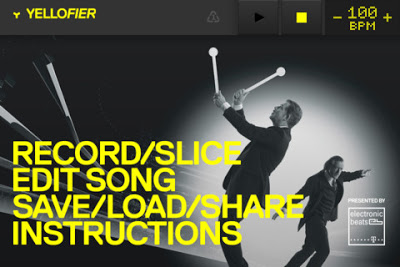
If Yello have made an app, and the coding was done by Jonatan Liljedahl (AudioShare dev) then it’s got to be good! Here’s the app’s description, and it’s free, so grab it now!
Yellofier makes anything into music. Record your voice, a musical instrument or everyday noises. Within seconds the app magically turns them into groovy music.
Edit the sounds and effects by moving and twisting colored blocks. Yellofier doesn’t look like any other music program. You can create a full song within minutes – even without knowing anything about music!
Create unique music with your own sounds and with the sounds of Yello’s musical maestro Boris Blank. The Yellofier also includes sounds and songs by some of the greatest musicians within electronic music. Anything can be yellofied!
- Automatically slice your sound into 8 pieces and create a groove
- Combine sounds and effects in an innovative step sequencer
- Multiple effects and variations
- Share your work
- 32 bundled sounds by Boris Blank
- Songs and sounds by the finest artists within electronic music: Carl Craig, Henrik Schwarz, The Orb, Trentemøller, Booka Shade, Orbital, The The, Thomas Fehlmann, Charles Webster, Håkan Lidbo and more…
For best sound, use headphones.
The demo tracks in Yellofier are under copyright protection.
Learn more about Yellofier and discover more of Yello’s music at yello.com
Produced by Boris Blank
Developed by Jonatan Liljedahl
Designed by Håkan Ullberg
Concept by Håkan Lidbo
Mellotron App for iPad: “Super Manetron” In App Store NOW!
http://www.insideout.co.jp/apps/
Super Manetron is the Mellotron for iPhone and iPod touch. Genuine sound sampled from Mellotron M400S (serial number 761) manufactured in the 70’s.
The Mellotron is an vintage sampling keyboard by analog tapes. The Mellotron had a strong impact on rock music, becoming a trademark sound of the progressive rock bands.
You can see an internal mechanism (tape running animation) and can enjoy simulation of Mellotron with eyes and an ear.
Features:
– Core MIDI compatible
– 35Kyes of sampled sounds from Mellotron M400S serial number 761 manufactured in the 70’s.
– 8 sec PCM full sampling sounds each Key
– Scrollable Keyboard & dual Keyboards with switchable key width
– No loop sounds (real performance feeling)
– Pre-loaded with 7 instruments including Flute, 3violins (Strings), Cello, Oboe, 8-voice Choir, Vibes, Brass
– 7 instrument sounds can be set as the favorite position of A,B,C position on setting screen
– A+B, B+C mix sounds position
– The sound of motor and tape rewind mechanical noise
– Tape running animation
– Pitch control by accelerometer
– Built-in Reverb that simulates spring reverb
– Original sounds source are recorded by 96KHz/24 bits
– Compiled under the supervision of Fumitaka Anzai (Famous vintage keyboard player & collector of Japan)
SWAG YOLO Vocal Pack for Ableton Free Download
Here are the hottest vocal samples for your tracks, Ableton Live Ready. Enjoy the Swag YOLO!
Visit AfroDJMac’s site for more stuff like this, including Live Instrument downloads, tutorials and music! http://www.afrodjmac.com
DATAMASKIN

