
New update release of Propellerhead’s Reason DAW v.6.5.3
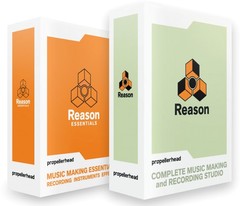
Propellerhead Software has announced updates to its Reason and Reason Essentials music production software.
Reason 6.5.3 and Reason Essentials 1.5.3 fix a few serious bugs, the most important being a problem where the program could crash under Mac OS X 10.8. These new versions replaces versions 6.5 and 1.5 of Reason and Reason Essentials. It is recommended that you update as soon as is convenient.
Changes in Reason / Reason Essentials
- Fixed a problem related to scrollbars under Mac OS 10.8, where the program could crash.
- Fixed a Create Menu bug, where sometimes the wrong device would be created.
- Fixed a bug in how the Browser uses the registry under Windows. This could lead to situations where some file types couldn’t be browsed and loaded.
- The Download All function for Rack Extensions could cause the Authorizer to misbehave or fail.
The updates are now available to download.
Auria LE has arrived – the professional digital audio recording system for iPad
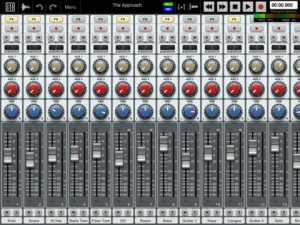
Auria LE – the professional digital audio recording system for iPad.
The mobile DAW you’ve been dreaming of has finally arrived. Auria LE is a 24-track digital recording system designed from the ground up for the iPad. With professional-level features and optional third-party plugin support from names like PSPaudioware, Overloud, Fab Filter and Drumagog (available via In-App purchase), Auria clearly sets a new standard for mobile recording.
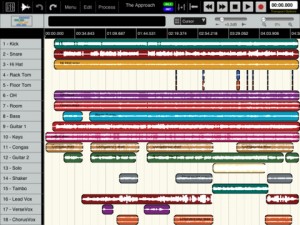

FEATURES:
- 24 tracks of simultaneous playback of stereo or mono files (upgradable to 48 tracks).
- Up to 8 tracks of simultaneous recording when used with compatible USB audio interfaces (upgradable to 24 tracks of recording) Camera Connection Kit required.
- 24-bit recording
- Supports sample rate of 44.1KHz only (upgradable to support 48K and 96K sample rates)
- Vintage-inspired ChannelStrip on every channel by PSPAudioware includes Expander, Multiband EQ and Compressor
- MasterStrip on all subgroup and master channels featuring PSPAudioware BussPressor, EQ and Mastering Limiter
- Third party VST effect plugin support available via in-app purchase (only iOS-version plugins are supported. All plugins must be purchased through the in-app store)
- ClassicVerb reverb plugin included
- StereoDelay and StereoChorus plugins included
- 2 Assignable subgroups(upgradable to 8) and 2 aux sends
- Powerful waveform editor with features like cut/copy/paste, duplicate, separate, gain, and more
- Flexible snapping tools allow snapping to events, cursor, bars, beats and more
- DropBox, SoundCloud and Audio Copy/Paste support
- Full automation support on all controls with graphical editing
- True 100mm faders when used in Portrait Mode
- Optional video import feature allows sample accurate sync of video to an Auria project with adjustable offset times and video export capability
- Timeline ruler options include minutes:seconds, bars:beats, samples and SMPTE time
- Auto-punch mode
- Full delay compensation on all tracks and subgroups
- Adjustable metering modes, including pre or post fader, RMS and peak
- Adjustable pan laws
- Sample accurate loop function
- Automatic sample rate conversion
- Built-in metronome
Includes a demo song mixed on Auria by Grammy winning producer/engineer David Kahne.
REQUIREMENTS:
iPad 2 or later strongly recommended.
Requires iOS 5.0 or later
USB audio interfaces require Camera Connection Kit
Pro Tools First Look: Introduction to Pro Tools 8
Additional videos for this title: http://j.mp/U6aBEw
Pro Tools First Look: Overview Of Pro Tools by Scott Freiman
Video 1 of 6 for Pro Tools First Look: Overview Of Pro Tools
This Pro Tools tutorial serves as a quick overview to the powerful new features in Pro Tools. If you want to see what Pro Tools is all about, or even if you want to compare Pro Tools Vs. Logic or Ableton Live, this free video is for you!
In 30 minutes of tutorials you’ll learn about the Pro Tools interface, how MIDI & notation work, and how to use Track Comping and Playlists in your Pro Tools sessions. There’s also an overview of Pro Tools’ new plugins!
If you like this free Pro Tools tutorial, be sure to check out our comprehensive Pro Tools 101: Core Pro Tools tutorial video, which is also produced by Scott Freiman.
More info on this title: http://j.mp/U6aBEw
Cubasis for iPad – Effects review
In this video we are showing all the effects that come with Cubasis for iPad.
Download Cubasis from the AppStore – goo.gl/p25xN
Portable Music Production System
Cubasis is Steinberg’s streamlined, multitouch sequencer for the iPad. Specially designed for quick and easy operation, Cubasis makes recording, editing and mixing a breeze. Record tracks in CD audio quality, and edit your music with the Key and Sample Editors, while the included mixer and audio effects polish your song to perfection. Cubasis comes loaded with dozens of virtual instrument sounds which can be played in real time using the virtual keyboard and drum pads. Cubasis’ projects can be even opened in Cubase under Windows and OS X! Cubasis places touch-intuitive production tools in your hands, opening up a new world of possibilities for your creativity.
Key features
• Unlimited audio and MIDI tracks (depends on the device used)
• Over 70 virtual instrument sounds based on HALion Sonic
• MixConsole with over 10 effect processors
• Over 300 MIDI and audio loops
• Virtual keyboard and virtual drum pads
• Sample Editor and Key Editor
• Export projects to Cubase, Dropbox, SoundCloud, AudioCopy and email
• Core Audio and Core MIDI compatible hardware supported
• Sequence other CoreMIDI apps (MIDI recording only) and run Cubasis simultaneously via background audio
• Audio import from iTunes music library, AudioPaste, Wi-Fi server and iTunes file sharing
• Audio mixdown and MIDI export
Reason tutorial: How to spice up your drum patterns
Drums. They’re absolutely everywhere and vital to most music. A good drum track can make or break a track. Luckily Mattias has some useful tricks up his sleeve to help you spice up your drum patterns!
Learn about ghost notes, tips for using REX loops to add some groove and how to create complex patterns in simple ways using polymeter.
Cubasis – Introduction video demo
Get it now! https://itunes.apple.com/us/app/cubasis/id583976519
More information: http://www.steinberg.net/cubasis
Cubasis is Steinberg’s streamlined, multitouch sequencer for the iPad. Specially designed for quick and easy operation, Cubasis makes recording, editing and mixing a breeze. You can also open your Cubasis projects in Cubase under Windows and OS X! Cubasis places touch-intuitive production tools in your hands, opening up a new world of possibilities for your creativity.
- Unlimited audio and MIDI tracks (depending on the device used)
- Over 70 virtual instrument sounds based on HALion Sonic
- Mixer with over 10 effect processors (insert and send effects)
- Over 300 MIDI and audio loops
- Virtual keyboard and virtual drum pads
- Sample Editor and Key Editor
- Export to Cubase, Dropbox, SoundCloud, AudioCopy & email
- Core Audio and Core MIDI compatible hardware supported
- Sequence other Core MIDI apps (MIDI recording only) and run Cubasis simultaneously via background audio
- Import audio from your iTunes music library or using iTunes filesharing, use AudioPaste or set up a Wi-Fi server in Cubasis
Cubasis from Steinberg arrives for the iPad
So here are some quite unexpected news from Steinberg – Cubase goes mobile:
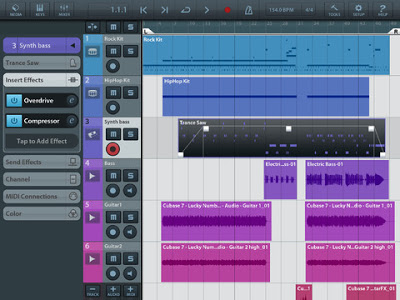
Portable Music Production System Cubasis is Steinberg’s streamlined, multitouch sequencer for the iPad. Specially designed for quick and easy operation, Cubasis makes recording, editing and mixing a breeze. Record tracks in CD audio quality, and edit your music with the Key and Sample Editors, while the included mixer and audio effects polish your song to perfection. Cubasis comes loaded with dozens of virtual instrument sounds which can be played in real time using the virtual keyboard and drum pads. Cubasis’ projects can be even opened in Cubase under Windows and OS X! Cubasis places touch-intuitive production tools in your hands, opening up a new world of possibilities for your creativity.
Key features
- Unlimited audio and MIDI tracks (depends on the device used)
- Over 70 virtual instrument sounds based on HALion Sonic
- MixConsole with over 10 effect processors
- Over 300 MIDI and audio loops
- Virtual keyboard and virtual drum pads
- Sample Editor and Key Editor
- Export projects to Cubase, Dropbox, SoundCloud, AudioCopy and email
- Core Audio and Core MIDI compatible hardware supported
- Sequence other CoreMIDI apps (MIDI recording only) and run Cubasis simultaneously via background audio
- Audio import from iTunes music library, AudioPaste, Wi-Fi server and iTunes file sharing
- Audio mixdown and MIDI export
Polyphony:
- 48 voices: iPad 2, iPad mini
- 64 voices: iPad 3, iPad 4
Project export to Cubase requires Cubase 7/6.5, Cubase Artist 7/6.5, Cubase LE AI Elements 6 or higherCubasis project importer extension must be installed and is available at http://www.steinberg.net/cubasisimporter
Cubasis is priced at $49.99.
Robert Lippok on Ableton Live 9
Robert Lippok is known for his expansive sounds and innovative beats, both as a solo artist and as part of To Rococo Rot. Robert invited Ableton to his home studio to share his thoughts on his favorite new enhancements to Live 9.
Chroma Sequenced Monosynth for Reaktor
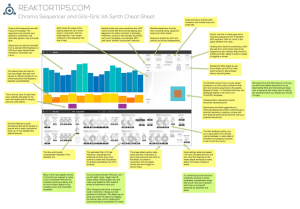
Introducing Chroma, a unique sequenced monosynth for Reaktor featuring sound and sequence morphing and multiple control methods – use your mouse, a MIDI controller, Konkreet Performer, TouchOSC or Lemur.
available now at http://www.reaktortips.com/2012/12/chroma-and-gris-gris-sequenced-monster.html
Chroma is a performance oriented monosequencer and VA carefully tuned for ergonomic ease of use and glitch free operation in standalone and plugin mode. Slur features in Chroma match up with legato and glide features in the Gris-Gris synth to create a slinky sinuous note articulation.
Sequences can be created and controlled via mouse, MIDI, Konkreet Performer, TouchOSC and Lemur. Since there is now full OSC support in the Reaktor plugin version, you can do everything with Chroma in your preferred DAW that you can do stand-alone. A dream come true!
TouchOSC and Lemur templates are included in the package but there’s something special about Konkreet Performer that sets things on fire when it’s paired with Chroma and Gris Gris, a certain magic in the way it morphs and distorts sound. It is my firmly held opinion that not nearly enough people use KP and if you want something really special and unusual on your iPad you should rush right over to Konkreet Labs or head straight for the App Store and buy a license.
Chroma is 24.99 USD and can be purchased and downloaded immediately. Remember, Chroma is a Reaktor ensemble and requires a full installation of Reaktor 5.8.0, not just Reaktor player.
triqtraq – beat making in 10 minutes
Details below:
running “triqtraq” on iPad mini.
It’s so nice groove maker!!
Audio Interface : Presonus FireStudio Tube
DAW : Apple Logic
Effect Processor : Lexicon MX300
Camera : Sony DSC-HX30V
Music producers and DJ’s will find dozens of possibilities inside triqtraq to compose and tweak beats on the fly.
Jam out some grooves, tweak them with the advanced effect automation and the unique loop range feature, and chain patterns to build up entire tracks.
Are you just starting out making music? Don’t worry, triqtraq is straightforward enough to get you good sounding results quickly…
Grab your iPhone and start to improvise; live, in your studio or on your couch.
Pick sounds from the included sample library, or import your own samples to get that unique sound.
triqtraq strikes the right balance between musical possibilities and limitations and lets you focus on the most important part of making music… having FUN!
KEY FEATURES:
✔ create musical patterns fast and intuitively
✔ record beats live or by using the step editor
✔ automate all effects in real-time
✔ record/automate multiple tracks simultaneously
✔ specify the length of a sequence per track
✔ unlink automation envelopes from main tracks
✔ change sounds while jamming
✔ store up to 16 patterns
✔ chain up to 16 patterns with the queue feature
✔ switch seamlessly between patterns
✔ use the loop range to create poly-rhythms
✔ use sounds from the 350+ factory sample library
✔ import your own sounds via iTunes file sharing
DATAMASKIN

