
Piky – Free synthesizer instrument plugin for Windows
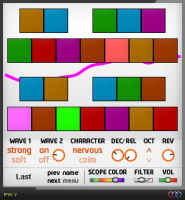
The Colorspace has released Piky, a free synthesizer instrument plugin for Windows.
2 OSCs synthesizer, it’s a simple instrument based on the creation of pikes and plucks with extreme easiness.
Many times I need just a really simple pluck or pike, without the need of too much options so I decided to create an instrument only for that!
Piky for Windows (VST) is available as freeware.
Visit: The Colorspace
Freebies when PLP celebrates 10 years
Join Peace Love Productions (PLP) as it celebrates its 10th year of specialized loop packs. For an entire decade, the company has released one pack of royalty-free loops after another, and now Peace Love Productions is giving away Metachemical’s Tough Breaks Reason ReFill for free. It’s a happy occasion for both PLP and its customers.
Tough Breaks is a Reason ReFill by Metachemical — the ideal collection for producers wanting to create hard-hitting break beat music. This collection includes drum sounds, basslines, synth riffs, and more; it boasts 163 loops, 33 drum one-shots, and 65 MIDI files (of drum beats, synth riffs, and basslines). The beats come with separated drum stems for each instrument, providing kicks, snares, percussion, hi-hats, and cymbals. Also included are synth riffs, basslines, and original sound effects. Likewise, Tough Breaks includes supporting MIDI files for select loops, and its included one-shot drums are mapped out in both EXS24 and Redrum.
Along with Tough Breaks, Peace Love Productions is also giving away a free 1 GB Taster collection to anyone who registers at the company’s Web site. The PLP Taster is a sampling of the many different genres that the loop provider has to offer. To receive this taster, visit peaceloveproductions.com, sign up for it, and verify your email address. A download link will be sent to your verified address immediately afterward.
The PLP Taster is a two-part download containing two zips with loops in 16-bit and 24-bit stereo ACIDized WAV. Genres include hip-hop, rock, trance, electro house, deep house, chillout, trance, techno, DJ scratches, industrial, ambient, and more.
According to the manufacturer, PLP was one the very first to offer specialized loop packs. While other companies were releasing audio sample CDs that you had to extract and edit your self, PLP was offering edited ACIDized loops on data discs.
Background check (courtesy of PLP): “PLP got its start by producing content for Sonic Foundry’s ACID Dj 3.0 back in 2000. One of the founders of PLP (Jason Donnelly, also known as DJ Puzzle) worked at Sonic Foundry from 1998 to 2000 and during Christmas break he received a phone call announcing he had just lost his dream job due to corporate downsizing. Thankfully he was kept on as a freelancer for many months after that editing and ACIDizing for their wonderful loop discs.
“The ACID DJ gig gave these two a nice little kick start and so they moved on to create even more underground dance loops. They ran a mail order business and printed the CDs as the orders came in. We thank you for supporting PLP and for helping us grow so that we could get inspired and in turn inspire others. To show our appreciation this whole time we have been giving back to the community. For over ten years without skipping a beat, so to speak, PLP has sent out 20 free loops every month to subscribers. Don’t forget to grab this months set by the way! Keeping it real for the sake of music.”
For more information on Peace Love Productions loop packs, visit peaceloveproductions.com.
Free Game Boy samples

Bedroom Producers Blog has released a free sample pack – Game Boy LSDJ Noise And Glitch Sessions:
Ok, here’s a brand new free bpb sample pack. It’s called Game Boy LSDJ Noise And Glitch Sessions, and contains sounds recorded from a black Game Boy running LSDJ software. I’ve created the sounds using LSDJ’s awesome synth engine, combined with the built-in pattern editor.
You’ll probably notice that the included sounds are much more aggressive than what you’d expect to hear in a standard Game Boy video game, for example. I was going for a glitchy, noisy vibe, and the LSDJ synth engine turned out as a great tool for creating such sounds.
All included sounds are 100% clean recordings of the Game Boy sound output, no post FX added. This is also my first sample set recorded in 24bit.
Specifications:
- Contents: 97 audio samples (24bit WAV)
- Download Size: 23.6MB (ZIP archive)
- Size On Disk: 38MB
Download at the BPB site.
TAL-Reverb 3 – free reverb effect
Togu is one of my favorite suppliers of free synths and effects, here’s there latest release
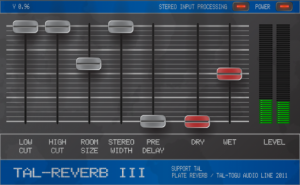
Togu Audio Line has released TAL-Reverb 3, a free reverb effect for Mac & Windows.
TAL-Reverb-III is an easy to use stereo plate plugin. Its the replacement for TAL-Reverb-II and has several improvements as an optimized GUI and some changes in the algorithm. It has a simpified EQ section, a meter display and shows actual slider values.
Features:
- Plate reverb sound.
- One simple room size control.
- Predelay up to one second.
- EQ section (12dB cut, low shelf filter at 1000Hz, high shelf filter at 200Hz)
- Stereo width control (from full stereo to mono).
- Stereo input mode (mono or stereo intput).
- Displays the slider value of the active fader.
- A meter shows the output volume.
- 10 factory presets.
- Made with the juce framework and open source.
Freeware bus compressor effect plug-in for Windows
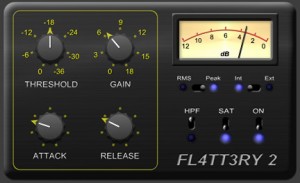
Platinumears has released version 2 of FL4TT3RY, a freeware bus compressor effect plug-in for Windows.
This is a gentle squashy compressor intended for use on busses, though it also works well on channels. It has a very soft knee, with a ratio that gradually increases to hard limiting, and a choice between RMS based level detection (with a window size that depends on the attack time) or a brand new peak sensing algorithm.
This unit is inspired by a particular bit of hardware that I know quite well. Its not “modelled” however: I came up with the algorithm first, thought it sounded similar, so then skinned the plug to resemble the hardware. It is definitely not a proper model, so I’m not going to name the unit in question.
Changes in FL4TT3RY 2
- Slightly gentler transfer curve brings it (subjectively) closer to the hardware that inspired it.
- Tweaked attack smoothing to make it a little more aggressive with the fastest settings.
- Tweaked release smoothing to make it pump less with the fastest settings.
- New peak sensing mode.
- External sidechain inputs.
- Left click the meter to toggle the range between 6, 12 or 18dB.
- Right click the meter to switch between Gain Reduction metering, or Gain change metering (which includes make-up gain).
FL4TT3RY 2 for Windows (VST) is available to download at no cost. Donations are appreciated.
More information: Platinumears
Two free virtual Minimoog synthesizer instruments for Windows
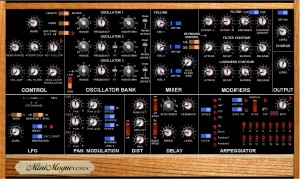
VoltKitchen has released version 2.3 of MinimogueVA and MinimogueLUXUS, two free virtual Minimoog synthesizer instruments for Windows.
Changes in MinimogueVA/MinimogueLUXUS v2.3
- New 24dB filter and a button to switch between the old 12dB filter and the new 24dB filter. The new filter is very advanced with built-in distortion, so it will use much more CPU. The old 12dB filter did not open up completely, but now you can enjoy the bright sound like the orignal when cutoff set to max when 24 db filter is selected. All sounds in the factory bank are set to the old filter, but I hope we can upgrade the synth with some new 24dB filter sounds later. Many of the old sounds have high resonance, and I advice you to reduce resonance level when switching to the new filter.
- Osc drive(offset) has been changed. It still has a little bit of offset just like the original, but much less than the 2.2 version.
- 10 new sounds by Sinisa Lupis.
- Added midi learn for bar-sync and the 16 gate off/on buttons.
- LUXUS version has got a new layout of controls to look similar to the new controller by Mario Jurisch of Synth-project.de.
MinimogueVA and MinimogueLUXUS are available to download as freeware VST instruments for PC.
More information: Gunnar Ekornås
Free virtual theremin VST
Blech Turm Studios has released BTS Theremin – a free virtual theremin VST for Windows.
BTS Theremin Features:
- 1 OSC (Sin/Squ/Mix)
- 2 LFOs (Pitch,Amp)
- 2 ADSR (1x Pitch LFO, 1x Amp),
- Waveshaper/Saturation, 10 Presets
Download at the Blech Turm site.
BLIP1000 – free matrix step sequencer instrument for Windows
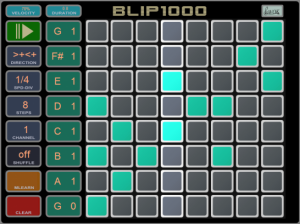
WOK has introduced Blip1000, a free matrix step sequencer instrument for Windows.
Blip1000 is inspired by matrix synths for the iPad and hardware like the Bliptronic 5000, which were derived from software like ToneMatrix, which was inspired by devices like the monome and the Tenori On and so forth
Here’s what the developer has to say about Blip1000:
Got a windows touchscreen computer and miss these cool apps like on the iPad?
Now you can generate MIDI sequences with a touch of your finger. Also great for controllers like Novations launchpad (together with Automap).
Blip1000 is a MIDI sequencer VST plugin. It plays mono- or polyphonic sequences depending on the selected notes and the enabled trigger buttons. Host sync with different speeds, swing, several play direction modes and MIDI controller learn – try it for free and start making music now!
Features:
- Clear and easy interface.
- Number of steps selectable (up to 8).
- Note per line selectable from 3 octaves with display.
- Several play modes (forward-backward, random etc.).
- Syncs to host – clock divider adjustable.
- Sequence transpose by MIDI input
- MIDI ouput channel selectable.
- Automatable in the DAW.
- Sequences can be saved as VST plugin presets.
- Random play.
- MIDI-ouput; any plugin or synthesizer can be used as sound source.
- Low on CPU.
Note: Blip1000 is nagware.
New 500 patches strong free Reason Refill
Tweakazound is an instrument Refill which has been made with Propellerhead Reason synths and effects. Overall 500 patches that are ready for you to use in your music. Reason can sound awesome if you know how to use it, which is probably not anything new for most of you.

You can preview Tweakazound ReFill below. It’s available for download at the Reflection X site.
This Refill is a donationware.
Zen – a free universal presets manager for Windows VSTis
Big Tick Audio Software has introduced Zen, a free universal presets manager for Windows VSTis.

Zen loads in any host as a vsti, and acts as a loader for other vstis. So with Zen, you can search for “Rhodes piano” and get a list of all matching presets – regardless of the final vsti (Rhino, Zebra, Absynth…). When you select one of the presets in Zen, the corresponding vsti is automatically loaded to play the requested preset.
Many popular vstis are supported, including:
- U-he ACE
- Native Instrument’s Absynth 5
- Rob Papen Albino 3
- Anti’s Augur
- FullBucket Blooo
- Green Oak Crystal
- DiscoDSP Discovery, Discovery Pro, Phantom and Vertigo
- NuSofting daHornet
- TAL Elek7ro
- Wusik EVE
- Tone12 Firebird
- Smart Electronic Foorius
- Tone12 Gladiator
- Boris K. Intro
- Progress Audio Kinisis
- ConcreteFX Kubik
- SarVST LoganA
- FullBucket Mono/Fury
- TAL NoizeMaker
- FuzzPilz Oatmeal
- LinPlug Octopus
- Schwa Olga
- SonicProjects OPX-Pro
- Our own Rhino and RhinoCM
- Humanoid Sound System ScannedSynth
- Buchty SQ8L
- LennardDigital Sylenth1
- Ichiro Toda’s Synth1
- Image-Line Sytrus
- Cakewalk Triangle II
- FabFilter Twin II
- Vaz+
- U-he Zebra
- Cakewalk Z3ta+
Eventually Zen aims to categorize all available presets, for all vstis.
Zen synchronizes its own local database of presets with a master online database hosted at www.bigtickaudio.com – users get new presets daily, delivered right into their sequencer, already categorized.
Commercial presets designers can use Zen to send demo version of their presets to all potential customers.
Users can preview the presets in Zen, directly in the context of their track, and buy the presets they like with just one click. Presets can be bought individually, as opposed to purchasing a full bank of presets.
- U-he ACE
- Native Instrument’s Absynth 5
- Rob Papen Albino 3
- Anti’s Augur
- FullBucket Blooo
- Green Oak Crystal
- DiscoDSP Discovery, Discovery Pro, Phantom and Vertigo
- NuSofting daHornet
- TAL Elek7ro
- Wusik EVE
- Tone12 Firebird
- Smart Electronic Foorius
- Tone12 Gladiator
- Boris K. Intro
- Progress Audio Kinisis
- ConcreteFX Kubik
- SarVST LoganA
- FullBucket Mono/Fury
- TAL NoizeMaker
- FuzzPilz Oatmeal
- LinPlug Octopus
- Schwa Olga
- SonicProjects OPX-Pro
- Our own Rhino and RhinoCM
- Humanoid Sound System ScannedSynth
- Buchty SQ8L
- LennardDigital Sylenth1
- Ichiro Toda’s Synth1
- Image-Line Sytrus
- Cakewalk Triangle II
- FabFilter Twin II
- Vaz+
- U-he Zebra
- Cakewalk Z3ta+
DATAMASKIN

