April 8, 2009 · Posted in
Electronic Music ·
Comments Off on Can you do anything but love Felix's machines

Felix’s Machines are music making sculptures. They were constructed in his bedroom and exist to facilitate music by translating rhythmic audio structures into a three-dimensional visual show.
They function as musical instruments as well as kinetic sculptures. The Machines are a performance device, but can be well suited to act as an art installation, theatre accompaniment, or standalone sculpture.
The Machines invite an audience to share the experience of their creator. He aims to exploit the complexity found behind the workings of most digital music and present it as a more accessible equivalent. These Machines do not intend to match human potential. Instead they exist to test the advantages of mechanical instruments alone.
Check out the video below >>
[vimeo http://vimeo.com/3570989]
April 6, 2009 · Posted in
Electronic Music ·
Comments Off on Good news for iPod and iPhone lovers
audioMIDI.com and VirSyn have announced iSyn, a virtual music studio for the iPhone/iPod Touch.
iSyn features
- Touch keyboard for live playing.
- Eight drum pads- tap for live beats.
- Two synth and one drum grid sequencer track.
- Two fully-programmable three-oscillator virtual analog synths.
- 32 song projects, each with 32 independent patterns.
- Incredible modulation effects using tilt and X/Y touch screen.
- Eight sample-playback drum machines- including 808, 909, synth drums and classic 80’s drum machines.
- Effects generator with delay, chorus, flanger and phaser.

KEYBOARD PAGE
Pressing the “Live” button with track 1 or 2 selected lets you play the iSyn keyboard in real time. Transpose the keyboard range up and down with the arrows above the keyboard. Dragging your finger after notes are played lets you add slides and vibrato; dragging up and down adds mod parameters for extra expression!

DRUM PAD PAGE
Press the “Live” button while the “D” (drum)
track is selected and bang on the eight drum pads all day!

SEQUENCER GRID
Tap and drag to insert notes on the grid. The piano keyboard can be swiped up and down to transpose the note range.

PATTERN PAGE
Press the “Pattern” button to select from 32 user-programmable patterns. Each project contains its own separate set of 32 patterns. Use the “AUTO” button to automatically play patterns one after the other and create entire songs!

SOUND SELECT PAGE
Choose from 32 user-editable preset sounds.

PROJECT PAGE
Here you can choose a complete song to work on.
A “project” consists of sound settings for synth tracks 1 and 2,
drum track settings, effects setting and 32 patterns.

SYNTH EDIT PAGE
iSyn features two powerful virtual analog synthesizers with the same sound quality and editability of computer-based virtual instruments! Simply tap each “building block” to access in-depth editing parameters.
Introducing Studio One – The Future of Music Production is Here. a groundbreaking music creation and production application for Mac OS X and Windows XP/Vista that makes audio recording, MIDI sequencing, and audio mastering ridiculously simple right out of the box, yet provides a wealth of professional features.

Fresh code, innovative drag-and-drop MIDI mapping and plug-in management, auto-configuration with PreSonus hardware, insanely good audio, unlimited tracks and plug-ins per track, and a powerful, inventive Start page that literally puts the whole project right in your hands are just a few of the compelling features that make Studio One the next generation in audio software. Far from just another music-production program, Studio One changes the rules of the game, giving you a complete solution from raw tracks to finished master, while supporting the latest standards and technologies.
Studio One is based on a cutting-edge audio engine that delivers unparalleled sound and automatically switches between 32-bit and 64-bit floating-point processing on the fly (even with a 32-bit OS), ensuring the highest quality audio at all times. It is compatible with any ASIO-, Windows Audio-, or CoreAudio-compliant audio interface, including, of course, the entire line of PreSonus interfaces.
[youtube=http://www.youtube.com/watch?v=nIxV-BsqdyY]
Features:
- Elegant single-window work environment
- Powerful drag-and-drop functionality
- Unlimited audio tracks, MIDI tracks, virtual instruments, buses, and FX channels
- Content browser with convenient sort options and preview player
- Integrated mastering solution with automatic mix updating, waveform editing, effects, Red Book CD burning, and digital release
- Automatic delay compensation
- Advanced automation
- 64-bit processing (even on 32-bit machines)
- Easy-to-use sidechain routing
- Awe-inspiring 64-bit effects suite
- Stunning virtual instruments
- User-friendly sampler
- Most intuitive MIDI-mapping system available
- Real-time audio timestretching and resampling
- AU, VST2, VST3, and ReWire support
- K System metering
- Gigabytes of inspiring content
- Compatible with any ASIO-, Windows Audio-,or Core Audio-compliant audio interface
Find out more here >>

Fat Bustard – 12 channel mixing with attitude
Thermionic Culture unveils the Little Bustard, their second valve summing mixer which has been designed to complement the Fat Bustard valve summing mixer by increasing the number of inputs channels. The new 19″ 2u Little Bustard can also be used independently by itself as a stand alone mixer.
Features include 16 input channels arranged as 6x stereo pairs with fixed gain at unity level with on/off switches, 4x mono inputs with mute switches and pan pots which can be defeated by another switch adding an extra 6dB of gain. The master output section has independent left & right 31 position output indented pots with a gain range from –17dB to +2dB.
The valve stages use a pair of ECC83/12AX7 on the gain stage, and a pair of PC86’s for the output stage. The master section will also have a simple output level indicator. To create a monster-summing mixer, The Little Bustard’s outputs can be plugged into the Fat Bustard’s AUX inputs increasing the number of channels to 28.
March 27, 2009 · Posted in
Electronic Music ·
Comments Off on Body language sound
Yet another weekend approaching fast 
On several blogs I have recently visited I have seen the question on how to create so called Body Language Sound which can be found e.g. with MANDY and similar artists – I am not sure I want to dig further in this, MANDY isn’t really my bag as frequent readers of my posts probably already have figured out, hehe
Anyhow I found this good tutorial on how to get to grips with BLS in Ableton. In this Ableton Live tutorial, DJ Gustavo Bravetti demonstrates how to create the sound of M.A.N.D.Y vs Booka Shade’s Body Language.
[youtube=http://www.youtube.com/watch?v=aBZal5xa0wc&feature=player_embedded]
Cheers all
Ronald Passion has created freeware effect plug-ins for Windows PC. The plug-ins are done in SynthMaker and include some custom code. Make sure to check them all out
Silver & White Magnum
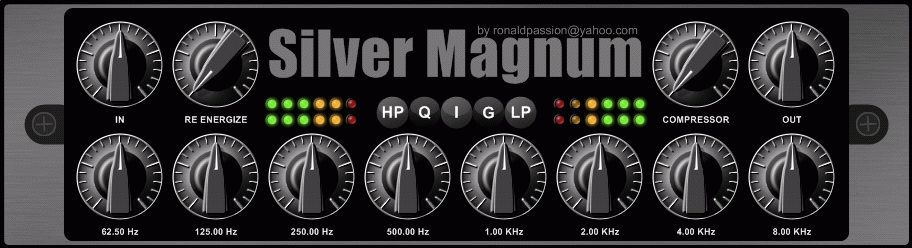
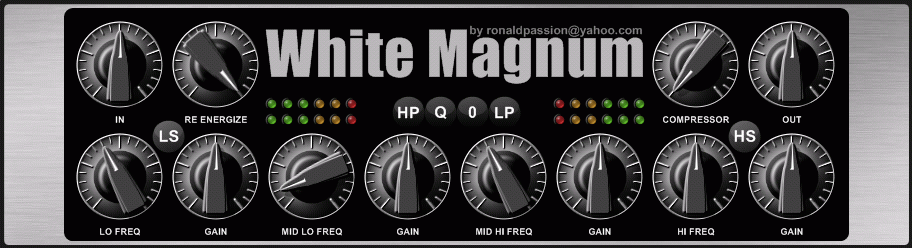
Silver & White Magnum are two analog valve custom parametric equalizer effects.
- Silver: G/F/V/B selects Guitar, Full, Vox and Bass parametric frequency scheme.
- White: HP -> 20, 30, 40, 60 & 80 Hz. LP -> 20, 12, 10 & 8 KHz.
- Q: 0 db/-3 db.
- Lowpass and Highpass filtering.
- Re Energize button (boost).
- Tube style Compressor.
- Noise floor is -100 db.
Silver Magnum
White Magnum
Bad Vox
Bad Vox is a simple tube equalizer effect for vocals.
- Frequency bands based on Manley Hardware Vox Box (only the EQ): 150Hz, 1.5kHz, 6.4kHz.
- Q: -3 db.
- Lowpass, Highpass and Notch filtering.
Bad Vox
Master EQ
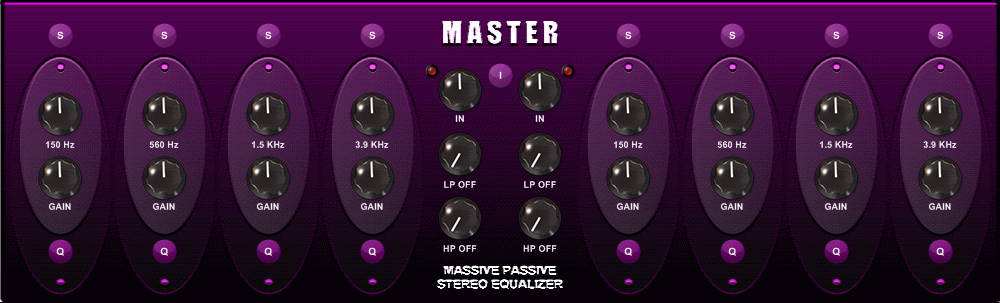
Master EQ is a tube equalizer for mastering (update to Massive Passive EQ).
- Frequency bands based on Manley Hardware Equalizer (Massive Passive Stereo EQ): 150Hz, 560Hz, 1.5kHz, 3.9kHz.
- Q: -3 db/-6 db.
- Noise floor: -85 db.
- Red LED meter for monitoring peaks.
- Lowpass & Highpass filtering.
Master EQ
Massive Passive EQ
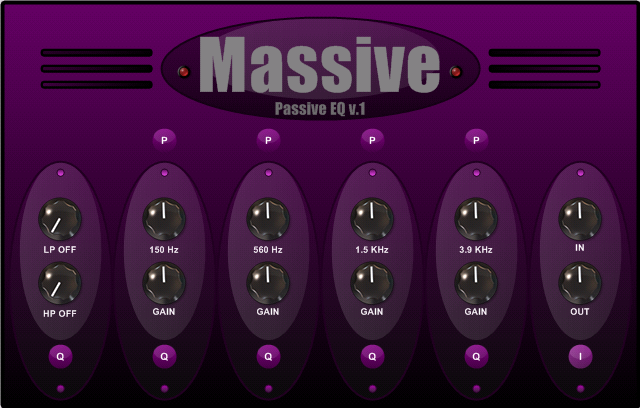
Massive Passive EQ is a freeware mastering equalizer effect for Windows.
Massive Passive EQ features
- Signal flow: IN + LP & HP + R1 (peaking & shelving) + R2 + R3 + R4 + OUT.
- Q is -3 db point and -6 db point.
- All frequencies based on Manley Hardware Equalizer (Massive Passive Stereo EQ).
- Red Led Meter (in & out).
Massive Passive EQ v1.0
Blue Channel
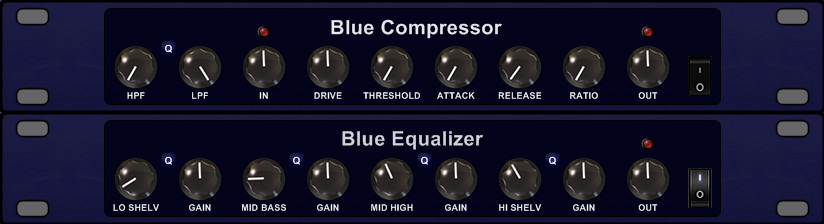
Blue Channel is a digital tube channel VST effect plug-in for Windows PC.
Blue Channel v1.0 features
- Compressor: Highpass + Lowpass filter, In/Out, Drive, Threshold, Attack & Release, Ratio, On/Off switch.
- Equalizer: Low shelf, Mid Bass, Mid High, High shelf, Master output, On/Off switch.
- Valve Tube Style control.
- 10 presets.
Blue Channel
Digital Parametric Equalizer
Digital Parametric Equalizer is a digital equalizer effect plug-in for Windows PC.
Digital Parametric Equalizer v1.0 features
- Highpass & Lowpass filter + 6 bands (-/+ 24 range for each).
- 4 settings for the bands:
- Standard: 100Hz, 360Hz, 720Hz, 1.5KHz, 5KHz, 10KHz.
- Bass: 60Hz, 100Hz, 200Hz, 500Hz, 800Hz, 1.5KHz.
- Vox: 240Hz, 380Hz, 800Hz, 1.2KHz, 2.5KHz, 5KHz.
- Guitar: 125Hz, 250Hz, 500Hz, 1KHz, 2KHz, 4KHz.
- Main output and on/off controls.
Update 05-mar-2009: New version has additional frequency settings (same download link below).
Digital Parametric Equalizer v1.0
Equalizer Passion
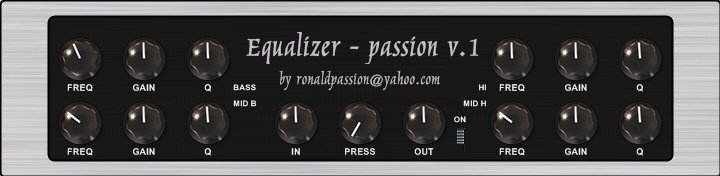
Equalizer Passion is a virtual analog equalizer effect.
Equalizer Passion v1.0 features
- Freq, Gain and Q for Bass, Mid Bass, Mid High and High frequency ranges.
- In- and output volume controls.
- Press Knob (“0” for natural “1” for pressing signal).
- On/Off switch.
Equalizer Passion
Crunch Passion
Crunch Passion is a dual guitar preamp (Clean & Crunch).
Crunch Passion v1.1 features
- Clean section: clean tube style model.
- Drive section: crunch drive (not modeled after a specific model but it sound like a Laney). Drive section input depends on clean section.
- Shape: controls the tone, from dull to sharp.
- Bass–Mid–Hi: 10dB range per band (i.e. Bass -5dB to 0 to 5dB).
- Volume: control volume of signal.
Crunch Passion
Slap Passion
Slap Passion is a tube bass preamp.
Slap Passion v1.1 features
- Input section: clean tube style bass model.
- Bass–Mid–Hi: 12dB range per band. (i.e. Bass -6dB to 0 to 6dB).
- Freq: Mid Freq selection — 175Hz – 350Hz – 525Hz – 700Hz – 875Hz – 1050Hz.
- Volume: control volume of signal.
Slap Passion
March 23, 2009 · Posted in
Electronic Music ·
Comments Off on Time to spice up your music PC?
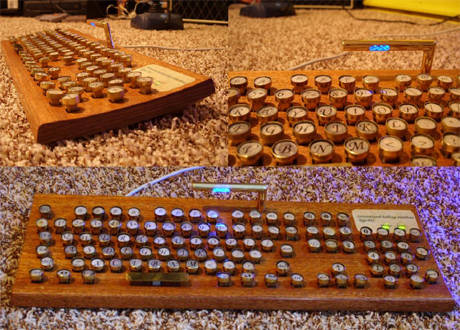
Why not a wooden keyboard with handmade typewriter digits. Here’s a step-by-step Instructables guide so you can make one for yourself. Cool!!
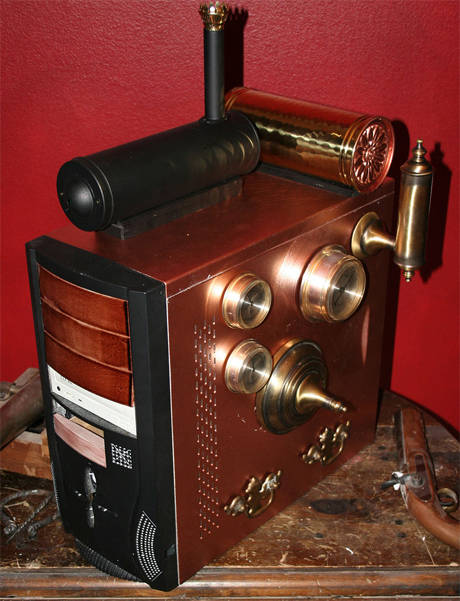
Or perhaps it’s better to go steam in these ecological days?
But if you are not in the mood for monday jokes perhaps you are more intrigued to try out the new sounds developed by Kreativ Sounds. They have released ABYSS FM8 Sounds, a collection of highly original sounds for Native Instruments FM8 synthesizer and Native Instruments KORE2 Workstation. Transform your FM8 and KORE synthesizer into a digital sonic monster with ABYSS FM8 Sounds!
ABYSS FM8 Sounds features
- 20 original sounds, each with 4 extreme variations (80 sound variations) for Native Instruments FM8 and KORE2.
- Each sound comes with custom ARP and MORPH info that allows you to create cool sequences and to morph between its four variations.
- Each sound features velocity and modulation wheel information for even more control over the sounds.
- All future minor updates with new sounds are free.
March 20, 2009 · Posted in
Electronic Music ·
Comments Off on A closer look on the JOMOX Sunsyn
[youtube=http://www.youtube.com/watch?v=Jj-hqEiIjX4]
Jomox Sunsyn, an analog machine made for sound designers. This is probably the most organic sounding newer synth, it can be raw, but also very smooth. It is not emulation of any historic synth and has own unique character. I can imagine that production of such quality instrument is just to expensive.
I would put it to top 5 of ever produced synths sonically. without effects it sound extremely rich, full and cutting through. Presets don’t represent capability of this beast.
More info here >>
March 16, 2009 · Posted in
Electronic Music ·
Comments Off on Having a hard time getting your friends to understand what you do?
Whether it be your kids, friends or dates in the pub one often run into the problem of describing what the heck you do when you’re in the studio playing around with your Prophet 5, Oscillators, plug-ins, mixer boards etc, than this little video might come in handy, LOL. It features the veteran sound designer and synth nerd Suzanne Ciani explaining sound, synthesis and music on 80’s childrens TV show ‘3-2-1 Contact’.
Well even you and I might learn something
[youtube=http://www.youtube.com/watch?v=B_tjcshEurc&eurl]
Cheers, even though it is Mondayyyyy, shit four more days before another great weekend
Without doing any associations on the name I am happy to announce that my friends in Rusty Trombones has released a new and intriguing plug-in adn better yet it’s free.
Since I have not had the chance to try it out myself yet it would be nice to get some feedback on it so post away >> awesome or sucks
Listen to it here: mp3 sample
So what does it do really…??
So this works as a doubler, or demented phaser, it is designed to widen and phatten. Of course you can misuse that as well. you have an LFO that controls how long back an echo is. You can set the length and speed of this LFO. Then there is a filter that can be LowPass, HighPass or Allpass, and a cut Hz so that you can control where the cut is. oh-yeah!. The distortion is to gritt up the sound a little, or a lot, it’s not the worlds bestest distortion. Then you can amplify the signal, if you want to. The filter can cut away a lot of the volume, that’s why we have it. Then finally there is a on/off. There are two to the left side and two on the right side. and finally one dry through parameter. So if you’d like to test one of your settings, turn the other three off (via on/off parameter) and then tweak away, baby. There are a few presets (yeah, we didn’t feel like making a lot of them, so we forced that shuriken.se guy to make a random-function and make a lot of presets there).
For more info >>
« Previous Page — Next Page »