
Novation at Musikmesse 2012
A view of the Novation product range on show at Musikmesse 2012, including information on the new Daniel Fisher sound pack for the Ultranova.
The Punisher – modular synth jam
Numerology 3 Pro and analog step sequencers in the modular. A real-time studio recording in Cubase 6. Synths used were the modular synths, Waldorf MWXT, MicroQ, TX816, Nord Lead 2X, Prophet 8, DX7II and Korg ES-1. Using a Novation Launchpad to control the Numerology tracks. Step sequencers are dotcom Q960, Q119 and STG Soundlabs Time Suite. The opening and closing sound is a new SSL1130 DDVCO through a CGS01 harmonic sequencer and back into the DDVCO exponential and linear modulation inputs. Video editing in Final Cut Pro X.
Novation TWITCH DJ Controller – Road Test
Here’s the background info:I n our latest video series “Road Test” — dedicated to road testing portable electronic music performance and production tools Dubspot Instructor, DJ and producer Abe Duque takes various music equipment out of the comfort of the studio and puts them to use while on the road as a traveling musician and performer. He documents his findings and details the creative possibilities these tools offer in a live performance setting.
In the first installment of Road Test, Abe brings the Novation TWITCH back into the Dubspot lab after a tour in Germany where he utilized the new DJ controller as his primary DJ equipment. Presented here are the results of his experience with the Twitch – from its light, compact, durable design, tactile and precise knobs, buttons, and faders to the multifunctional touchstrip controls and Fader FX feature. As you can tell by now, the Twitch absolutely passes Abe’s Road Test. Stay tuned for more.
Novation Impulse – Full review
Shorn’s back with a look at the new super controller from Novation. With Automap 4.2 integration and semi-weighted keys
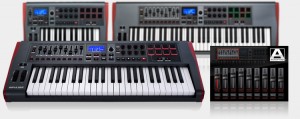
Impulse is a range of professional USB/MIDI controllers. They each have a precision keyboard and a full control surface powered by a brand new version of Novation’s Automap control software – Automap 4 (which makes getting hands-on with your DAW/plug-ins fast and simple). Impulse also has 8 back-lit drum pads which can warp arpeggios, roll beats and launch Live clips.
Novation V-Station EDM Heaven Soundbank
This soundbank brings a new life to the Novation V-Station synth, especially if you’re into wide EDM (Electronic Dance Music) area. Big Room Plucks, Synth / Lead presets and Pads – that’s what you’ll find in this soundbank.
More info at: http://www.designasound.com
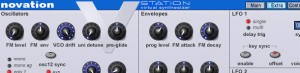
EDM Heaven – soundbank (created for Novation V-Station soft synth), suited mostly for EDM (Electronic Dance Music) genres. It contains 38 smooth, big room pluck sounds inspired by such artists as Kaskade, Dinka, Jerome Isma-Ae (“Big Room Pluck Sounds”), Pryda as well as some old classic plucks inspired by Chicane, Anjunabeats releases, Paul Van Dyk etc.
Bank also contains 52 Synth / Lead presets which can be used in wide range of genres. The rest is filled with 10 bass presets and 25 warm, smooth pad presets suited for background stuff, sidechaining etc.
All in all there are 125 presets which will bring a new life to your Novation V-Station synth.
Extensive coverage of Alchemy Mobile
Demo of the Alchemy Mobile App by camel audio using the Cinematic library sounds. Played on the Novation Impulse 25 controller keyboard.
And here are all the details:
Alchemy Mobile includes everything from evolving soundscapes and fat basses to lush pads and pulsing arpeggios, and is available for free from the iTunes App store. This is the iOS version of Camel Audio’s award-winning Mac/PC Alchemy synth – the leading sample manipulation synthesizer which can be heard on thousands of records and films by world-class artists. Touch Remote for Alchemy on Mac/PC
With the Pro Upgrade ($19.99/€15.99/£13.99), you can remotely control Alchemy or the free Alchemy Player on your desktop computer. This is the first iPhone App to offer a dedicated touch remote feature for a desktop synth! Easy one touch access to the remix pad and preset selection means you’ll spend more time getting inspired and less time reaching for your mouse.
Create Your Own Sounds with the Remix Pad
Discover an almost limitless palette of sounds using the unique remix pad to morph between sound variations. 16 controls including cutoff, resonance, ADSR and effects parameters are specially selected for each preset to make tweaking sounds to fit your music easier than ever.
External MIDI or Built In Keyboard
The Alchemy Mobile interface was designed with ease of use in mind. You can play the mini keyboard built into the app, which features scalable key size and one touch major and minor keys so even the clumsiest fingers can play along with friends. You can also plug in an external Core MIDI keyboard.
Copy/Paste and Loop Player
Using Alchemy with other apps like NanoStudio and Garageband is easy, thanks to the included loop player. Simply paste a loop from your sequencer into Alchemy Player, hit record, and play in your killer bass part, and then paste the resulting loop back into the sequencer. Alchemy Player is the first iPhone app to feature exposé, which makes switching between pages a breeze.
Most Powerful Synthesis Engine on iOS
Want to know why Alchemy Mobile has such amazing sounds which can change so drastically with a tap of the remix pad? The performance controls and remix pad are linked to the most powerful synthesis engine on iOS, which allows you to morph and change the sound in radical ways not possible with any other synth. Alchemy’s VA synth, sampler and granular and additive resynthesis, combined with almost unlimited modulation sources, effects and a flexible arpeggiator are used to power this expressive way of creating new sounds for your music.
Expandable with Sound Libraries
The free version of Alchemy Mobile includes 25 sounds, with a further 25 available when you register for free with Camel Audio. You can expand Alchemy Mobile with a wide range of sound libraries such as BigTone, Cinematic and Arp Dimensions from world class sound designers. The libraries each contain 50 sounds (400 variations) and are available as in-app purchases for $4.99/€3.99/£2.99.
Twitch To Ableton Live Translator
More from Novation with the news of a Twitch to Ableton Live Translation application. This takes the Novation Twitch – DJ control surface with audio interface, and makes it play nicely with Abletons Live software. This translation layer appears to be built using MAX/MSP an advanced MIDI manipulation application – indeed, the source-code is freely available so the tweakers can modify the application to do what they wish. Available for download now from the Novation website (Mac and PC).
Novation has created an application that allows users to set up and use the TWITCH to control parameters in Ableton Live (and any other MIDI compatible DJ software).The purpose of this software is to receive ‘raw’ MIDI messages generated by the TWITCH hardware and ‘translate’ them into MIDI messages that can be learned to parameters in Ableton LIve. TWITCH Translator for Live is not intended to be a solution to provide a universal DJ mapping for Live. Every Live user will want to use TWITCH in a slightly different way to another, so this allows a blank starting point to map to parameters in Live in any way you want. This application has been created using Cycling 74 Max/MSP software. This means that every user is able to run this application regardless of whether they own Max/MSP, but users of Max/MSP are able to open the ‘source code’ to edit and tweak to their own preference.
More Information
Daniel Fisher on Novation UltraNova
A nice run through of the UltraNova filmed by Sweetwater
Brand new Nova-series synth engine based on Supernova II:
• Single part with up to 18 voices, 14 filter types, 36 wavetables, 5 effect slots
• Patch Browse enables you to browse 300 sounds by type & genre
Touch-sense controls enable totally new sound-shaping & performance:
• Trigger envelopes/LFOs/filters/FX by just touching the encoders
• Large rotary control instantly allows you fine control of any parameter
Totally gig-able with 37 full sized keys, a vocoder, and loads of controls:
• Voice optimized 12 band vocoder with gooseneck mic
• High quality key bed with aftertouch for expressive playing styles
Software plug-in editor and Patch Librarian for full visual editing:
• Plug-in editor allows you to view and edit in with software
• Software Patch Librarian a organise, store and share unlimited patches
Built-in 2 in 4 out USB audio interface and it can be bus powered:
• UltraNova can be used to stream audio to and from a host computer
• Stereo main (analogue & SPDIF) and aux outputs, and MIDI in/out/thru ports
One Man Band Electronic Jam
“By the way a clip to see me jaming with some of my equipment. The used instruments are:
A-100 Analog Modular System
Mopho filtered by EBBE & FLUT
Novation X-Station
Korg Kaoss Pad”
The all new Novation Impulse – Professional USB/MIDI controller keyboard
Impulse is a range of professional USB/MIDI controllers. They each have a precision keyboard and a full control surface powered by a brand new version of Novation’s Automap control software – Automap 4 (which makes getting hands-on with your DAW/plug-ins fast and simple). Impulse also has 8 back-lit drum pads which can warp arpeggios, roll beats and launch clips in Ableton live.
Impulse also comes with a stack of free software and sounds:
• Ableton Live Lite – powerful loop based music-making software
• Novation Bass Station – legendary analogue bass synth as a software plug-in
• Loopmasters sample library – over 1GB of royalty-free samples
• Mike The Drummer – 502MB of live drum loops and breaks
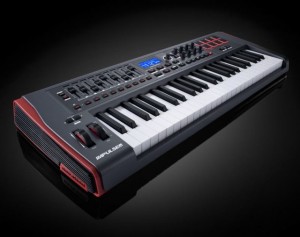
Some unique features:
- Aftertouch. Keybed quality is paramount for obvious reasons. What’s typically missing, for those who like it, is aftertouch support, available here.
- Full DAW control. Available on the Axiom but previously missing on Novation’s offering, you get 8 knobs, 9 faders and buttons, and an LCD for controlling your DAW. (Only one fader on the 25-key model, since all of that wouldn’t fit.
- Automap. It wouldn’t be a Novation keyboard without the company’s Automap feature. Whether that’s good or not depends on whether you like the functionality; I’ve tended to find it a bit fiddly at times, though the implementation with Propellerheads’ Reason is fantastic. (Hosts are a big part of the variable here.)
- Pads that do more. This one’s rather interesting: you get drum pads set up to do arpeggios, rolls, and Ableton Live clip launching. You could do that with any pads, but neat to see it on the keyboard, and I’m curious to learn more about the specific implementation.
DATAMASKIN

