
Meta.Dj iPad Dj App Demo
Backgrounf info: “I had the pleasure to contribute content for this app. You’ll find many of my loops, midi files, and a remix called Power by Jah Boogie.”
Track Deck allows you to load MP3s from your iTunes collection and mix them, beat match them, and completely mangle them with the multi effects processor. TrackDeck includes auto BPM detection, four programmable cue points, x/y effects pad, scrolling waveforms, cross faders, an line fader. Features a free song from Jah Boogie called Power Dj Puzzle’s Club mix and Dj Puzzle loops. Music provided by Desha Music Inc.
Looptastic allows you to combine a huge selection of included loops with your own beats to make a masterpiece. Bend the mix into submission with powerful sound manipulation tools. Share your mixes and performances with the world via SoundCloud! Import your own loops or download loop packs from the in app store. Looptastic automatically syncs up to all of the apps loaded within the meta.DJ app’s cells.
SaMPL3R (aka Grüvtron) is an arpeggiator synth/sampler. Choose a Preset and grüvtron selects the right sequences and instrument sounds to create the foundation for your own new instrument parts. It’s the Smart Instrument for Electronic Musicians, DJs and Dance Producers. Grüvtron comes preloaded with performances and sounds created for Techno, Trance, Dubstep and other electronic styles. Gruvtron automatically syncs up to all of the apps loaded within the meta.DJ app’s cells.
Drumtron is a drum sequencer that comes with preset drum patterns that can be customized and synced up to all of the apps loaded within the meta.DJ app’s cells.
OFFICIAL INFO
Are you ½ producer and ½ DJ? Has your style outgrown the abilities of 2 virtual decks, digital wax and a mixer?
meta.DJ is targeted at modern DJ-style performances and lets you blend your iTunes music tracks with drum machine beats, sound fx, synthesized instrument parts, mix effects like delays, stutters, filters and more! Each iTunes track can get it’s own reusable Cue and Loop presets, to let you work the track to the fullest.
All from an easy-to-use touch interface!
meta.DJ gives you:
QUAD DEVICE SUPPORT — TRACKS, LOOPS, INSTRUMENTS AND MORE!
Use of up to 4 virtual devices at any one time. Use any combination of devices during your set including Track Decks (for iTunes tracks) plus Looptastic, SaMPL3R and drumtron instruments based on Sound Trends grüvtron technology.
TRACK DECKS
Load your track into a Track Deck and breath new life into your library.
• iTunes Integration
Easily import tracks from your iTunes library.
• Automatic BPM Detection
Automatic tempo detection plus x2, /2 and Beat Grid adjustment tools let you nail down those tricky tracks.
• Cues/Loop Presets
Use the waveform display to help gets things just right. Playback automatically plays back on the beat.
• Auto Loop for Tracks
Use for creating Loop Presets or to quickly throw in 1/2/4/8/16/32 bar loops as you play the tracks during your Live Set!
LOOPTASTIC
The loop-based remix instrument for playing, mixing and adding effects to audio loops. Every loop’s a fader!
• Scratch Strip interface for scratching and interactive control of loop playback
• 3 FX zones
DRUMTRON
A new take on the drum machine. Mix together Kick, Snare, HiHat and other parts to build the mix how you feel it. You get FIVE pounding kits loaded with parts. All done without using audio loops so the sound stays tight with a cool pitch control for some freaky FX!
SaMPL3R
Based on grüvtron, SaMPL3R lets you easily add instrument parts (arpeggios, chord stabs, basses, leads, etc) to the mix in any key and morph them together. Plus a Control Strip lets you add filter and modulation to the sound. Key Mode can help you find the key of your tracks, and/or play the sound live.
15 MASSIVE EFFECTS WITH XY PAD CONTROL
Each device has it’s own mixer fader and can have up to FOUR (4) FX assigned at once. FX include Low/High Pass Filter, Gate, Stutter Loop, Stutter Stepped, Stutter gate, Bitcrusher, Flanger, Glitchy Repeater, Delay, Reverb, Pan, Compressor and Pump. All are controlled by an XY pad with “Hold” feature for setting an FX setting like a preset.
SETS and SNAPS
Each Set Document includes user-defined combinations of Devices with a collection of Snaps. Each Device Snap includes the content in the Device (music tracks w-Cues/Loops, Instruments Presets, audio loops, etc.) and mix information (effects, volume level),stored as easily recalled snapshots.
Meta.DJ is available for $9.99
Get this app here http://bit.ly/rrLs6k
How to program a Roland TR-808
The TR-808 is a classic drum machine that used analog synthesis to create its sounds. The sounds have a very thin and pure quality and aren’t grungy like it’s successor the TR-909. In fact, the 808 has become the signature beatbox used in most R&B and hip-hop as well as a lot of dance and techno music. Booming bass kicks, crispy snares and that annoying cowbell sound made famous during the 80’s are all part of the 808 and its famous sound.
Its 16 drum sounds include the famous boomy low kick, snappy snares, low/mid/hi toms, low/mid/hi congas, rimshot, claves, hand clap, maracas, cowbell, cymbal, open hihat, closed hihat and accent. All of the sounds can be edited and/or tuned and have individual outputs. Unfortunately it is not MIDI equipped but it does use Roland’s DIN Sync.
A small demonstration about how to program a Roland TR-808
Sorry for my bad english, and please don’t complain about the bad audio quality because this movie is just for educational use.
Steal that sound!
Hal Leonard Books has published Steal This Sound by Mitchell Sigman. Presented by Keyboard Magazine, the book is a collection of Sigman’s columns of the same name from Keyboard, detailing the greatest synth sounds from the greatest records, and how they can be achieved with modern gear.
Presented in chronological order as they appeared in the magazine from inception to the present, Steal This Sound includes more than sixty articles describing prominent synth sounds from Prince’s “When Doves Cry” and Nine Inch Nails “Closer” to MGMT’s “Time to Pretend” and Radiohead’s “Everything in It’s Right Place”.
Hal Leonard Books PR officer had this to say, “Steal This Sound is packed with invaluable tips and insights into re-creating these great synth sounds and provides a unique view into how synth technology has evolved over the years. Sigman explains how these sounds were created originally on synths by Moog, ARP, Sequential Circuits, Roland, and Korg, and gives step-by-step instructions to re-create the sounds using widely available modern plug-ins and software instruments from a host of manufacturers. Steal This Sound is a great read for music enthusiasts and an invaluable resource for keyboardists and programmers.”
About the Author:
Mitchell Sigman is a Los-Angeles based keyboardist, guitarist, and producer. His band Celebutante plays the LA area and has numerous TV track placements in shows such as The Jersey Shore, The Bold and the Beautiful, Burn Notice, Monk, and more. Sigman also won a BMI award in 2008 for his work on the Berlin track “Scream”, which is used as the theme song for the Lifetime drama Angela’s Eyes. Sigman has been a writer for Keyboard Magazine since 2004.
Pricing and Availability:
$19.99
More information:
New album from Auto-auto
Auto-auto is at it again. After playing and touring together with among other Aesthetic Perfection and Combichrist the past few years they’ve finally managed to go back into the studio and assemble something that sounds like an album. The release is planned to be released in october on Out Of Line and is entitled “Dancing Through Dark Times”.
Here’s one song that did not make it to the new album:
Auto-auto – death blues(clip) by johan-7
The material has been inspired by anything from Haddaway to Blutengel (“The former as a god of eurotechno and latter as a horror example it would seem”, so the band’s Johan Hellqvist says).
More info soon but keep an eye on www.auto-auto.se for more info and some really funny blogposts.
First plugin especially developed for creating rich motion sounds
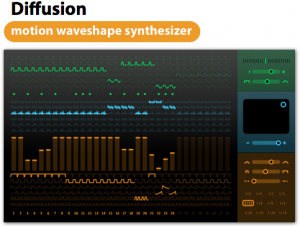
Sinevibes has announced Diffusion, a synthesizer instrument plug-in for Mac.
Sinevibes is extremely excited to announce Diffusion, its very first instrument plugin which has been especially developed for creating rich motion sounds. Diffusion’s unique synthesizer engine combines additive oscillators and waveshaping models with an advanced matrix sequencer that allows for over 400 different parameter combinations per step. All this being accessible via an intuitive interface makes Diffusion an extremely capable tool for producing animated synths and basses which have incredible density and character while being clean and warm at the same time.
“To create synth and bass parts required for today’s electronic music styles, producers often need to layer multiple plugins and do a lot of post-processing.” – says Artemiy Pavlov, founder and chief developer at Sinevibes. “With Diffusion alone, they can now create very complex motion instruments with a lot of liveliness and character, enjoying an extremely fun-to-use interface while at it.”
Diffusion features
- Dual monophonic oscillator with 6 additive waveforms and 6 waveshape transformation models.
- Flexible tempo-synchronized sequencer with up to 32 steps, each with individual setting for note switch, waveform, waveshape model, envelope type and modulation depth.
- High-contrast user interface with randomization features.
- Useful collection of preset patches and templates.
Diffusion for Mac (AU) is available to purchase for $59 USD. It requires Mac OS 10.5 or later, and a 32 or 64 bit AudioUnit instrument host application that supports Cocoa user interface technology.
Awesome live modular recording
A live modular recording. Three CGS01 Harmonic Sequencer modules from Catgirl Synth were used to generate melodies automatically. This generative piece reminded me of the virtually unlimited species of creatures under the sea.
The video content was shot by Nick Hope and crew of bubblevision.com.
More about Catgirl synths here >>
Welcome to the Cloudroom House
Welcome to the Cloudroom House – a music experience for everyone to join and share.
The Cloudroom House is not just an album, it’s a song cycle that consequently breaks away from conventional ways to release and receive music. This song cycle aims for wholeness and therefore challenges you to complete it with your contribution. You can contribute by simply paying attention and lending me your ear. By giving it a listen you are also giving it a meaning. I am no one and my music is all in vain unless you bring this to life by your notice.
The Cloudroom House furthermore explores the relationship between performer and recipient – the relationship between you and me. There are a lot of questions we need to find the answers for. At first, how do we define our relationship? What determines our relationship? Is it reliance? Is it a symbiotic reciprocity and mutuality or is it interdependency that binds us? In addition, we need to decipher whether our binding is abiding or only temporary and if we can stand on our own or not.
So you see that I’m rather amorphous and faceless and that’s why I would like you to shape me. Only you can shape me. I want to take you on a journey as my constant companion. We could build up something here together. It’s completely in your sole discretion what you make of the Cloudroom House. You decide what it’s all about. You can call me the house’s structual engineer whereas you are its interior decorator and as long as you listen, you are a part of it.
Circuit bent Yamaha PSS-780
Analog Chorus Hacked to reveal sweet LFO, which is then patched into the Pitch-Bend wheel for Pitch LFO. Also can be patched into the drum circuits for unique Drum Pitch LFO……
Loads of Glitch Mods for the Digital Drum machine section, including Pitch Modulation Knobs (Pitch down & Pitch Up ‘Over-Clock’ Knobs), Tonal Distortion / Ring Mods, Glitch & Phat Modulating Bleep Tones / Bass Tones…
Description of the PSS-780:
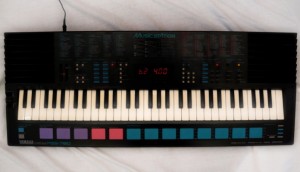
The Yamaha PSS-780 is a five-octave (61-key) small-key keyboard, and was a very sophisticated keyboard when it came out in 1989.
The keyboard uses a 2-operator FM Synthesizer to produce 100 pre-set voices, and also offers manual control of some (but not all) of the synthesizer parameters, so the user can create their own sounds. Five user-defined sounds can be stored in memory with single-button access. Percussion is PCM (sample) based, and can be played manually using the row of pads in front of the keyboard. A total of 32 percussion sounds are available, selectable in four banks of eight, and custom rhythm patterns can be created and looped using the “Custom Drummer” feature.
There are also 100 pre-set rhythm and auto-accompaniment patterns, each with an orchestrated ending and three different fill-ins available. The fill-ins are orchestrated, and are activated using the three large purple pads in front of the keyboard, and are therefore very easy to hit at the right moment during a live performance. The three fill-ins can also be used as Intros, but when used like this they play percussion only with no orchestration, and the orchestration begins after the Intro. With the “Synchro Break” function enabled, you can also add your own manual fill-ins or a drum solo (!) using the drum pads during the performance. This works with either the pre-set rhythms, or your own “Custom Drummer” loop.
There is also a five-track sequencer, which allows independent recording of each track using different voices (including user-defined voices) with simultaneous playback, together with auto-accompaniment or custom rhythm pattern, so complex orchestrations can be achieved.
There is also a pitch-bend wheel (configurable range between 1 and 12 semitones) and lots of other features and effects which I won’t detail here – get the Manual if you are interested.
While the PCM rhythm sounds each have a defined stereo “position” the voices are fundamentally mono, and the only stereo effect comes from enabling the “Stereo Chorus” function.
The built-in speakers are remarkably good (as expected on a Yamaha), but my example has an unusually hissy amplifier, and there is also a constant high-pitched whistle on the output. The hiss gets even worse when “Stereo Chorus” is enabled. I have owned my PSS-780 since I was bought it for Christmas in 1989, and it has always had this noisy output, so I suspect this is a design flaw on the PSS-780.
There is an interesting easter egg in the PSS-780’s firmware. If you hold down the top two white keys at the far right-hand end of the keyboard while switching on the power, the keyboard enters what I can only assume is some kind of diagnostic test routine. I won’t spoil the surprise for you, but try pressing some buttons and see what happens! Don’t worry – you can restore normal operation by switching off and back on again.
Arturia’s Minimoog V has been thoroughly updated
Arturia has released a major update to its virtual take on the Minimoog synthesizer, the Minimoog V.
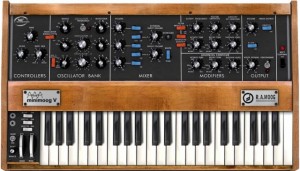
Here’s what’s new in Minimoog V 2.5:
- Support for 64-bit VST and Audio Unit
- Support for Pro Tools 9
- MIDI Control Assignment Improvement
- Update of toolbar look and feel
- Added support for NRPN MIDI controls
- Added triangle LFO waveform
Features:
- All the parameters of the original minimoog V
- Advanced automation mode
- Revolutionary preset navigation system called the SoundMap
- New formant-based FX called the Vocal Filter
- New Chorus and Stereo Delay Effect section
- More than 1000 presets created by talented artists and sound designers,
Minimoog V 2.5 is a free upgrade for all registered users.
SQ-80 Rack for Ableton Live
This Ableton Live rack was created using samples from a SQ-80 synthesizer on the “Hush” preset. The samples are courtesy of Tom from http://www.waveformless.blogspot.com Please check out his site for lots of great information about electronic music and a weekly sample pack download.
Download the Instrument Rack @ http://bit.ly/freesynth26
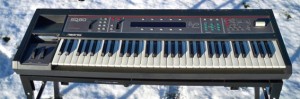
Today is an exciting day for me, it marks six months of releasing these Ableton Live Racks for your downloading pleasure. I want to thank you for your support and kind words, it means a lot to me and has made this a truly exciting project to work on.
A big reason I do this is to meet new people and share ideas and music with people I would otherwise have no way of reaching; I thought that this 26th Ableton Rack should reflect that.
One great soldier of information in the electronic music community is Tom who writes the blog Waveformless. The motto of the site is a “Freeform discussion of electronic music and the techniques and gear used in making it.” I highly recommend checking it out and exploring the vast information from synthesizer news to free sample Fridays. This weeks Free Ableton Live Rack was created using some of Tom’s free samples. Thanks to Tom for sharing these samples and letting me rack them up for everybody’s enjoyment!
I’m not going to pretend I know anything about the SQ-80, I’ve never touched one in my life, but therein lies the beauty of the internet. Tom supplied us with a bunch of samples from the “Hush” preset, as well as a sample of the synth powering down. From there I have merely thrown the samples into Live’s Sampler and mapped out some choice macro knobs. The result is something that I hope you will find useful. (If nothing else, play around with the notes on the extreme high end of the keyboard. That’s where the samples of the SQ-80 being powered down are, and the sounds I am most excited to use in my own productions. Great call on adding that sample, Tom!)
DATAMASKIN

