
UK synth pop act Mirrors are back with new material
Although they are now one man short. After several EP’s and singles released in 2009 and 2010, which was then followed by the debut album “Lights and Offerings” early in the spring, the UK band Mirrors are now back with the first two snippets from their recent work in the studio. Here’s their official statement:
“Dear all,
Sorry for our brief hiatus but a lot has changed in the Mirrors camp over the last few months. Firstly we say farewell to Ally Young. Ally has been an integral part of Mirrors since it’s foundations and has brought his ideas and enthusiasm to every part of our world.
We are all very sad to see him leave and wish him all the luck in the world in his future endeavours. We remain the closest of friends. As for the rest of us, we couldn’t be more excited about our future in Mirrors. We’re back in the studio now and the songs are coming thick and fast!”

Shooting Stars by theworldofmirrors
Make sure to check out the interview we did with Mirrors this spring, right here >>
A second album is under production and will reportedly be released early next year.
Donut the 2D looper – Loading Files demo
New version of Donut the two-dimensional looper for iPad featuring file loading.
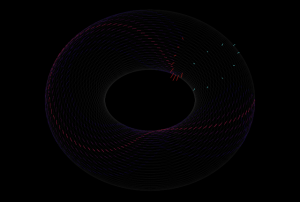
Inspired by the IBM tape loop machine, Donut is the latest release from The Strange Agency. This sound sequencer is a strange one, like the old IBM machine, it makes time two-dimensional by first creating a three dimensional loop and two dimensional sound. It does this by first looping a linear track, then multiplying it into stacks and finally taking the loop stack, and wrapping it itself into a loop, just as the original linear recording is looped.
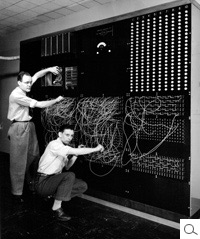
You use Donut by recording sound into (or through) it, and playing the recorded sound back. You control the playback and recording heads with a 2d vector for each, determining the rate at which the head steps through the loop and loop of loops.
There are still quite a lot of sample points in there and therefore the 2d surface can be very sparse. Imagine if we recorded on the Donut in one direction, but played back in a perpendicular direction. We would only hit one sample of the recording amidst a loop of silence. Thus, Donut can create extremely sparse soundscapes.To make the soundscapes denser, Donut lets your record and play sound with multiple heads (or, using a synthesizer term, voices). These heads can be spread out across the loop surface in both dimensions, creating some awesome temporal effects.
Korg iKaossilator: First Look and Review
Ean Golden reviews the Korg iKaossilator app for iPads and iPhones. It’s the normal Kaossilator, but cheaper and on your iOS device!
Learn more at http://www.djtechtools.com/2011/10/18/ikaossilator-for-ip…
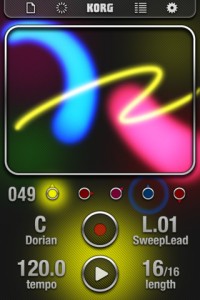
iKaossilator for iPhone Highlights :
● Play sounds by simply stroking, tapping, or rubbing the screen with your finger
● Bold Visual Effects move along with your performance and add excitement
● 150 diverse built-in sounds cover any style of dance music
● Scale/Key settings allow anyone to perform with musical precision
● Easily create tracks with the loop sequencer using up to five parts
● Control loops in real time for DJ-Style live performances
● WIST capability allows wireless sync-start with other apps such as the iELECTRIBE
☐ Perform Using A Single Finger
iKaossilator uses the unique X-Y interface made famous by Korg’s entire Kaoss Line, including the original hand-held KAOSSILATOR. Create melodies and phrases simply by stroking, tapping, or rubbing the touch screen with your finger; no musical knowledge is required.
☐ Bright, Colorful Visual Effects
iKaossilator is also focused on its graphic design, which shows up beautifully on the iPhone’s high-quality display. The visual effects on the iPhone’s display move along with your performance and add excitement. These bold, colorful graphics provide an exciting performance experience.
☐ 150 Diverse Sounds Covering Many Musical Styles
Use the 150 built-in sounds to perform and produce a broad range of dance music styles including hip-hop, house, techno, dubstep, nu-disco, and electro. Enjoy the synth leads and synth bass sounds you expect from a synthesizer, as well as acoustic sounds that simulate piano or guitar chords, even the popular sound effects used by DJs. The drum sounds let you play and manipulate various patterns simply by moving your finger.
☐ Loop Sequencer
The built-in loop sequencer lets you layer up to five musical parts. To create a track, simply assign a loop such as synth, bass, chords, sound effects, or drums to each part. Fifty loops created by professional musicians are built-in to help you get started quickly. In addition to its track-making capabilities, this loop sequencer is also a great feature for live performance. The Mix Play feature makes it easy to enjoy live remixing; you can switch seamlessly to another loop or extract a specific part from another loop while the playback continues.
Time machine: ROLAND JUPITER-4 Analog Synthesizer 1978
The Roland Jupiter-4 “Compuphonic” from 1978 was an affordable four voice polyphonic programmable synthesizer. It has 8 presets and 8 RAM memories. The Jupiter-4 was the first of the Jupiter series and was also the first synthesizer which featured an arpeggiator.
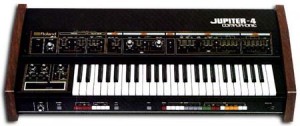
I played the Jupiter-4 dry, and also sometimes with a bit reverb and delay.
The JP-4 was played by Depeche Mode, Vince Clarke, Tangerine Dream, Frank Duval, Gary Numan, Tomita, Kitaro, Duran Duran and others.
The Jupiter 4’s basic architecture was 4 identical voice cards, each with a VCO (with sub-oscillator), resonant low pass VCF (Roland IR3109 IC, which could self-oscillate), and VCA. Modulation included an ADSR envelope and LFO. The LFO, routable to oscillator pitch, pulse width, filter cutoff and amplifier, was notable for being able to reach audio frequencies, allowing for crude FM and AM synthesis.
The Jupiter 4’s two most distinctive features were provided by virtue of its “compuphonic” digital control of the four voice cards, made possible by two Intel 8048 chips:
- An arpeggiator, with a choice of up, down, up/down, or random mode. The arpeggiator can be prominently heard in Duran Duran’s 1982 hit single “Rio.”
- Four voice assignment modes, which, as well as simple 1 VCO-per-voice polyphony, included the ability to effect 4-VCO unison when one key was pressed, 2-VCOs per voice when two keys were pressed, and 1-VCO per voice when three or four keys were pressed. This effect can be heard on tracks such as “Seconds” by The Human League and “I Dream of Wires” by Gary Numan.
The final signal path also included a simple high pass filter and a stereo chorus effect. The Jupiter 4 had 10 preset sounds and also featured 8 memory locations for user-created patches.
Despite not being incredibly popular, it did manage to find its way into the hands of some musicians, most of which were associated with the New Wave and synthpop music scenes (see below). Phil Oakey of The Human League eulogised that despite its limitations “the Jupiter 4 will be tatooed on my heart for ever”.
EM-Tronic Digital Synth kit
This kit provides you with all the components you need to make a small handheld digital synth. All you need to do is build the kit and find an enclosure to fit it into.
About the EM-Tronic:
With the combination of pitch, speed and mode controls, giving endless combination of sounds this Synthesizer packs quite a punch for it’s size. The best thing is I’ve included the basic software file so you can hack the sound to your hearts content.
The information in this Instructable is all you need to build this synth but if you would just like a kit to put together I have made a few up. EM-Tronic KIT
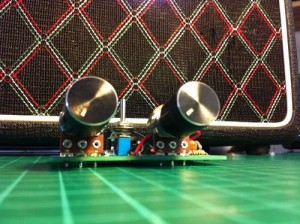
You will need:
*Circuit board ( get one made or just use strip board)
*The ability to program a Picaxe 08m2 Microcontroller.
*Electronic components( resistors, capacitors, voltage regulator, 9v battery clip, switch, potentiometers, 3.5mm socket, knobs,Picaxe 08m and LEDs
*Soldering iron and solder
*Wire cutters
*Allen key to fit the knobs
*An enclosure to fit the kit into if you want one.
Apart from these instructions I’ve included the circuit board schematic(eagle), circuit board layout(eagle) and the software file EM-tronic.BAS. This gives you all the details you need to build your own EM-Tronic. If the files don’t download or I’ve left something out please let me know and I will sort it out.
The Pain Machinery “Hard Cash”
Latest video from The Pain Machinery, enjoy
Details:
A music video I produced and directed for a friend of mine. Shot in July, edited the past few weeks.
Filmed on Panasonic AF101 and Canon 5D MkII, with a bunch of different Canon, Zeiss and Nikkon lenses.
The Pain Machinery on Facebook: facebook.com/thepainmachinery
CC license applies to footage.
More info on the Panorama controller for Reason 6
The basic idea of the Panorama is a custom front end controller for Reason 6, based around a MIDI keyboard and plenty of knobs and sliders.
Mixer
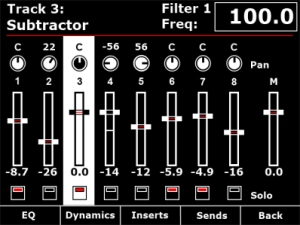
Channel strip
The mixer channel strips in Reason are comprehensive and like the real world hardware – quite long! Panorama breaks the channel strip down in to manageable localized sections, accessible at the push of a button. From the mixer menu described in Part 1, you have access to EQ, Dynamics, Inserts and Sends across the buttons below the display. The encoders to the right of the display map to the targeted channel strip in the mixer. If a track is selected in the sequencer, the corresponding mixer channel becomes targeted. Alternatively, you can target a mix channel using the 8 buttons when set to ‘select’ mode (described in part 1).
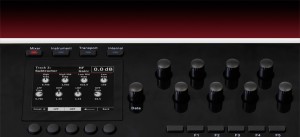
Here we are taking a closer look at how Panorama access’s the EQ parameters.
Panorama allows you to gain access to Reason’s mixer at the touch of a button. Here you see the Reason mixer channels assigned to be operated by each of Panorama’s controls. The display gives you an accurate overview of what parameter each control is assigned to as well as current value state. Let’s look at the display screen in some more detail.
Panorama is our vision of how a great controller should work. Yes, there are many ‘generic’ controllers on the market already but we have yet to find one that satisfies our criteria of operating the software, as if it’s hardware – That’s Panorama. Panorama uses a communication protocol that has been custom designed for Reason 6, putting control – every control – at your fingertips. There’s nothing generic about this controller. Panorama really does access all areas.
Nektar Panorama general specifications
- 49 note weighted keyboard w/aftertouch
- Pitch bend + modulation wheels
- Motorized fader
- 9 50mm faders
- 9 encoders above the faders
- 8 programmable LED buttons
- Display
- Additional 8 encoders
- 12 velocity and pressure sensitive pads
- Navigation and menu buttons
- Transport control
- Sustain socket
- Pedal socket
The whole design is custom for Panorama including the keybed. Our communications protocol that handles interaction with Reason 6 is also custom. The main idea behind Panorama is to complement the computer ,so a user can have immediate access to areas of Reason where tactile control is an advantage without having to reach for the mouse which typically disrupts workflow.
Or to put it in other words: Panorama is first an instrument and gives the user the experience of operating Reason, as if it was hardware.
hummingbird
by 寅王
Intro video for the new Macbeth X-Series Modules
Background info: This is first short intro vid for the new Macbeth X-Series Modules in 3U- more to follow- but I like the slightly heavy feel to this! You are basically listening to one oscillator triggering two dual EGs sweeping the the dual SV filter- so it’s one filter module that you are hearing!
Available from Analogue Haven and Schneidersladen very shortly!
iPad App – DXi FM Synthesizer Demo
Short demo of some of the sonic features of this FM app by Takashi Mizuhiki. DXi brings FM to your iPad, but it’s closer to the DX27 than the legendary DX7. There are four operators rather than six and polyphony is reduced from 16 to three, from what we can tell. DXi also offers a neat 16-step sequencer and an effective XY performance pad, to mix operators and patterns in real time.
Description
DXi is a FM synthesizer application inspired by 80’s most popular FM synthesizer. You will enjoy creating sounds as well as playing music with this application.
FM synthesizer is still popular among many people by its unique tone. We carefully selected parameters from original synthesizer so you will be enjoy editing tone with them easily. You need to know some technique to tweak the tone, but you will be able to get DXi’s special tone and effects while having some fun!
Creating sound effects is another idea to enjoy DXi.
We loaded 16 step loop sequencer as a bonus feature!
If you remember the days of FM synthesizers, try creating the tone you remember from them.
If you have no experience with any FM synthesizer, we are sure you will be enjoying the unique tone world!
* 4 operators FM synthesizer
* Anti-ailiased oscillator
* 8 algorithms
* Envelope, frequency (Ratio or Fixed) can be set each operators.
* Feedback control on operator number 4.
* 2 master effects (LPF with Resonance and Delay)
* Import/Export function to save the tone you created. (URL schema text string format)
* Audio recording function. And you can transport recorded audio file, .wav, onto Mac/PC via iTunes file sharing.
* Clipboard audio sharing support. You can export recorded waveform to other application via clipboard. It’s compatible with Intua’s clipboard.
* Supports external MIDI keyboards via Core MIDI USB adapters. iPad users can use Camera Connection Kit. And iPhone/iPod touch users can use Yamaha i-MX1.
DATAMASKIN

