
iZotope Trash 2 – Extended Video Review
Russ takes a look at the new iZotope Trash 2 plug-in and finds out that it offers far more than one would first think.
Trash 2 takes the best of Trash and makes it even better. With an entirely new sonic architecture, brand new features, optimized performance, better sound quality, and support for modern hosts and formats, Trash 2 is primed for a powerful new era of audio mangling, distortion, and experimentation. Let sonic mayhem ensue.
KEY FEATURES
- Distort in ways you never dreamed with the Trash module’s 60+ distortion algorithms, perfect for transforming your sound into something never before heard.
- Design your own unique distortions, from massive to mild and everything in between, with a new, customizable, multiband Waveshaper.
- Let your tracks inhabit any space or object with the new Convolve module. Choose from over 100 impulse responses or load your own to put your bass in a washing machine or your keys in a cave.
- Find a new voice: make your audio speak and growl with two redesigned Filter modules, each one featuring new vowel formant filters, screaming peaks, node modulations, and more.
- Start trashing your audio immediately with an extensive new preset library and an ear-friendly Limiter that ensures you can play without fear.
Looking good – the new Access Virus TI Snow Black Edition

The Virus TI series comes in different flavors. You’re looking for something ultra compact and yet powerful? The sturdy Virus TI Snow features exactly the same sound engine like its bigger Virus TI brothers. It fits on an issues of Time magazine and has proven itself to be an ideal companion for musicians on the road or with limited desktop estate.
The Snow features 4 multimode parts and about 50% of the polyphony in comparison to the bigger models. Those result in everything in between 10 and 50 voices cranking out the same powerful signature sound like all other Virus TIs. Each and every voice can use up to four oscillators in parallel including Virtual Analogue, Wavetable, HyperSaw and Grain Oscillator models.
The filter section comprises two independent multi-mode filters with optional Mini Moog emulation and self-resonance. An extensive array of parallel effects enable you to compose highly complex sounds in virtually no time.
In Multi mode, your patches sound 100% identical and include all of the effects. The 4 independent parts can be routed to 1 Stereo Analogue or 3 USB outputs streaming audio directly into your sequencer workstation. The software suite includes a VST, RTAS and AU compatible plug-in allowing for total recall, sample-accurate timing and modern automation features.
The audio inputs and outputs can be optionally used as a sound card in your sequencer. The hardware knobs can be used to either control the Virus’ sound engine or compatible third party software plug-ins.
Native Instruments – Maschine Stand in the Studio and on Stage
Apart from showing off quite a basic stand for the Maschine, the song played definitely makes it worth while watching, details below:
For studio and stage – demonstrated by Berlin beatsmith Comfort Fit. The Maschine Stand fits both first generation Maschine models and the new black and white MK2 hardware controllers. Find out more: http://www.native-instruments.com/maschinestand
Credits:
Music and performance by Comfort Fit:
http://www.facebook.com/comfortfit
Voice Controlled Synth – BitSpeek Rack Extension
Using Audio as a Control Voltage source in Reason 6.5 using the Pitch and Amplitude follower in Sonic Charge Bitspeek. Please note that you can create something similar using Neptune Pitch Corrector, however BitSpeek has extra CV out features that make this process pretty simple. Also, BitSpeek is available for Reason Essentials whereas Neptune is only available in the full version of Reason.
http://shop.propellerheads.se/product/bitspeek/
QuNexus Smart Sensor Key Controller – Kickstarter Video
Video featuring the recently announced QuNexus Key Controller, the marketing pitch below:
QuNexus is a vividly illuminated keyboard that is both fun for beginners and a must have for modern musicians. 25 vividly illuminated, touch-sensitive keys invite the beginner to explore, and provide valuable performance feedback for the professional. Smart Sensor keys detect pressure, location, and velocity giving you unprecedented musical control.
Great for beginners and educators
Together with popular software apps, beginners can learn to play quickly and easily with QuNexus’ game-like blue and white glowing keys, creating a fun and interactive learning experience. Now anyone can play the piano.
Pro functionality
QuNexus is the first keyboard controller to unite four generations of synthesis: MIDI, Control Voltage, OSC and USB.
“Though unconventional, QuNexus’ sensor keys are faster and more accurate than my other keyboard controllers” Lauren Urroz (Keyboardist-DJ-Producer)
25 Smart Sensor Keys detect Pressure, Location, and Velocity
Polyphonic Aftertouch
7 Octave range
Pitch Bend Pad
2 CV/Gate Inputs
Gate and 3 CV Outputs (16-bit)
Blue and White LED Illumination with 16 levels of brightness
Portable: 14 oz, 3.5″ x 10″ x .5 ”
Plug and Play: USB powered, no drivers needed
MacOS, Windows, iOS, Android, Linux
INSTRUMENT 1 – upcoming MIDI controller / musical instrument for iOS
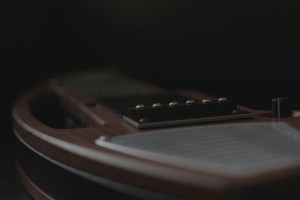
Artiphon has announce the INSTRUMENT 1 – an upcoming MIDI controller that they describe as ‘the most advanced musical instrument for iOS. INSTRUMENT 1 is controller that’s compatible with CoreMIDI iOS apps and designed to be a professional quality instrument. The body of the INSTRUMENT 1 is inspired by the forms of traditional stringed instruments and is cut from ‘heirloom-quality’ hardwood. It can be held in multiple familiar positions–from guitar and fiddle to lap steel and upright bass.

Artiphon INSTRUMENT 1 Specifications:
- Compatible with any CoreMIDI-enabled iOS app and thousands of audio apps.
- Patent-pending force-sensitive interface with six virtual frets and strings, and a strum section inspired by single-coil guitar pickups.
- Accommodates five playing positions: guitar, mandolin, bass, violin, & lap steel.
- High-quality onboard connections for headphones, microphone, ¼-inch stereo instrument cable, and MIDI in/out, and USB.
- Controls for volume, instrument modes, and octave switching.
- Rechargeable internal battery and 12v power input.
- Integrated stereo speakers and a 30-watt, class-D amplifier.
- Advanced control of multi-track recording apps including GarageBand, Pro Tools, and more.
- Body carved of specialty hardwoods and bamboo from sustainable sources.
- Designed and hand-built in Nashville, TN.
“We designed the INSTRUMENT 1 as a hybrid of pro-level components, ergonomic accessibility, and traditional instrument manufacturing techniques,” says Artiphon founder Mike Butera. “It’s been two years in the making and is unlike anything else on the market. We can’t wait to see all the ways musicians put it to work in their creative processes.”
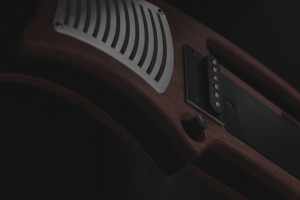
Note: The images shown here are based on an INSTRUMENT 1 prototype. The final prototype is nearly complete and production of the first units is planned for early 2013.
Price and Availability:
Artiphon will begin taking pre-orders for the INSTRUMENT 1 in the first quarter of 2013, at a price point under $1000.
amPlug + monotribe X3 – NOBUSHI / BakaOscillator
Composed by BakaOscillator
Use, KORG monotribe X3, VOX amplug (Bass,Lead,Night Train)
とにかく歪ませたかったのです。
Demo Video: uPhase+
uPhase+ is an instrument geared towards live play. It has many features and shortcuts to enable complex improvisation with spatialized patterns. Browse the documentation or head straight to the Video Tutorials to learn how to play, or take a look at the demos below to get a feel of what is possible. uPhase+ will be released in the app store worldwide on November 27th, 2012. Until then, it will only be in the swiss app store. If you have downloaded uPhase Client without reading the app’s description, sorry , uPhase Client does nothing on it’s own. It’s only function is to connect via local wifi to an iPad running uPhase+.
Enjoy
Minimoog Voyager + Tenori-On
Background video description (Googlish from Spanish):
THIS VIDEO IS TEACHING. NOT intend to present as art WHAT SOUNDS HERE.
The Tenori-On is also a good sound module, excellent sequencer. Among the possibilities that is counted as sequencer to sequence the analog equipment that has MIDI inputs and outputs.
Following the setup of the video:
MIDI
Tenori-On Voyager IN to OUT
Tenori-On Voyager OUT IN
After connecting as specified above and turn on both instruments. You must assign the MIDI channel of the MIDI channel Moog Tenori-On you want to tie. In the example, the Voyager melodic loop, which sounds all the time, is assigned to MIDI channel 1 and the layer 1 of the song within the Tenori-On.
AUDIO
Tenori-On: Stereo audio output to the audio console, without processing.
Voyager: mono audio output mono audio input of the MF-104Z Moogerfooger Delay and Moogerfooger audio output to audio console.
Do not use any additional processing.
This is just a simple example of how to incorporate the Tenori-On to September 1 analogue.
For MIDI analog synthesizers but with controls without CV / Gate, the recommendation is to use a converter MIDI to CV / Gate.
If you have a MIDI Patchbay (like MOTU MIDI Timepiece), it is possible to sequence up to 16 tracks simultaneously with external MIDI instruments.
We welcome your comments and your questions.
AS
Information about music and technology. In your language.
Visit the blog: armadasonora-mx.blogspot.com
Write to: armadasonora@gmail.com
Tutorial: How to Stretch Midi Notes in Ableton Live
Here’s a quick tip on how to use Ableton’s stretch midi notes feature. It’s a super useful technique for changing the duration of a set of midi notes.
Music made with AfroDJMac’s Wind Chimes Synths: http://bit.ly/windchimesynth
Visit my site for more stuff like this, including Live Instrument downloads, tutorials and music! http://www.afrodjmac.com
DATAMASKIN

