
Afterglow version 3 – Soundcells explores new colors in the Reason rack!

“Afterglow v3” – the ultimate atmospheric resource ReFill for trance producers, jungle heads and ambient artists. It’s analog, it’s digital, it’s tender and raw, glitchy at times but above this all: Extremely Atmospheric !
All sounds have been meticulously designed to be combined with eachother in the exact way the user would like it to be heard. Get great malstroem-, suprising subtractor- and fantastic thor patches, furthermore 280 samples from analog and digital gear, physical modeling synths and also field recordings.
Version 3 adds 25 inspiring combinator patches mainly based on the new field recordings which are included in this version (the patch name addition “v3” makes clear which patches are the new ones).
• 279 combinator patches in 6 folders: Atmospheres & Textures, FX Style, Keys, Miscellaneous, Pads, Rhythmic.
• 120+ NNXT patches, 60+ Malström patches, 50+ Thor patches and 15 Subtractor patches.
• 11 great demo tracks included.
Ruffletron – demo of a synth outfit
A basic demo of the sensors embedded in the skirt and neck piece.
One of the yellow side buttons is meant to have a deeper bass sound, but we recorded using the audio in jack on the camera, so it couldn’t be captured.
For my next video, I would like to get this on an actual musician.
This project was in collaboration with Cullen Miller.
For more documentation:
lara-grant.com/ruffletr0n-2/
Review Of The Arturia Mini V
In this Video Neil takes a detailed look at the advanced features of the Arturia Mini V, An expanded software emulation of the classic MiniMoog Vintage Synthesizer.
JM Jarre’s “Oxygen II” – on Elka and Technics organs
Background information:
This is not intended as a 1-to-1 reproduction of Jean Michel Jarre’s famous classic. It is more like my shot at it using the instruments that I have.
It’s funny that just because JMJ used an Eminent U310 and later an Elka X-705 then these exact organ models sells for astronomical prices while most other organs can be bought for peanuts.
So therefore I have used Elka X-30 and Technics SX-C600 to play most of the arrangement. I don’t have a MiniPops 7 drum machine so I used a Rhythm Ace. One thing I did to make it more authentic was that I manually added the quijada sound to the rhythm. I synthesized it on my Roland JX-8P because I felt that it was vital for the mood of the melody. The sequence that runs through the first part was programmed on the little Korg Poly 800 and most of the sound effects was made on my Roland SH-2000. Finally I added the sound of my homebuild zimbelstern because I hadn’t got a clue on how to make the huithuithuithuithuit sounds of the EMS synthesizer that I assume Jarre used.
For once I had the sheet music. I found it at the public library – you know, the house with books made of real paper in it. But it’s not easy when the composer doesn’t follow his own notes on the recording he made!
I haven’t added many effects efter the sounds were recorded. Just some panning, reverb, and echo.
Reaktor Tutorial: Filter Modulation PM vs FM
http://vimeo.com/49551176
This is the first in a new series of Reaktor Tutorials that will be posted on flipmu.com. This video covers the different ways in which you can modulate a Filter in Reaktor, and discusses the details about why you would choose one input over the other.
The video starts with a brief overview of the test ensemble, and demonstrates the way different controls sound when hooked up to either the PM input or the FM input.
The second half of the video goes into the details of WHY you might want to hook up knobs and LFOs to the Pitch inputs, and hook up ENVs to the Frequency inputs.
The example ensemble can be found at flipmu.com/work/software/
Figure – Update : AudioCopy with nanostudio
http://ios-music.homewoke.net
It corresponded to AudioCopy with the latest update. You can use this in earnest.
Figure updates below:
That’s a nice little update, here’s what’s new:
- AudioCopy—enabling pasting of Figure audio directly into AudioPaste or Pasteboard compatible apps on iOS
- WIST (Wireless Sync-Start Technology)—simultaneously start two iOS devices with compatible apps
- Additional new atonal / chromatic scale mode
- Performance pads now have a grid
EMW-200 – The Time Tunnel video opening
Final version of this EMW-200 introductory video:
Opening for the EMW-200 Synthesizer videos. Computer Graphics by EMW – Soundtrack by Malte Steiner.
Ableton Live Tips – Configuring 3rd Party Plugins
Thavius Beck is back with a new Live tutorial focusing on plug-ins, additional info below:
More info: http://bit.ly/O8U711
Dubspot Instructor, Ableton Certified Trainer, and electronic musician Thavius Beck returns with a brand-new season of Did You Know? We launched the series back in January, and for eight consecutive Mondays, Thavius shared invaluable production advice, tips, tricks, and techniques and examined some of the less explored and slightly hidden features in Ableton Live. In this episode, Thavius offers tips and techniques for configuring third-party plug-in effects with Live, using Novation’s Bass Station VST.
As nice as it is to have so many instruments and effects available within Live, there are many times when you will want to use a third-party plug-in instead. Thankfully not only are you able to use third-party effects, but you can also automate them and MIDI or key map their individual parameters to control them. There are many simple ways to do this, but in this video we will look at the Configure button that shows up when you unfold a third-party plug-in inside of Live.
For this example, I am using Novation’s Bass Station plug-in. When I first put my Bass Station (or just about any other third-party plug-in not built into Live) onto a track, I get a pretty generic interface with a black square and circle (representing an X/Y grid) and not much else. What I would like to see instead are the parameters that I want to either automate or potentially map to my controller without having the Bass Station interface blocking my view of the arrangement. One way to do that is to unfold the effect (hit the triangle in the upper-left corner), which will reveal the Configure button. Once Configure is enabled, you can just click on the parameters in the effect that you want to see in Live’s generic third-party effect interface. This will also make these parameters show up in the Arrangement View’s automation lanes.
This can also be done by simply entering the MIDI or key mapping mode and clicking on parameters of the effect (without mapping them), or by altering the parameters while recording to the arrangement view. Using Configure is a great option when you don’t want to inadvertently alter the parameters on other sections of the track or song after the fact; you can select the parameter you want to tweak, go the exact spot in the arrangement you want to tweak and automate it without recording it live. Just another way to give you more control over your effects. – Thavius Beck
Experimental music interview: Designers in Residence 2012: Yuri Suzuki
Denki Puzzle and Tube Map Radio
Yuri investigates the workings of consumer electronics. He has made a collection of working objects that attempt to demystify electronics and give the user a better understanding of how things work.
designmuseum.org/exhibitions/2012/designers-in-residence-2012
Film by Alice Masters and sound by Neil Cheshire
#DesignersinResidence
Jennings – new Kontakt version of an early all-valve synthesiser designed in 1946
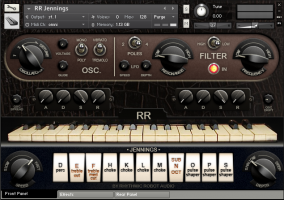
Rhythmic Robot Audio has released Jennings, a Kontakt software version of an early all-valve synthesizer designed in 1946.
The original Jennings Univox was played by The Beatles during their early sets at the Cavern in Liverpool, and by the Tornadoes, who used it to create the signature synth sound of their 1962 synth-pop hit Telstar.
It was designed by Tom Jennings who went on to form Vox amplifiers, and comprised a valve-based oscillator which could be run through a series of wave shapers, filters and EQs controlled by tab switches on its front panel, capable of creating over 2000 variations on the basic waveform. Vibrato added movement to the sound, while a knee lever controlling volume allowed the player to manage swells and tremolo wobbles in real time. The sound was output through a dedicated speaker cabinet into which the keyboard packed for transportation, making it a real alternative to other more cumbersome valve-based synthesisers like the Hammond Novachord for gigging bands.
The Jennings Univox was similar to the Clavioline, another valve-based portable synth, but differed in its use of a sawtooth variant as its source waveform where the Clavioline used a square-wave variant. It is this valve-based sawtooth, rich in harmonic overtones and minor valve instabilities, that gave the Univox its uniquely warm analogue sound.
The Rhythmic Robot software version of Jennings starts with a meticulous recreation of the original instrument based around 24-bit, 20-second chromatic samples of a professionally restored Univox and using a combination of multiple sample sets and convolved IR maps to simulate the behaviour of all of the Univox’s control tabs. Key click samples and a full sample set of the “Sub Octave” tab can be trimmed in level relative to the main wave forms, allowing more comprehensive balancing of the Univox’s tone.
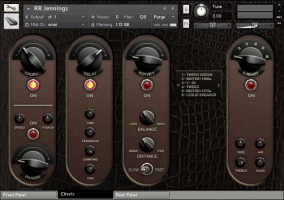
For musicians wanting to explore the start of the synth era with complete authenticity, a “compliance mode” can be enabled to allow the user quickly and easily to dial in patches which conform exactly to the standards of the 1946 original. Patches designed in “compliance mode” sound indistinguishable from the original hardware Univox. However, for anyone wanting to go beyond the limitations of the original, Jennings extends the capabilities of the Univox considerably, adding polyphony, dual oscillators (drawing on different sample sets for a richer tone), a multi-mode resonant filter with LFO, precise control over envelopes (including attack curves) and a comprehensive effects section incorporating Chorus, Phaser, Echo, Rotary Speaker simulation and Amp Cab modelling.
Accessing these effects and additional controls allows the user to create patches using a familiar subtractive synthesis model, but drawing on Jennings’s front-panel tabs to create a base palette of over 2000 “oscillators”. Any tab combination can be used as the starting point for a patch and then doubled up, detuned, filtered, effected and so forth. The result of this versatility is that Jennings is capable of creating both authentic, 1946-accurate tones in “compliance mode”, and modern synthetic patches with a signature valve character, all from one clearly laid-out graphic UI.
Jennings is available now from www.rhythmicrobot.com priced at £59.95.
Features:
- 24-bit, 20-second samples of a professionally-restored Jennings Univox.
- All-valve waveforms.
- Convolved IR maps and multiple sample sets combine to recreate all front-panel tabs.
- One or two oscillators, with detune and Osc Spread control for stereo width.
- Multi-mode resonant filter switchable between 2-pole (12dB/octave) and 4-pole (24dB/octave), high or low pass.
- Filter and Amplitude envelopes; Amplitude envelope with specific attack-curve control (for “sucky” or “snappy” attacks).
- Filter LFO and switchable Amplitude (tremolo) / Pitch (vibrato) LFO, with adjustable ramp time.
- Full effects section with Chorus, Phaser, Delay, Rotary Speaker and Amp Cab simulator.
- Stereo Widening in combination with Osc Spread maps keys across the stereo sound field.
- “Compliance Mode” makes creating authentic 1946-style patches simple.
Jennings requires Kontakt version 4.2.3 or later (including Kontakt 5). Not compatible with Kontakt player.
(Via KVR)
DATAMASKIN

