
How to Create a Tuned 808 Bass in Ableton
“Hello, AfroDJMac here with a tutorial and free Ableton Live Device Rack for you! This week I give you an Roland 808 bass drum sample that can be tuned to play in key with your song or as a bass line. The Roland 808 has some great low end on it and it makes for a nice instrument to create earth shaking bass sounds. At higher octaves this synth makes for a nice electric keyboard like instrument #bonus! ”
Download: http://bit.ly/freesynth36
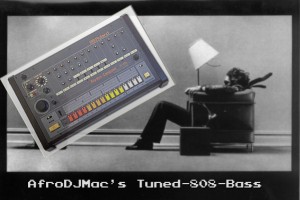
The iconic Roland 808 drum machine is a staple in modern music. Each sound is loaded with character and can be found across many musical genres. This week I spent some time with samples of the heavy hitting bass drum. The result is a Free Ableton Live Device Rack that allows you to play the bass drum like an instrument. I’ve tuned the bass drum and spread it out over the keyboard to create a bass instrument that allows your bass drum to play in key with your songs and even play melodies. To help give it some punch, I have fortified it with an additional 808 bass drum sample and a sample made with Ableton’s Operator. These two layers add a more high end “click” sound to the bass drum notes, helping to round out the sound and add definition to the low end melodies. In the accompanying video, I take you through how I created it, so you can mimic this idea with any sample you like, and then explain how the device rack is set up. So get your subs out and get ready to shake the neighborhood as we dive in to some serious lo frequency madness!
Yamaha DX7 – DeeEx collection of 80’s FM synthesis programs for Live, Kontakt, Renoise & Logic
Puremagnetik has released DeeEx, which they describe as a collection of 80’s FM synthesis programs based on the Yamaha DX7. It includes almost 500MB of professional multisampled instruments and is now available for Ableton Live 8, Kontakt 4, Renoise and Logic. Here’s all the details directly from Puremagnetik:
For Ableton Live
Each DeeEx Live Rack employs Sampler’s unique Frequency Modulation capabilities for extreme tweaking, beyond what the original was ever capable of. All DeeEx instruments were built and programmed within Live for a seamless production experience. With expertly crafted macro controls, powerful effects racks and high quality samples, DeeEx for Ableton Live brings one of the most legendary synthesizers in history right to your desktop.
For Kontakt, Renoise and Logic
DeeEx for Kontakt has been customized to offer a huge range of tweakable parameters. Within DeeEx’s KSP-based user interface, music and sound producers can immediately take control of numerous effects and sound shaping options. The Renoise and Logic versions of DeeEx have been built from the ground-up for a seamless user experience. XRNI and Logic Channel Strips integrate directly into their hosts for quick access and easy playability.
DeeEx Features
- Over 20 professionally multi-sampled instruments
- Over 600 high quality samples
- Advanced Ableton Live Racks with Macro Controls
- “Renoise Ready” XRNI files for instant playability
- Kontakt KSP easy edit GUI
Requires Ableton Live 8.2.1, Kontakt 3.5 or Logic 8
250 MB of physical RAM
600 Megabytes (MB) of free hard disk space
More information:
Yamaha PSR-190 Drums for Ableton
Download the live set @ http://bit.ly/freesynth35
All sounds made with my Yamaha PSR-190 keyboard from the early 90s or so. Have fun with it and enjoy!
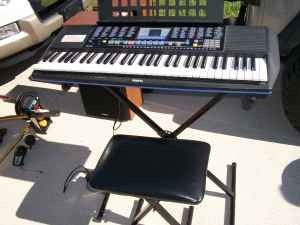
I like to think that there is a place for just about every sound or instrument, somewhere, in some song. It doesn’t matter how cheap it is or whether it’s top of the line gold or a bargain bin reject, sometimes things fit perfectly. I’ve found this to be true with a cheap RadioShack microphone, which barely qualifies as a nice toy, but actually records some nice room sounds for drum tracks. And another time with my far-from-classic Yamaha PSR-190. I got the PSR-190 shortly after starting to play guitar and was immediately amused by its built in rhythms and preset sounds that are nothing like the instruments they are named after. Its career in dust collecting was off to an impressive start. But as I grew and ventured off into the world of recording, I began to appreciate its character. I think I began incorporating it into some of my songs as its final test, failure meaning a swift trip to the Wednesday morning trash pick up or an adolescent reenactment of the final minutes of any good Nirvana concert (read: smashed to smithereens). Now I would never want to listen to a track composed entirely of PSR-190 sounds, but a layer or two often fit surprisingly well.
This week’s Free Ableton Live Rack is a drum rack made up of the Yamaha PSR-190′s awesomely late 80s-ish kit. There’s some really indispensable kick and snare sounds, and the toms… the toms are such a charming $80 attempt at Phil Collins that you have to love them. There were fourteen sounds in total, but to make things fit nicely on your MPC style pads, I modified a Kick and Snare sound, stretching them using Ableton’s Impulse instrument. I’ve included some FX to allow for some further sculpting. The video will take you through the particulars.
Space Forest Synth – New Ableton Live rack
Our ever so persistent friend AfroDJMac explores the world of space music. Keep wondering if he will fail to deliver any week soon, LOL

The 34th Free Weekly Ableton Live Rack from AfroDJMac is a warm textured and evolving pad sound created from a heavily processed vocal sample. The perfect soundtrack to an a day in an intergalactic forest in deep space. Space out with this fun synth 
Download @ http://bit.ly/freesynth34
For anyone looking for a space aged, intergalactic sound straight out of an alien planet, this week’s free Ableton Live rack is for you. Here is a sound that is alive with movement and textures. Created from a heavily processed vocal sample, the Space Forest Synth offers some exciting sound sculpting possibilities. The synth is then racked up with some effects to add to the spacey feel, as well as a built in arpeggiator, allowing you to morph it to taste.
Lately, I’ve been having a lot of fun resampling chords from all kinds of instruments from guitars to synths. In the following video, after taking you through the Ableton rack, I show you my technique for creating all new sounds by resampling instruments. From there, it’s quick and easy to create all new sounds and progressions from your preexisting material. It’s a total blast! Below is an instrumental track I created last night using that exact technique (drums from my Operator Drums Rack and resampled arpeggiated chords and baseline created with the new Kasio M4L Instrument) Enjoy

FB383, Ableton + TouchOSC for iPad
“Just a short jam with ableton live controlling by FB383 analog TB303 clone. ableton is controlled using TouchOSC for iPad.
www.Voltage-Controlled.com”
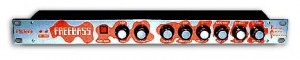
Another monophonic analog TB-303 clone! The FB 383 is a re-packaged version of the MB33 with a special front-panel design as part of an exclusive deal with Turnkey music shop UK. Just like the MB33, the FB 383 offers all the same basic sounds and controls as the original TB-303 in a 1-unit rack module. It has just 8 basic knobs for the same basic 303-like control: tune, filter cutoff, resonance, envmod, accent and decay. Unlike the 303 however, the oscillator can be varied from sawtooth to square from a knob on the front! Also featured is an external audio input to the filter for processing other elements.
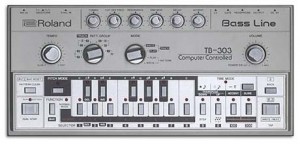
TB303 is a monophonic analog bass synthesizer married to a pattern-based step sequencer released in 1982. It features a single analog oscillator with two waveforms (ramp or square) and has a simple but excellent VCF filter with resonance, cut-off, and envelope controls. There are also knobs to adjust tuning, envelope decay, tempo and accent amount.
Ableton Live – Kasio-M4L virtual phase distortion synth
Ableton has released Kasio-M4L, a free Max for Live instrument by Oli Larkin.
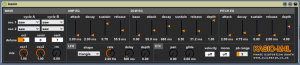
Like its namesake CZ-series synths, Kasio-M4L uses Phase Distortion synthesis – in which the phase of a sine wave is modified in various ways to produce new waveforms. Kasio-M4L builds on its digital legacy, producing plastic basses, sharp bell-like timbres and shimmering resonant pads. Utilizing two CZ-style oscillators, ring modulation, three Envelope Generators and an LFO, a wide variety of timbres are possible. Kasio-M4L serves to bring the classic sounds of Phase Distortion to all Max for Live users.
Kasio-M4L comes with 32 presets inspired by the original CZ-synths. All controls are laid out on one easy-to-use panel for instant tweaking. Select from eight CZ waveforms for each oscillator in the “Wave” section. Different waveforms can be set for each alternating cycle; the second oscillator can also be detuned and mixed as a ring modulator signal. The ADSR Envelope Generator sections control amplitude, pitch and the all-important DCW (digitally controlled wave-shaping) which varies the amount of phase distortion. Vibrato is controlled via the LFO section.
Kasio-M4L is a free download from Ableton. Requires Ableton Live 8.2.6 or higher and Max for Live.
More information:Kasio-M4L
Free Ableton Live Operator Glitch Drums
Get your drums going with AfroDJMac’s latest Live rack featuring the Operator synth
I made a rack of 16 drums, exclusively with Ableton’s Operator synth. They sound pretty glitches out yet exciting. Some fun and interesting effects added into the instrument rack helps to spice things up with a healthy dose of character. Follow along as I show you how it works. Thanks!
Download @ http://bit.ly/freesynth33
Background information:
After last week’s Ableton Rack, the Gibson Pad, I received a few questions regarding the drums I used in creating the demo video. So, this week’s rack is the drum rack I used to create those sounds. The FM synthesis in Ableton’s Operator can be used to attain nearly any sound imaginable. Lately, I have been using it to create some far out drum sounds. This week’s Free Weekly Ableton Live Rack is just that, a collection of different drums made with the Operator synth. Every time I open Operator and start messing around with it, I am always amazed at what I get. The drum sounds I created are all racked up into a drum rack and from there I added a bunch of useful effects. First is a bit of New York Style Compression, which is just a combination of the dry, uncompressed signal and a heavily compressed version; the macro knob allows you to blend them to taste. I’ve added both a lo and hi pass filter, distortion, reverb and delay. Also, I’ve thrown in a vinyl distortion that is designed to emulate the sound of a drum hit being sampled from a record. One of the cool things about sampling off a vinyl is the crackling you get behind the drum sounds and the way it cuts out at the end of the sample. To achieve this, I set up a vinyl distortion followed by a gate. The gate is set to close out the vinyl crackles, but open when the drum sounds. The result is that you only hear the vinyl crackles while the drums are sounding, just like with a vinyl sample. I love this effect, it adds so much life and grit to the drum sounds. This technique can be emulated for any sample, not just drums. So here it is in all, I hope you enjoy it!
New virtual A 303 Clone for Ableton
analogfactory says that ‘Black, fast and toxic’ is the best description for the rackmounted monophonic true analog MAM MB33 synthesizer which was released in the 1990’s. Black Mamba is a replica of this little synth combined with the powerful Instrument Racks of Ableton Live.
Originally released as a TB303 clone by German company MAM (Music and More), the MB33 had a true analogue single VCO with two basic waveforms – square and saw. analogfactory say that, as the MB33 had the possibility of morphing those waveforms, it was able to create more tones than the TB303.
Black Mamba has been chromatically sampled in 24bit/96khz with high-end Apogee A/D converters and, besides the two basic waveforms, analogfactory has sampled 9 further waveforms using the morph possibilities of the VCO.
Pricing and Availability:
$21.99
More information:
Le K Live @ Wilde Renate Berlin using 4 iPads with touchAble
The complete controller for Ableton Live
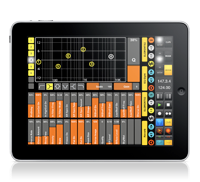
TouchAble version 1.3 was recently released, you can check the changes here >>
Key features:
• Clip Grid
• Mixer
• Devices
• Keys
• Pads
• XYZ-Pad
6 Modules to control every aspect of Ableton Live 8 wirelessly!
How to effectively control Ableton Live 8 TouchAble
TouchAble App for iPad is available through the iTunes App Store http://www.itunes.com/app/touchable
touchAble is an unique iPad app is the first application to give Ableton Live users full control over their digital audio workstation, without the tiresome process of manual midi-mapping. touchAble allows live users to walk away from their computer and perform live from anywhere within Wi-Fi range (using ad-hoc connection or router) while keeping latency at a minimum.
TouchAble App includes 6 advanced modules, Clip grid, Mixer, Devices, Pads, Keys, XY Pad, and 2 commands menu : clips and transport.
TouchAble provides a powerful, intuitive and reliable multitouch control solution for professional use.
TouchAble includes templates for lives plugins and is fully compatible with vsts, audiounits and instruments.
The new update, touchAble 1.3 contains over 30 new features and changes, such as a loop and beatjump section, enabling anything from CDJ style mixes to creative loop manipulation, a completely rebuilt mixer that allows users to modularly choose the controls they need – complemented by the long awaited crossfader. 3 new native templates have been added: Auto Filter, Ping Pong Delay & the very first Instrument – Impulse – and are waiting to be tweaked. The new Settings Menu not only offers a cascade of new control-options – but also simplifies the connection process by adding Bonjour support.
changes / new features:
Clips:
– added Loop menu to clip module. Do loops on the fly – on whole tracks or on already prepared loops. think Traktor looping – Keep loops that you like.
– added keep loop feature which allow you to save the new loop made as new clip.
– Added beatjump / loopjump menu to clip module. Do beatjump / loopjump of a set size in the currently playing clip of a track.
– track header buttons in the clip module now function as ‘jump to active clip’ buttons. For group-tracks they allow to fold and unfold the tracks.
Mixer:
Completely rebuilt mixer:
– added crossfader to mixer
– added A/B control to mixer
– added support for as many sends as you like + name of the send tracks are now displayed.
– added possibility to show as many faders at once as you like – and you can decide which!.
– added the possibility to control return tracks the same way you can control normal tracks
– added “+” mode to fullscreen for double length faders for precision tasks
– added snap mode to mixer
Drums:
– added velocity sensitivity mode to drum pads
Devices:
– Added Impulse native template
– Added Auto Filter native template
– Added Pingpong Delay native template
– Track Header buttons in the Device Selection View will switch Lives view to the device chain of the respective track.
XYPad:
– snapshots will be saved with saved templates of XY pad now
– after morphing / playing / stopping snapshots the dots will not be affected by gravity till touched
General:
– Added support for 4 iPads
– Added possibility to link several ipads and setting their relative positions.
– touchable will prefer a wired connection if available (MyWi etc)
– design & layout changes throughout the app
– added 16 tracks mode
– triple quick taps on relative faders will: bring the fader to max value if it is done on top of the fader, bring the fader to the exact middle value if you tap around the middle part, and bring the fader to 0 value if you tap on the bottom part.
– Finally touchable will connect via bonjour – tests show that almost no setup is needed to connect
New Settings:
Clips:
Lock navigation in Clip grid – On / Off:
-If enabled, clips will start immediately after touching – but you won’t be able to scroll in the clip grid
Slide Clips to launch in Nav Lock Mode – On / Off:
-Makes it possible to slide e.g. a row of clips in different tracks to start them
Devices:
Always Open Device View 8 – On / Off:
-If enabled, devices will always show the FX8 view instead of switching to FX32 for devices with more parameters.
Mixer:
Relative Crossfader – On / Off:
-same as relative faders elsewhere – just for the crossfader
Hide Mutes – On/Off:
-If enabled, mutes are hidden from the view.
Max Shown Controls for 2/4/8/16 tracks mode (0-8, 0 being disabled):
-You can set the maximum amount of controls shown per channel in each of the different sizes. When changing size the mixer will automatically show/hide faders depending on your preference.
General:
Link iPads – On / Off:
–
enables or disables automatic following of secondary ipads.
bugfixes:
– arm / exclusive arm fixed
– numerous fixes for smaller issues / crashes / performance improvements
TouchAble is supported by many professional musicians, performers, djs and composers around the world, who use touchAble on stage or in studio.
DATAMASKIN

