
TC-11 – tutorial on sequencer notes and scales
This tutorial looks at the basics of sequencer programming in TC-11. Starting with a non-pitched patch, we insert a sequencer to quantize the frequency to note values. Two approaches are taken: building a specific scale, and using the Add parameter to quickly fly through a note scale.
TC-11 is a programmable modular synthesizer on the iPad, controlled by multi-touch and device motion controllers. All synthesis parameters can be controlled by these two sources, which allows the user to create countless unique patch configurations.
TC-11 does not use on-screen objects like knobs or buttons for synthesis control. Instead, your touches are the controllers. Distances, angles, rotation, speeds, and timings created by the touches are used to push synthesis parameters in real-time. TC-11 opens up every inch of the screen for performance. Plus, the iPad’s device motion capabilities can be used as controllers. The accelerometer, gyroscope and compass can be assigned to synthesis parameters to turn your iPad into a expressive motion-controlled synth.
http://youtu.be/qkko4fBwHmY
For more information, visit www.bitshapesoftware.com or follow @BitShapeSoft on Twitter.
Little Boxes – an experimental music box concept for iPad
Little Boxes is a music box concept for iPad. It consists of a tangible part composed of three separate music boxes that interact with an iPad and an application. When placing one of the boxes on the iPad, it recognizes it and activates. The idea is that each box contains its own universe revealed by the action of the crank with an animation and melody proper to each. The aim is to give a new dimension to the music box, and transcribe visual sensations that don’t exist in a standard music box. This work reflects my desire to play with the physical and digital elements by making them interact. It allowed me to embrace different areas, and confront myself with creative and technical challenges. The result is the creation of a world through the music box, where everyone can enter and interact with it.
Review of Auria iPad DAW from Wavemachine Labs
Following yesterday’s post on the release of the 48-track DAW for iPad
“Russ takes a look at the new Auria iPad DAW from Wavemachine Labs.
He does a show and tell of the highlights and gives his opinion.”
http://ios-music.homewoke.net
The first VST loading application in iPad.
It is a first impression of Auria which is full-scale DAW.
As individual comment, improvement is still required.
However, this is a future big possibility.
Grammy award winning producer David Kahne discusses Auria, the 48-track digital audio recording system for iPad.
Filmed and edited by Nocturnal Media
Auria – the 48-track digital audio recording system for iPad has now been released
WaveMachine Labs has announced that Auria – the 48-track digital audio recording system for iPad – is now available.
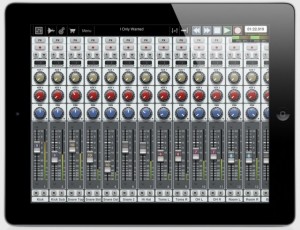
Auria has generated a lot of buzz since its introduction at the 2012 NAMM Show. Auria is a 48-track digital recording system, designed from the ground up for the iPad. Offering advanced features like AAF import/export, and third-party plugin support from names like PSPaudioware, Overloud, Fab Filter and Drumagog, Auria challenges people’s notions of what you can do with an iPad.
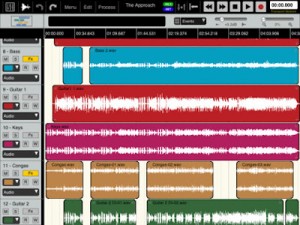
Highlights:
- Up to 48 tracks of simultaneous playback of stereo or mono files.
- Up to 24 tracks of simultaneous recording
- Supports sample rates of 44.1KHz, 48KHz and 96KHz
- Third party VST effect plugin support available via in-app purchase (only iOS-version plugins are supported. All plugins must be purchased through the in-app store)
- 8 Assignable subgroups and 2 aux sends
- Powerful waveform editor
- Full automation
Features:
- 48 tracks of simultaneous playback of stereo or mono files. (24 tracks on iPad 1)
- Up to 24 tracks of simultaneous recording when used with compatible USB audio interfaces (Camera Connection Kit required)
- Supports sample rates of 44.1KHz, 48KHz and 96KHz (iPad 1 supports only 44.1KHz and 48KHz)
- Vintage-inspired ChannelStrip on every channel by PSPAudioware includes Expander, Multiband EQ and Compressor
- MasterStrip on all subgroup and master channels featuring PSPAudioware BussPressor, EQ and Mastering Limiter
- 64 bit double-precision floating point mixing engine
- Third party VST effect plugin support available via in-app purchase (only iOS-version plugins are supported. All plugins must be purchased through the in-app store)
- AAF import and export allows transferring complete sessions between popular DAWs like Logic, Pro Tools, Nuendo, Samplitude and more
- Convolution reverb plugin with included IR library
- ClassicVerb reverb plugin included
- StereoDelay and StereoChorus plugins included
- ReTune plugin included for auto pitch correction of vocals
- 8 Assignable subgroups and 2 aux sends
- Powerful waveform editor with features like cut/copy/paste, crossfade, duplicate, separate, gain, normalize, dc offset, reverse, and more
- Flexible snapping tools allow snapping to events, cursor, bars, beats and more
- DropBox, SoundCloud and Audio Copy/Paste support
- Track freeze for minimizing CPU usage
- Full automation support on all controls with graphical editing
- True 100mm faders when used in Portrait Mode
- Optional video import feature allows sample accurate sync of video to an Auria project with adjustable offset times and video export capability
- Timeline ruler options include minutes:seconds, bars:beats, samples and SMPTE time
- Auto-punch mode
- WIST support for wireless syncing of other compatible music apps
- AuriaLink allows two iPads running Auria to play and record in sync, allowing for 96 tracks of playback and 48 tracks of recording
- Full delay compensation on all tracks, subgroups, and aux sends
- Adjustable metering modes, including pre or post fader, RMS and peak
- Adjustable pan laws
- Sample accurate loop function
- Automatic sample rate conversion
- Built-in metronome
- Auria includes a demo song mixed by David Kahne
Requirements:
- iPad 2 or later recommended.
- Compatible with all iPad models (iPad 1 has only 24 tracks, 44.1KHz and 48 KHz)
- Requires iOS 5.0 or later
- USB audio interfaces require Camera Connection Kit
Auria is available now in the App Store for $49.99.
See the WaveMachine Labs site for more details.
ALBA ECSTASY – Music for iPad
All you can eat iPad electronic music 
In this video the music was composed only with iPad, overdubbing Animoog, Yamaha Synth&Dr Pad, Sunrizer, SynthTronica and Addictive Synth and it is only demonstrating some capabilities of the above music apps for iPad. Screenshots during recordings. Music composed by ALBA ECSTASY.
More music on http://www.albaecstasy.ro
Atlantic landing – iFretless bass midi controller on iPad / iPhone
iFretless is a new musical instrument app for iPad / iPhone. In this video you see an iPad jam session, showing how iFretless works as a MIDI controller, sending the notes we play to synthesizer apps running the background on the iPad.
If this video makes you wish you had a copy of iFretless, head on over to the app store: http://itunes.apple.com/us/app/ifretless-bass/id512929963?mt=8
We used several other iPad synthesizer apps as background MIDI synths:
Sunrizer – http://itunes.apple.com/us/app/sunrizer-synth/id443663267?mt=8
(An excellent imitation of a classic analog synthesizer)
BS-16i – http://itunes.apple.com/us/app/bs-16i/id388149926?mt=8
(A soundFont compatible synth. It has great sound if you put great soundfonts in it. We’re using the AKAI-SteinwayIII piano soundfont in this video.)
Soon to be released: AURIA – 48-Track Recording System for iPad
Wavemachine Labs has announced that it has submitted Auria, a new 48-track recorder for the iPad, to Apple for approval.
Here’s what they have to say about it:
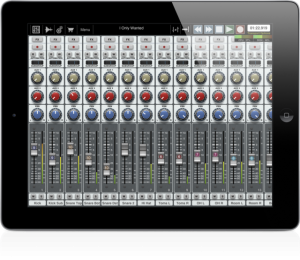
With the ability to play 48 mono or stereo 24bit/44.1 kHz (higher sample rates possible!) tracks simultaneously, record up to 24 of those tracks simultaneously (through any supported USB multichannel audio interface), and edit and mix with familiar tools and full parameter automation, it’s clear Auria sets a new standard for iPad multitracking.
What’s more, Auria’s 64-bit Double Precision architecture ensures ample headroom for plug-in processing and mix summing, transforming your iPad into a recording and mixing system with sound quality that rivals most DAWs.
The depth is in the details. Like customizable pan laws. Like meters that are selectable between peak and RMS. Like full delay compensation for all tracks, including aux sends and sub-groups. Complete with a vintage-inspired channel strip on every channel, a dedicated master channel strip, VST effects engineered by renowned makers such as PSPaudioware, Overloud, Fab Filter and Drumagog, and support for Dropbox, Soundcloud, AAF, and MP3, Auria truly raises the bar for recording and mixing on the iPad.
The introductory price for Auria will be $49.99.
iOS: Get the legendary Simmons Clap Trap right in your pocket
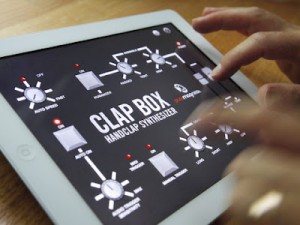
Now you can put the legendary Simmons Clap Trap right in your pocket or backpack! The Clap Trap was an iconic 1980s “Handclap Synthesizer” whose unique sound can be heard across much of early electronica
Clap Box is a perfect emulation of the classic 1982 Clap Trap. It is inspired by all of the cool sounds of the original, the same programming logic, plus more modern enhancements like MIDI trigger and BPM matching. So put a legendary handclap synthesizer right in your pocket or backpack and check out Clap Box today!
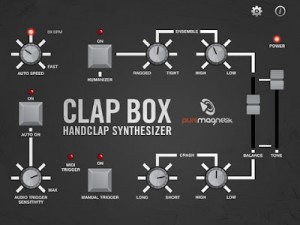
Clap Box Features
• Authentic emulation of the original Clap Trap
• Audio Trigger via your device’s built in mic – just clap your hands in realtime to trigger!
• Full MIDI support over WiFi
• Auto Speed triggers at BPMs up to 300
• “Humanize” function creates random variations”
Free for iPad and iPhone:
Clap Box – Puremagnetik
orangePeels : Beatsurfing / Teenage Engingeering op1 / Machinedrum
Checking out the Beatsurfing app:
New set up test three. Now that other gear can be used in conjunction with the op1, I was able to try out a new midi controller app for the iPad : Beatsurfing.
Imho, its the best ‘build a midi controller’ app that has been made so far. It is designed in a way that is more conducive to working with a PC and software synths, however, there is still a lot that can be done in an all hardware setup like mine.
This video shows a template I have created. In this test of the app, I chose to try and keep it simple with focus on being musical rather than create a complex setup where I tend to lose the music along the way.
MonoSynth Controller for Mssiah
Testing the MonoSynth Controller for Mssiah (C64 Midi cardridge)
Available at the Apple AppStore for iPad
MonoSynth Controller for Mssiah
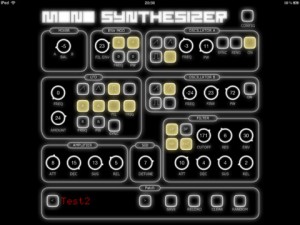
The Mssiah is a Midi cardridge for the Commodore C64. With this app you can easily control the mono synthesizer component of Mssiah via a midi connection.
– load/save patches
– generate random patches
– share your patches with your friends (itunes file sharing enabled)
a Commodore 64 and the Mssiah-Midi-Modul is required.
** this is not an official 8bitventures app **
** this is just a little homemade project to support the mssiah community **
DATAMASKIN

