
FL Studio Guru | Sidechain Inputs and VocALign
Enter the Giveaway – http://synchroarts.us7.list-manage.co…
Setting up the VocALign plugin from Synchroarts. http://www.synchroarts.com/
Real-time vocal sample manipulation using SampleWiz
How to use SampleWiz to create real-time sampling effects for the Radiohead song “Everything In Its Right Place”
The Washington & Lee University Electronic Music Ensemble (EME) performed the Radiohead song “Everything In Its Right Place” in their Fall ’12 concert. This video describes how they utilized an iPad app called SampleWiz to mimic the real-time sampling effects used by Radiohead in this song. EME members Matt Kinderman ’16 and Rodes Brown ’13 explain and demonstrate these techniques.
Under the direction of Graham Spice, the EME capitalizes on the strengths of its individual members. This ensemble calls upon its performers to utilize their instrumental or vocal talents in new ways incorporating electronic music. In addition, those students who specialize in composition, engineering, and production are given the opportunity to showcase their skills in the creation and performance of this contemporary music. A strong visual element is also included in their concerts provided by computer-generated video projections.
SWAG YOLO Vocal Pack for Ableton Free Download
Here are the hottest vocal samples for your tracks, Ableton Live Ready. Enjoy the Swag YOLO!
Visit AfroDJMac’s site for more stuff like this, including Live Instrument downloads, tutorials and music! http://www.afrodjmac.com
Nectar Elements – latest addition to the Nectar family of vocal plug-in effects
iZotope has announced the release of Nectar Elements, the latest addition to the Nectar family of vocal plug-in effects. Built on the same award-winning DSP as Nectar, Nectar Elements features an easy-to-use interface designed with the singer-songwriter, podcaster, or home recordist in mind. iZotope says that, with ten vocal processing effects working behind the scenes, Nectar Elements simplifies vocal production, allowing users to focus on their sound, not their set-up.
iZotope Product Manager, Brett Bunting, told us, “By introducing Nectar Elements, iZotope is pleased to offer single-click vocal production to a broader set of users. Our vocal product line is focused on great sound and simple workflow. With Nectar Elements, anyone can quickly explore a wealth of complete vocal sounds, each with unique and intuitive control.”
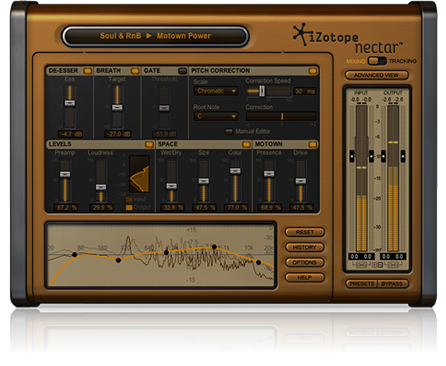
Nectar Elements features dozens of Style presets that let you choose between a variety of classic and creative vocal styles, from Motown to Grunge to radio-ready podcast. Easily and quickly adjust the simple controls to find your voice and make it shine.
Key Features:
- Rapidly audition different vocal sounds with professionally-designed Style presets in a wide variety of Genres.
- Personalize your sound with easy-to-use controls that drive sophisticated vocal processing.
Even more:
- Levels: Quickly get punchy vocals with the loudness you need for consistency across your tracks.
- Space: Help settle your vocals into your mix with delays and reverbs that add ambience and “smoothing.”
- Dedicated per-Style controls: Adjust intelligent sliders that perfectly complement the Genre and Style of choice.
- EQ: Enhance and sculpt the tone of your voice, or adapt any Style to suit your sound’s needs.
- De-Esser: Easily remove unwanted “ess” sounds and sibilance using just one intelligent slider.
- Gate: Remove room tone and other unwanted noise quickly to get vocals crisp and broadcast-ready.
- Automatic Pitch Correction: Fix out-of-tune notes so you can keep those “almost perfect” takes.
Pricing and Availability:
Nectar Elements is now available for MSRP $129 USD or €99 EUR.
Additional preset packs for Nectar and Nectar Elements are available for free at www.izotope.com/nectar/presets
Introducing Vio: Transform Your Voice
Transform your voice into a mesmerizing instrument. Morph and shape the sounds you create by exploring Vio’s entrancing interface. Learn more at http://transformyourvoice.com
Sonic adventures — always in tune
Build sonic universes from your own voice. The innovative audio engine behind Vio goes far beyond existing voice effects to create novel, futuristic vocal styles. Vio’s sound spaces vary in character from edgy and energetic to mellow and relaxing. Vio surprises and inspires your creativity: you may not intend to do something, and it comes out cool. Whether you are an amateur or seasoned professional, Vio’s pitch correction technology ensures that everyone sounds in tune and is beautifully harmonized.
Touch Control
Explore each sound space by touching Vio’s swirling particle vortex. Move the vortex around the screen and change how your voice is transformed – harmony is added or subtracted, melodies emerge and disappear, and reverberations shape shift.
Looping
Double-tap the screen, loop what you have just sung or hummed, and focus on morphing your sound with the particle visualizer.
Recording & Sharing
Record your performances and share them via email, SoundCloud, Dropbox, or iTunes file sharing. Choose between compressed and high quality audio files.
Advanced Features
Visit http://squareb.co/vio to learn about advanced features like changing keys and recording high quality audio.
Breakaway Vocalizer
Demotrack of the breakaway vocalizer, all sounds from the vocalizer, some reverb and delay
The vocalizer has a pitch to midi converter build inside
It contains 74 sounds wich can be expanded by extra cartridges (mine has the new age cartridge)
The soundchip inside is the same as the Ensoniq ESQ-1 synthesizer.
This machine can be controlled by midi but is also has an external input.
In this demo i fed all kinds of things into the input like a radio, a mic, a drumcomputer and multitracked it.
The results can be somewhat unpredictable wich is good for experimental music.
Texas Instruments: Speak & Music on LSD
Running a Texas Instruments “Speak & Music” keyboard through a Chamber of Sounds LSD (Light Sensitive Delay). Get your LSD on, only at chamberofsounds.com
Tutorial: How To Use Reaper’s “ReaComp” Compressor Plugin
ReaComp is REAPER’s compression effect. In this quick tip Ken Theriot uses ReaComp on a vocal track and demonstrates how to make the most of it.
Tutorial: Wave Arts “Dialog” – Introduction to vocal processing
Jonas “Missing Identity” Hagenvald explains the new plugin “Dialog” from Wave Arts and enhances a vocal from the singer Lulablue.
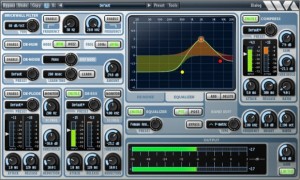
Dialog combines in one plug-in all the processing needed to clean up, adjust, and sweeten recordings of the spoken voice. It is perfect for voice-over, film/tv recordings on location or sound stage, and broadcast.
Dialog includes brickwall filters, de-hum and de-buzz processing, broadband noise reduction, de-ploding, de-essing, 10-band equalization, compression, and limiting. Separate presets for each section allow you to get results fast.
The brickwall filters have variable rolloff slopes and can be used to cutoff low or high frequency ranges. The de-hum processor uses notch filters to eliminate 10 harmonics of either 50 Hz or 60 Hz hum. The de-buzz processor squelches nasty line frequency buzzes. The de-noise processor is the stellar sounding MR Noise algorithm with a simplified interface. De-plode and de-ess are custom processors; use de-plode to tame plosive sounds and use de-ess to adjust the amount of sibiliants. The EQ section is the powerful and easy to use TrackPlug equalizer, with 10 bands of equalization, 11 different filter types to choose from, and a variety of presets. The compressor is the TrackPlug Vintage compressor, with presets tailored to voice processing.
Vocal processing: Electric Voice
Further adventures in vocal processing using the TC Helicon Voiceworks and the iVoxel vocoder iPad app.
More on the TC Helicon VoiceWorks:
This popular harmony processor has been used by songwriters, performing musicians, and jingle and movie music creators to put their creative stamp on vocals. VoiceWorks has a full complement of vocal processing tools from microphone preamp to four voices of harmony generation, pitch correction, reverb and tap tempo delay, compression and EQ. There’s even a song mode that allows you to step through a pre-programmed series of steps with the optional Switch3 footswitch.
- A complete signal path from mic input to stereo output. All you add is a PA, (or DAW) and your voice.
- Capable of creating up to 5 part harmony or doubling with your voice
- Harmonies can be controlled by MIDI keyboard or by setting key and scale
- 100 user-programmable presets
- Reverb and delay can be used simultaneously and have extensive editing parameters
- Thicken effect adds lush detune-style chorusing to your lead vocal in addition to other effects
- Compressor, 3 band EQ and gate
- Editor program for Mac and PC available free via download
DATAMASKIN

