
Yamaha SY85 Realtime Control
Quick demo on using the faders in real time to effect the sound while you’re playing.
About the Yamaha SY85:
In the early 1990’s most synth manufacturer’s quest to use digital forms of synthesis to re-create acoustic sounds (as well as analog sounds) led to an onslaught of rather boring instruments. Among the mob of digital synths some stood out such as Korg’s M1, Roland’s D-50, and Yamaha’s SY-85. Fading away were the days of Yamaha’s FM-synthesis, replaced by Advanced Wave Memory (AWM2). Throughout the 1990’s Yamaha used AWM2 in many of their successful products because of its high sonic quality and advanced synth-like editing features. The SY-85 was a powerful workstation keyboard capable of some great sounds and full arrangements.
It’s a 16-part multitimbral MIDI synth with a nicely weighted 61-note keyboard designed to be the main keyboard in your MIDI studio, with tons of sounds and sequencing features built-in. It has a long but narrow 40 character x 2 line LCD display and a 5×5 mode selection matrix which enhances operation by allowing fast easy access to any of the SY-85’s modes. In addition to pitch & modulation wheels and dual output level controls, the SY-85 has eight slide controls that can be used to control a range of parameters while performing for expressive real-time power. Best of all it’s got multi-mode filters and a dual-effects processor with chorus, flange, reverb, delay, exciter, parametric EQ, echo, ring modulation, leslie, distortion, etc. The effects can be used in series or parallel, and there are 4 busses to route sounds through them. Other features include a 3.5″ floppy disk drive, external memory card slots and two assignable stereo outputs.
The Punisher – modular synth jam
Numerology 3 Pro and analog step sequencers in the modular. A real-time studio recording in Cubase 6. Synths used were the modular synths, Waldorf MWXT, MicroQ, TX816, Nord Lead 2X, Prophet 8, DX7II and Korg ES-1. Using a Novation Launchpad to control the Numerology tracks. Step sequencers are dotcom Q960, Q119 and STG Soundlabs Time Suite. The opening and closing sound is a new SSL1130 DDVCO through a CGS01 harmonic sequencer and back into the DDVCO exponential and linear modulation inputs. Video editing in Final Cut Pro X.
Synth spotting: I Feel Blade Runner Love
http://youtu.be/T1hZgELpBGU
Background information:
On my Kawai SR-7 organ. Homage to “I Feel Love” by Donna Summer and “Blade Runner Theme” by Vangelis. These seem to gel together in a loose way. Yamaha HS-8 on the right has nice string sounds.
Scale Tuner – Yamaha’s scale tuning application for iPad/iPhone/iPod touch
Scale Tuner allows you to change the tuning of a compatible Yamaha keyboard or digital piano to Arabic or pure temperament tuning. The internal piano voice lets you confirm the scale settings without the need of a connected MIDI keyboard.
HandySynth – sample based emulation
“Icebreaker Audio have recently released HandySynth – a sample based emulation of a custom circuit-bent Yamaha HandySound.
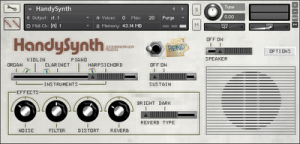
Key Features include:
All original instrument sounds chromatically sampled at 24-bit 48kHz
8 circuit-bent sound variations
Convolution based emulation of the original speaker at various microphone positions
Authentic emulation of the HandySound volume envelopes and tuning via custom scripts
Additional Effects: Distortion, Filter and Spring Reverb
Download also includes a copy of C-Bent Kit for Battery
Available now from the Icebreaker Audio website for £5 (€6/$8 approx.)”
Yamaha PSS-9 – Free Samples
Yamaha PSS-9 – http://www.vstplanet.com/News/2012/Yamaha_PSS-9_Drum_Kit
Developer:hardballsrecords.com
Background information:
The keyboard has an audio out socket built in so no mods were needed to play it through effects boxes. With a keyboard like this, it’s all about what you can do with the sounds once they are outside of the keyboard. As an experiment, I’ve multitracked an entire composition with this and it actually sounded reasonable. It has PCM drum samples which are pretty good with the right effects applied, and the string sounds can take on quite an analogue nature if external chorus and delay are used.
The most realistic sounds are probably the brass and woodwind sounds – which is what FM synthesis was known for. I personally see each of the programs on the keyboard as a different starting waveform to be altered by external effects.
For such a small keyboard, having eight notes of polyphony across a 32 note keyboard seems a lot. The split voices are good for jamming. This is a great little keyboard for self indulgent jamming wherever the mood might take. It can be run off 6 AA batteries and has it’s own built in speaker which isn’t that loud, but loud enough
Comments About the Sounds:
Basic 2-op FM sounds, about 40 basic ‘single’ sounds then doubled ‘ensable sounds’ to create chorus plus preset split voices. Ensamble and Split voices are based on preset combinations of the first 40 single sounds
DX5 playing DM “Shake the Disease” 101 version
Background data:
Happy 2012 everyone. Updated “Shake the Disease” version, more 101 oriented. Yes, I used Alan original samples in my EMAX II  The sample allocation is the same alan used on tour.
You can find some mistakes as this was recorded at the first take, first time I played the whole track (once assigned samples and levels).
More covers coming soon, also my next new album with original tracks (reworking on some demos these days).
Gear Used:
Upper: Emu EMAX II HD
Mid: Emu Emax I
Low: Kurzweil PC1x
Backtrack recorded in Pro Tools. Grid metal effect was recorded hitting a pipe on a grid door.
Composed by Martin L. Gore.
Hexagon Eye – Circuit Bent Yamaha PSS-270
Hexagon Eye is a circuit bent Yamaha PSS-270. Chorus speed, depth, and morphback controls have been fitted. Morphback adjusts the chorus feedback and changes the timbre of the chorus signal simultaneously. An overdrive control is also provided. The sustwist control emphasizes the decay tails of sounds and brings out higher harmonics. An octave drop switch pitches notes down. The randomize switch produces new timbres when active during a patch change. When in use, the keys will play shifting sounds. All controls are fitted into a side cart to allow plenty of room and easy identification for live use.
Schematics available at: http://seaweedfactory.blogspot.com/2011/12/yamaha-pss-270-modifications.html
See more at http://seaweedfactory.blogspot.com
iPhone’s SIRI plays the piano
SIRI plays a YAMAHA Disklavier WIRELESSLY via WIFI & Airplay, complete with moving keys in full expression and moving pedals. Presented by the inventor of SmartKEY for Disklavier, Craig Knudsen.
Take a standard MIDI songfile and convert it to an audio file (while maintaining the MIDI data). The songfile is then sent wirelessly via WiFi to an Apple Airport Express (which is mounted underneath a Yamaha Disklavier reproducing piano. The audio output of the Airport Express is then connected to the analog MIDI inputs of the Disklavier, using a standard audio cable.
Then, you simply ask Siri to play your favorite song from your iTunes library, and Siri responds immediately, by making the Disklavier’s keys and pedal move up and down, recreating the performance, including full orchestration.
The result is nothing short of magical.
Short improvisation featuring the Phaedra
Short improvisation. Yamaha CP80B, DSI TETR4, Korg Monotribe, Eventide Space and TimeFactor, Doepfer modular, Roland RE-201. Sequenced from Naught Panther Phaedra running on an iPad.
“Since there will be an inevitable question, I’ll go ahead and say now that the CP-80B is running through the TimeFactor and Space, and the Space is set to its Shimmer algorithm. These are the only effects on the piano. … Anyhow, sequenced by Phaedra, as is proper for music like this.” – Chris Randall
DATAMASKIN

