POLYKEYS beta
PolyKeys by ASWAVE is a freeware Virtual Analog Polyphonic Softsynth Synthesizer and as been around since 2006 in beta form and is still updated for time to time. filled with a few presets that show the diversity of the vsti plugin and is capable of a who lot more sounds to create another true classic synth from the freeware world of vst plugins instruments and effects.
in this video i have tried to show the range of sounds that can be made with this synth classic, rather that make it sound musical.
please note
the most irrating thing about downloading this classic synth is that you have to add a websearch engine to your web browers as homepage or add to tabs before refreshing and downloading this plugin, i say except it and delete later on if you wish
For more infomation visit
http://aswave.altervista.org/
http://proemio77.altervista.org/
extra presets
http://rekkerd.org/patches/plug-in/po…
REX Jockeying with Livid OHM64 and Reason 5
Reason maestro Peff is back with a new video:
Video overview of using the OHM64 with Reason 5 to create a live pa setup to switch loop slots and crossfade between sources and effects. It’s not really music composition, but more like Loop Jockeying.
Controls are mapped via standard remote override mapping, however this setup requires a bit of remote codec hacking to alter the behavior of the function keys and top 4 rows of buttons.
http://propellerheads.se
http://lividinstruments.com/hardware_…
Feast your eyes on the The MC-20 Controller for Korgs iMS-20 App
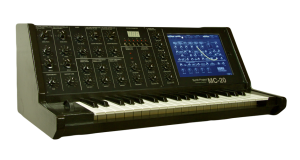
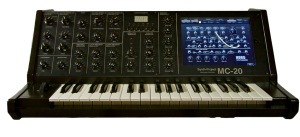
The MC-20 Controller for the iPad has a 3 Octave Full Size Keyboard. So the size of the Case is nearly 1:1 of the original MS-20 Synthesizer.
The case has a iPad Slot to let the iPad inside the Case and you don´t need any place beside the case for the iPad.
The normal parameters are controlled by the USB64 Midi Interface from Doepfer, via Knobs and pots like the real Hardware Synth. To handle the patch cords, i use the iPad. I think, this will be a good way, because the patch sockets of the App and the VST Instrument too, have no Midi CC´s.
The Advantage is, that i can use with iPad App, the Sequencer and the Drum Machine of the App too. So i have a little so-called MS-20 „Workstation“. ;o)
New Drum Step Sequencer for the iPad
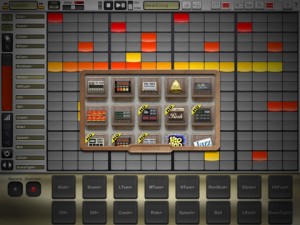
Simple Is Beautiful has released DrumTrackHD – a new Drum Step Sequencer for the iPad.
Building on DrumTrack8′s foundation (for iPhone) but redesigned to take advantage of the iPad’s interface and capabilities, DrumTrackHD adds FX (audio effects), up to 16 tracks of scalable patterns (up to 32 steps), track automation, pads, signature modification, sample patterns, new HD drum kits, reverse samples and more.
The app lets you your kits by importing user samples, adding/subtracting/replacing tracks, or creating multi-sample tracks. Add audio Fx, swing and more while playing back and fine tuning your song.
Export your patterns or songs in General MIDI or WAV Format (Ipcm, aac, or Ima4), transfer files with iTunes, upload them to SoundCloud or copy them (as audio file) using AudioCopy protocol (FourTrack) or Intua (Beat Maker) public pasteboard methods.
DrumtrackHD Key Features:
- Based on critically acclaimed iPhone app DrumTrack8, great looking, intuitive user interface to make killer rhythms.
- Classic transport functions (play/pause/reset, loop in pattern)
- Global adjustable swing
- Adjustable BPM with tap tempo recognition, long hold for numerical input, or drag & slide
- Change drum kits by scrolling or in the Kit Selection Dialog during live sets
Pattern Edition
- Up to 16 tracks depending on the Drum Kit
- 1 to 32 steps per pattern with optimized screen usage
- Edit each step’s velocity, pan, pitch and start/end offset, and even reverse samples
- Coherent color-coded visual representation facilitates pattern recognition and reading
- Multi-touch step drawing and editing
- Adjustable length and signatures (4/4, 3/4, 4/8, etc.) for each pattern
- Rectangle selection allowing to quickly move, copy, delete and duplicate whole/part of a pattern
Song Edition
- Easy drag and drop UI for song creation
- Unlimited number of unique patterns, with editable name and color, in a song.
- Unlimited number of pattern instances in a song structure.
- Mail/export song/pattern as MIDI files or audio (wav, adpcm or aac) to import into your choice of DAW
- Render to disk: transfer files to and from your iPad using iTunes.
- Sonoma Wireworks AudioCopy and Intua pasteboard integration to copy/paste (as audio) into other Apps
- Upload songs and patterns to Soundcloud to share with friends.
Drum Kits
- Choose from more than 15 kits, including the classical 808, 909, 606, LM1, etc.
- Advanced kits with multi-sample per track, with random or velocity-based triggers
- Entirely user-customizable kits: adding, removing or replacing samples in tracks, and importing user samples.
Fx: Real-time Audio Effects
- Up to two simultaneous Fx
- Assign to Master return track or two possible return tracks, with adjustable wetness
- Delay: time or beat quantization
- Filter: low-pass resonant filter
- Bitcrusher: beat rate and sample reduction
- Saturator
Mixer
- Adjustable volume and panning per track
- Large mute and solo buttons
- 2 adjustables Fx return per track
Misc:
- Automation panel for precise controls of a track’s parameters, including clear, linear or quadratic ramps, shuffle, randomize, copy/paste functionalities…
- Pads panel: live jam, overdubbing and quantized recording.
- Integrated documentation and Quickstart
DrumtrackHD is available now in the App Store for $9.99.
Via ST
History of the DAW
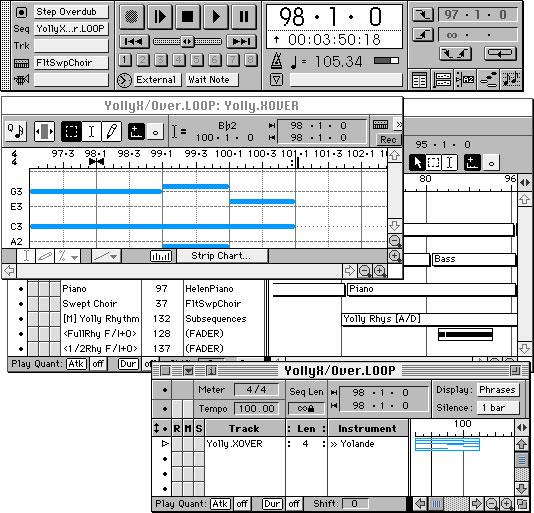
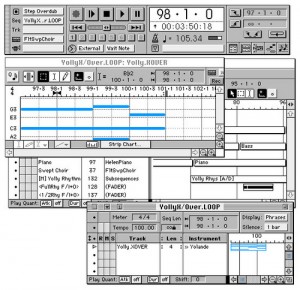
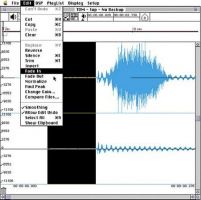
At KVR a nice article has been posted covering the history of the DAW and how it all began, below is a quick excerpt from the article and some snapshots:
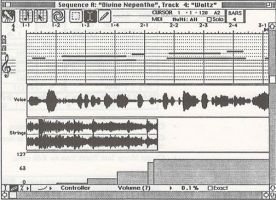
“In 1986 Opcode was the leader in patch librarian and MIDI interface sales so we had a pretty good idea of the size of the market and how fast it was growing, but we had a problem with our sequencer. Although we had loyal and passionate customers we were #3 behind both Performer from MOTU and Mastertracks from Passport in terms of sales. We believed we could change this by reinventing our sequencer and incorporating both a list view like Performer and a graphic piano roll view like Mastertracks. The primary editing windows were linked in such a way that the user could easily move back and forth to match the type of editing they were doing. The commands were set up to optimize the strengths of each type of editing. Whenever you made a change on one window it was automatically updated in the other, saving time and effort when you switched between views. There was a powerful strip chart feature in the graphic window where you could edit note parameters like Velocity and Pitch Bend, which hadn’t been done at the time.
Like Opcode with our MIDI interfaces, Digidesign was the market leader in hard disk recording hardware with both their Sound Tools product, which connected to the Mac through SCSI, and their lower cost NuBus Audiomedia card, which was designed for the fast growing ‘multimedia’ market. As they moved more into hard disk recording their primary competition was New England Digital. NED was marketing an extremely expensive system called the Post Pro. Though they were interested in the high-end market Digi knew that they didn’t yet have the feature set to appeal to post production customers so they were looking for ways to broaden their market beyond sound designers.”
expressionPad for iPad wireless MIDI demo with Reason
expressionPad is a new kind of midi/synth controller. This video demos expressionPad connecting to Reason.
Continuous multi-touch support means you can control pitch bend, dynamics, and modulation with each touch, even as you change notes.
Tune your expressionPad in fourths, fifths, or in guitar tunings such as standard or Open C.
expressionPad features a built-in polyphonic synthesizer so you can start making music right away. Experience the flexibility of polyphonic portamento — an electronic music first!
Connect to your music studio via Wifi MIDI. With expressionPad and our free moxMidi tool enables you to control Reason, Ableton Live, Logic, Garage Band, and more!
expressionPad Features:
- Continuous multi-touch support means you can control pitch bend, dynamics, and modulation with each touch, even as you change notes.
- Tune your expressionPad in fourths, fifths, or in guitar tunings such as standard or Open C.
- expressionPad features a built-in polyphonic synthesizer so you can start making music right away.
- Connect to your music studio via Wifi MIDI. With expressionPad and the moxMidi tool, you can control Reason, Ableton Live, Logic, Garage Band, and more.
Pricing and Availability
expressionPad is available now for $2.99.
Link:
MidiPads (MidiPadz) with Traktor Pro
MidiPads is the full version of MidiPadz Lite and it’s got several new features. It’s not just a drumpad controller, here I show its usage with Traktor Pro.
Learn about the user interface in the first part. For details in conjunction with Traktor skip to the last third.
Get MidiPads on the App Store: http://itunes.apple.com/us/app/midipa…
Synthrtotek.com iPod iPad & IPhone Audio Interface
Synthrtotek.com iPod iPad & IPhone Audio Interface with Left & Right 1/4″ Stereo OUTS Fender Stat
This is out new audio interface for only $35.99 that outputs to discrete Left and Right 1/4 channels. Made in the USA. This demo is with the Moog Filtatron using a Fender Strat and Korg Kaoss Pad 2.
And One >>> MIX

“Get Bent” – A Cooking Show About Circuit Bending
After taking an extended vacation from making the cooking show to indulge a budding curiosity in the worlds of circuit bending and microelectronics, I finally found a way to merge the knowledge I’d acquired and the “lost footage” I’ve been sitting on since missing the deadline for this season of Bobby Flay’s “Grill It. While lacking the superfluous bells and whistles of previous episodes, I get to feature a popular recipe from my collection with my honey peanut chipotle BBQ sauce, flat leaf mustard greens get their propers, and I flex a recipe that was built purely by inspiration. There’s no actual measuring to do, and for the record, I had purposefully chosen to cook something for the BF audition that was something I had NEVER HAD BEFORE, using only loves and memories to create something as original as possible. Even as I was preparing and filming it, I had no idea if it would even turn out to be edible, much less completely kick-ass and like eating a smokey gnocchi pancake.. (“SMOKEY GNOCCHI!” I own that now.) So in the spirit of taking things apart and putting them back together, I present my potential return to the world of the cooking show in “Jrm Says.. ‘Get Bent..” Enjoy, or don’t. Either way, thanks for watching.
DATAMASKIN