
More stuff at NAMM – Discover the KOMA
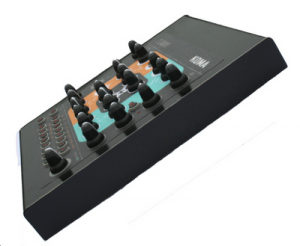
Below is their pitch and specs:
This year, Eowave is attending the NAMM 2012 and will announce the release of the KOMA! 2011 has been full of new releases with the Ribbon, a monosynth/USB/audio controller and the release of the little analogue synth DOMINO in November. We’ll show the KOMA [no relation to KOMA Electronik], an analog bassline synth with memory and a 16 step sequencer that will be ready to ship very very soon!
, a step back into the 80s with a touch of 2012…
KOMA is an analog sequenced bass synthesizer inspired by classic synths from the 1980s with a synthesis section with 256 sound presets and 256 patterns and a step sequencer section.
The synthesis section offers the possibility to mix 4 different waveforms (saw, square, sub, noise) for infinite modulations. The SUB DESYNC mode enables to desynchronize and to detune the SUB and the main oscillator for complex sounds. The filter is a 24 dB resonant low-pass filter. The LFO has 8 waveforms (triangle, ramp up, ramp down, square, random, digital noise, staircase up, staircase down) and can modulate the VCO, VCF or PWM.
To this particular analog sound of the 80s, we added a touch of modernity with controls and parameters to save compositions and performances. The 16 step sequencer has 4 sections: 1 for the notes and 3 freely assignable to a parameter of your choice to create living sequences with sonorities like Vince Clark or Jan Hammer.
With 256 sound presets and 256 patterns locations, the KOMA is a versatile instrument for live performance as well as a powerful composition and sound design tool. Its very intuitive control panel allows the user to edit all parameters in real-time.
Oscillator section
MAIN OSCILLATOR
– Main VCO with 2 waveforms (square and saw), plus SUB (square) and NOISE
– The pulsewidth of the square waveform can be modulated by env2 or by the LFO.
– The main oscillator can be transposed up to 3 octaves
– The main oscillator frequency can be modulated by the LFO or by env3
– Glide
– Mix of the 4 waveforms
SUB
– sub (sub can be 1 or 2 octaves below the master freq).
– The DESYNC mode enables to desynchronize and detune the SUB from the main oscillator.
– In the DESYNC mode, the SUB can be at the same frequency than the main oscillator or 1 octave below.
Filter section
– 24dB resonant low-pass filter for a classical 80s sound
– Variable cutoff and resonance
– The filter can be modulated by ENV2, KB, LFO.
– External audio with a trimmer to feed the filter
LFO section
– The LFO has 8 waveforms (triangle, ramp up, ramp down, square, random, digital noise, staircase up, staircase down)
– Variable speed
– The LFO modulates the VCO, VCF or PWM
– External MIDI clock synchronization
ENV1, ENV2 & ENV3
– ENV1 & ENV2: these 2 envelopes ADSR modulate respectively the amplitude and the filter.
– Attack goes from 2ms to 10 s.
– ENV3: envelope Attack/Decay modulates the VCO
VCA section
– Vca is affected to env1
MEMORY
– 4 banks of 64 sound presets (SAV PRST, SAVE PAT)
– 4 banks of 64 patterns
– 256 sound presets
– 256 patterns
Sequencer
– 16 steps sequencer with 16 LED
– 4 sections: 1 section for gate and note and 3 sections freely assignable to any parameter of the front panel.
– Random feature
– Adjustable tempo
– You can transpose the sequencer via an external MIDI keyboard.
– Each line can have a different number of steps to create complex modulations
– Chain up to 8 sequences.
– Shuffle feature
– External MIDI clock synchronization
Connections
– Audio in
– Audio out
– MIDI in
– USB (for software update and MIDI in&out)”
Easy OSC learn with Sensomusic Usine
Here a presentation of a new feature for OSC control in the new version of Usine ( http://sensomusic.com). if you know the midi learn, now count with the OSC Learn ! Move a parameter on your smartphone, ipod or android tablet , Usine automatically recognize and name the parameter ! Never be so easy to use OSC in an audio appz !
Here a simple example of mapping sounds on a picture , implemented in Sensomusic Usine with a touch-screen.
NAMM teasers from Eowave – featuring the Domino Filter and Reaktor
Here is a quick look at the Eowave Domino, focusing on the sound of the filter, using the sawtooth oscillator
Eowave Domino’s LFO sync’d to MIDI clock. This video shows LFO waveforms: triangle, ramp up, ramp down, square and random. You can have fun manipulating the LFO speed setting while sync’d to MIDI clock. The LFO is modulating the 24db/oct filter and the pulse width of the square waveform oscillator in this video.
Using the audio input to route a drum beat from a Reaktor Ensemble Krypt, through the Domino’s 24 db/octave filter. Domino’s LFO is tempo sync’d to Reaktor’s MIDI clock, and is modulating the filter cutoff.
Pure Minimal – A Minimal Techno sample pack
Here’s a new sound pack from Sampler Banks – featuring minimal techno sounds
http://www.samplerbanks.com/pure-minimal-minimal-techno-drum-loops-and-sample…
Pure Minimal is a collection of glitched, processed and tweaked minimal music loops produced specifically for the dance music producer.
Samplerbanks has released Pure Minimal, a sample set that they say features hundreds of twisted drum loops, bass and synth sounds, dozen of sampler kits offering you a fresh start for your minimal techno productions.
Pure Minimal is produced by Nawarro, a professional producer creating remixes and EPs for Anjunabeats, Deep Blue, Blaubeat (Baroque) and Dowalve Records, and Samplerbanks tells us that this sample pack was particularly inspired by the tribal and percussive movement as well as artists like Deadmau5, Sander van Doorn and Wippenberg.
Samplerbanks say that Pure Minimal is a collection of glitched, processed and tweaked minimal music loops produced specifically for the dance music producer. The pack contains 308 Drum, 65 Bass and 36 Synth Loops recorded at 126, 127 and 128 bpm. Loops are available not just as ACID-ised WAV files, but the whole source material is available in Apple Loop, REX2, Reason 5 ReFill or Ableton Live Pack formats
Added to the package are 100 Hats, 102 Kicks, 100 Percussions, 9 Riffs, 100 Claps, 50 SFX, 22 Stabs, 15 Vocal One-shots, 50 SFX and even 15 Egyptian vocal one-shot samples recorded during a trip. Samplerbanks tells us that all these samples are pre-mapped as 12 sampler banks kits for the popular software sampler formats: Kontakt, EXS 24, HALion, Reason NN-XT and SFZ.
- 541 MB original sounds, 100% royalty-free
- 409 24-bit loops categorized into Bass, Drum and Synth sections
- 498 one-shot samples
- 12 ready to play patches for Reason NN-XT, HALion, Kontakt, EXS and SFZ compatible soft samplers.
- Formats: Ableton Live, Reason Refill, ACID WAV and Apple Loops versions are available separately.
Pricing and Availability:
$31 USD / £19.95 GBP / 24.16 Euro – available as instant download
More information:
NAMM – Kontrol Surface 1974
http://youtu.be/VDdEMezZxek
And here’s the background info:
SmithsonMartin Inc. has done it again. This time it’s called Kontrol Surface 1974.
Launching at NAMM 2012, combine this amazing new controller with the Emulator Modular software and you have the most powerful midi controller on the planet!
Create your own custom multi-touch layouts for ANY midi software;
DJ
Traktor, Virtual DJ, Torq, Mixvibes, Ableton, Serato (with external mixer), ProDJ, MixMeister
Music Production
ProTools, Ableton, Reason, Kore, FL Studio, Sonar, Logic, Acid
Video
Resolume, Arkaos, Grand VJ, PCDJ, Virtual DJ, Serato, Modul8, Mixvibes VFX
Pro Audio
iLive, Cakewalk, ADK, Soundforge, Yamaha PM5D, Digidesign
Lighting
GrandMA, Lightjockey, ShowXpress, Venue Magic
How to make a funky auto-wah bass effect – Reason Sound Design
Propellerhead Software’s product specialist Mattias Häggström Gerdt shows you how to make a Bootsy Collins-style funky auto-wah effect for electric bass (but you can use it on anything, really!).
Link to download the featured patch this week (Reason 6 song file format): http://www.propellerheads.se/stuff/Andrew_Skelton-Fifth_house_bass_Twist.reason
NAMM teaser – Pittsburgh Modular Filter Demo
Teaser demo of the upcoming Pittsburgh Modular Filter. More info is available at www.PittsburghModular.com
More info:
The Filter is a voltage controlled, analog, state variable filter designed by Pittsburgh native and electronics experimenter Michael Johnsen. The state variable topology was chosen because it allowed us to produce a very smooth and natural sounding filter, in addition to offering several other modes of operation, each with a unique sound and energy all their own.
There Is No Sweet Spot
This Filter defines the sound of Pittsburgh Modular. It offers a warm, organic sweep through the full frequency range. The lowpass filter is gummy and relaxed while the highpass is clean and defined. The goal was to produce a filter that did not have a sweet spot; where the every turn of the frequency knob produced something interesting.
View the Filter product page.
UVI Announces Emulation II
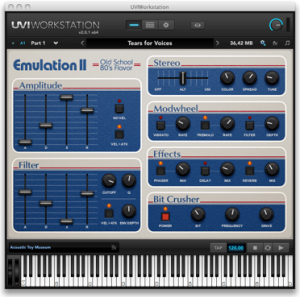
UVI has announced Emulation II, it’s simulation of the fabled E-mu Emulator II sampler. Here’s what they have to say:
“Emulation II features a set of unique instruments to reproduce that typical music from the 80s: from warm digital sounds to the most analog-ish textures.
UVI adopted a hybrid approach to create these sounds, combining deep multi-sampling and powerful modeling tools (analog filters, LFO, envelopes, etc.), inspired by the original machine and enhanced with today most modern audio processing and script technology.
Sounds were recorded and carefully selected from the authentic restored instrument, with the very best analog and digital gear, suiting UVI quality standard. This process allows preserving the original sounds’ lo-fi charm.
Besides, hundreds of sounds and instruments among the best are included: drums, bass, bells, choir-voices, fretted instruments, FXs, keyboards, mallets, percussion, synths, strings, orchestral hits and a lot more.
A simple, yet complete, user interface reproduces the looks and feeling of the most famous and essential machine from the eighties. With 250+ best sounds and primary editing tools, Emulation II enables you to create authentic spin-offs with infinite options of sounds and tones.
This is definitely the ultimate digital version of the long standing professional sampler of the mid-80s, that has been used by Depeche Mode, Peter Gabriel, Pet Shop Boys, New Order, Jean-Michel Jarre, Stevie Wonder, Genesis, Paul McCartney, Enya, Vangelis, in John Carpenter’s soundtracks, etc.
Discover also Drumulation: an utter beatbox with step sequencer from the eighties, loaded with 500+ drums and percussion sounds. Make your beats sound 12 bits!”
Emulation II is available for Mac and PC in Standalone, VST, AU, RTAS, and MAS formats. Requires an iLok dongle.
Price is $199
Finger tapping in Geo Synthesizer using mono note setting
This is a quick example of soloing in Geo Synthesizer, using the Mono option. When activated, only one note will play at a time. As a result, when you hold down one note and repeatedly hit another, you can get a finger tapping effect, much as you would on a guitar. The sound is Geo Synthesizer preset ‘Baker’s Axe’.
Scratching on iPad with DJ Rig and iRig MIX
http://www.irigmix.com | http://www.djrig.net
iRig™ MIX is the first mobile mixer for iPhone, iPod touch or iPad devices. iRig MIX offers the same controls you would expect from a professional DJ mixer (crossfader, cues, EQ and volume controls, etc.) in an ultra-compact mobile mixer that can be used with a huge variety of iOS DJ mixing and other apps.
DJ Rig™ is a full-featured, double-deck DJ mixing app for iPhone. DJ Rig provides instant song play from the device’s music library, tempo sync, sample-based pads, performance recording and an arsenal of high-quality DJ effects. Together with iRig™ MIX, DJ Rig is the most portable, pro-quality setup for mobile DJs and musicians.
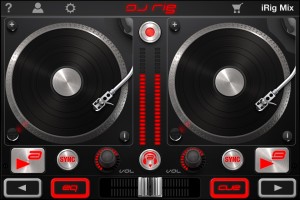
iRig MIX allows regular DJ-ing using two iOS device but also just one device on its two separate channels (using apps that split out to mono signals). Additionally — as seen for the first time on any DJ mixer – it can be used for mixing any type of audio sources (coming from mp3 players, CD players, etc.) with an iOS device using automatic tempo matching and beat synching thanks to its X-Sync feature when used with the DJ Rig app from IK Multimedia.
• 2 stereo inputs with gain, bass, treble and volume controls, independent cue on each channel with LED indication and channel crossfader
• Instrument/microphone/extra input with volume control can be processed by iOS apps (such as AmpliTube, VocaLive)
• Stereo output with RCA connectors, master level and LED meters
• High quality, pristine sound
• Quality headphone output for master or cue monitoring with independent volume control
• Input switch splits Input 1 into dual-mono for use with DJ mixing apps on a single iOS device
• “X-Sync” mode allows auto-sync with any audio source using the included DJ Rig free app
• Can also be powered with battery packs and mobile chargers
• Includes 4 free apps: DJ Rig, AmpliTube, VocaLive, GrooveMaker
iRig MIX and DJ Rig with one iPad and CDJ (iOS device + any other music player)
DATAMASKIN

