
EMW-200 – The Time Tunnel video opening
Final version of this EMW-200 introductory video:
Opening for the EMW-200 Synthesizer videos. Computer Graphics by EMW – Soundtrack by Malte Steiner.
Ableton Live Tips – Configuring 3rd Party Plugins
Thavius Beck is back with a new Live tutorial focusing on plug-ins, additional info below:
More info: http://bit.ly/O8U711
Dubspot Instructor, Ableton Certified Trainer, and electronic musician Thavius Beck returns with a brand-new season of Did You Know? We launched the series back in January, and for eight consecutive Mondays, Thavius shared invaluable production advice, tips, tricks, and techniques and examined some of the less explored and slightly hidden features in Ableton Live. In this episode, Thavius offers tips and techniques for configuring third-party plug-in effects with Live, using Novation’s Bass Station VST.
As nice as it is to have so many instruments and effects available within Live, there are many times when you will want to use a third-party plug-in instead. Thankfully not only are you able to use third-party effects, but you can also automate them and MIDI or key map their individual parameters to control them. There are many simple ways to do this, but in this video we will look at the Configure button that shows up when you unfold a third-party plug-in inside of Live.
For this example, I am using Novation’s Bass Station plug-in. When I first put my Bass Station (or just about any other third-party plug-in not built into Live) onto a track, I get a pretty generic interface with a black square and circle (representing an X/Y grid) and not much else. What I would like to see instead are the parameters that I want to either automate or potentially map to my controller without having the Bass Station interface blocking my view of the arrangement. One way to do that is to unfold the effect (hit the triangle in the upper-left corner), which will reveal the Configure button. Once Configure is enabled, you can just click on the parameters in the effect that you want to see in Live’s generic third-party effect interface. This will also make these parameters show up in the Arrangement View’s automation lanes.
This can also be done by simply entering the MIDI or key mapping mode and clicking on parameters of the effect (without mapping them), or by altering the parameters while recording to the arrangement view. Using Configure is a great option when you don’t want to inadvertently alter the parameters on other sections of the track or song after the fact; you can select the parameter you want to tweak, go the exact spot in the arrangement you want to tweak and automate it without recording it live. Just another way to give you more control over your effects. – Thavius Beck
Experimental music interview: Designers in Residence 2012: Yuri Suzuki
Denki Puzzle and Tube Map Radio
Yuri investigates the workings of consumer electronics. He has made a collection of working objects that attempt to demystify electronics and give the user a better understanding of how things work.
designmuseum.org/exhibitions/2012/designers-in-residence-2012
Film by Alice Masters and sound by Neil Cheshire
#DesignersinResidence
Jennings – new Kontakt version of an early all-valve synthesiser designed in 1946
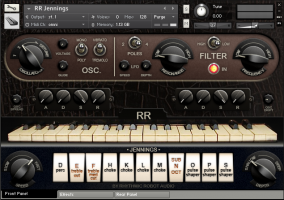
Rhythmic Robot Audio has released Jennings, a Kontakt software version of an early all-valve synthesizer designed in 1946.
The original Jennings Univox was played by The Beatles during their early sets at the Cavern in Liverpool, and by the Tornadoes, who used it to create the signature synth sound of their 1962 synth-pop hit Telstar.
It was designed by Tom Jennings who went on to form Vox amplifiers, and comprised a valve-based oscillator which could be run through a series of wave shapers, filters and EQs controlled by tab switches on its front panel, capable of creating over 2000 variations on the basic waveform. Vibrato added movement to the sound, while a knee lever controlling volume allowed the player to manage swells and tremolo wobbles in real time. The sound was output through a dedicated speaker cabinet into which the keyboard packed for transportation, making it a real alternative to other more cumbersome valve-based synthesisers like the Hammond Novachord for gigging bands.
The Jennings Univox was similar to the Clavioline, another valve-based portable synth, but differed in its use of a sawtooth variant as its source waveform where the Clavioline used a square-wave variant. It is this valve-based sawtooth, rich in harmonic overtones and minor valve instabilities, that gave the Univox its uniquely warm analogue sound.
The Rhythmic Robot software version of Jennings starts with a meticulous recreation of the original instrument based around 24-bit, 20-second chromatic samples of a professionally restored Univox and using a combination of multiple sample sets and convolved IR maps to simulate the behaviour of all of the Univox’s control tabs. Key click samples and a full sample set of the “Sub Octave” tab can be trimmed in level relative to the main wave forms, allowing more comprehensive balancing of the Univox’s tone.
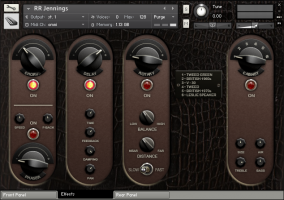
For musicians wanting to explore the start of the synth era with complete authenticity, a “compliance mode” can be enabled to allow the user quickly and easily to dial in patches which conform exactly to the standards of the 1946 original. Patches designed in “compliance mode” sound indistinguishable from the original hardware Univox. However, for anyone wanting to go beyond the limitations of the original, Jennings extends the capabilities of the Univox considerably, adding polyphony, dual oscillators (drawing on different sample sets for a richer tone), a multi-mode resonant filter with LFO, precise control over envelopes (including attack curves) and a comprehensive effects section incorporating Chorus, Phaser, Echo, Rotary Speaker simulation and Amp Cab modelling.
Accessing these effects and additional controls allows the user to create patches using a familiar subtractive synthesis model, but drawing on Jennings’s front-panel tabs to create a base palette of over 2000 “oscillators”. Any tab combination can be used as the starting point for a patch and then doubled up, detuned, filtered, effected and so forth. The result of this versatility is that Jennings is capable of creating both authentic, 1946-accurate tones in “compliance mode”, and modern synthetic patches with a signature valve character, all from one clearly laid-out graphic UI.
Jennings is available now from www.rhythmicrobot.com priced at £59.95.
Features:
- 24-bit, 20-second samples of a professionally-restored Jennings Univox.
- All-valve waveforms.
- Convolved IR maps and multiple sample sets combine to recreate all front-panel tabs.
- One or two oscillators, with detune and Osc Spread control for stereo width.
- Multi-mode resonant filter switchable between 2-pole (12dB/octave) and 4-pole (24dB/octave), high or low pass.
- Filter and Amplitude envelopes; Amplitude envelope with specific attack-curve control (for “sucky” or “snappy” attacks).
- Filter LFO and switchable Amplitude (tremolo) / Pitch (vibrato) LFO, with adjustable ramp time.
- Full effects section with Chorus, Phaser, Delay, Rotary Speaker and Amp Cab simulator.
- Stereo Widening in combination with Osc Spread maps keys across the stereo sound field.
- “Compliance Mode” makes creating authentic 1946-style patches simple.
Jennings requires Kontakt version 4.2.3 or later (including Kontakt 5). Not compatible with Kontakt player.
(Via KVR)
Analog synthesizers – GRP A4 x8 24 Oscillators in unison
Paolo Groppioni plays eight Grp A4 Analog Synthesizers in unison. Twentyfour wild VCOs under the same MIDI master keyboard control.
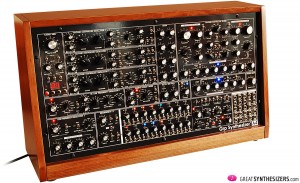
- Voltage Controlled Oscillator 1, 2, 3
- Wide audio range (64’-2’) w. Tune & Fine; six analog waveforms (sine, triangle, triangle & saw, saw, saw & variable pulse summed, variable pulse); manual pw & pwm (from VCLFO1, EG1, S&H, Aft); FM 1 Amt (lin/exp –from VCLFO1, LFO2, VCO1, 2, 3, Noise, S&H, EG1, EG2, Aft, ModW, KeyVel, EnvFoll) w. phase rev; FM 2 Amt (only exp – from VCLFO1, Env Foll); sub oscillator (on VCO 1, 2) -1/-2 oct; hard sync (VCO 1 master); kybd on/off (w. user’s selectable octave offset from MIDI Interface).
- Ring Modulator
- Ring Mod Sources: VCO 2 & VCO 3/Ext Input (user’s selectable).
- Noise Generator
- White & Pink Noise selectable.
- External Input
- Input gain from line to mic level; freely adjustable Gate Threshold (Gate to EG 1-2); enclosed envelope follower (goes into mod buss).
- Audio Mixer
- Separate level controls for VCO 1, 2, 3, Sub 1, 2, Ext Input, Ring Mod, Noise.
- Filter Section
- Dual analog filter section: 24 db/Oct Low Pass Transistor Ladder Filter w. pole selection & 12 dB/Oct State Variable Low, Band, High, Notch Filter.
- Each filter has a separate Distortion/Level control.
- Filter section can be configured in LP 24 Only, SV 12Only, Serial (LP into SV), Parallel, Direct Out (LP 24 goes on Left Audio Out, SV 12 goes on Right Audio Out).
- Low Pass Filter:
- Slope selection (6, 12, 18, 24 dB); Cutoff Frequency; Resonance; Overload LED; FM1 Amt (from VCLFO1, LFO2, VCO 1, 2, 3 Env Foll, Noise, S&H, EG2, Aft, ModW, KeyVel) w, phase rev.; FM 2 Amt (from VCLFO 1); FM 3 Amt (from Step Sequencer, Kybd Track 0-120%; Key Vel On/Off.
- State Variable Filter:
- Mode (12dB HP, 6 dB BP, 12 dB LP, 6 dB Notch); Cutoff Frequency; Resonance; Overload LED; FM1 Amt (from VCLFO1, LFO2, VCO 1, 2, 3 Env Foll, Noise, S&H, EG2, Aft, ModW, KeyVel) w, phase rev.; FM 2 Amt (from VCLFO 1); FM 3 Amt (from Step Sequencer, Kybd Track 0-120%; Key Vel On/Off.
- Voltage Controlled Amplifier
- Dedicaded Envelope Generator (see below); Control Selection (dedicated EG2, ON-hold, External CV); VCLFO1 Amt.
- AutoPan
- AutoPan Off/Internal Clock/VCLFO1; Pan Frequency Control; LED (red = internal clock; blue = VCLFO1).
- Stereo Main
- Master Volume.
- Envelope Generator 1
- Multi Stage Loopable Env (Attack, Hold, Decay, Sustain Lev, Sustain Time-Only in Loop On, Release); Gate Source Selection (Keyboard, S&H, ExtIn/ Step Seq); independent EG Amt for 24 dB LP Filter and 12 dB State Variable Filter, both w. user’s selectable EG polarity.
- EG time goes from 1msec to 60 sec.
- LED: red = EG under Gate sources; blue = EG under Step Sequencer control;
- Loop Envelope: loop from Attack to Release, w. Sustain Time selectable.
- Loop Mode Switch:
- Loop Off: EG as standard AHDSR, no Sustain Time.
- Gate: EG loops from A to S (w. Sustain Time max 60”) as long as Gate is On.
- Auto: EG full loop, from A to R; independent from Gate.
- Envelope Generator 2
- Same as EG 1, without Hold segment.
- Voltage Controlled Low Frequency 1
- Frequency (from very low to 2500 Hz); Waveform (sine, ramp, triangle, saw, square w. variable pulse); FM Amt (exp, w. phase normal/rev); FM Sources (Key, EG1, EG2, LFO2, Seq A, B, A+B, S&H, Aft, ModW, EnvFoll); Sync (Off, Gate, Seq, MIDI – dividing factor selectable from internal MIDI Interface); Shaping LFO out (from: Off, EG1, EG2, Lfo2, SeqA, B, A+B, S&H, Aft, ModW, EnvFoll).
- LFO act as modulation buss for auxiliary sources: EG1, EG2, S&H, Noise, VCO2, EnvFoll. The aux source can be amplitude modulated with the Shaping Select.
- Voltage Controlled Low Frequency 2
- Frequency; Freq Range (Low-Mid-High); Waveform (Triangle, Square); Shaping Select (Off, Aft, ModW).
- Independent Send Modulations for: VCO 1, 2, 3 freq; PWM 1, 2, 3; VCF 24/12 Cutoff; VCA Level.
- Sample & Hold
- Frequency; Frequency Source (Int, VCLFO1); LED (red = Internal, blue = VCLFO1); S&H Source (Pink Noise, White Noise, VCLFO 1, LFO 2, VCO 1, 2, 3); Glide.
- The S&H Clock can be routed to EG firing; there are three options: Off – no routing; Gate – the S&H clock is ANDed with keyb/ext/manual Gate; Auto – EGs always fired from S&H.
- Tuning/MIDI
- Master Tune; Portamento Time; Bend Amount; VCO 1 Portamento On/Off, VCO 1, Bend On/Off; Hold On/Off; A440 On/Off; Retrig On/Off; Manual Gate.
- MIDI Interface: MIDI Channel Select; Keyboard Off Octave Offset; External CV In Octave Offset; MIDI Clock Divider on LFO Reset.
- A4 receives: MIDI Note On/Off, Bend, Modulation, Aftertouch, Key Velocity, Expression Pedal, Damper.
- Step Sequencer
- User’s configurable Mode Select 8×2 or 16×1.
- Clock Source: Int, VCLFO1, Ext, MIDI.
- Clock Divider on all Clock Sources; dividing factor MIDI: 1/1, ¼, 1/4t, 1/8, 1/8t, 1/16; dividing factor TTL: 1/1, /2, /4, /16, /32.
- Sequencer Mode: FW, BW, FW/BW, PNDL, ALT, RND, TRG.
- CV Seq Clock: A, Off, B on internal Clock.
- VCO Seq Enable: VCO 1, 2, 3, Off/A/B/A+B
- VCF Seq Enable: 24dB Off/A/B/A+B; 12dB Off/A/B/A+B.
- Step Repeat: Off, x2, x3, x4.
- Permutations: n,n+1; n, n+1, n; n, n, n+1, n.
- Loop On/Off.
- Hold On/Off.
- Manual Controls: Reset/Step Advance, Run/Stop, Continue
- Pulse Width (legato/staccato) on Internal & MIDI Clock.
- Row A & B Parameters: Glide Amt; Range (x2, x4, x8); Quantizer On/Off.
- Step Parameters: LED; Step Value; Gate On/Off; Step Mode (End, Skip, Normal).
- Connections
- Audio: Mono Out; Phones Out; Left/24dB Out; Right/12 dB Out; Audio External In.
- Filter: CV In 24 dB; CV In 12 dB.
- Amplifer: CV In VCA.
- Synth Control: CV In; Gate In.
- External Modulation Buss: Ext 1/AftT; Ext 2/ModW.
- Sequencer Connections: Row A/B/A+B CV Out; Row A/B/A+B Gate Out; Run/Stop In; Continue In; Loop On/Off In; Clock Input; Clock Output; CV In Clock Modulation.v
Game of Thrones theme – Live on Eigenharp Alpha
This is Geert Bevin’s rearranged version of the theme song from ‘Game of Thrones’. It’s entirely played live on the Eigenharp Alpha, a new electronic instrument. Original song and soundtrack by Ramin Djawadi.
Check out Geert’s other Eigenharp music:
https://www.youtube.com/playlist?list=PLDFC8056082F8FC69
You can download this song from SoundCloud:
http://soundcloud.com/gbevin/game-of-thrones-theme
OP-1 Accessories Review – Unit Portables Bag
Presented here is DJ Thomas White’s review of the new Teenage Engineering OP-1 Accessories line including:
Brick Knobs
Antenna
Crank
Bender
Screen Protector
Accessory Bag
Unit Portables OP-1 Bag
Thomas provides a brief overview of each item with as much detail as he has at this time. His focus is on packaging, quality and basic application. In depth use and techniques may be presented in future videos.
“I love the bag! Get one now to protect your OP-1 from the elements. Thank you Teenage Engineers and also to you, the viewer for checking out another one of my videos. Happy music making!”
ISL – new inter-sample True-Peak limiter
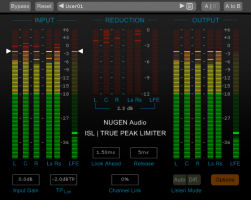
NUGEN Audio has launched ISL, an inter-sample True-Peak limiter that gives complete control over peak levels in audio signals from mono to 5.1. ISL diverges from traditional approaches to limiting by measuring inter-sample peaks and allowing the user to set the true-peak limit, rather than the traditional threshold at which limiting begins. By measuring and correcting for inter-sample levels, ISL protects against distortion that can be introduced when codecs such as mp3 and AAC are applied downstream. Like all NUGEN Audio tools, ISL is intuitive to use and lets audio professionals mix with their ears, leaving ISL to ensure compliance with loudness standards. Designed for the transparent limiting of relatively dynamic high-quality audio, ISL can also be used to hard-limit and reduce dynamic range where required.
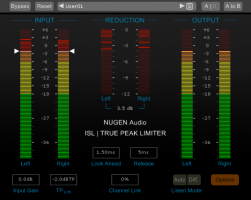
Using the standardized true-peak algorithms of ITU-R B.S. 1770 and related standards, ISL is suitable for post-production and broadcast applications. Features include comprehensive dBTP metering, adjustable channel linking, support for audio formats from mono to 5.1, adjustable ballistics, color splits, and peak indicators.
“I recently finished a “Between the Ears” program for BBC Radio 3 using ISL, and I found it completely transparent. I deliberately tried pushing it hard and it just works, even with much more gain reduction than I would normally consider using in this context. The NUGEN Audio ISL True Peak Limiter is now my limiter of choice for all my broadcast work,” said independent post production engineer Mike Thornton.
ISL is part of NUGEN Audio’s new range of innovative and easy-to-use loudness correction tools, which includes VisLM and LM-Correct.
ISL is RTAS, Audiosuite, AU and VST-compatible and available in 32-bit and 64-bit versions for OS X and Windows at $249.
More information about ISL and other NUGEN Audio products is available at www.nugenaudio.com.
Synth performance: amnésie – J’ai tué mon chat
Monday morning synth spotting, including Roland Juno 60, Roland SH101 & Moog Little Phatty, in this french video:
Extrait de l’album Le trou noir – Ego Twister – 2012 (sortie le 10-10-12)
Version originale : http://soundcloud.com/amnesie1/jai-tu-le-chat
Enregistré et filmé live dans les studios du CNDC au Quai à Angers.
Avec : Yan Hart-Lemonnier, Maxime Dobosz et Wilfried Thierry
Technique son : Loïc Lebris
Réalisation : Wilfried Thierry
Skube – A Last.fm & Spotify Radio
Rethinking home audio and understanding how and where people share music was the jumping point for creating Skube. We are moving more towards a digital and online music listening experience, current portable music players are not adapted for this environment. And sharing music in communal spaces is neither convenient nor easy, especially when we all have such different taste in music.
The result of our exploration is Skube, a music player that allows you to discover and share music and facilitates the decision process of picking tracks when in a communal setting.
It is a fully working prototype through the combination of using Arduino, Max/MSP and an XBee wireless network. We access the Last.fm API to populate the Skube with tracks and scrobble, and using their algorithms to find similar music when in Discover mode. Then using Applescript, we get Spotify to play the music. We use XBees for the wireless communication between the each Skubes and to the computer using custom software that manages all this.
For more information, please check out the blog post: soundplusdesign.com/?p=5516
Project by:
Andrew Nip – cargocollective.com/andrewnip
Andrew Spitz – andrew-spitz.com
Ruben van de Vleuten – rubenvandervleuten.com
Malthe Borch – ciid.dk/education/portfolio/idp12/students/malthe-martin-borch/
As part of the Tangible User Interface module at CIID ran by Vinay Venkatraman, David Cuartielles, Richard Shed, and Tomek Ness.
Music:
Artist – Kirsten & Marie
Track – My Dear
Album – Discover the Sound of Denmark
DATAMASKIN

