
_ultraGlitcher for Ableton Live
Julien Bayle has released ultraGlitcher 1.0 – a new audio FX unit for for Ableton Live
Ableton Live effects available here: http://designthemedia.com/ultraglitcher
FEATURES
– 3 fx stages based on step sequencing
* frequency modulator modulating the input with a raw and gloomy carrier
* crusher crushing bit depth resolution + sample rate of the input
* dirty delay delaying and modulating the feedback on very uncanny manners
– independant step sequencers for audio-channels L/R
– global bypass switch
– global dry/wet
– master shaper envelope based with retriggering rate
The signal pass thru several internal modules, successively:
– frequency modulator
– crusher
– dirty delay
Each module are based on a step sequencer, except the step shaper.
Each module can have its own step number. At each step, a value is popped out to a dsp depending on the nature of the module.
You can tweak steps for both L/R channels and you can also link them, the L step sequencer becoming the one used for both channel modulation.
Each module contains a small step sequencer helper providing an eay way to create sequences increasing or decreasing, including a small cycle, on-the-fly
At last, each module contains a smoother providing a small interpolation between each step.
frequency modulator modulates the frequency of the signal by using a carrier. You change frequency from min to max and you can adjust the range corresponding to min & max. You also have a multiplier to make it sounding crazier.
crusher crushes the signal by degrading sample rate & bit depth. You can choose each value for each step for each audio channel. You also have a divider that provide a sample rate tweak for very low frequency with a better resolution.
dirty delay delays the signal. You can choose feedback amount for each step. You can also choose the delay time manually or sync with the transport. A Bizarre mode provides a very strange noise/sample-and-hold delay time movements that is interesting.
A global waveshaper can be enabled at the master output.
You choose a triggering rate and the envelope is applied to the incoming waveform just before to be popped out to the next device in the chain.
Waves Element Synth – Video Review and all the specs
Russ takes a look at the new Waves Element virtual instrument synth and asks can Waves do for virtual instruments what they did for plug-ins?
Find out what he thinks with this show and tell video review
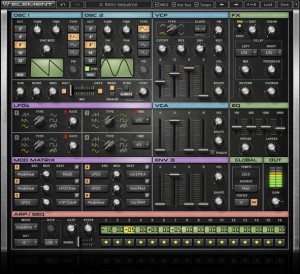
Introducing Element: The first ever synthesizer from Waves. Powered by Virtual Voltage™ technology, Element is an analog-style polyphonic instrument engineered to deliver the fat, gritty sound of the classics, with all the precision, flexibility and control of contemporary digital synths.
Element includes a vast array of convenient features and functions. Like integrated effects. A 16-step arpeggiator / sequencer. MIDI Learn for all controls. And a massive preset library, with total tweakability. Plus, all parameters are laid out right there in front of you, so when inspiration strikes, there’s no need to scroll through page after page to customize your sounds. Searing leads, booming basses, ethereal pads, electro-percussion, sequential motions, mind-blowing FX and lots more: Element does it all.
Features
Powered by Virtual Voltage™ technology
Integrated chorus, delay, reverb, distortion and bit crusher effects
16-step arpeggiator / sequencer
Plugin and standalone components
Controls
Oscillators
OCT determines the pitch range.
TUNE determines the pitch.
FINE fine-tunes the pitch.
TYPE determines the waveform type.
PW determines the pulse width. (Pulse waves only)
VCO selects between virtual Voltage-Controlled Oscillation and virtual Digitally- Controlled Oscillation.
SINE MOD controls the modulation of OSC 1 using a sine oscillator. (OSC 1 only)
FM (Frequency Modulation) controls the amount by which the frequency of OSC 2 is modulated by OSC 1. (OSC 2 only)
PhM (Phase Modulation) controls the amount by which the phase of OSC 2 is modulated by OSC 1. (OSC 2 only)
SYNC synchronizes the triggering the OSC 2 waveform to the rate of OSC 1.
Additional Oscillators & Mix Section
SUB mixes in a triangle wave one octave below OSC 1.
NOISE mixes in white noise.
RING controls the ring modulation of OSC 1 and OSC 2.
OSC 1 / OSC 2 activate each oscillator.
MIX balances the mix between OSC 1 and OSC 2.
MONO toggles between monophonic and polyphonic modes.
RTRG controls envelope re-triggering.
UNISON activates a doubling effect which creates a richer sound.
PORT determines the glide time (portamento) between notes.
LEGATO determines whether glide will always occur, or only when the previous note is still held.
Voltage Controlled Filter
TYPE determines the filter type.
SLOPE toggles between two types of pole filters.
CUTOFF controls the VCF cutoff frequency.
RES controls the amount of filter resonance.
ENV determines the envelope’s cutoff modulation depth.
KBD controls keyboard tracking using C3 as its reference point.
FM controls the amount of frequency modulation on filter cutoff by OSC 1.
ADSR determines the filter’s envelope cutoff behavior after a note is triggered.
VEL sets the VCF cutoff in relation to the Note On velocity.
SHAPE determines the contour of the envelope time constants.
Voltage Controlled Amplifier
VCA envelope controls the note level from trigger to release.
VEL sets the envelope depth in relation to the Note On velocity.
SHAPE determines the contour of the envelope time constants.
PUNCH controls the dynamic transient enhancer.
Low Frequency Oscillators
TYPE controls the LFO waveform shape.
RATE controls the frequency of the free LFO.
TIME controls the rate of the synced LFO, locked to the project BPM.
LED displays pulsate at the same rate as the LFOs.
Envelope 3
VEL sets the envelope depth in relation to the Note On velocity.
SHAPE determines the contour of the envelope time constants.
Modulation Matrix
PHASE inverts the phase, per assignment.
SRC determines the modulation source.
DEST determines the destination of the modulation source.
MOD sets the amount by which the modulation source affects the destination.
Arpeggiator/Sequencer
MODE determines the operational mode.
OCT determines the range, in octaves, of the arpeggiator.
TIME (drop-down) activates the host BPM sync function, and sets the rate using note values.
RATE sets the arpeggiator rate when TIME is set to Free.
GATE determines the length of each sequencer step as a percentage of its note length.
STEPS determines the number of steps in the current sequence.
SWING pushes even-numbered notes/steps toward the next odd-numbered note/step, to create a shuffle/swing feel.
Effects
DIST controls the amount of distortion effect.
PRE/POST is a toggle control which determines the placement of the distortion effect in the signal path, either pre-VCF or post-VCF.
CRSHR is a distortion-like effect which simulates a reduction in the bit-depth and resolution of the sound.
DELAY is a stereo delay allows separate delay times for left and right channels, using note values.
LEFT sets the delay time for the left channel.
RIGHT sets the delay time for the right channel.
MIX determines the amount of delay effect in the mix.
FEEDBACK determines the amount of gain fed back to the delay input.
REVERB controls both the amount and size of the virtual plate reverb sound.
CHORUS determines the amount of chorus modulation.
EQ
HiPASS controls the high pass filter frequency.
LoPASS controls the low pass filter frequency.
100 controls equalization at 100 Hz.
600 controls equalization at 600 Hz.
1500 controls equalization at 1500 Hz.
9000 controls equalization at 9000 Hz.
Global and Out Sections
TEMPO displays the current tempo.
SOURCE determines the clock source.
VOICES determines the number of voices which may be played simultaneously.
HD activates High Definition mode, which extends the digital resolution, resulting in enhanced depth and greater high-end definition.
GAIN sets Element’s overall output volume, after all generators and processors.
METER displays Element’s overall output energy.
9000 controls equalization at 9000 Hz.
Read more: http://www.waves.com/content.aspx?id=12081#image#ixzz2Gw3J6yqS
Depeche Mode – new single ‘Heaven’ on January 25th
According to Sony Germany, the new Depeche Mode single is called “Heaven” and will be released January 25th in Germany, January 28th in the rest of Europe and January 29th in the states. The 3:53 track will be a teaser for the new studio album to be released in March 2013.
Sony rep stated: “It is not the best track from the album, wait till you hear the entire album.”
Future Retro 777 modifications
This video shows off a few modifications to a FR-777 bass synth, performed by Jered at FR some 15 years ago. Shown are the Oscillator sync, Endless-drone, and LFO-to-cutoff mods, plus variations.
“Around 2:20, when I say “Envelope”, please substitute “LFO!”
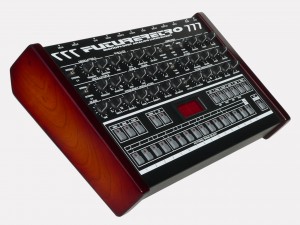
The Future Retro 777 is a monophonic analog synthesizer with a digital sequencer. The 777 is a sleek retro design that has realized the full potential of the monophonic pattern based synth. It’s not just another TB-303 emulator. It uses analog circuitry and has a lot of hands-on knobs for instant sound tweaking. And while the 777 has extensive editing and modulation abilities, the layout is as basic and intuitive as an old SH-101 or MC-202!
The 777 functions quite well as either a standalone bass sequencer or as a sound module in a MIDI environment. Two oscillators (A / B) produce a fat bass sound. Modulation abilities are quite complex, the oscillators themselves can modulate each other for example. The filter is very nice with switchable 3 or 7 pole slopes as well as other sound shaping controls for a wide range of tones. An external sound can be routed through the filter too. The sequencer, OSC B and the decay envelope can also modulate the filter cutoff. The 777 also employs a smart accent effect for that extra bit o’ kick in your bassline.
As a sequencer the 777 shines once again. Bear in mind that this sequencer accommodates a monophonic (single tone) instrument which normally has very basic sequencing needs. Notes are entered using the pseudo-keyboard buttons. Programming is different than other synth / grooveboxes of similar function but is relatively easy to master. Up to 256 patterns can be linked to form up to 16 songs all of which remain in memory. And of course all real-time editing can be recorded into your sequence and are also MIDI controllable. Final goodies include an internal MIDI to CV-gate converter, glide or portamento effects, distortion, chorus and phase effects and more!
Audio Damage has a new bit shredder out – Bitcom
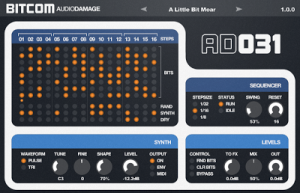
There are subtle plug-ins you put on the two-buss to give a nice gentle vibe to a track. Bitcom is not one of those. There is no “analog modeling” in this effect. There is no warmth or tube saturation. It is utterly devoid of anything to which the word “vintage” can be applied. Bitcom is a modern bit-shredding digital banshee that beggars description and lives on the edge of instability.
In a nutshell, a step sequencer drives a custom-designed bitcrusher, with a synth sidechain. But that sentence doesn’t begin to describe the abuse that Bitcom is capable of. We pulled out every trick in the book to build a modern electronic music effect that can turn even the most sedate input in to a swinging, screaming pain-monkey, wreaking havoc on lesser sounds.
Bitcom requires OS X Intel 10.6.0 or later, or Windows XP SP 2 or later; the installers include both 32- and 64-bit versions.
Bitcom Features:
Bit Banging: Bitcom’s bit engine is unique; each step has eight switches that (to simplify matters greatly) turn individual bits on and off. So all 8 switches on, and the output is pretty much like the input. Start turning them off and Strange Things Happen.
Synth Signal: Bitcom includes a simple monophonic synth that can either be always on, envelope driven, or controlled via MIDI. This is mixed with the input signal to create strange new sounds. Alternatively, Bitcom can be used without any input at all, as a moderately capable synth.
Sidechain: When using the VST3 version, the sidechain input can replace the synth section. This has the net effect of putting two input signals in to a meat grinder. Strange Things Ensue. Don’t say we didn’t warn you.
Sequencer: Bitcom’s step sequencer syncs to the host DAW. The sequence can be of arbitrary length from 1 to 16 steps, and the sequencer has internal swing.
Doepfer A167 Offset and Outputs
A closer look at the output and offset options on the Doepfer A167 Comparator.This is Part Two of Two. Includes Oscillocope views of waveforms using the Dave Jones Design O’Tool. Sound and Video by Raul Pena.
NI Absynth – Brian Eno – “An Ending (Ascent)”
Anthony Distefano’s Absynth version of Eno’s “An Ending (Ascent)” from Apollo: Atmospheres and Soundtracks. This was all done using Absynth’s envelopes.
Element – new synthesizer instrument plug-in for Window and Mac
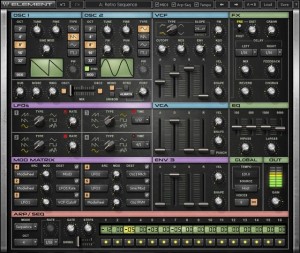
Waves has announced the release of Element, a synthesizer instrument plug-in for Window and Mac.
Introducing Element: The first ever synthesizer from Waves. Powered by Virtual Voltage™ technology, Element is an analog-style polyphonic instrument engineered to deliver the fat, gritty sound of the classics, with all the precision, flexibility and control of contemporary digital synths.
Element includes a vast array of convenient features and functions. Like integrated effects. A 16-step arpeggiator / sequencer. MIDI Learn for all controls. And a massive preset library, with total tweakability. Plus, all parameters are laid out right there in front of you, so when inspiration strikes, there’s no need to scroll through page after page to customize your sounds. Searing leads, booming basses, ethereal pads, electro-percussion, sequential motions, mind-blowing FX and lots more: Element does it all.
Element for Windows and Mac is available to purchase for the introductory price of $99 USD (regular $200 USD).
Exploring a sample based generative music app – Caelestis
http://apps4idevices.com/read/caelestis
Caelestis is a sample based generative music app that creates unique and very interesting results. It uses bouncing balls that generate notes as they bounce off the walls of the three different shaped rooms. The sound balls can be initiated at any velocity, and the shaped rooms can be rotated at different speeds to create interesting combinations. Each sample can be pitched by semitone increments, and assigned to one of three octave ranges. It is a free app with a $0.99 in-app purchase for importing and exporting samples and recordings. I should note that all file management is accessed through the Audio Copy section, and for referencing tempo, you need to run a drum app in the background. But I have to say that I find this app to be very impressive, with a great range of features, and it’s very easy to use. The unique layers of sounds and rhythms really make Caelestis … A Killer App!
Review by Nick Trass
Diego Stocco: Full talk from Wired 2012
Diego Stocco
Second to talk was musician Diego Stocco who turns the world around him into musical instruments. He opened his talk by asking the audience to imagine the waves in the ocean and how the shapes the water makes can be turned into “living frequencies” that can be used to create music. He also demonstrated Bassoforte, an instrument made out of a bass guitar and a piano.
Thinks took a turn for the weird when he showed how to make music from the different sounds of a tree. “So I tuned a tree…” he said, which he did through a series of interactions such as knocking on the bark and shaking the branches.” Other projects include making tunes from kitchen items and a dry cleaner. He concluded: “I want to live in a future with more music that will surprise me.”
DATAMASKIN

