
FORGOTTEN MACHINES
The title track from the latest album by Decktonic, out now on 56kbps Records. Free download:
http://decktonic.bandcamp.com/album/forgotten-machines
THIS IS DECKTONIC
http://thisisdecktonic.com
Directed by Rich Keohane
http://www.richenvironments.com/
Mint.io – Beta test
Background description below:
Only 1 basic 909 drum pattern, 1 synth bass pattern and preset, 1 Vibes realtime recorded loop and some chords… This came during the testing session, shot with the iPhone. Note that this is not the demonstration of the full sonic possibilities.
Lemur 4 – The learning curve is about to drop
Details on Lemur:
Control anything
Lemur is a professional iOS controller app that doesn’t cut any corners. It lets you control anything, any way you want. Total flexibility means it can go as deep as you need it to. Lemur can control DJ software, live electronic music performance software, studio production software (DAWs), VJ software, visual synthesis software, stage lighting and more.
Rock solid standard
Major stadium-touring acts use Lemur on stage. The original hardware version was introduced to the public in 2004 and Lemur software now benefits from nearly 10 years of development. These are just two of the reasons Lemur is the name cited when talking about multitouch control.
A controller unequalled
Lemur has often been imitated but never equalled. The physics engine, which can make faders and balls bounce, is entirely unique: allowing anything from a slight organic feel to absolutely chaotic modulations. Lemur goes deep: it comes with more than twice as many unique objects as comparable apps. Options for adjusting the look and feel of objects are vast, and connection to your gear is simple.
User Library
Access templates from top artists and the Lemur community. Some of these are actual templates used on stage, others are pure studio or creative tools. Share your own or simply browse the library and download whatever suits your needs.
Sound Magic releases Neo Distortion VST for Windows

Sound Magic tells us that Neo Distortion is a distortion effect unit which features a 2-stage distortion Overdrive, followed by 4 optional distortion units including a Waveshaper, Fuzz, Soft Distortion and Contour.
They say that it provides meticulous controls for the 4 distortion types and combined with the Overdrive unit, you can build your own style of distortion to feature your unique sound style.
Features
- Internal 64-bit floating point precision.
- 2 Stages Distortion, First OverDrive, Followed by 4 optional distortion units including a Waveshaper, Fuzz, Soft Distortion and Contour.
- Support up to 32Bit/384KHz resolution.
Pricing and Availability:
Neo Distortion costs €49
More information:
Anton Corbijn’s Front 242 – Headhunter video released
PIAS has just made public the video for the track, by the great Anton Corbijn. Rumour has it that the director misheard the track title as ‘egghunter’, which explains the grainy footage of a fruity lady being chased around wearing an egg on her head, eggs falling, and so on. For more on PIAS Recordings 30 year anniversary and their vinyl reissues, please visit their website.
Maschine and MIDI Designer Duet
Dan Rosenstark, founder of MIDI Designer, plays a duet with Native Instruments Maschine and MIDI Designer. This video highlights MIDI Designer 1.4.2’s new position-sensitive drumpads and absurdly-low latency.
“Thanks for watching and for checking out MIDI Designer!”
MIDI Designer (http://midiDesigner.com) is a professional MIDI controller for iPad, iPhone and iPod touch. Design your perfect MIDI control surface right on your device. MIDI Designer is used by professional musicians, DJs, sound engineers, lighting engineers, and robotics experts.
Yamaha CS01II Plays BIG MUFF by Depeche Mode – Cubase Screen Capture
Youtube alias peahix has uploaded this DM cover of Big Muff, details below:
I’ve had several skeptics weigh in on my various Depeche Mode covers done all on my Yamaha CS01II synth, so I thought I’d make a screen-cap video showing the Cubase session for my rendition of “Big Muff.” Here’s the mastered version I posted previously: http://www.youtube.com/watch?v=5IiZlvr7fXs
In this version, you can see all my parts, and I solo all the different bits throughout so you can hear how it all comes together. Note that for several sounds there are actually two different tracks that play together to form a composite sound. The CS01II is a pretty limited synth, and in order to more accurately achieve certain sounds, I had to split things into their component parts. The channels that remain muted throughout are just the MIDI parts, which aren’t outputting to anything here, since each MIDI track was recorded one at a time via the CS01II to an audio track. Anyway, hopefully this is useful or interesting to someone!!
Yamaha CSo1 II:
The CS01 is a very old but classic analog monosynth from Yamaha. Although originally designed for use by novice musicians or first time synth-buyers, the CS01 has been recognized by today’s electronic musicians as one fat little bass machine with simple controls. In a nutshell, the CS01 is simple to use and edit but still has some great features for any situation. It’s tiny and portable, it has baby-sized keys and it can run on batteries, and there is a built-in amplifier and speaker which is quite fun.
As for sounds and synthesizing, the CS01 is the perfect monosynth for bubbly and growling bass! It features a very nice 12dB resonant VCF filter. In addition to the oscillators’ sine and square type waveforms there is PWM and noise. There are also LFO controls, glissando (like portamento), a typical ADSR envelope generator, pitch & mod wheels and even a breath controller input. A CS01 mkII (pictured below) was later released by Yamaha soon after the original. It featured an improved 24dB resonant VCF (filter) with adjustable slider control over resonance instead of switchable on/off resonance as found on the original. The CS01 mkII is also identifiable by its black case with green letters.
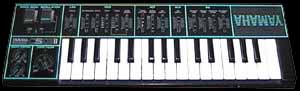
Diego Stocco – Transformed Rain
Diego Stocco has released another sound design video work, the meditative Transformed Rain.
Here’s what he has to say about it:
Few days ago I was working on a new instrument and needed to pick up some tools from my work table outside. It was a rainy day.
While I was sorting through the tools, I started hearing a faint tonal rhythm that reminded me of ethnic percussions and wondered where it was coming from. It was the rain hitting a metallic trash bin that I had left upside down in front of the working table.
I stopped for a moment and focused my attention on the sound.
Besides the percussive noise of the rain, I started hearing some overtones, so I got inspired to create a piece by expanding the tonal resonances present within that sound. No additional instruments or samples. I hope you’ll enjoy it!
Doepfer is back – with Dark Energ II analog synth
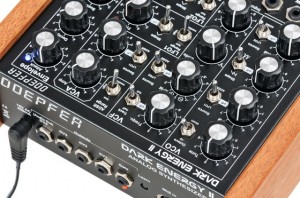
Doepfer has announced availability of its new Dark Energy II, a redesigned version of the monophonic analogue synthesizer with USB/MIDI interface and CV connectivity.
So why the need to redesign something so successful so soon? Simple. Needs must. And who better to explain this than company CEO Dieter Doepfer himself: “As the Dark Energy had to be discontinued, because an important electronic component (CEM3394) is no longer available, we decided to do a redesign. The new Dark Energy II looks like the Dark Energy at first glance, but the basic sound of the Dark Energy II is clearly different because of the new circuits for the VCO, VCF, and VCA.”
Given the absence of that rich-sounding, analogue ‘synthesizer-voice-on-a-chip’ (CEM3394) from Curtis Electromusic Specialities successor OnChip, how does the Dark Energy II sound? Still rich, still analogue — with 20 to 30 minutes tuning time needed for the VCO’s temperature-controlled pure analogue circuitry, but different… mainly because of the completely different filter type.
Notable differences in specification between the two — together with a number of functional additions to the Dark Energy II — are as follows: firstly, the Dark Energy II features a sawtooth-based VCO core (compared to the Dark Energy’s triangle-based one), which, as implied, outputs a sawtooth waveform, with a waveform Shape switch for selecting sawtooth, off, or clipped/inverted sawtooth; meanwhile, that all-important, sounding-defining VCF is centred around a 12dB multimode filter with lowpass, notch, highpass, and bandpass, together with an all-new filter Mode control for continuous transition from lowpass via notch and highpass around to bandpass (as opposed the 24dB lowpass variety with linear frequency modulation (LFM) control found on the Dark Energy); the VCF’s exponential frequency modulation (XFM) control also has a polarization function, whereby the modulation source (LFO2 or ADSR) selected by the Source switch can affect the filter frequency with a positive or negative behaviour (by rotating rightwards or leftwards, respectively); finally, the VCA has an exponential scale (unlike the Dark Energy’s combined linear/exponential scale).
Benefitting those with a modicum of electronics know-how, the Dark Energy II offers much more internal expansion possibilities than its ‘Mk I’ predecessor courtesy of pin header terminals for the following functions: rectangle and sawtooth VCO outputs, linear FM input for VCO, hard sync input for VCO, lowpass/bandpass/highpass VCF output, rectangle and triangle outputs for each LFO, and optional reset/direction features for each LFO — all conspiring to make this already flexible synthesizer even more flexible!
The upshot of those differences is that sounds created on a Dark Energy II of course cannot be replicated on a Dark Energy (and vise versa) — though there is nothing to stop the two distinctive synthesizers from being daisy-chained together to produce an even wider palette of sounds. Indeed, several units can be polyphonically or monophonically cascaded (via internal MIDI out/MIDI in connections) to create an ‘über-synth’ of sorts!
Dark Energy II is available to purchase online within Germany directly from Doepfer for 428 EUR incl. VAT, or from an authorised dealer. An optional Glide control option is also available for self-installation for 10 EUR incl. VAT.
Ableton Live Tip – Set Tempo BPM with Scene Launch
Here’s a quick Ableton Live Tip on how to change the tempo and bpm when you trigger a scene in session view. This is a must know for live performance! Enjoy!
Visit AfroDJMac’s site for more stuff like this, including Live Instrument downloads, tutorials and music! http://www.afrodjmac.com
DATAMASKIN

