
Addictive microSynth
Combines the synthesis power of Addictive Synth with an easy to use 4 track loop recorder.
It was never so easy to create beautiful sounds and driving loops.
The unique dynamic wavetable synthesis allows you to explore an unprecedented
wide range of sonic territory. From acid loops, crystal clear percussions, realistic
human choirs to complex musical soundscapes nothing seems impossible
with only a handful parameters to tweak.
Via virsyn
Animoog versus the real thing
Here’s a good bass check up from one who I believe knows what he’s talking about when it comes to comparing real Moogs to softies:
Animoog Taurus bass impression, compared with “Taurus” presets from the Moog Little Phatty, and Arturia Minimoog V. $1 vs. $1300 vs. $200.
First thing I worked on with the Moog Animoog iPad app, was programming a passable Taurus-type bass sound(two saws, octave apart, detuned slightly). There is mojo coming from both the Little Phatty and Arturia Minimoog that I couldn’t capture, but I feel like this’ll do a pretty good job in a pinch.
To program the sound, this is what I found:
1. Build off of a static saw Timbre. “StaticFatSaw1” is good. Putting a “Sine” wave, or “OctaveSaw” in the Timbre slot next to it gives some good variation moving around on the X/Y pad.
2. The key for me to getting the vibe in the right ballpark was forcing the synth into mono operation, and using the “Detune” control to separate the saw into two separate octaves. This can be accomplished in two ways I’ve found:
-(preferable) “Unison” set to “4”, “Detune” set to approximately “8”, and ONLY use the Left audio output from the iPad(I used the “tip” side only of a stereo 1/8″ TRS to dual mono 1/4″ TS cable, coming out of the headphone jack)
– “Unison” set to “2”, and “Detune” very slightly under “10”. This’ll sound alright coming out of the iPad speaker, but is less flexible, and would be difficult to perform with.
3. all Orbit, Path, Delay settings to “0”
4. approx. fiter settings: Drive “10”, Env. “0”, Freq “5.3”, Res. “1” – maxing out the filter “Drive” seemed to be a key to getting the right amount of “spit” in the sound with the filter wide open.
5. approx. Thick settings: Crush “0”, Drive “2.5”
6. I zeroed out all Mods, except for one, that makes the poly-pressure open up the filter freq:
– Source off, amount “0”
– Control poly-pressure, amount “+33”
– Destination: filter-freq
7. Setting the KB scale to “Chromatic” with “Mono” and “Legato” makes the on screen keyboard act as I would expect. “Cor” at “10”, “Glide” around 45%.
All three Synths recorded straight into Steinberg MR816csx. Levels adjusted slightly, no additional post processing.
Derek Buddemeyer demo Phrase Sampler in JamUp
Derek, (Hangnail Guitars), shows a demonstration of JamUp PRO by PositiveGrid with a few amp models/effects and overdub capabilities of the phrase sampler.
Available in the iTunes App-Store!
http://www.positivegrid.com/jamup/
JamUp is a guitar/bass multi-effect app, gives you a load of authentic guitar tones, sound-on-sound looping and 30+ modules right on your iPad and iPhone!
Powered by the newly developed multi-stage MESH Modeling engine, JamUp includes 6 historic amp models and 6 matched convolution speaker models, comes with classic and fuzzy stomp, spring and digital reverb, tangy modulations, tape and digital delays, filter, compressor, noise gate and other essentials.
JamUp is born with great “play alone” capabilities. The phrase sampler can capture loops and riffs and create instant sound-on-sound overdubs, it’s the easiest way to create a one-person-band sound in minutes. With the Jam Player, you can play along with any tracks from your iTunes library, plus, you can easily create a loop and control the tempo and pitch with built-in high fidelity time stretching engine.
Nice Omega Code 8 Polyphonic demo – Arp 2600 and CS80 filters
Here’s some background information:
When I touch the big knob under the screen I’m changing the filter type or tweaking filter parameters for the CS80 filter. I picked up a fully loaded 4 month old Code 8 this week, with 8 Arp 2600 and 8 CS80 filters! I was up late last night playing it for hours….Sounds a bit like an Oberheim OBX. When you turn on all the waveforms it will saturate a bit, so it’s not super clean like everyone says.
Filter demo here
http://soundcloud.com/coolcolj/studio-electronics-code-8
And CS80 filter demo
http://soundcloud.com/coolcolj/code8-cs80-filter
Arp2600 filter demo
http://soundcloud.com/coolcolj/studio-electronics-code-8-1
iPad App – DXi FM Synthesizer Demo
Short demo of some of the sonic features of this FM app by Takashi Mizuhiki. DXi brings FM to your iPad, but it’s closer to the DX27 than the legendary DX7. There are four operators rather than six and polyphony is reduced from 16 to three, from what we can tell. DXi also offers a neat 16-step sequencer and an effective XY performance pad, to mix operators and patterns in real time.
Description
DXi is a FM synthesizer application inspired by 80’s most popular FM synthesizer. You will enjoy creating sounds as well as playing music with this application.
FM synthesizer is still popular among many people by its unique tone. We carefully selected parameters from original synthesizer so you will be enjoy editing tone with them easily. You need to know some technique to tweak the tone, but you will be able to get DXi’s special tone and effects while having some fun!
Creating sound effects is another idea to enjoy DXi.
We loaded 16 step loop sequencer as a bonus feature!
If you remember the days of FM synthesizers, try creating the tone you remember from them.
If you have no experience with any FM synthesizer, we are sure you will be enjoying the unique tone world!
* 4 operators FM synthesizer
* Anti-ailiased oscillator
* 8 algorithms
* Envelope, frequency (Ratio or Fixed) can be set each operators.
* Feedback control on operator number 4.
* 2 master effects (LPF with Resonance and Delay)
* Import/Export function to save the tone you created. (URL schema text string format)
* Audio recording function. And you can transport recorded audio file, .wav, onto Mac/PC via iTunes file sharing.
* Clipboard audio sharing support. You can export recorded waveform to other application via clipboard. It’s compatible with Intua’s clipboard.
* Supports external MIDI keyboards via Core MIDI USB adapters. iPad users can use Camera Connection Kit. And iPhone/iPod touch users can use Yamaha i-MX1.
Tme machine – Oberheim OB-X + Roland VP330 “Zero Gravity”
Vintage synth demo track by RetroSound – “Zero Gravity”
strings and human voice choir: Roland VP330 Vocoder Plus mk2
lead and pad sounds: Oberheim OB-X 8-Voice
recording: multitrack
The Oberheim OB-X is an analog polyphonic synthesizer. It was the first Oberheim synthesizer that was created with internal prewired modules and not with the bulky SEM modules. Because of this, it was more functional for live performance, and therefore more portable. It was introduced in 1979 and was discontinued in 1981. It came in four, six, and eight-voice models. The starting price for only 4 voices of polyphony was a steep US$4,595. Besides the generous polyphony, each OB-X came with a memory capable of holding 32 user-programmable presets, along with polyphonic portamento, and polyphonic sample and hold. The OB-X was in direct competition with the Sequential Circuits Prophet-5. The OB-X would be used by artists such as Nena, Rush, Queen, Prince, and Jean Michel Jarre. It spawned more Oberheim analog synthesizers, such as the OB-Xa, the OB-8, and the Matrix series of synthesizers.
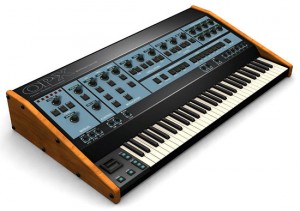
Sonicprojects have created a VSTi emulation of the OB-X, for Windows and Mac platforms called the OP-X, with near-identical sounds to the hardware version.
Small Steps on SynthX 2
http://vimeo.com/30688078
>> One of my very first steps on the awesome SynthX from Wayoutware on my iPad 2. I’ts the first synth I love to play without MIDI keyboard.
Built using Way Out Ware’s award winning virtual analog technology and heavily optimized for the iOS operating system, SynthX delivers a great looking and sounding analog experience to the iPad. A mathematically modeled synthesizer, SynthX contains no samples. As a result, it is very small in size, yet it has an extremely large and professionally design sound library. An effects chain including distortion, flanger, delay and limiter are included. Additionally, a separate identical effects chain is provided to process an external signal connected to the iPad’s audio input. SynthX has been designed from the beginning for the iPad and multi-touch. It has a comprehensive MIDI implementation using CoreMIDI including MIDI Note send and receive and MIDI Beat Clock LFO sync. You can also record your performances within SynthX and use Sonoma Wireworks AudioCopy to share your performance with other iPad apps. It also supports iTunes file sharing which allows you to drag your performances in full quality into your favorite digital audio workstation.
More insight into the iKaossilator for iPhone/iPod Touch
As announced earlier, but here’s a new video demo of the app. Given how perfectly suited the iPhone is to being used as an X/Y pad, a mobile version of Korg’s Kaossilator was always a no-brainer. And so we have the new iKaossilator, which has appeared on the App Store this very day.
The full details are below, but the bottom line is that you can make music with the app just by “stroking, tapping or rubbing” your Apple mobile device’s screen, which also displays visual effects.
There are 150 built-in sounds, scale/key settings and a five-part loop sequencer.
The Korg iKaossilator is available now from the App Store priced at £6.99 (the price will double as of 30 November). There’s no native iPad version at this time.
Korg iKaossilator official details
Korg has revolutionized the musical instrument world with their dynamic line of Kaoss products, using an intuitive X-Y pad to provide expressive musical control. The palm-sized KAOSSILATOR synthesizer placed modern music-making in the hands of thousands of musicians and non-musicians alike. Now that same excitement has been captured in the iKaossilator app for iPhone!
iKaossilator for iPhone Highlights:
? Play sounds by simply stroking, tapping, or rubbing the screen with your finger
? Bold Visual Effects move along with your performance and add excitement
? 150 diverse built-in sounds cover any style of dance music
? Scale/Key settings allow anyone to perform with musical precision
? Easily create tracks with the loop sequencer using up to five parts
? Control loops in real time for DJ-Style live performances
? WIST capability allows wireless sync-start with other apps such as the iELECTRIBE
Perform Using A Single Finger
iKaossilator uses the unique X-Y interface made famous by Korg’s entire Kaoss Line, including the original hand-held KAOSSILATOR. Create melodies and phrases simply by stroking, tapping, or rubbing the touch screen with your finger; no musical knowledge is required.
Bright, Colorful Visual Effects
iKaossilator is also focused on its graphic design, which shows up beautifully on the iPhone’s high-quality display. The visual effects on the iPhone’s display move along with your performance and add excitement. These bold, colorful graphics provide an exciting performance experience.
150 Diverse Sounds Covering Many Musical Styles
Use the 150 built-in sounds to perform and produce a broad range of dance music styles including hip-hop, house, techno, dubstep, nu-disco, and electro. Enjoy the synth leads and synth bass sounds you expect from a synthesizer, as well as acoustic sounds that simulate piano or guitar chords, even the popular sound effects used by DJs. The drum sounds let you play and manipulate various patterns simply by moving your finger.
Loop Sequencer
The built-in loop sequencer lets you layer up to five musical parts. To create a track, simply assign a loop such as synth, bass, chords, sound effects, or drums to each part. Fifty loops created by professional musicians are built-in to help you get started quickly. In addition to its track-making capabilities, this loop sequencer is also a great feature for live performance. The Mix Play feature makes it easy to enjoy live remixing; you can switch seamlessly to another loop or extract a specific part from another loop while the playback continues.
Link : KORG iKaossilator by [?] – Download KORG iKaossilator in the iTunes App Store
Enjoy
Stylophone Effects
Here is a demonstration of how you can use the Looper in the Eventide TimeFactor, along with the Octaver, Crystals, Harpeggiator, and H910 H949 effects in the Eventide PitchFactor, to create lots of unique sounds from only a few notes. For more info visit
http://Eventide.com/AudioDivision.aspx
RGBSOUND PRO
Only Rgbsound Pro sounds were used for the music of this video.
No effects were added (except of last 5 seconds).
By tapping the colors you play sounds and you launch infinite electronic loops, by shaking the device you change your music pattern. If you have an Ipad you can use the screen-saver mode to project a colored mixture of visual effets on a screen, for example while you’re playing as DJ in a club. RGBSOUND is simple, fast and intuitive; create your groove and surprise yourself!
★HOW TO PLAY★
✔single tap to play a sound
✔double tap to start a loop
✔swipe up/down on a button to accelerate/decelerate a loop
✔single long press to show volume/pitch controls
✔use the direction square buttons to change the sound table
✔shake the device to change the set of sounds in each tables
✔press the central rotating button to show the control mask where there are the master pitch and general bpm sliders, a central reset square button, and square buttons to save tracks
DATAMASKIN

