
EDM: Mash Up – Live In Studio (iPAD Lemur, Touch-Able, Ableton)
DJ Zinkus speaks about his own vision of EDM Live performance at events and makes live performance demo of personally designed music control panel on iPad (Lemur).
www.djzinkus.com
PPG Wavegenerator – test of upcoming voice-per-channel MIDI mode
Geert Bevin has been helping Wolfgang Palm with adding a new feature to PPG Wavegenerator that allows per-note expression over MIDI by implementing a voice-per-channel MIDI mode. This is a quick test of the first fully working version he sent me today. It’s short, but he hopes it shows the possibilities of this feature with new electronic instruments like the Eigenharp.
Note that this demo is only using one single sound that has independent expression in three axis for each individual note.
Geert is using a modified version of the standard ‘Jigsaw Lead’ patch that has up-down movement mapped to per-note filter cutoff (Y movement in PPG), pressure (X movement in PPG) to note volume and left-right movement to per-note pitch with a 5 semitone interval.
More information about this excellent iPad synth here:
http://wolfgangpalm.com/
This new feature is probably going to be available as an additional in-app purchase.
iPulsaret Microsound Granular Synth for iPad
iPulsaret for iPad brings all the powerful Density/Pulsaret (Mac/Win standalone) Granular Synthesis tools to the world’s most popular tablet. densitygs.com
iPulsaret is a new real-time software capable of all time-domain varieties of granular synthesis. A genuine granular playground able to generate a wide range of usual and not so usual effects: time/pitch shifting, time/pitch jittering, intricate textures, grain fountain/pulverizer, recording and manipulation of buffers, dynamic envelope shape and many more. iPulsaret for iPad will give you all the basic and advanced tools you need to manipulate sound in subtle and surprising ways. All these features are packed in an optimized, user-friendly, visually sharp interface that is easy to access when fast-improvising live, composing in a studio, or sound designing at home and on the go! You will have the power, freedom, and flexibility to create like never before – on your iPad! iPulsaret allows you to load from some built-in sound samples, record audio directly with your iPad mic and/or add your own WAV, AIFF files via iTunes.
With iPulsaret it is possible to capture the stereo output (of granulation) into the documents folder while play the keyboard or moving granulation parameters in real-time.
Control and shape grains, anytime, anywhere with iPulsaret for iPad.
– 16 Polyphony Voices
– ADSR Note Envelope
– Aftertouch Y scrubbing
– Snapshots Presets and Snapshots Morphing Pad
– Documents folder sharing via iTunes
– Sonoma Audio Copy and Paste
– Dropbox Supports
– Sound File and Snapshots rename
– Granulation Wave source: Prototypes WavePad, Trainlet and Sampled Sound
– Grain Envelope Deformation
– Grain Glisson sweep
– Grainlet linkage
– FX chain: Echo, Ring Modulation, Lowpass Moog Diode Ladder and High Shelf filters, Reverb FDN and Dynamic Compressor/Expander
– Record audio directly with iPad mic
– Auto load audio after recorded ( on/off ) in Grab Audio
– Capture Master Audio Output
– Run Audio in Background
– Sliders and Knobs double tap switch to Default/Last values
– Sliders and Knobs Fine step increment/decrement
– Fine exponential Slider
– Settings: AfterTouch Y step
– Settings: Load last UI state
– Settings: Polyphony Grains Overlapping Controls
– Settings: Sampling Rate and Buffer Size
– Quick Help embedded
Impaktor Drum Synthesizer app for iPhone & iPad with Drum Sticks! – Demo and Looping Jam
Impaktor for iPhone and iPad (universal app) is a drum synthesizer that you trigger with your device’s built in microphone. The app is EXTREMELY accurate in perceiving the volume (velocity) of the notes you play, and even can trigger different tones from the synth with different sounds. “The real acoustical impulses from the built-in microphone are used as an excitation source for advanced sound modules that simulates behavior of membranes, cymbals, metallophones or strings. This makes Impaktor a highly responsive and expressive instrument.”
Tabletop App For iPad – A Detailed Introduction
In this video series Freth Productions go into detail about the Tabletop interface and the specifics about how the devices work, up to and including making music.
This video was made using Reflection (iPad screen and audio to PC wirelessly), Camtasia (recorded with) and Power Director 10 (processed for YouTube from a raw AVI to MP4). NOTE: There are audio glitches during extended audio, caused by the Reflection software. It is not caused by Tabletop.
Square Beats – the iPhone Beatbox
Will definitely put this one up on my download list for the Ipad
Free Version: itunes.apple.com/en/app/square-beats/id547240415
Pro Version: itunes.apple.com/en/app/square-beats/id526060437
Square Beats has a unique and very simple interface, but accomplishes so much.
It starts by presenting a set of squares to you that are timed from left to right.
You simply tap on one of these squares to activate its sound. Hit some more and you have your first loop, but that’s just one set. Pinch Out and you can create the next.
You not only can attach different instruments and sounds to every set you also can put them next or on top of each other to create a complex beat.
Sounds difficult? It’s really not.
Everything like setting the tempo, changing instruments, pitch, sustain or volume is easily done with just a few fingertips. Even the key of a set can be changed like that.
Within minutes Square Beats lets you sketch out ideas or create astonishing beats by just exploring the app playfully.
You can save your songs and export them to an audio file.
You want to share them with your friends? No problem. We build in an option to let you post your beats to SoundCloud.
Square Beat comes with 96 instruments. If that’s still not enough, you can create your own instruments within the app.
And last but not least: Square Beats looks freaking cool too. Try it.
Square Beats – Main Features:
• 96 different Instruments
• including 17 Drumkits
• Instrument Creator
• Beat Switcher
• Variable Number of Blocks per Set
• Set-based Volume Contoller
• Set-based Sustain Controller
• Set-based Pitch Controller
• Set-based Key Settings
• Exportoption to SoundCloud
• Export to Audio File
Mode Machines SID (Sneak Preview)
“Hello ladies and gentlemen, here you can find our new product SID. We work real hard to present the new SID as soon as possible.
Coming real soon! ”
The latest hardware melds the classic chip sounds of the SID chip with an x0x sequencer a la the Roland TB-303. The preview also reveals more of how this unit works, including per-note modulation and sequencing features. Earlier this year, they added a Mac/Windows/Linux editor; now, they’re adding an iPad editor as well.
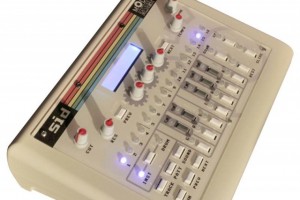
Features:
- Built around the original MOS SID chip, as heard in the Commodore 64, at least in the first 300 units.
- x0x control layout
- Step sequencing
- 3 expression knobs for macro controls of each patch
- Bundled editor software (see the video below, from earlier this year)
- NERD-PANEL, “a powerful interactive blueprint which enables you to address the chip one pin at a time – also a great educational tool.”
- 100+ Patches.
- 50+ Wavetables drum sounds/effects.
- Audio in, out; MIDI in, out. USB connectivity for MIDI control, too.
- Onboard display.
- German and English documentation.
More informations @:
www.modemachines.com
www.facebook.com/modemachines
www.modemachines.tumblr.com
www.twitter.com/modemachines
www.flickr.com/photos/modemachines
www.myspace.com/modemachines
New release: DJ Rig for iPad – The All-in-One, Fully Featured, Professional DJ App
The new DJ Rig from IK Multimedia that we have been featuring earlier this week has now been released in the AppStore. They say that DJ Rig for iPad takes professional mobile DJ mixing to a completely new level, providing a comprehensive suite of professional DJ mixing tools, all in one convenient app. DJ Rig for iPad greatly expands the feature set from DJ Rig for iPhone, offering numerous new capabilities that previously have only been available on professional DJ software for the Mac and PC.
With DJ Rig for iPad, mobile DJs will possess the virtual equivalent of a full professional DJ setup — two turntables or CD players, a DJ mixer, a DJ multi-effects unit, a phrase sampler and more, all in an portable package to take their spin to the next level, anytime and everywhere. With DJ mixer, a DJ multi-effects unit, a phrase sampler and more, all in a portable package to take their spin to the next level, anytime and everywhere.
DJ Rig for iPad is a fully self-contained DJ environment that can be directly connected to a sound system, but even more functionality is available when it’s used in tandem with IK’s new iRig MIX ultra-compact mobile DJ mixer. iRig Mix offers complete physical track control, thanks to its full-length channel faders and crossfaders, additional EQs, and direct connections for headphones, microphones, loudspeakers or a PA system. When used together, DJ Rig and iRig MIX provide a comprehensive DJ setup that packs all the features the most demanding DJs need — all in an ultra-light combo rig that can be up and running in seconds.
Professional DJing for the first time on iPad
- Familiar double Deck configuration with a triple twist — When first launched, DJ Rig for iPad looks and feels very familiar — its interface accurately replicates a full dual-deck hardware rig with each deck routed through the audio output jack on the iPad (split stereo). What’s different is that each deck has three visual modes: “Vinyl” for traditional creative scratch effects, “Digital” jog for a more traditional CD manipulation and the new “Waveform” view for accurate cue placement, synchronization and visualization of beats.
- Sync, mix & scratch — DJ Rig for iPad with CloneDeck™ technology allows DJs to mix and scratch on their iPads, just like they would with hardware counterparts. The built-in dual-deck system with a crossfader allows them to mix with ultra-accurate precision, and the Tempo Sync, X-Sync and Beat Match functions automatically align the beats from any two sources for flawless transitions. The new AutoMix feature will automatically crossfade and mix music to keep the beat going even when the DJ steps away.
- New creative DJ effects provide unlimited sonic possibilities — DJ Rig for iPad features 18 available BPM-synced DJ effects for customizing mixes and build-ups, always at the perfect tempo. Effects include Delay, Flanger, Crush, HP filter, LP filter, BP filter, Compressor,Wah, Phaser, Fuzz, Reverb, and Stutter, plus 6 completely new effects: Noise, Tail, Brake, Spin, Twist UP and Twist DOWN. The X/Y effects interface provides full creative control and real-time manipulation that will inspire DJs to be their creative best.
- On-board sampler with expandable sound banks — DJ Rig for iPad features an “on-the-fly” sampler with 9 accessible and assignable pads for adding sound bites and samples to mixes. For even more creative flexibility, DJ Rig for iPad provides “live sampling” and “looping” functions for completely customizing and personalizing the mix.
DJ Rig for iPad features:
- Customizable deck display with Vinyl, Waveform or Digital Deck interface with accurate scratching engine with CloneDeck™ technology
- Waveform display mode for ultra-precise visual cueing
- Fast BPM detection and beat map analysis with Tempo Sync and Beat Match
- X-Sync mode detects the BPM from external audio sources and automatically syncs the audio/tempo of internal decks to external devices (when used with iRig MIX)
- Advanced looping section with continuous loop surface; create loops with tempo divisions always to the beat; manual and slip mode available
- 18 effects: Delay, Flanger, Crush, HP filter, LP filter, BP filter, Compressor, Wah, Phaser, Fuzz, Reverb, Stutter and more, with X/Y touch interface control
- 6 new creative effects: Noise, Tail, Brake, Spin, Twist UP and Twist DOWN
- On-the-fly expandable sampler machine with 9 pads and 4 banks slot
- Live sampling functionality with volume and pitch control
- 5 visual cue points per song and Auto Cue for automatic first beat positioning
- 3 crossfader curves for customizing fades and crossfade filter
- Direct access to iPod Music library and playlists
- AutoMix Feature for automatic mixing of playlists or entire library
- Live recorder allows recording of full mixing gigs
- Supports/plays all major digital audio formats including MP3, AAC, WAV, AIFF
- Multiple output configurations for virtually any audio setup
Pricing and Availability:
DJ Rig for iPad is available at an introductory price of $19.99/€15.99 from the App Store on iPad. A limited free version of DJ Rig for iPad is also available for download.
More information:
Virsyn Harmony Voice is a harmonizer turning your voice into a choir
Virsyn describes their new Harmony Voice app as a pitch shifter and harmonizer with professional features including automatic tuning correction.
Virsyn says that you can sing and Harmony voice will add up to four voices according to the chords you play with the piano keyboard or, alternatively, instead of playing the chords yourself you can let Harmony Voice play the chords automatically to enrich the sound of your voice in a musically pleasant way.
The voice character can be adjusted in a way that you can turn a female voice into a male voice and the other way round, while a realtime visual intonation-display gives you feedback of the tunes you sing.
Features:
- Four part realtime Harmonizer / Pitch corrector
- Different Harmonizer modes:
- Manual harmonization by playing chords with up to four notes while singing
- Automatic harmonization ( Kraehenbuehl )
- Play base note and Harmony Voice adds appropriate chords
- Directly play the tunes for up to four voices with the keyboard.
- Select key note and scale for harmonization and pitch correction.
- Harmonies can be in just ( Barbershop ) or tempered tuning.
- Mix your original voice with the harmonized parts.
- Change the voice character.
- Play background track from your iTunes library.
- Hi-end reverb effect for room simulation.
- Chorus and Delay effect.
- Use a CoreMIDI compatible Interface to control Harmony Voice with a MIDI Keyboard.
- Audio recorder with Metronome.
- Upload to SoundCloud and File Export.
- Audio pasteboard for exchange with other Apps
Pricing and Availability:
$5.99
More information:
Demo of Scape – the new iPad app by Brian Eno and Peter Chilvers
Scape
Available now for iPad
http://www.generativemusic.com
Scape makes music that thinks for itself. From Brian Eno and Peter Chilvers, creators of Bloom, Scape is a new form of album which offers users deep access to its musical elements. These can be endlessly recombined to behave intelligently: reacting to each other, changing mood together, making new sonic spaces.
Can machines create original music? Scape is our answer to that question: it employs some of the sounds, processes and compositional rules that we have been using for many years and applies them in fresh combinations, to create new music. Scape makes music that thinks for itself.
– Brian Eno, Peter Chilvers
Includes 15 original scapes
Scapes can be saved into a gallery and added to a playlist
Plays in background of other apps (excluding iPad 1)
Generates random scapes
Scapes can be shared by email
Supports AirPlay and Retina display
Headphones or external speakers recommended
Brian Eno
Synthesiser, found sound, bells, bass guitar, strategies, images, art direction
Peter Chilvers
Synthesiser, chapman stick, structures, probability networks, additional images, software design
DATAMASKIN

