
Turnado effecting a Korg Electribe MX
Just playing with some of the factory preset FX from this great app by Sugar Bytes
Turnado is a revolutionary multi-effect tool, crafted especially for massive real-time audio manipulation. It combines unique and dynamic effects with the most intuitive and immediate control you can imagine. Just turn it on and crank it up.
In the studio, simply dial in your effect from a super-sweet selection of 24 pro-quality algorithms, then mash up your audio content with minimum fuss, quickly adding dynamic variation to your arrangements. Take it to the stage and unleash Turnado’s true power. With instant access to eight effects and immediate control over key parameters, Turnado is guaranteed to cause devastation on the dance floor, shredding beats and crunking breaks to insane proportions.
The idea is simple:
Turn a knob and the effect is on.
Turn the knob further to adjust effect parameters and apply modulations.
Turn the knob down and the effect is off.
With its instantaneous, one-knob, multi-parameter modulation features, Turnado will lay waste to the audio landscape. Giving you the power to crunch, chop, twist, mash and elevate your music to new levels, Turnado will have you creating wicked new sounds that will blow any crowd away.
Unlocking the power of your MIDI controller each effect requires only one knob to control it. Underneath this simplicity lies a matrix of effect parameters and modulation engines, all controlled by the main knob. This control matrix provides serious depth to the plugin and gives you the ability to create original and truly unique effect programs.
If the power of one-knob action still doesn’t rock your boat, the awesome “Dictator” mode will sink your battleship. It allows you to animate all the main knobs and run that animation with just one fader. That’s one fader, controlling up to 8 different effects, with potentially hundreds of parameter changes!
Turnado’s primary focus is on beat manipulation, so you will find lots of loopers, slicers and grain tools in the rack. Alongside these beat-mashing effects are an arsenal of distortions and filters as well as first-class delays and reverbs. With extensive modulation possibilities each effect can produce millions of unbelievable variations that can be morphed and twisted into something new every time you tweak those knobs.
Turnado will inspire you again and again, delivering completely new variations of your original sounds and grooves every time, so what are you waiting for…turn it on.
Turnado comes for Mac/PC as Standalone application and VST/AU/RTAS/AAX plugin.
Turnado takes realtime audio manipulation to the next level.
Just assign effects to knobs and crank them up! Lots of new
granulizing, freezing, filtering, slicing, looping and scratching effects
have been developed to make Turnado the best effect you ever had!
Studio Science: Patrick Pulsinger On Patching Modular Synths
Viennese-bred producer Patrick Pulsinger has managed to leave his warped electronic signature on just about every style and tempo of dance music, including albums from Hercules And Love Affair and Elektroguzzi among others. Here, he demonstrates patching his bespoke modular synth at the 2013 Red Bull Music Academy in New York.
Originally from East Germany, Pulsinger moved to Austria while still a child, and got into producing acid techno after he moved to New York to escape the Austrian military service. On returning home, he set up the Cheap Entertainment label and began releasing his music under various pseudonyms, on imprints like Disko B, Compost Black Label, and Mo’ Wax. Weaving together elements from across the spectrum of Detroit techno, Chicago house, funk, jazz, electro, soul, hip hop, and disco, Patrick has the ability to spin out a masterpiece. When he isn’t working on compositions for film scores, collaborations with orchestras and choirs, or as co-operator of Vienna’s Feedback Studio, he is also responsible for two remarkable albums in electronic music in recent years: Elektro Guzzi’s self-titled exploration into organic techno, and the second album by Andy Butler’s Hercules and Love Affair.
For more films, lectures and features, visit redbullmusicacademy.com
Exploring Sounds with Jordan Rudess
You can view Jordan’s PledgeMusic campaign at:
www.pledgemusic.com/projects/jordanrudess
It’s been a few years since I recorded my last solo album, “Notes On a Dream”. The inspiration has been flowing ever since and I’m now ready to set forth in recording my orchestral piece, Explorations, as well as my solo piano album, Explores. You know that I am not one to sit back and drive on the traditional path so we are going to explore some cutting edge technology options.
For “Explorations,” we will be creating an entirely virtual orchestral experience. We will bring virtuoso instrumental players into the studio and not only make an audio recording but also capture them on film with the goal of creating a unique, visual experience.
My solo piano album entitled “Explores” will be created as a completely interactive iOS app experience in addition to being made available in a CD and digital download format. You can sit back and simply enjoy the album or add your personal touch or play a duet with me and share your version with your friends.
Things have changed so much in the music business in recent years and now we have the possibility of coming directly to all of you, the fans, to get involved and to be a part of making this happen. No longer are we subject to what was, rather, what is possible!!
By enlisting YOU and working through PledgeMusic, the pipelines will be running with unfiltered Jordan Rudess creativity! As a member of my team, you will be able to follow along with me as these projects come to life – sharing the journey and the inspiration to explore new musical and interactive frontiers.
Korg MS-20 mini Demo with Rich Formidoni
Rich Formidoni from Korg demonstrates the MS-20 mini at Kraft Music.
Studiologic Sledge Review Teaser
The yellow beast is up for a nice review – check out the teaser video for more details and sounds
Mitchell Sigman gives a quick overview of Studiologic’s new Sledge virtual analog synthesizer. Full review coming soon in Keyboard Magazine!
Logic Tutorial: Programming Trap Beat Patterns Using Ultrabeat + MIDI Controller
More info: http://bit.ly/146Xrgh
Matt Shadetek returns with another episode of Secret Knowledge, our video tutorial series of production tips, techniques, and advice for Logic users. In the second video, Shadetek continues his tutorial on creating trap beat patterns using Apple’s Logic Pro.
MFB Urzwerg & Synthesizerscom & Dark Energy
Continuing on from yesterday’s video featuring the MFB Urzweg – here’s a new video hooking it up with a full blown modular system
MFB Urzwerg Pro is controlling four separate synth channels on Synthesizers.com Modular System. Each row sends CV for oscillators and Gate for Envelope(s); MIDI Out from Urzwerg is transmitting MIDI Clock to Acidlab.de MIAMI Analog Drum Machine. TC Flashback Delay (set at eight dotted lenght) is connected to Aux Send on mixer. Far on the left of picture, the 960 Step Sequencer acts like a “real time preset voltage source” for full four sequences transpose.
MFB Urzwerg Pro step sequencer is controlling Doepfer Dark Energy mk I analog synthesizer. CV 1 goes on pitch, CV 3 goes on Cutoff, CV 4 goes on Amp; Gate 1 goes on EG Gate. LFO 1 Square wave out from Doepfer goes to External Clock on sequencer.
OP1 Drums – Free Ableton Live Rack
Fan of Teenage Engineering’s OP1 – then check this one out from AfroDJMac
Free Ableton Pack Download @ http://bit.ly/freesynth77
Tutorial on how to create drum fills and variations, plus two free Ableton Live Racks. The OP-1 Drum Rack was made with the synthesizer engines on Teenage Engineering’s OP-1, and the effect rack is designed for easy drum fills and changes.
9.0.4 for Ableton Live is here in disco style
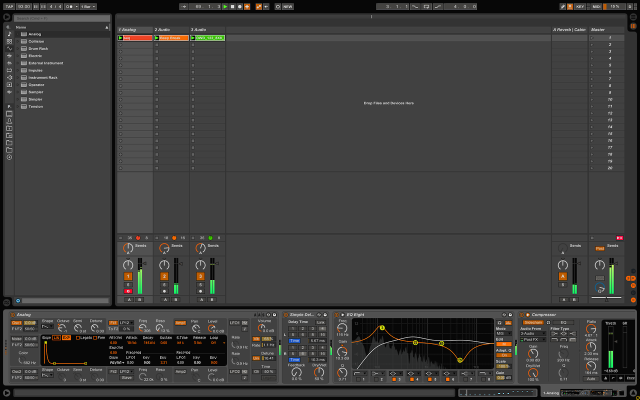
Ableton has released Live 9.0.4 – and Disco lives.
Here are the details:
9.0.4 Release Notes:
Bugfixes:
- VST / AU plug-in devices could be inactive after loading a Live set containing a large number of plug-ins (regression in Live 9.0.3).
- The “grab_control” function which allows to gain control over a control surface’s button matrix via Max for Live would not work anymore (regression in Live 9.0.3).
- Fixed a bug which could cause the File Manager window to reopen after launching Live.
9.0.3 Release Notes:
Improvements and feature changes:
- Added a new skin: “Disco”.
- Added a new option to the “Record/Warp/Launch” preferences pane: “Start Transport with Record”. If activated, the transport will start immediately when clicking on the Session- or Arrangement-Record buttons. If deactivated, it prepares for recording as in Live 8, so you have to launch a clip in Session View or click the ‘Play’ button. You can hold down the Shift modifier key when clicking on the record buttons to invert the behavior temporarily.
- When recording automation on top of an existing automation envelope, and quickly clicking on different positions in parameters like sliders, X/Y pads, etc., Live now records a latching automation envelope instead of jumping back to the previous value.
- The Compressor device does not clip input signals at +20 dB anymore.
- Added control surface support for Novation Launchkey series.
- Added control surface support for M-Audio Axiom Air Mini 32.
- Added a user satisfaction survey. After several hours of usage, Live will ask you to rate the software on the next startup. You can submit a star rating or simply dismiss the survey.
- Updated manual, lessons and translations.
Bugfixes:
- The Trial version of Live 9.0.2 could hang on startup.
- Live would not work as a ReWire slave on Windows.
- The performance of the Ableton Index process has been improved, especially on OS X.
- The Ableton Index process would sometimes not scan all folders after adding them to the sidebar.
- The Ableton Index process could block the GUI during saving and exporting of Live sets, presets or clips.
- Scanning folders containing a huge amount of files could take longer than necessary.
- The Browser would not update its content pane after a change in the file system if the selection was somewhere outside of the Browser.
- Expanding the Audio Unit folder in the browser’s “Plug-ins” label could be slow for users which have a lot of library content installed.
- Live would not save a clip self-contained after dragging it to the Browser and confirming the name of the new clip by clicking anywhere outside of the Browser.
- The Session Record button would not turn off if the recording was aborted, e.g. by stopping or deleting the currently recording clip, disarming a track, etc.
- Under certain conditions, MIDI notes would not get recorded into a clip slot after deleting a previous clip.
- Overdubbing into MIDI clips could unnecessarily bloat the undo history file.
- Fixed a graphical glitch which could occur in the representation of the filter curve in EQ Eight’s Frequency Display.
- Several MIDI control surfaces would not correctly shut down after quitting Live, e.g. motorfaders on the Mackie Control would not return to zero, Axiom Pro devices would not exit Hypercontrol mode, etc.
- The “Project Mix IO” control surface would not work.
- The channel strip buttons on the Mackie Control XT would not work.
- Fixed a bug where the key navigation in track headers would not work properly when certain control surfaces are selected.
- When using control surface scripts, the blue hand would sometimes not map to any device, e.g. after creating a device and then deleting it by using undo.
- Live could sometimes crash on quit in case a faulty MIDI remote script throws an exception in the Python console.
- Fixed a crash which could occur in Live Intro when right-clicking on a drum rack chain.
Changes for Push:
- Using the touch strip to change banks in drum racks now requires to pick up the current value, to avoid changing banks accidentally while playing.
- Fixed incorrect intervals in the Locrian scale.
- The velocity curve setting would reset to the default value when opening a new Live set.
- Changing the pad sensitivity settings could be slow if a drum rack was in focus.
- Updating the LCD display could be slow when switching between Drum and Note mode.
- The Push LCD could remain blank and no mode would be selected after holding the ‘Browse’ mode button.
- Fixed a bug where ‘Browse’ mode would be exited after swapping a Max for Live instrument.
- Tracks created by dragging an instrument would sometimes not be automatically armed if Push is connected.
- The “Arm Exclusive” preference would not be respected when Push was connected.
- Fixed a bug where recording wouldn’t work properly if the default clip launch mode was set to ‘Toggle’ mode.
- Fixed a crash which could occur when using the ‘Quantize’ function.
- Fixed a crash which could occur when using Push to delete a device whilst recording automation for this device with the mouse.
NI’s Traktor DJ for iPhone hands on videos
Phil Morse of Digital DJ Tips gives a ten-minute talkthrough of all the main features of Traktor DJ for iPhone from Native Instruments, a groundbreaking DJ app for iPhone. Full review at: http://www.digitaldjtips.com/2013/05/…
The Verge’s Trent Wolbe is joined by Jim Mazur to show off the new Traktor DJ app for iPhone. Previously only available on the iPad, Traktor DJ allows you to mix music using an easy touchscreen interface.
DATAMASKIN

