
Want a free OSX version of the classic Neuron synth?
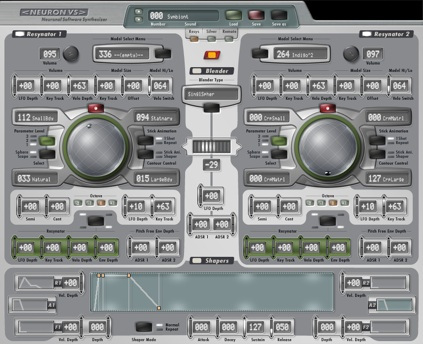
The Hartmann Neuron synthesizer is rare, the company that released it out of business, and the software version discontinued – until now. Developer Stephan Bernsee has released Neuron VS – the software version of the Neuron – as a free app for Intel Macs. Neuron VS was US $899 when it was originally released.
More information on the Neuron VS:
In 2000, Axel Hartmann and I, Stephan Bernsee, set out to designing a novel synthesizer based on artificial neural networks used for sound synthesis, the <NEURON> synthesizer. We were able to get support from a lot of people, including well known artists such as Hans Zimmer, and Hartmann Music as a company won several awards for innovation in synthesis technology.
Unfortunately and despite the huge interest in our products, due to some issues with distribution and our hardware manufacturer Hartmann was driven out of business in 2004. With the company dead there was no chance for <NEURON> owners to get tech support or updates.
Just recently, a Facebook group came into existence that managed to attract many knowledgeable and skilled Neuron owners who provide support and advice to each other in their spare time. To aid them in the process of keeping the Neuron alive I have dusted off the old NeuronVS sources in order to revive the NeuronVS VST plug-in, a software-only version of the Neuron synth that came with a powerful hardware controller, the <NUKE>. Thanks to the generosity of former Hartmann CEO Stefan Rapp and Neuron designer Axel Hartmann I am now able to provide an updated version of the original <NeuronVS> software here free of charge, (hopefully) free of bugs – and with no warranties of any kind.
Note: Their are some notable limitations about the current version of Neuron VS:
- The project is a labor of love by Bernsee, and he notes, “This is a free and unsupported product and we don’t have the resources to develop for Windows.”
- It’s also based on an older version of the VST standard, VST SDK 2.1. Because of this, the current version will not be compatible with some DAWs.
- It’s designed to work with the Hartmann Nuke controller, and some features are unavailable without it.
Real-time vocal sample manipulation using SampleWiz
How to use SampleWiz to create real-time sampling effects for the Radiohead song “Everything In Its Right Place”
The Washington & Lee University Electronic Music Ensemble (EME) performed the Radiohead song “Everything In Its Right Place” in their Fall ’12 concert. This video describes how they utilized an iPad app called SampleWiz to mimic the real-time sampling effects used by Radiohead in this song. EME members Matt Kinderman ’16 and Rodes Brown ’13 explain and demonstrate these techniques.
Under the direction of Graham Spice, the EME capitalizes on the strengths of its individual members. This ensemble calls upon its performers to utilize their instrumental or vocal talents in new ways incorporating electronic music. In addition, those students who specialize in composition, engineering, and production are given the opportunity to showcase their skills in the creation and performance of this contemporary music. A strong visual element is also included in their concerts provided by computer-generated video projections.
New Performance Synth App for the iPad
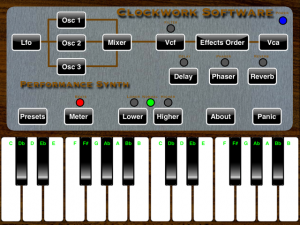
Here is an interesting Performance Synth, an app that turns your iPad into a real time performance instrument. This $5 app allows you to carry a complete, full featured, real time synthesizer around with you and have it available for whenever the need arises. Performance Synth uses a subtractive architecture so if you like the MiniMoog you will love Performance Synth.
Product description:
Performance Synth is Clockwork Software’s amazing synthesizer for the iPad. Performance Synth can express an almost infinite variety of unique sounds using its subtractive synthesis architecture. While Performance Synth doesn’t have every feature a stand alone synthesizer has, you have in your hand an amazingly powerful tool in a portable, use anywhere format. As the name implies, Performance Synth is meant to be played in real time. If you are a guitar or bass player you can carry around a complete musical synthesizer in your guitar case and use it where ever you need it. Performance Synth’s architecture and capabilities are similar to that of a Mini-Moog or a Roland Juno synthesizer. Many of the synthesizer sounds heard in todays contemporary music and movies can be reproduced with Performance Synth. Unlike old analog synthesizers, Performance Synth is implemented entirely in software which means all timing is rock solid and Performance Synth will never, ever go out of tune. Performance Synth turns your iPad into a complex musical instrument which will take time to completely master. In experienced hands, Performance Synth is a serious musical instrument. For all users, Performance Synth can be a source of wonder and delight with the multitude of sounds and sonic textures it can create.
Performance Synth has the following features:
– Three voice polyphony
– Three independent, configurable oscillators
– An LFO (Low Frequency Oscillator) for AM/FM modulation of the other oscillators
– Oscillators have six octave range
– Oscillators have four selectable waveshapes: Sin, Triangle, Square and Sawtooth
– Oscillators can run in tracking mode or polyphony mode
– Oscillators can be detuned in relation to each other
– Oscillators can be amplitude or frequency modulated to a user selected level
– Built in metronome with tappable tempo and selectable beats per measure
– 24 db/octave variable resonance Low Pass sweepable filter
– Pink noise generator
– Two Attack, Decay, Sustain, Release (ADSR) type envelope generators for driving filter (Vcf) and amplitude (Vca) envelopes
– Effects infrastructure which allows audio effects to be applied in any order.
– On board effects include Delay, Phaser and Reverb
– Ability to save and load presets. This allows you to save your important sound setups and recall them in real time during a performance.
– All aspects of Performance Synth run in real time
Introducing the new Vocalizer Pro from SONiVOX
Sonivox has announced that their Vocalizer Pro, a Vocoder musical instrument:
Vocalizer Pro allows the creation of simple or intricate vocal harmonies that can extend far beyond the natural limitations of the voice. One preset has the ability of producing thousands of different results—depending on the audio source. The original Vocalizer is known for its ability to process any type of vocal, percussive or melodic audio track; Vocalizer Pro expands on these capabilities. Using SONiVOX?s Polaris spectral synthesis engine, Vocalizer Pro can transform any audio input “into a synthesizer,” for “deep and complex” musical results.
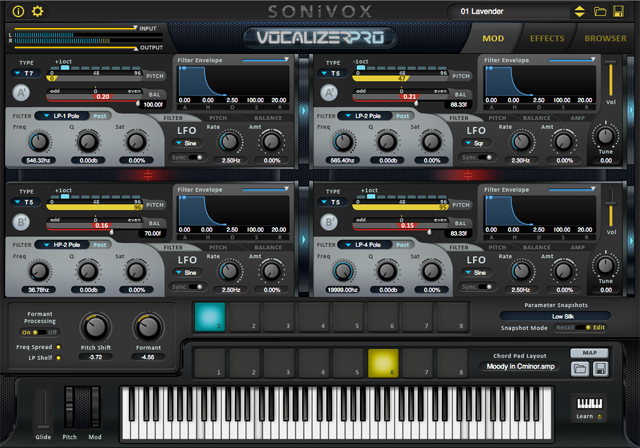
“We created Vocalizer Pro to provide a truly unique experience. These snapshot pads give you endless ways to be expressive and creative,” says Jason Jordan, Head of Soundware at SONiVOX. “For each pad, every automatable parameter can be set to a different setting. It’s almost as if every pad is a completely different patch, allowing the performer to instantly switch between parameter settings. People are really going to have a lot fun with Vocalizer Pro.”
Sonivox Vocalizer Pro supports AU, VST, or RTAS formats, and is compatible with 32- or 64-bit Mac or Windows systems. The MSRP is $199.99 (USD).
http://www.sonivoxmi.com
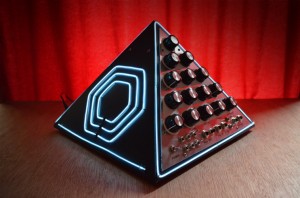
Quick test of mini pyramid synth
This was commissioned by Jay Gambit, for use by noise collective Crowhurst.
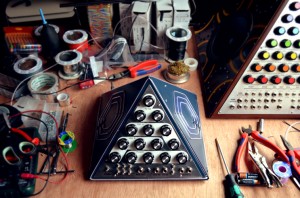
It is a second generation pyramid synth in the style of the original designed by Pete Fowler, commissioned by XL Recordings for The Horrors. This unit contains a MFOS phaser and WSG.
More details here: www.nervoussquirrel.com/tronpyramid.html
Each synth contains a Sound Lab mark II, built from a circuit board sold by Music From Outer Space. This provides each synth with two very stable VCOs, a state variable VCF, two envelope generators, VCA, LFO, patchable sample and hold, white noise generator and an audio mixer.
There are plenty of switches and sockets for creative signal routing, and external inputs to process your microphone, guitar or electric ocarina. Control voltage inputs allow other synths and sequencers to control different parameters. Each pyramid also has a MFOS 8-stage phaser, built in speakers and 72 colour changing LEDs.

Tutorial: Re-Grooving Audio in Reason 7
Jim Aikin shows how to conform audio files (such as drum loops) to MIDI grooves, and how to export and work with the results as a sliced REX file in Reason’s Dr. OctoRex instrument.
Reason 7 brings tons of new improvements for the mixer, the rack and the sequencer. Integrate your instruments into Reason with MIDI out, audio slicing and audio quantize. Turn your recordings into REX loops. For mixing, we’re introducing a spectrum analyzer with visual EQ, group and parallel channels and workflow improvements. To inspire, Reason 7 imports audio from your music library and web formats, the enhanced Factory Sound Bank comes fully loaded with tons of new loops and drum kits and the new Audiomatic Retro Transformer effect adds a futuristic-vintage sound to any tracks.
Learn more about what’s new in Reason 7
How to create the 1980s pop ballad sound
One of the typical keyboard-based setups that were used in the ’80s for ballads.
Moog Minimoog: synth bass
Roland TR-808: drum machine
Yamaha DX7: electric piano
Mellotron M4000D Hands-On
We go hands-on with the digital Mellotron re-creation that the keyboard world is abuzz about. Boutique one-trick pony? Maybe, but it does that one trick so exceptionally well that it’s getting attention from the likes of Rami Jaffee (Wallflowers, Foo Fighters).
Some specifications:
It is a 24 bit digital uncompressed audio playback unit with ca 100 Mellotron and Chamberlin sounds built in. Extra cartridges will be available with 100 sounds each. It has a custom built full Mellotron style wood keyboard with depth sensitivity and polyphonic aftertouch out via MIDI. The front panel user inteface has 2 TFT-displays of high quality and are capable of showing pictures of the actual instruments. The dimensions of the cabinet are 34″x19.5″5.25″ (86x50x13.5cm) (WxDxH).
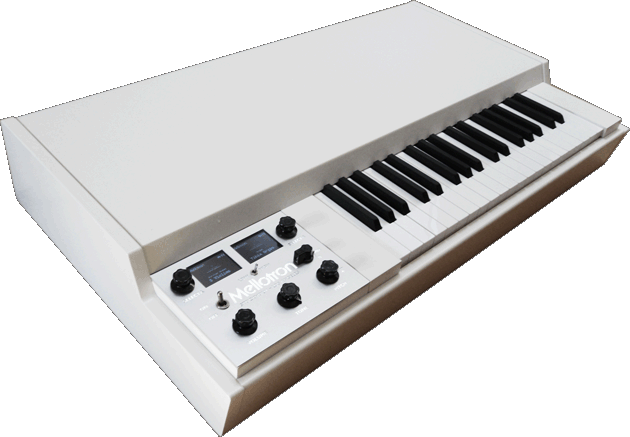
Here is some more info about the M4000D:
- Mellotron style wooden keyboard with depth sensitivity and polyphonic aftertouch via MIDI out.
- 100 original Mellotron and Chamberlin lead sounds included, with IMMEDIATE access.
- The sounds are taken from the original first-generation tape library giving the same sound quality as the original Mellotrons made in the 60s and 70s.
- It has our very advanced and in-house developed streaming technology for uncompressed 24 bit audio reproduction.
- The software and audio engine has taken 3 years to develop, but our concept of the digital Mellotron has been in development since the mid 90s. We bought parts of the original inventory from a company called ‘Mellotron Digital’.
- Furniture quality cabinet with hinged lid.
- Expansion slot gives you 100 extra sounds on special compact flash cards, all from the original archives. There will be ca 8 expansion cards released with a large variety of sounds.
- Two high-quality TFT displays and a backlit laser cut front panel.
- Our very advanced and in-house developed streaming technology for uncompressed 24 bit audio reproduction.
- Three gold plated balanced XLR outputs, all other connectors are gold plated for maximum reliablilty.
- Dimensions: 859x501x135 mm, weight 17.5 kg.
YMO click badge (like a metronome)
Motif of rhythm guide for drummer.
PIC12F683
YMO – 1979.11.19 朝の国営放送より
Garageband Song sample loops to Roland MC-808 samples Convertor
This video demonstrates how a Garageband song created collaboratively using sample loops of Sweet Home Alabama on a mac and an ipad Garageband easily converted into a series of Roland MC-808 compatible sample loops and transferred quickly onto the MC-808.
1. The song is put together collaboratively using Garageband on the Mac and iPad
http://www.youtube.com/watch?v=qDIosK…
2. The samples are then extracted from the song using the fixed1t Garageband Archive audio sample extractor
http://www.youtube.com/watch?v=Zhj88r…
The samples are then reviewed to check their type using the fixed1t audio samples data lister
http://www.youtube.com/watch?v=gNMJEc…
The Samples are then converted into WAV, little endian files and renamed in line with the MC-808 fast sample loading convention, using the fixed1t Garageband to MC-808 sample convertor.
The video then shows you have to get the sample quickly onto the MC-808 and play them.
Please rate the video and leave comments.
Cheers fixed1t
DATAMASKIN

