
Something new from KORG…
Korg Grooveboxes Leaked (Pic)
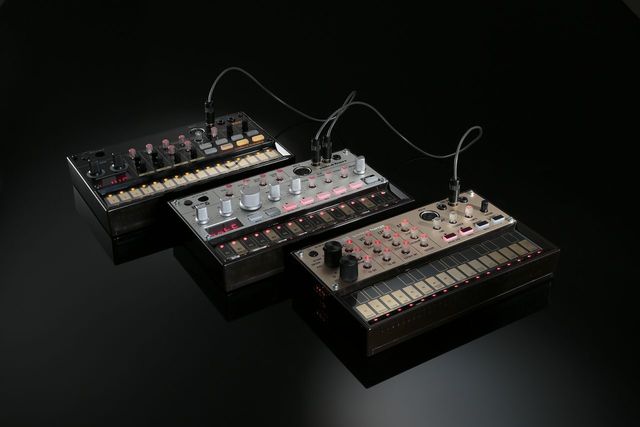
Looks genuine enough – I guess we will know more tomorrow, when MusikMesse kicks off in Frankfurt. Perhaps not real and just a rumor, as KORG has been focused on the new KORG MS20 Mini and KingKORG synths. The design is more a throwback to the Roland TB series which KORG has not done in the past.
ELECTRIFY
http://apps4idevices.com/read/electrify
Electrify is a very powerful and flexible sample based groove machine. It does look a bit complex at first but that is only because it contains so many features. It’s just a matter of setting up sequences for each sample, then triggering each clip to create your arrangement. There are 8 tracks to work with and 8 layers to create variation or multiple song parts. There is a non-destructive sample editor to shape each sample and 2 effect busses each with 9 effects each to choose from. The mastering section contains an equaliser and compressor to further tighten the mix. Samples can be pasted in from the general pasteboard but it also comes with a great collection so you can get straight in and start creating. It’s worth spending the time to understand the workflow of Electrify because it is designed for live performances so it is easy to use. The live recording feature is perfect for creating both evolving loops, complete songs and interesting rhythm tracks. I love this app because it creates such good results, so rating this app is very easy….A Killer App!
Review by Nick Trass
Roland MC-505 / MC-303 Promo Video revitalized
Here is a video Jordan Passmore created using segments of a Roland promo video they released sometime in the late 90’s.
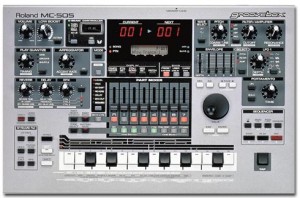
An all in one techno music production studio, this machine has it all. A massive collection of professional and coveted electronic synth and drum sounds, effects, built-in real-time VCF and envelope knobs for tweaking, a sequencer/arranger, and many other great additions. This is the successor to the MC-303 and is now much more advanced. Its sounds will be familiar to any techno-head.
The LFO and resonant filters allow quick and easy sound manipulation. The new D-Beam allows you to randomly tweak your sounds by passing your hand over an infrared beam! It has a great sequencer for building your songs (with groove quantizing and part level faders for mixing) as well as many idea catchers like the phrase sampler and arpeggiator.
This is an all-in-one music machine that’s great for DJ’s or anybody else who wants to create slamming dance tracks. Designed as a stand alone machine, they do not work quite as well when incorporated into a multi-synth keyboard rig. It’s perfect for beginners and advanced users, but offers the most possibility to those who will use it exclusively. By the way, in comparison to the MC-303, this is far better especially in the quality and quantity of sounds!
Moog Analog Groove performance
Three Moog analog synths sequenced by Koushion. Koushion is a MIDI Step Sequencer iPad app that allows you to easily program drum patterns, melodies and more using your existing hardware synthesizers, softsynths, samples and other electronic music gear. Works great with Ableton Live and other DAWs.
MikroWave Android sequencer – sketching a groove
Quickly sketching a groove on MikroWave, the sequenced synthesizer for Android devices. The video shows how a bubbly bass line can be created and what modifiers are available to the synthesizer and drummachine.
You can get it on Google Play : https://play.google.com/store/apps/details?id=nl.igorski.mikrowave
You can also test drive the FREE version (fully functional with the omission of saving and exporting of songs/audio). You can find it under “more apps from this developer” on Google Play.
PongFu – like it never rained
Spectralis groovebox +
a microkorg xl pad sound
sequenced by the spectralis
The Spectralis is the first “GrooveBox”, which combines the LIVE usability of the latest digital technology with the best elements of proven analog technology. We also have thrown in some other cool features which give the synthesizer much more flexibility than anything seen before. While traditional Sequencers are limited to playing back rhythm patterns and tone sequences, the step Sequencer of the SPECTRALIS makes possible highly complex sound creations which opens up completely new worlds of sound when used in connection with the programmable FIXED FILTER BANK. In addition to its outstanding analog sound possibilities the SPECTRALIS also provides DSP based sound creation, which takes care of all the ancillary needs for drumsounds and polyphonic voices. This sound creation is 48 voice and offers killer drum sounds, creamy pads and a lot of other goodies.
New Groove Drums Synth from IMEA
Steelberry Clones reader Dan A from IMEA tipped us on their new Groove Drums Synth that now has been released, here’s what he tells about it:
VSTi plugin and Application, its architecture combines a sequencer, a sampler, a synthesizer and the randomization tool of Groove Drums that allows you to create easily and intuitively grooves and drums loops.
The standalone version allows you to use the plugin without the need for a host sequencer and so be able to export drum loops independently.
The difference with GROOVE DRUMS is to affect the channels to a sampler and a synthesizer that allows you to create synthetic percussions.
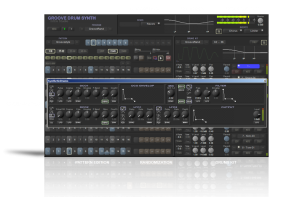
Features:
• Pattern based drum machine engine + Sampler + Synthesizer.
• Innovative tool for randomization.
• Ability to export audio loops.
• 12 channels.
• 3 parametric filters per channel.
• 2 effect sends per channel.
• Independent outputs.
• 16 patterns of 64 steps per channel.
• Drag & Drop patterns.
• SCALE mode for velocity on the tune that selects the closest note in an editable range.
• Master equalizer and insert effects.
• Comes with Chorus, Compressor, Delay, Filter, Flanger, Limiter, Reverb and Overdrive.
• Comes with standalone version allows the use of the VSTi without the need for a host sequencer.
mikrosonic RD3 HD – Groovebox for Android
Finally we start to see more quality apps coming also for Android tablets – check out this new Groovebox. Create your own grooves and drum loops with RD3 HD – Groovebox!
Use your Android phone or tablet as a musical instrument and make your own electronic music tracks!
Recreate the sound of early electronic dance music with the RD3 HD — Groovebox that recalls two 303-style analog synthesizers, a drum machine plus distortion, phaser and delay audio effects!
Developed in Berlin, RD3 HD – Groovebox is a pioneering audio app that lets you program your own grooves. This multi-touch enabled app makes it simple to invent unique loops and manipulate them with resonant filters and effects on the go.
Appropriate both for experienced musicians and novices.
Use it for live performances in landscape mode on phones and 7-inch tablets or use the additional special rack view on 10-inch tablets in portrait mode.
RD3 HD is optimized for Android 2.3 (Gingerbread), 3.X (Honeycomb) and Android 4 (Ice Cream Sandwich).
Loops you’ve created and exported with the Groovebox can also be automatically integrated into mikrosonic’s audio mixer app SPC – Music Sketchpad.
Musical Features:
– Two virtual analog synthesizers
– 4 types of waveforms per synth
– Reminiscent of the legendary 303 synthesizer
– High-quality or regular filter modes
– Drum machine with 10 drum kits: 808, 909, 606, CR-78, Linn, KR55, RZ1, DMX, RX11, DPM-48
– Real-time step sequencer for the synths and the drum machine
– 3 effects: distortion, phaser and delay
– 4 bars with 16 steps per instrument
– 3 play modes: Solo, loop or random
Technical Features:
– Special portrait mode for 10-inch tablets
– Multi-touch control
– Live session recording
– Audio loop export as WAV files
– Session save capability
– Cut/copy/paste pattern
– OpenSL support
– App2SD
System Requirements:
– Android 2.3 or higher
– Screen resolution 800×480 (WVGA) or higher
– 800 MHz CPU or faster supporting ARMv7
More details at: www.mikrosonic.com/rd3hd
New Reason 6 Refill from Nucleus – Celluloid Beats
Nucleus SoundLab would like to introduce you to a brand-new ReFill exclusively built for Propellerhead Reason 6 – Celluloid Beats. Celluloid Beats features an amazingly unique set of cinematic percussion loops suitable for filmscoring, game sound design, IDM and other electronic genres. The loops inside have been specially processed using a proprietary additive vocoding techique to emphasize long, smooth decay stages. Beyond the high-quality loops themselves, Celluloid Beats is also the first ReFill in an innovative new series called Modular Grooves.
Modular Grooves ReFills are meant to provide musicians and producers with a infinitely configurable palette of loops. These loops sound great at virtually any tempo thanks to being sampled using Wide BPM technology – anywhere from 60bpm to 300bpm is fair game. There is no reason to be limited by the original tempo of a loop any more!
Each Combinator patch in a Celluloid Beats contains 8 loops – 1 original loop and 7 creative loop remixes. This is achieved by using the Slice Edit Mode on Dr. OctoRex to change filtering, decay, volume and more on a per-step basis for each loop. Going farther than that, unique FX are added to each patch which are used to effect specific loop slices – so each slice in a loop can have a different distortion, filtering or delay! The resulting loop remixes sound incredibly complex, but they certainly aren’t complicated to use. A single Combinator Rotary switches between all 8 loops; and you can also easily dive into Dr. OctoRex to tweak any loop remix to taste! To help users understand the Modular Grooves technology and get the very most out of it, PDF documentation is included.
Celluloid Beats also comes packed with all its loops in raw REX2 format outside the ReFill itself at no additional charge. So users can easily load these loops into other sampler, such as Kontakt, Ableton Live, Battery and more without any hassles.
- 40 24-bit 44khz REX2 loops form the base of Celluloid Beats
- 280 loop remixes using all 8 loop slots on Dr. OctoRex
- Each patch built exclusively for Reason 6
- All REX2 loops included outside the ReFill, for use in other samplers
- Detailed PDF documentation on the creation and operation of the ReFill
Download the free Demo ReFill right here.
More info on the two new synths from Casio: XW-G1 and XW-P1
Casio has introduced two new keyboard synthesizers at the Winter NAMM, the XW-G1 Groove Synthesizer and the XW-P1 Performance Synthesizer, here are the full specs for both of them:
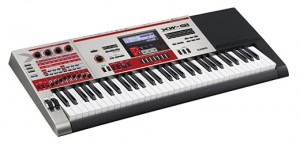
The Casio XW-G1 is a ‘groove synthesizer’ equipped with a keyboard and designed to offer the various kinds of digital equipment used by club DJs, including the ability to create and play back a variety of rhythm patterns and musical phrases.
Features:
- Step Sequencer
- 100 different rhythm patterns are available for playback in the preset sequences
- Up to 100 original rhythm patterns can be recorded as user sequences
- Users can improvise using the set of 16 buttons while playing back rhythm patterns
- Multiple rhythm patterns—as many as 99—can be connected in a sequence and played as loops using the Chains function
- Phrase Sequencer
- 100 musical phrases can be readily played back using the preset phrases
- Up to 100 musical phrases spontaneously played on the keyboard can be stored in memory as user phrases
- Live performance functions
- A multifunction keys enables users to assign essential functions for DJ performances to keys
- 420 preset tones including Solo Synthesizer and PCM tones can be quickly accessed in keyboard performances
- The Arpeggio function can automatically play arpeggios just by pressing keys
- Sample Looper
- Sounds performed on the synthesizer as well as sounds input from external source can be sampled and played back in loops of up to 19 seconds long, allowing overdubbing
- Sampled sounds that are saved as user tones can be played in keyboard performances
- Other features
- Wide variety of preset tones or internal PCM and Synth waves to create sounds
- Various input and output terminals enable connection of audio equipment and MIDI-compatible devices, such a DJ gear and musical instruments
- Portable MIDI devices or audio equipment can be placed on the designated rubber holding space
Specifications are available at the Casio site.
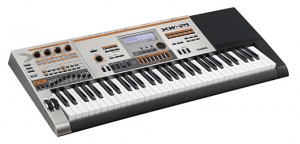
The XW-P1 is designed to be a true performance synthesizer that allows users to create a wide array of sounds from many preset tones, including Solo Synthesizer, Hex Layer, and Drawbar Organ tones, as well as numerous types of internal PCM and Synth waves.
Features:
- Wide selection of preset tones ensures quick access in performances
- 100 Solo Synthesizer presets can reproduce vintage analog synthesizer sounds
- 50 Hex Layer presets layer as many as six tones for ensemble sounds
- 50 Drawbar Organ presets can reproduce traditional Drawbar Organ sounds
- A total of 420 PCM Melody and PCM Drum presets have been produced from samples of various instrument sounds including pianos, guitars, and drums
- Synth features
- A total of 311 internal Synth waves reproduce vintage analog synthesizer sounds
- A total of 2,158 PCM waves are built in, including wave data from the CZ series, Casio’s best-selling digital synthesizers of the 1980s
- Users can create integrated sounds by layering analog synthesizer waves and PCM waves
- Users can produce original Hex Layer sounds by combining as many as six preset tones
- Users can create their own Drawbar Organ sounds by using the nine sliders
- Variety of functions useful for live performances
- Users can assign performance setups for up to four designated keyboard zones by using the Performance function
- The Phrase Sequencer lets users create and play back musical phrases to enhance their performances
- The Step Sequencer allows users to create and play back a variety of rhythm patterns
- The Arpeggio function can automatically play arpeggios just by pressing keys
- Useful features for applications ranging from performance to music production
- SMF data or audio data saved on an SD card can be played back while playing the keyboard
- MIDI devices, microphones, audio players, and other equipment can be connected using the various input and output terminals
- Portable audio equipment or MIDI devices can be placed on the designated rubber holding space
Specifications for the XW-P1 are available at the Casio site.
DATAMASKIN

