
Tech Vocals – new sample library in the Grid Machine Slice series for Kontakt
Channel Robot has released Tech Vocals, a sample library is the Grid Machine Slice series for Kontakt.

Here are Volumes 2 and 3 of the best selling Minimal Tech Vox – a fantastic collection of snipped, glitched, processed and tweaked minimal vocal samples, produced specifically for the dance music producer.
Whether you are making Tech, Electro, Deep or Mainroom Dance Music – these samples recorded by pro session singers have been mangled, chopped and edited to provide you with the building blocks for some awesome grooves.
Featuring a killer selection of one word single shot samples, glitched vox sounds, vox stabs, Fx Processed Loops, vocal hooks and re-sequenced parts which together form a formidable collection of samples for any producer looking to introduce the human element to loops and sections of their productions, and now you can further process cut, mix, slice and glitch to produce completely unique content in Grid Machine Slice.
The sound library is available to purchase from Loopmasters for £29.95 GBP.
I Dream of Wires 3: Orphx & Modulars – The Physical Element
Canadian duo Orphx have been releasing electronic music since 1993, and while they were best known in experimental/industrial music circles for many years, today they are regarded as pioneers in the fusion of techno and industrial music. Orphx’s recent output on Sonic Groove has met with critical acclaim from many of techno’s leading DJs. Having performed live with laptops for several years, Orphx’s Christina Sealey made the decision to delve in modular synthesizers, hoping it would bring some spontaneity and excitement to Orphx’s music, both on stage and in the studio.
Orphx’s Christina Sealey will be performing live, as part of Sealey/Greenspan/Lanza, at I Dream Of Wires’ 2012 MUTEK showcase.
For more info on Orphx: orphx.com
I DREAM OF WIRES is a forthcoming documentary film about the history and resurgence of modular synthesizers. The film is currently in production. This is the 6th in a series of extended interviews, which will be produced and released in various formats throughout the production, and following the release, of the film. I DREAM OF WIRES extended interview segments are sponsored by MATRIXSYNTH (m.matrixsynth.com).
Catch I DREAM OF WIRES’ showcase at Mutek Montreal 2012: Saturday June 2 @ Satosphere, with live performances, all incorporating modular synthesizers, by Sealey/Greenspan/Lanza (Orphx/Junior Boys), Keith Fullerton Whitman (Kranky/Editions Mego), Solvent (Ghostly International/Suction Records), Clark (Warp Records), and Container (Spectrum Spools).
For info on the film: facebook.com/idreamofwiresdocumentary
More on the new MacBeth Micromac – three shadows
Here’s what they have to say about it:
As we hit production of the micromac- her’s one of the last videos from the prototype units- this video features the desktop version doing baqss lines and the 3U format version doing some strange glide stuff! It’s been an interesting experiment- the keyboard controllers are 2 x Korg Prophecies doing the arpegiation thing at different timings! Apart from my own designs featured here- I’d highly recommend 2 x Prophecies as keyboard controllers! I guess all this sound coming from such small units….starts to erase the need for the massive modular…especially if you after this kind of sound! All played live….and yes, the video needs a touch of brightening slash contrast!
All new – SLVR Spreader
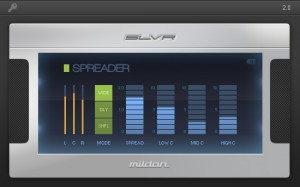
SLVR Spreader is a state-of-the-art stereo widener suitable for mixing and mastering. It combines different stereo imaging technologies, letting you apply ample amounts of widening without weakening the overall sound. Use it on individual tracks like vocals, on group tracks like drums, and all the way to the final master.
Widening without Weakening
Most stereo wideners work by increasing the level of the side signal against the mid or center signal (often referred to as mid-side imaging). This results in a wider sound but it also weakens everything in the center section (e.g. Bass, Kick, Vocals, Snare). The problem is that you can’t just bring up the center level, as that will simply cancel out the widening, which brings you back to square one.
With SLVR Spreader, you can apply as much widening as you want, as it lets you bring back important center signals lost in the widening. It does this by carefully screening out which parts of the center are being widened and protecting those signals. It also splits the center into 3 bands so that you can restore only the affected frequencies.
Three Powerful Modes
Wide mode uses a mid-side algorithm for widening the signal. This is suitable for stereo recordings, group tracks, and mastering.
Delay mode spreads the signal’s frequencies across the stereo image and applies minute amounts of delay to emphasize the stereo effect. This can be used to fatten ambient sounds like vocals and pads.
Shuffle mode interleaves the signal’s frequencies and spreads them across the stereo image. While the stereo effect is less pronounced in this mode, it can help the signal cut-through a busy mix without introducing artifacts or phase issues.
3 Channel Meters
SLVR Spreader has separate meters for Left, Center, and Right channels, allowing you to apply just the right amount of widening to the signal. For best results, increase the Spread fader until the Center peak is at the same level as or just above the Left and Right peaks.
Genome Sequencer MASSIVE MIDI Jam!
Background data:
Finally getting my brain in to the GENOME Midi Sequencer, by White Noise Audio. It is VERY COOL!
Using network MIDI, I’ve connected the iPad2 (running Genome/Arctic Keys/BS-16i/NLog Pro), to an iPhone 4 (running Sunrizer) and an iPod Touch (running Arctic Keys).
Also, via an iRig MIDI connector on the iPad, am sending a MIDI signal to a Moog Little Phatty as well. Can you believe this all works! I have a pretty strong WiFi signal, so the iPhone/iPod Touch work well and there isn’t any discernible latency.
Presumably I could run my other iPod touch as well, with a compatible virtual MIDI app. I also have a MIDI splitter box, so the idea of sending to more MIDI hardware is also a idea (or by chaining with MIDI THRU).
The possibilities are great with Genome!
MIDI Mandala – a wireless Midi controller for iOS

Intelligent Gadgets has released MIDI Mandala– a wireless Midi controller for iPod/Touch, iPhone, and iPad
Previously, Intelligent Gadget’s Mandala Music app first introduced the idea of using a circular arrangement of control pads to generate music. The user selects a musical scale that is mapped to the mandala. The lowest note is in the center, followed in increasing pitch from the top, alternating back and forth, down to the bottom. Compared to a square grouping of control pads, or even a keyboard on smaller devices like an iPhone or iPod, the circular arrangement is much easier to play. In fact by mapping a scale to the control pads there are, in effect, no wrong notes.
Where Mandala Music uses an internal FM synthesizer to generate sound, Midi Mandala lets you play networked Midi synths wirelessly using the same circular control concept.
Run multiple versions at the same on different Midi channels and control different synth sounds simultaneously.
After touch controls let you change the pitch and loudness of a sound, providing subtle nuances of expression. 16 presets allow you to save your own custom settings..
From The Vaults : Depeche Mode: A Conversation with Mr. Gambaccini from 1993
Radio DJ Paul Gambaccini interviews the members of Depeche Mode at home and in the studio in this exclusive documentary footage from 1993 for From The Vaults on The Warner Sound.
From The Vaults is the weekly unveiling of the documentaries, interviews, and performances unearthed from the Warner library.
Subscribe to The Warner Sound:
http://goo.gl/8LzoM
ARP Quartet Multi-Timbral Polyphonic Vintage Analog Synthesizer 1979
http://youtu.be/_UMQjNU0Ins
“Brass, Strings, Organ and Piano sounds can be played individually or layered on top of each other in any combination (although, I can’t hear Brass when added to Piano)”
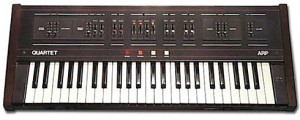
The ARP Quartet is identical to the Italian made Siel Orchestra. In fact, it is the Orchestra! ARP bought, relabeled and sold it as the Quartet without changing it much. It’s a 4-part orchestral synthesizer with 4 sections: Brass, Strings, Organ and Piano. These 4 tone color families can be played individually or two can be simultaneously played. They are also individually tweakable. Selected presets will light up LEDs to show you which sliders and buttons can be used to modify the current section. The synth itself is very limited however, and there’s no external control, no pitch/mod wheel and few edit parameters. But it sounds very good and it is, after all, a classic analog synth.
The Brass section creates Trumpet and Trombone sounds with independent attack and sustain controls. The String section creates Cello and Violin sounds with independent attack and sustain controls. The Organ section is 2-voice and has a Celeste sound available as well. The Piano section offers two types, traditional or Honky Tonk.
Noatikl 2 – desktop generative music software
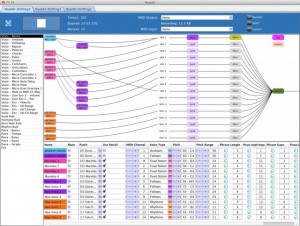
Intermorphic has introduced Noatikl 2, the latest version of their desktop generative music software for Mac & Windows.
It’s currently available, in beta stage. Here’s what’s new…..
Noatikl 2 Features:
- Integrated Partikl multi-synth & modular synth/fx network
- Built-in support for the the advanced Partikl MIDI, sound & FX multi-synth for sound generation as previously featured in Mixtikl
- Full MIDI output support still retained; Partikl output is optional (but enabled by default)
- Partikl? checkbox in transport panel makes it a snap to enable/disable Partikl output
- Makes it easy for new Noatikl users to get going without any preparation of hooking-up to separate synthesizers; Noatikl makes sounds right out of the box!
- MIDI output from Noatikl is now optional – no need to configure Noatikl with MIDI devices!
- Plug-ins: Noatikl generates both optional Partikl audio data (new!) and MIDI data (1.x)
- The complete set of synth/effects presets as featured in Mixtikl
- Supports built-in custom sample wavetable (DLS1/Ogg/Wav based) (dialogs not available Mixtikl)
- By default, now saves to .partikl format, which includes all noatikl rule data and associated partikl sound data
- New main Noatikl Network editor view
- Shows both Noatikl Voice networks and Partikl Synth/Effects network
- Drag Voice to MIDI Channel (or vice-versa) for easy MIDI channel mapping
- Drag Voice to Voice for easy Follow/Repeat voice networks
- Tap synth/effects boxes to pop-up built-in Partikl FX/Synth network/unit and sample editors
- Supports built-in custom sample wavetable (DLS1/Ogg/Wav based)
- Improved transport panel
- Templates from Mixtikl now built-in
- BellsMetalsArps
- Dronemaker1
- Gen Drums 1 MIDI (previously sold as an add-on for Noatikl at $6.99)
- Gen Drums 1 Owt
- Gen Drums 2 MIDI (previously sold as an add-on for Noatikl at $6.99)
- Gen Drums 2 Owt
- Gen Elements 1 MIDI (previously sold as an add-on for Noatikl at $6.99)
- Gen Elements 1 Synth
- GenMix1
- GenMix2
- GenMix3
- GenMix4
- GenMix5
- GenMix6
- GenMix7
- Noatikl Seed
- LoopBeats 1
- LoopBeats 2
- ZZZ_rests
- Built-in support for playing partikl:// and noatikl:// URLs
- Share your Noatikl compositions via Twitter!
- Export your Noatikl compositions as “mixtikls” so Mixtikl / Mixtikl Free users can hear them!
- New Menu options:
- Export -> Export With Partikl Sounds
- Export -> Export as Mixtikl Mix (share your Noatikl compositions with Mixtikl users – even those with Mixtikl Free!)
- Export -> Export Noatikl Rules
- Export -> Save As Noatikl Rules
- Tools -> Show Folders -> Noatikl MIDI Recordings
- Tools -> Show Folders -> ~/Library/Noatikl (Mac only!)
- Tools -> Show Folders -> Noatikl data folder
- Tools -> Show Folders -> Partikl TG
- Tools -> Show Folders -> Partikl FX
- Options -> Devices -> Output
- Options -> Devices -> Input
- Help -> Other IM Creativity Tools -> Mixtikl / Liptikl
- Minor changes
- Replaced the Pattern Editor dialog “Default” button with a “Presets” button, matching all various options in Mixtikl’s drill-down Noatikl editor. This makes it *far* faster to get going with patterns.
- Mac: by default use ~/Library/Noatikl, rather than ~/Documents/intermorphic/noatikl
- Renamed various items in the Noatikl object/parameter group side-bar
- If you try closing when a modified file is mid-edit, you’re prompted first to save or close the file.
- Various bug fixes
M83 ‘Reunion’ coming soon…
Out on May 29th is the new M83 EP “Reunion”. A trailer has now been released and it was directed by Fleur and Manu.
“Reunion” is the second single off of the 6th M83 album “Hurry Up We’re Dreaming”. The single will be released with a remix package of 6 exclusive re-works of the track, including remixes by Dale Earnhardt Jr. Jr., Mylo, Sei A, The Naked And Famous, Polly Scattergood, and White Sea.
“Reunion” EP tracklisting:
- Reunion (Album Version)
- Reunion (The Naked And Famous Remix)
- Reunion (Sei A Remix)
- Reunion (Polly Scattergood Mix)
- Reunion (Dale Earnhardt Jr Jr Remix)
- Reunion (Mylo Remix)
- Reunion (White Sea Remix)
Subscribe to the M83 YouTube channel to be the first to see the new ‘Reunion’ video: http://www.youtube.com/m83
…or follow on:
http://facebook.com/m83music
http://twitter.com/m83news
http://ilovem83.com
Music: ‘Reunion (The Naked And Famous Remix)’ available as part of the Reunion EP/ Pre-order from iTunes: http://smarturl.it/m83rit
M83 has added a new date in London at the Brixton Academy on Nov 8th, for full live listings see the website: http://ilovem83.com/live
DATAMASKIN

