
Demystifying the Mod Matrix in Reason synths
Many advanced synths in Reason have a Mod Matrix – an essential component in creating great patches. This week we’ll become familiar with the way the Mod Matrix works, and in Part 2 we’ll cover some more advanced topics.
Noisepad Sequencer – Sneak preview
Here’s a teaser for the upcoming release of the updated Noisepad Sequencer, check it out, details can be found below:
SOON AVAILABLE ON THE APPSTORE : Noisepad with build-in sequencer. Now you can make your own patterns with the Noisepad sequencer.
New features:
– Save up to 12 patterns
– Variable pattern length (bars)
– BPM
– Tap
– Swing
– Metronome
– Organize your samples (drag and drop on your pads)
– Hold button.
Check out our website for the latest updates http://www.noise-pad.com
Yamaha SY85 with Korg Kaoss Pad effects – live improvisation
Music video improvisation on a Yamaha SY85 with Korg Kaoss Pad (mini-KP) effects. Using the HOLD button on the Koass this is another way of connecting music gear together rather simply. If there is interest I might show how to connect the devices together and recording the audio. In this case I record to a Zoom H2n.
Special Edition MK 2 x0xb0x / Roland TB 303 Comparison
http://youtu.be/Fz007tYItDA
Brand New Professionally Built x0xb0x – Using NEC 2SA733AP high beta transistors + 945NPN transistors in the Oscillator, Filter, Envelope and Amplifier sections for the most authentic Roland TB 303 clone money can buy. Remember where you saw it first…….
Tutorial for Loopy, the live-looper for iOS
This is the introductory tutorial for Loopy, the live-looper for iOS: Recording the first track, count-in, tempo and clock length controls and track-twisting.
Product description:
This is a looper that’ll come out to play, but get down to work when you want to get serious. While other music creation apps tend to be either powerful but difficult to learn, or easy to use but limited in features, Loopy doesn’t compromise. Loopy offers a sleek, expressive, instantly understandable interface that beginners can start using effectively straight away. It’s fun, right from the start. More advanced users, however, will not be disappointed by Loopy’s rich feature set, with extra features many other loopers just don’t have. Plus, a sophisticated interactive tutorial system lets users discover Loopy’s more advanced features at their own pace.
RECORD & LAYER
– Six, nine, or twelve beautifully rendered circular loops, with simple yet powerful controls.
– Count-in, count-out and record chaining lets you keep your hands free to play an instrument.
– MIDI control, to control Loopy via foot pedal or other controller.
– Overdub, to build beautiful, complex soundscapes from many layers.
– Support for tracks of any multiple or fraction of a beat, for flexible and expressive looping.
– Sophisticated audio or visual metronome to keep you in time – no matter what time signature you choose.
– Perfectly synchronized, low latency audio engine.
IMPORT & CONSTRUCT
– Import loops from your computer via iTunes, with support for AIFF, WAV, MP3, M4A, CAF and more.
– Bring in audio from many other audio apps with integrated audio copy and paste.
– Imported loops are automatically fit to your beat, no matter what tempo.
MANIPULATE & TWEAK
– Full stereo audio, with pan controls for each track to create custom stereoscapes.
– Fix up timing by twisting tracks around to line up the beat, or make funky sound effects with dynamic time shifting.
– Drag a track onto another track to merge tracks, and clear up a space.
– Live, dynamic tempo adjustment to speed up or slow down your creations, without altering the pitch.
– MIDI clock sync, to play in time with other MIDI-capable devices or apps.
PERFORM & SHARE
– Record whole performances with in-app session recording facilities.
– Upload performances or single loops straight to SoundCloud, and post to Twitter or Facebook.
– Email audio clips.
– Share audio with many other audio apps with audio copy and paste.
– Transfer loops or performances to your computer via iTunes.
Samsara Cycle Audio releases Boxxy D VSTi for free
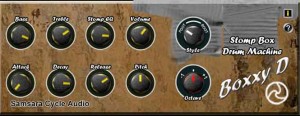
Samsara Cycle Audio tells us that Boxxy D is a VSTi for simulating the effect of a Mississippi Drum Machine.
They say that the plug-in also simulates Bass Drum instruments for use in many styles of music, especially Dubstep.
Features:
- Bass and Treble EQ controls
- Stomp EQ – controls EQ via velocity
- Volume control
- Envelope: Attack, Decay, Release
- Style switch
- Octave switch
Pricing and Availability:
Free.
More information:
Testing: iPad +midi-touch + Nord Modular + Ensoniq DP2
Background information:
Testing out midi-touch with the G2 and DP2.
The Ensoniq is cool. I edited the patch with my old G4 laptop and sound-diver. Its getting sequenced (reverb mix) parameter changes from Ableton Live. This results in some clicks here and there, but i don’t mind. I patched the stereo delay after the reverb so the clicks bounce around the stereo field too.
Acidlab Autobot live improv demo
Live improv over a new Reverb And The Verse song.
This is meant as a demo video for “tap write mode” on the Autobot, which I can see using on lots of future tracks. This thing has totally changed my feeling towards my euro-rack, in that its now really inspirational tonally. Before, it was mostly an afterthought.
The Acidlab Autobot is a 303 sequencer for eurorack; it has no sound of its own. It is driving a Cwejman VM-1 on really basic settings using a lowpass and a Sawtooth wave. The cv/gate are driving the Cwejman, while the Accent out is sent to filter frequency.
I have intentionally turned down the song to showcase the Autobot better.
Signal path: eurorack to Speck Xtramix to RME Fireface 800.
Popular iOS app NanoStudio now as a free version on Mac OS X
Blip Interactive has released a Mac OS X version of its popular iOS virtual studio, NanoStudio.
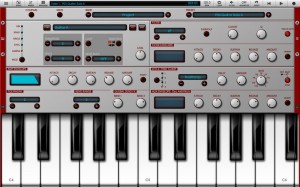
NanoStudio, the award winning music production app for iOS, is now available on the Mac App Store! Transfer your NanoStudio projects between iOS, OS X and Windows to make music wherever and whenever it suits you. Made a banging tune on your computer and need to go out? Email it to your phone and just carry on where you left off! NanoStudio has virtual analogue synths, sample trigger pads, a comprehensive sequencer, a sample editor, a mixer and multiple effects all integrated into a single application. Record your ideas in real time, mix synth layers with samples, compose and arrange your tune using the powerful sequencer and bring the mix alive with effects such as reverb, compression and EQ. Transfer projects between your computer and your iOS device, or use NanoStudio’s comprehensive audio mixdown options and export features to get your ideas over to your favourite desktop DAW.
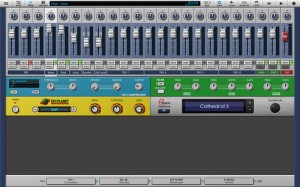
Key Features:
- NanoStudio has virtual analogue synths, sample trigger pads, a comprehensive sequencer, a sample editor, a mixer and multiple effects all integrated into a single application.
- Record your ideas in real time, mix synth layers with samples, compose and arrange your tune using the sequencer and bring the mix alive with effects such as reverb, compression and EQ.
- You can transfer projects between your OS X or Windows computer and your iOS device, or use NanoStudio’s audio mixdown options and export features to get your ideas over to your favourite desktop DAW.
Other features:
- Eden synth (also plays samples) – single or dual keyboards, XY controllers, pitch bend and accelerometer control
- Sequencer with up to 64 tracks and a piano roll editor for note, velocity and controller events, all with undo/redo
- TRG-16 sample trigger pads
- Sampling and resampling, sample editor and effects processor with undo/redo
- Mixer with 4 inserts per channel, 2 global send busses and volume/pan automation on every channel
- Transfer samples, final mixes and individual track mixdowns to your Mac/PC using NanoSync or email
- MIDI input
- Built in help
It’s free – so check it out in the Mac App Store
DATAMASKIN

